

The settings shown in the panel reveal that FortiFx EA operates with a structured risk-reward approach, controlled position sizing, protective trailing stop management, and a well-defined trading schedule. The EA prioritizes stability through fixed pip-based TP/SL and adaptive lot sizing based on recent losses.
📌📌📌 Buy this unlimited FortiFx EA MT4 product here 📌📌📌
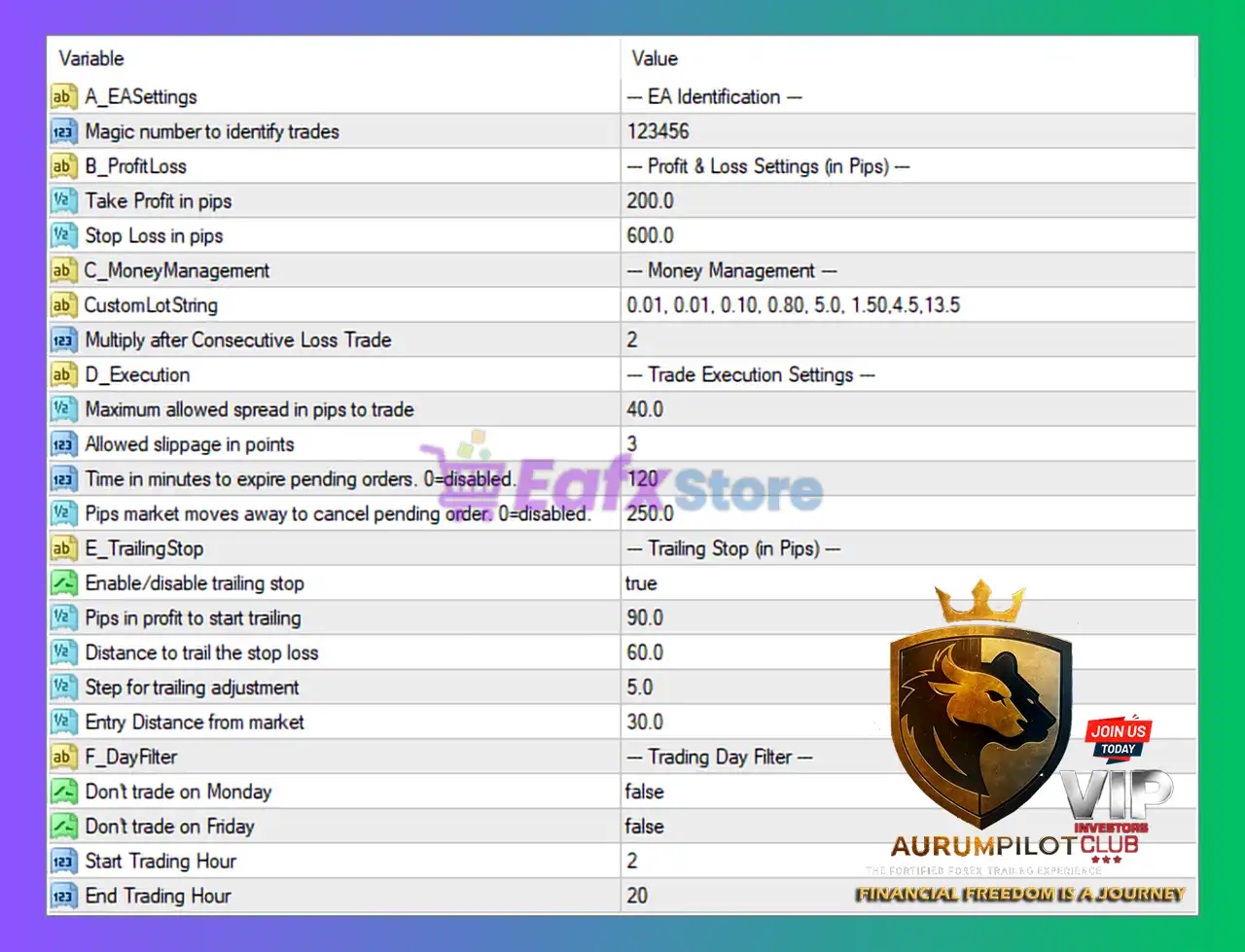
🧩 EA Identification
• Magic Number: 123456
A standard but unique identifier for distinguishing FortiFx EA’s trades from other EAs or manual entries.
This avoids trade management conflicts.
🧩 Profit & Loss Settings (in Pips)
These are critical for defining the EA’s reward and protection levels.
• Take Profit: 200 pips
A relatively wide TP that shows the EA aims for medium-to-long trend movements rather than scalping.
• Stop Loss: 600 pips
SL is 3x larger than TP, indicating:
- A trend-following or breakout model
- Willingness to absorb deeper pullbacks
- Lower frequency but potentially high-value trades
The risk-reward ratio is aggressive but typical for swing systems.
🧩 Money Management Settings
• CustomLotString = 0.01, 0.01, 0.10, 0.80, 5.0, 1.50, 4.5, 13.5
This list suggests FortiFx EA uses step-based lot sizing depending on trade phases or signal tiers.
The progression moves from micro lots to extremely large lots, indicating:
- A scaling system
- Possibly risk tiers depending on trend strength or signal confidence
• Multiply After Consecutive Loss Trade = 2
Lot size doubles after a losing trade.
This is a martingale-style recovery, but activated only after consecutive losses, not every trade.
It helps recover drawdowns but increases risk during prolonged losing streaks.
🧩 Trade Execution Settings
• Maximum Spread Allowed: 40 pips
Very high spread allowance—this EA can operate on volatile or exotic pairs.
• Allowed Slippage: 3 points
A reasonable slippage tolerance that maintains accurate execution.
• Pending Order Expiration: 120 minutes
Orders expire after 2 hours if unfilled.
→ Prevents old signals from triggering in irrelevant market conditions.
• Pips Market Moves to Cancel Pending Orders: 250 pips
If market shifts 250 pips away, pending orders are cancelled.
This ensures the EA avoids entering trades after trend reversals.
🧩 Trailing Stop Settings
• Trailing Stop Enabled: true
The EA actively protects profits.
• Profit in Pips to Start Trailing: 90 pips
Trailing activates only after significant movement, confirming a swing-trade profile.
• Distance to Trail Stop Loss: 60 pips
A fairly wide trailing distance, allowing trades to breathe.
• Step for Trailing Adjustment: 5 pips
The stop updates every 5 pips, keeping protection dynamic.
• Entry Distance from Market: 30 pips
FortiFx EA waits for price to move away from the entry zone, preventing slippage-based or premature triggers.
🧩 Trading Day Filter
• Don’t trade on Monday: false
• Don’t trade on Friday: false
The EA trades all trading days, maximizing opportunity.
• Start Trading Hour: 2
• End Trading Hour: 20
Active from 02:00 to 20:00 server time, which:
- Avoids extremely early spreads
- Avoids low-volume late-night sessions
- Filters out unpredictable first-hour market noise
This is a smart time window for stability.
🧩 Conclusion
The FortiFx EA configuration reveals a swing-focused trading algorithm built on pip-based profit targets, structured stop-loss protection, and controlled martingale-style lot scaling. With a 200-pip TP, 600-pip SL, and trailing stop activation at 90 pips, the EA aims to capture meaningful market swings while safeguarding profitable trades. Advanced execution filters—such as spread control, pending order expiration, and market-distance cancellation—help the system avoid poor entries during volatility. The flexible day-and-hour filters ensure trading occurs during optimal liquidity sessions. Overall, these settings position FortiFx EA as a trend-oriented, medium-term system designed for traders seeking a balance of automated precision, controlled risk escalation, and disciplined profit capture.