
🔶 What is FXChronos EA?
FXChronos EA is an advanced automated trading system designed for the MetaTrader 5 (MT5) platform, focusing on time-based execution, smart risk management and comprehensive news filtering. The Expert Advisor (EA) is built to deliver consistent performance by adapting to market conditions while minimizing exposure to unfavorable trading environments.
📌 Vendor Website: View here
FXChronos emphasizes controlled risk exposure, spread filtering, and macroeconomic awareness, making it suitable for traders who prioritize stability and long-term account protection.
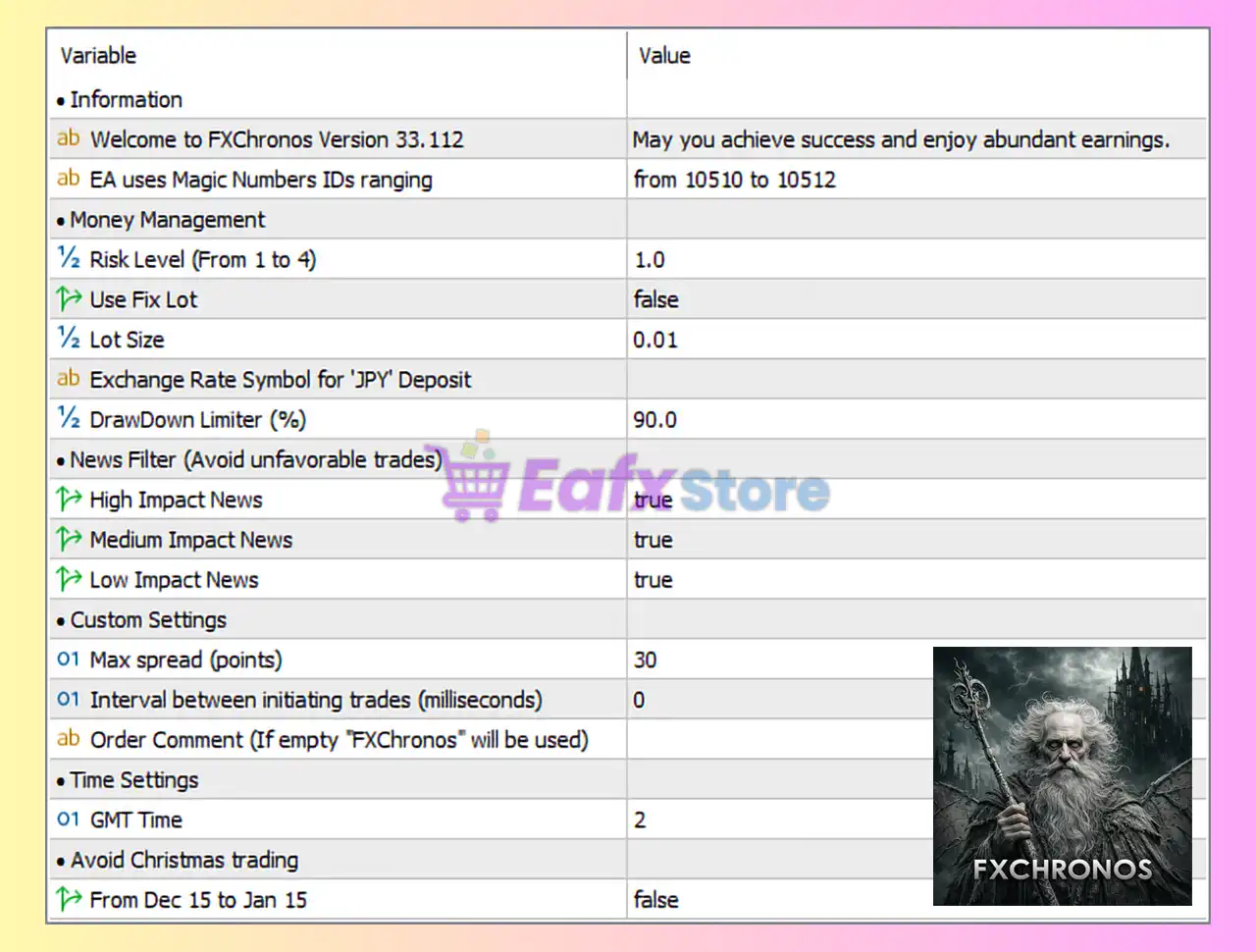
🔶 General Information
| Parameter | Value | Description |
|---|---|---|
| EA Version | 33.112 | Current version of FXChronos EA. |
| Magic Number Range | 10510 – 10512 | Unique IDs used to manage trades. |
➡️ Analysis
Using multiple magic numbers allows the EA to manage different strategies or trade groups simultaneously.
🔶 Money Management Settings
These parameters control how the EA manages risk and position sizing.
| Parameter | Value | Description |
|---|---|---|
| Risk Level (1–4) | 1.0 | Lowest risk setting. |
| Use Fixed Lot | false | Enables dynamic lot sizing. |
| Lot Size | 0.01 | Base lot size reference. |
| Drawdown Limiter (%) | 90.0 | Maximum allowed drawdown. |
➡️ Analysis
- Risk Level 1 = conservative trading approach
- Auto lot sizing ensures adaptability
- However, 90% drawdown limit is extremely high, meaning limited protection
🔶 News Filter Settings
One of the most important features of this EA.
| Parameter | Value | Description |
|---|---|---|
| High Impact News | true | Avoids trading during major events. |
| Medium Impact News | true | Filters medium-level events. |
| Low Impact News | true | Filters minor events. |
➡️ Analysis
This configuration enables full-spectrum news filtering, ensuring the EA avoids:
- High volatility spikes
- Unexpected market reactions
- Slippage during announcements
🔶 Custom Trading Settings
| Parameter | Value | Description |
|---|---|---|
| Max Spread (points) | 30 | Maximum allowed spread. |
| Trade Interval (ms) | 0 | No delay between trades. |
| Order Comment | FXChronos (default) | Label for trades. |
➡️ Analysis
- 30-point spread filter ensures good execution conditions
- No trade delay allows high responsiveness
🔶 Time Settings
| Parameter | Value | Description |
|---|---|---|
| GMT Offset | 2 | Adjusts EA to broker time. |
➡️ Analysis
Proper GMT alignment ensures:
- Accurate news filtering
- Correct session-based execution
🔶 Seasonal Trading Filter
| Parameter | Value | Description |
|---|---|---|
| Avoid Christmas Trading | false | EA trades during holiday period. |
| Period | Dec 15 – Jan 15 | Holiday range (inactive). |
➡️ Analysis
Since this feature is disabled, the EA will continue trading during low-liquidity holiday periods, which may increase risk.
🔶 Key Characteristics of This Configuration
The FXChronos EA is configured as:
- Low-risk automated trading system
- Dynamic lot sizing enabled
- Full news filtering (high, medium, low)
- Spread-controlled execution
- Continuous trading (including holidays)
🔶 Advantages of the Current Setup
➡️ Strong News Protection
Avoids all levels of economic events.
➡️ Conservative Risk Approach
Low risk level ensures stable performance.
➡️ Efficient Execution
Spread filter improves trade quality.
➡️ Flexible Automation
Dynamic lot sizing adapts to account size.
🔶 Risks to Consider
- Drawdown limiter set too high (90%)
- Trading during holidays may increase volatility risk
- No delay between trades may increase overtrading
🔶 Conclusion
The FXChronos EA MT5 settings (Version 33.112) represent a conservative, news-aware automated trading system designed to operate under controlled conditions.
Key highlights include:
- Risk Level 1 for low-risk trading
- Dynamic lot sizing with 0.01 base lot
- Full news filtering (high, medium, low impact)
- Max spread limit of 30 points
- GMT offset configured for accurate timing
While the EA offers strong protection against market volatility through news filtering and spread control, traders should consider adjusting:
- Drawdown limiter (reduce below 30–40%)
- Holiday trading filter (enable for safety)
Overall, FXChronos EA is suitable for traders seeking a stable, low-risk automated trading solution with strong emphasis on market condition filtering and execution quality.