
🔶 What is Dragon Expert for MT4?
Dragon Expert MT4 is an automated trading system designed for the MetaTrader 4 (MT4) platform, focusing on grid trading combined with martingale recovery strategies. This Expert Advisor (EA) is built to capture small, consistent profits by opening multiple positions and scaling lot sizes when the market moves against initial trades.
With parameters such as distance between trades, martingale levels, risk scaling, and profit targeting, Dragon Expert EA is suitable for traders who prefer high-frequency trading with recovery-based logic.
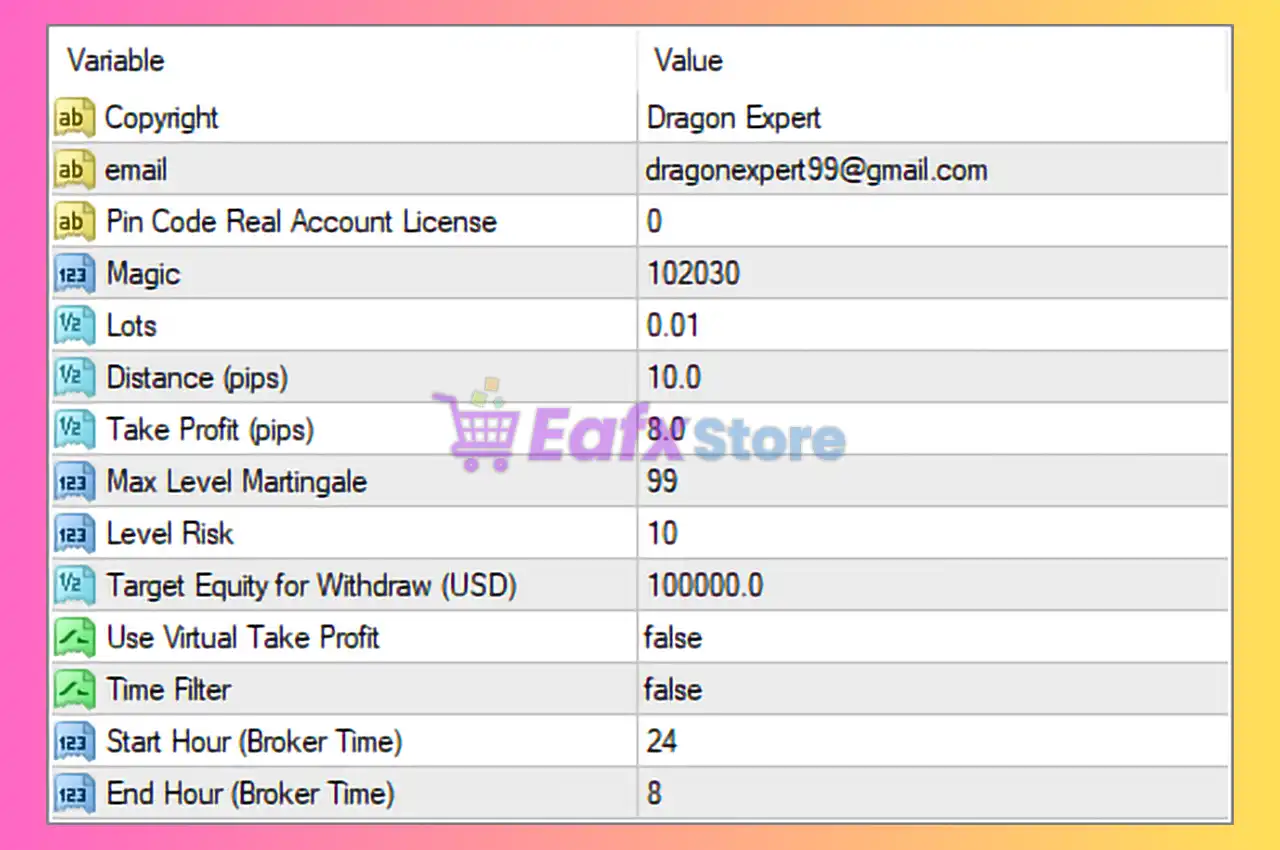
🔶 General Information
| Parameter | Value | Description |
|---|---|---|
| Copyright | Dragon Expert | Developer information. |
| [email protected] | Support contact. | |
| License Pin Code | 0 | Account license identifier. |
| Magic Number | 102030 | Unique identifier for EA trades. |
➡️ Analysis
The magic number (102030) ensures the EA manages only its own trades, especially when multiple EAs are running simultaneously.
🔶 Lot Size & Risk Settings
These parameters define position sizing and risk exposure.
| Parameter | Value | Description |
|---|---|---|
| Lots | 0.01 | Initial trade size. |
| Level Risk | 10 | Risk intensity level. |
| Max Level Martingale | 99 | Maximum number of martingale steps. |
➡️ Analysis
- 0.01 lot size = low initial risk
- Risk level 10 indicates a relatively aggressive configuration
- Max martingale level 99 is extremely high, allowing deep recovery cycles
⚠️ This setup suggests very high-risk martingale trading, especially in trending markets.
🔶 Grid Trading Settings
Controls how trades are spaced and executed.
| Parameter | Value | Description |
|---|---|---|
| Distance (pips) | 10.0 | Distance between grid orders. |
➡️ Analysis
A 10-pip grid spacing indicates:
- High-frequency trading
- Tight order placement
- Suitable for scalping strategies
However, tight grids can lead to rapid position accumulation.
🔶 Profit Target Settings
Defines how trades are closed in profit.
| Parameter | Value | Description |
|---|---|---|
| Max Take Profit (pips) | 8.0 | Target profit per cycle. |
| Use Virtual Take Profit | false | Uses real TP instead of virtual closure. |
➡️ Analysis
- Small TP (8 pips) → scalping-focused strategy
- Real TP ensures actual market closure rather than internal tracking
🔶 Account Protection Settings
| Parameter | Value | Description |
|---|---|---|
| Target Equity for Withdraw | 100000.0 | Equity target for profit withdrawal. |
➡️ Analysis
This is more of a long-term account goal, not an active protection feature.
🔶 Time Filter Settings
Controls when the EA trades.
| Parameter | Value | Description |
|---|---|---|
| Time Filter | false | Time restriction disabled. |
| Start Hour | 24 | Start time (inactive). |
| End Hour | 8 | End time (inactive). |
➡️ Analysis
Since the time filter is disabled, the EA operates 24/7, including:
- Low-liquidity periods
- High-volatility sessions
🔶 Key Characteristics of This Configuration
The Dragon Expert EA is configured as:
- Grid + Martingale trading system
- Tight 10-pip grid spacing
- Very high martingale limit (99 levels)
- Small take profit (8 pips)
- Continuous trading without time restriction
🔶 Advantages of the Current Setup
➡️ High Profit Frequency
Small TP allows frequent winning trades.
➡️ Fast Recovery System
Martingale logic helps recover losses quickly.
➡️ Low Entry Lot Size
0.01 lot reduces initial risk exposure.
🔶 Risks to Consider
➡️ Extremely High Martingale Exposure
Up to 99 levels → very high drawdown risk
➡️ No Stop Loss
Unlimited loss potential in strong trends
➡️ Tight Grid
Rapid accumulation of trades increases margin usage
➡️ No Time or News Filter
Exposure to all market conditions
🔶 Conclusion
The Dragon Expert MT4 settings represent a high-risk, high-frequency grid trading system that relies heavily on martingale recovery logic to generate consistent profits.
Key highlights include:
- 0.01 initial lot size with aggressive risk level (10)
- 10-pip grid spacing for frequent trades
- 8-pip take profit for scalping strategy
- Martingale levels up to 99 (very high risk)
- No time filter → 24/7 trading
While this configuration can produce frequent small profits, it carries significant risk due to:
- Lack of stop loss
- Unlimited martingale scaling
- Continuous exposure to market volatility
👉 For safer operation, traders should consider:
- Reducing martingale levels
- Increasing grid distance
- Adding equity or drawdown protection
- Enabling time or news filters
Overall, Dragon Expert EA is suitable for experienced traders who understand grid and martingale risks, and who can actively monitor account performance to avoid large drawdowns.