

This guide walks through the inputs of Gold Breaker EA MT5 with the values recommended for live trading. The set files that come with the EA already contain these settings, so you can load them in one click and adjust only what your broker or account needs.
🔢 Gold Breaker EA MT5 Settings Guide – Complete Parameter Explanation
Gold Breaker EA is an automated gold trading system designed to combine breakout-based entries with advanced risk management, virtual execution features and NFP news protection. The EA includes flexible lot sizing controls, drawdown protection, virtual stop-loss/take-profit handling, and dedicated Non-Farm Payroll (NFP) filters to help traders manage risk during high-impact market events.

🔢 Gold Breaker EA MT5 Parameters Explained
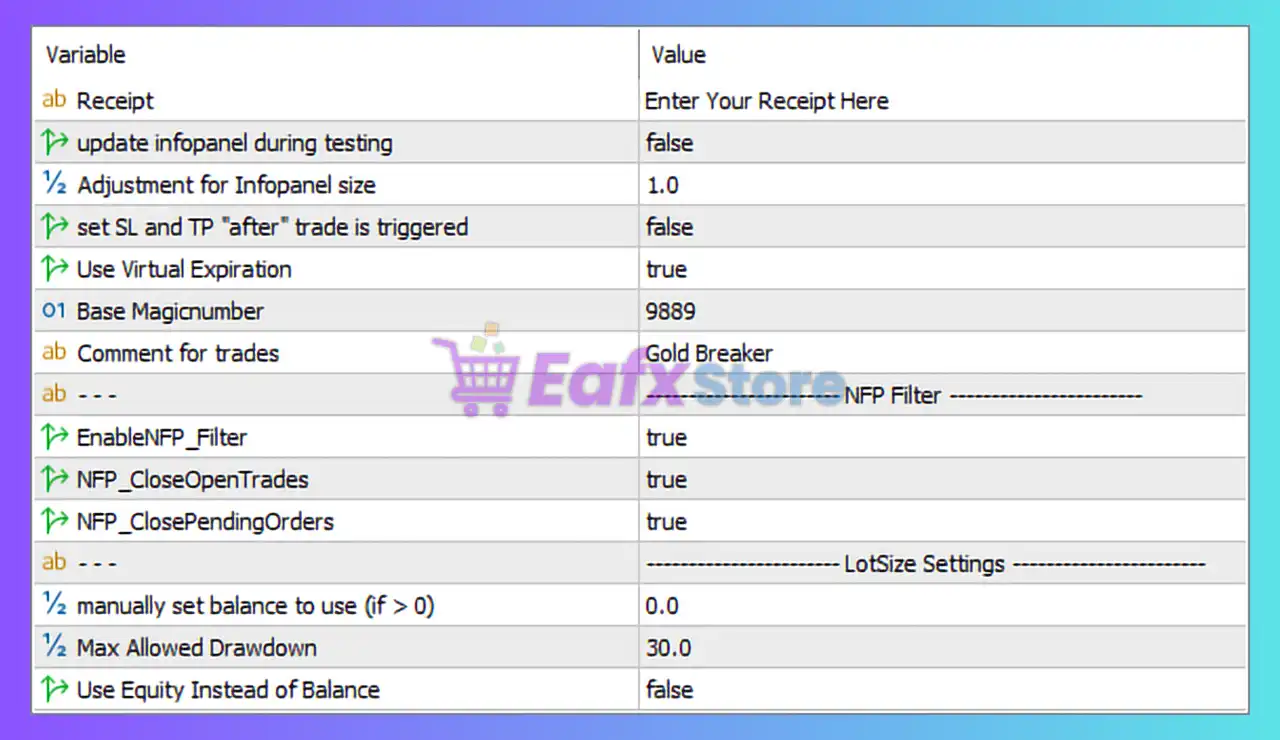
🔶 General Settings
🔹 Receipt = Enter Your Receipt Here – Field used for entering the EA license key or receipt information required for activation.
🔹 update infopanel during testing = false – Disables real-time updating of the information panel while running strategy tests.
🔹 Adjustment for Infopanel size = 1.0 – Controls the scaling factor of the information panel; 1.0 uses the default display size.
🔹 set SL and TP "after" trade is triggered = false – Stop Loss and Take Profit are not delayed and will be applied according to the EA’s normal execution logic.
🔹 Use Virtual expiration = true – Enables virtual expiration management for pending orders, allowing the EA to handle expiry internally rather than relying on broker-side expiration.
🔹 Base Magicnumber = 9889 – Unique identifier assigned to all trades opened by Gold Breaker EA MT5 to distinguish them from other EAs or manual trades.
🔹 Comment for trades = Gold Breaker – Custom trade comment attached to positions opened by the EA.
🔶 NFP Filter Settings
🔹 EnableNFP_Filter = true – Activates the Non-Farm Payroll (NFP) news filter to protect trading activity during major U.S. employment releases.
🔹 NFP_CloseOpenTrades = true – Automatically closes currently open trades before or during NFP events.
🔹 NFP_ClosePendingOrders = true – Automatically removes pending orders when NFP news approaches to reduce exposure to extreme volatility.
🔶 Lot Size Settings
🔹 manually set balance to use (if > 0) = 0.0 – Uses the actual account balance because the value is set to 0.0; entering a positive value would force the EA to calculate risk using a custom balance amount.
🔹 Max Allowed Drawdown = 30.0 – Maximum permitted drawdown is limited to 30.0%; trading protection mechanisms may activate when this threshold is reached.
🔹 Use Equity Instead of Balance = false – Risk calculations are based on account balance rather than current account equity.
🔢 Configuration Summary
🔹 Magic Number: 9889
🔹 Info Panel Scale: 1.0
🔹 Virtual Expiration: Enabled (true)
🔹 NFP Filter: Enabled (true)
🔹 Close Open Trades During NFP: Enabled (true)
🔹 Close Pending Orders During NFP: Enabled (true)
🔹 Manual Balance Override: 0.0
🔹 Maximum Allowed Drawdown: 30.0%
🔹 Use Equity for Risk Calculation: Disabled (false)
🔹 Trade Comment: Gold Breaker
🔢 Conclusion
Gold Breaker EA MT5 is designed with a strong focus on risk control and news-event protection. Its built-in NFP filter, automatic trade and pending order closure during high-impact events, virtual expiration management, and 30.0% maximum drawdown control make it suitable for traders who want additional safeguards while trading gold and other volatile instruments. Proper configuration of these parameters can help improve stability and protect trading capital during unpredictable market conditions.
🔢 FAQs
❓ What is the purpose of the Magic Number 9889 in Gold Breaker EA MT5?
The Magic Number 9889 uniquely identifies trades opened by the EA, allowing it to manage its own positions independently.
❓ Does Gold Breaker EA MT5 include an NFP news filter?
Yes, the EA includes an NFP filter that can automatically close open trades and pending orders during Non-Farm Payroll events.
❓ What does Max Allowed Drawdown = 30.0 mean?
It defines a maximum drawdown threshold of 30.0%, helping traders control risk and prevent excessive account losses.
❓ What is Virtual Expiration used for?
Virtual Expiration allows the EA to manage pending order expiration internally rather than depending on broker-side expiration settings.
❓ Should I use Equity instead of Balance for risk calculations?
By default, the setting is disabled (false), meaning calculations are based on account balance. Advanced users may enable equity-based calculations if desired.
Get Gold Breaker EA MT5
Download Gold Breaker EA MT5 with its set files, read the full product details and requirements here: Gold Breaker EA MT5 →