

This guide walks through the inputs of GOLD Eagle MT5 with the values recommended for live trading. The set files that come with the EA already contain these settings, so you can load them in one click and adjust only what your broker or account needs.
🔢 GOLD EAgle MT5 Settings Guide
GOLD EAgle MT5 is an automated Expert Advisor designed for systematic trading with flexible trend-line analysis, automatic lot management, manual trading controls, trailing-stop protection, grid functions, drawdown reduction, and account-level risk management. The EA provides extensive configuration options for trading direction, chart timeframe, position sizing, Take Profit, Stop Loss, trailing distance, grid spacing, lot multiplication, drawdown protection, time filters, candle filters, Moving Average confirmation, news filtering, notifications, and chart interface settings.
The displayed configuration is particularly detailed, giving traders control over both automated trading and manual-order management while allowing different risk and position-management mechanisms to be enabled or disabled according to the trading setup.
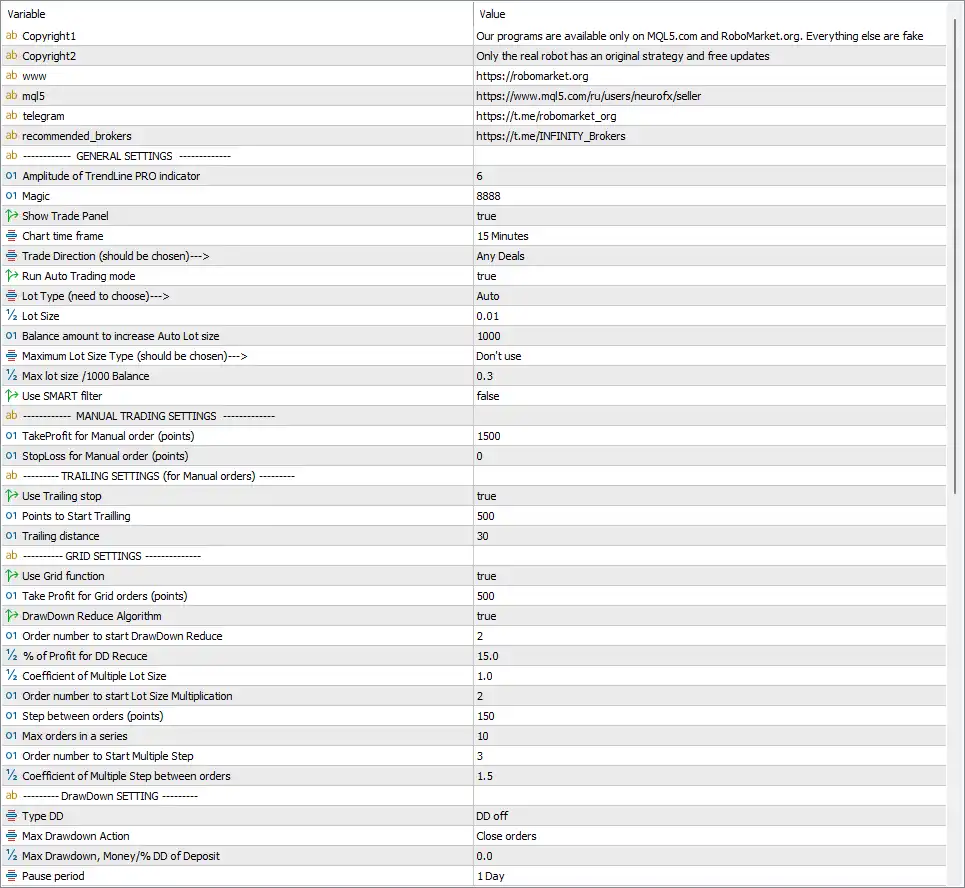
General Trading Settings
🔹 Amplitude of TrendLine PRO indicator = 6 — Sets the TrendLine PRO indicator amplitude to 6, controlling the sensitivity of the trend-line calculation.
🔹 Magic = 8888 — Sets the EA Magic Number to 8888, allowing the EA to identify and manage its own trades.
🔹 Show Trade Panel = true — Enables the on-chart trading panel.
🔹 Chart time frame = 15 Minutes — Sets the EA's chart/trading timeframe to 15 Minutes.
🔹 Trade Direction (should be chosen)---> = Any Deals — Allows the EA to operate with any supported trading direction.
🔹 Run Auto Trading mode = true — Enables the EA's automatic trading mode.
🔹 Lot Type (need to choose)---> = Auto — Selects automatic lot calculation instead of a fixed lot-size method.
🔹 Lot Size = 0.01 — Sets the starting or base lot size to 0.01 for the automatic position-sizing calculation.
🔹 Balance amount to increase Auto Lot size = 1000 — Sets the balance increment to 1000, which determines the balance step used when increasing the automatically calculated lot size.
🔹 Maximum Lot Size Type (should be chosen)---> = Don't use — Disables the maximum-lot-size limitation.
🔹 Max lot size /1000 Balance = 0.3 — Sets the maximum lot calculation value to 0.3 lots per 1000 balance units if the corresponding maximum-lot function is activated.
🔹 Use SMART filter = false — Disables the SMART filter.
Manual Trading Settings
🔹 TakeProfit for Manual order (points) = 1500 — Sets the Take Profit distance for manual orders to 1500 points.
🔹 StopLoss for Manual order (points) = 0 — Sets the Stop Loss for manual orders to 0 points, meaning no fixed manual-order Stop Loss is configured through this parameter.
Trailing Settings for Manual Orders
🔹 Use Trailing stop = true — Enables the trailing-stop function for manual orders.
🔹 Points to Start Trailing = 500 — Activates the trailing-stop mechanism after the position reaches 500 points of favorable movement.
🔹 Trailing distance = 30 — Sets the trailing-stop distance to 30 points.
Grid Settings
🔹 Use Grid function = true — Enables the EA's Grid trading function.
🔹 Take Profit for Grid orders (points) = 500 — Sets the Take Profit distance for Grid orders to 500 points.
🔹 DrawDown Reduce Algorithm = true — Enables the DrawDown Reduction Algorithm to manage the position structure when the configured conditions are reached.
🔹 Order number to start DrawDown Reduce = 2 — Activates the DrawDown Reduction Algorithm starting from 2 orders.
🔹 % of Profit for DD Reduce = 15.0 — Sets the profit percentage threshold for the DrawDown Reduction mechanism to 15.0%.
🔹 Coefficient of Multiple Lot Size = 1.0 — Sets the lot-size multiplication coefficient to 1.0 for the relevant Grid/position-management calculation.
🔹 Order number to start Lot Size Multiplication = 2 — Starts the lot-size multiplication mechanism from 2 orders.
🔹 Step between orders (points) = 150 — Sets the Grid distance between consecutive orders to 150 points.
🔹 Max orders in a series = 10 — Limits a Grid series to a maximum of 10 orders.
🔹 Order number to Start Multiple Step = 3 — Starts the Multiple Step mechanism from 3 orders.
🔹 Coefficient of Multiple Step between orders = 1.5 — Sets the Multiple Step distance coefficient to 1.5, affecting how the spacing between subsequent Grid orders is adjusted.
Drawdown Settings
🔹 Type DD = DD off — Sets the DrawDown protection mode to DD off, meaning the dedicated drawdown-control module is currently disabled.
🔹 Max Drawdown Action = Close orders — Defines Close orders as the action to be taken when the configured maximum drawdown condition is reached.
🔹 % Max Drawdown, Money/% DD of Deposit = 0.0 — Sets the maximum drawdown threshold to 0.0, which corresponds to no active numerical drawdown limit under the displayed DD off configuration.
🔹 Pause period = 1 Day — Sets the drawdown-related trading pause period to 1 Day.
HTF Filter Settings
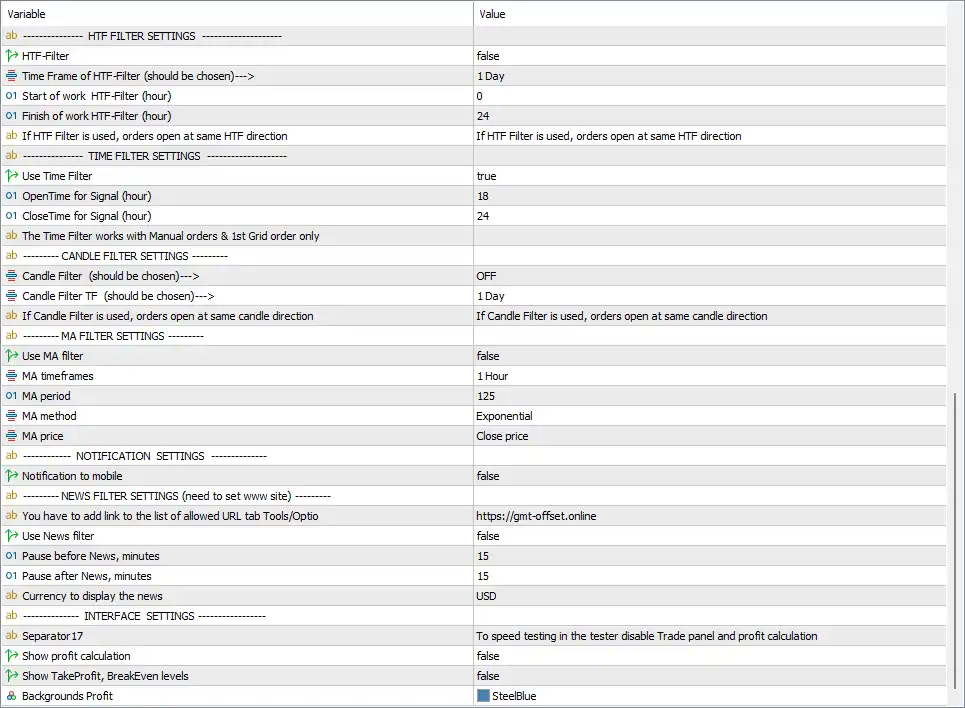
🔹 HTF-Filter = false — Disables the Higher Timeframe filter.
🔹 Time Frame of HTF-Filter (should be chosen)---> = 1 Day — Sets the Higher Timeframe reference to 1 Day when the HTF filter is enabled.
🔹 Start of work HTF-Filter (hour) = 0 — Sets the HTF filter's starting hour to 0.
🔹 Finish of work HTF-Filter (hour) = 24 — Sets the HTF filter's ending hour to 24.
🔹 If HTF Filter is used, orders open at same HTF direction = If HTF Filter is used, orders open at same HTF direction — Indicates that when the HTF filter is enabled, orders are opened in the same direction as the selected Higher Timeframe trend.
Time Filter Settings
🔹 Use Time Filter = true — Enables the trading-time filter.
🔹 OpenTime for Signal (hour) = 18 — Sets the signal-opening time to 18:00.
🔹 CloseTime for Signal (hour) = 24 — Sets the signal-closing time to 24:00.
🔹 The Time Filter works with Manual orders & 1st Grid order only — Indicates that the Time Filter applies to manual orders and the first Grid order only.
Candle Filter Settings
🔹 Candle Filter (should be chosen)---> = OFF — Disables the Candle Filter.
🔹 Candle Filter TF (should be chosen)---> = 1 Day — Sets the Candle Filter timeframe to 1 Day when the filter is enabled.
🔹 If Candle Filter is used, orders open at same candle direction = If Candle Filter is used, orders open at same candle direction — Indicates that orders follow the direction of the selected candle when the Candle Filter is activated.
MA Filter Settings
🔹 Use MA filter = false — Disables the Moving Average filter.
🔹 MA timeframes = 1 Hour — Sets the Moving Average analysis timeframe to 1 Hour.
🔹 MA period = 125 — Sets the Moving Average period to 125.
🔹 MA method = Exponential — Selects the Exponential Moving Average (EMA) calculation method.
🔹 MA price = Close price — Uses the Close price as the source for the Moving Average calculation.
Notification Settings
🔹 Notification to mobile = false — Disables mobile notifications from the EA.
News Filter Settings
🔹 You have to add link to the list of allowed URL tab Tools/Options = https://gmt-offset.online — Provides the URL that should be added to the allowed URL list in MetaTrader's Tools/Options settings when the news function requires it.
🔹 Use News filter = false — Disables the News Filter.
🔹 Pause before News, minutes = 15 — Defines a 15-minute pause before a news event when the News Filter is enabled.
🔹 Pause after News, minutes = 15 — Defines a 15-minute pause after a news event when the News Filter is enabled.
🔹 Currency to display the news = USD — Sets USD as the currency for news events displayed by the EA.
Interface Settings
🔹 Separator17 = To speed testing in the tester disable Trade panel and profit calculation — Provides an informational note recommending that the Trade Panel and profit calculation can be disabled to speed up Strategy Tester testing.
🔹 Show profit calculation = false — Disables the profit-calculation display.
🔹 Show TakeProfit, BreakEven levels = false — Disables the display of Take Profit and BreakEven levels on the chart.
🔹 Backgrounds Profit = SteelBlue — Sets the profit interface background color to SteelBlue.
Current Configuration Summary
🔹 Trading Timeframe: The main Chart time frame is 15 Minutes, providing the primary timeframe for the displayed EA configuration.
🔹 Trading Mode: Automatic trading is enabled with Run Auto Trading mode = true.
🔹 Trading Direction: Any Deals is selected, allowing the EA to operate in its supported trading directions.
🔹 Lot Management: The EA uses Auto lot sizing with Lot Size = 0.01 and a 1000 balance increment.
🔹 Maximum Lot Control: The maximum lot function is set to Don't use, while Max lot size /1000 Balance = 0.3 remains configured.
🔹 Manual Orders: Manual orders use TakeProfit = 1500 points and StopLoss = 0 points.
🔹 Manual Trailing: Trailing Stop is enabled with activation at 500 points and a trailing distance of 30 points.
🔹 Grid Trading: The Grid function is enabled with Take Profit = 500 points, 150-point spacing, and a maximum of 10 orders in a series.
🔹 DrawDown Reduction: The DrawDown Reduce Algorithm is enabled and starts from 2 orders, with a 15.0% profit threshold.
🔹 Grid Multiplication: Lot-size multiplication starts from 2 orders, while the Multiple Step mechanism starts from 3 orders with a coefficient of 1.5.
🔹 HTF Filter: The Higher Timeframe Filter is disabled, although the configured reference timeframe is 1 Day.
🔹 Time Filter: The Time Filter is enabled from 18:00 to 24:00 and applies to manual orders and the first Grid order.
🔹 Candle Filter: The Candle Filter is OFF, with its configured timeframe set to 1 Day.
🔹 MA Filter: The MA Filter is disabled, with a configured 1 Hour, 125-period, Exponential Moving Average based on Close price.
🔹 News Filter: The News Filter is disabled, with 15 minutes configured before and after news events and USD selected for news display.
🔹 Drawdown Protection: The dedicated DD module is set to DD off, with Close orders configured as the maximum-drawdown action.
🔢 Important Notes About the Settings
🔹 Grid Function: Because Use Grid function = true, the EA is configured to use Grid trading. Traders should understand how the order spacing, maximum order count, and lot-management settings affect cumulative exposure.
🔹 DrawDown Reduction: The DrawDown Reduce Algorithm = true operates separately from the main Type DD = DD off setting, so the two mechanisms should not be treated as identical functions.
🔹 Manual Stop Loss: StopLoss for Manual order = 0 means no fixed manual-order Stop Loss is configured through this specific parameter.
🔹 Time Filter: The active 18:00–24:00 window is specifically described as applying to Manual orders & 1st Grid order only.
🔹 HTF Direction: If the HTF Filter is enabled, the EA is configured to open orders in the same direction as the Higher Timeframe signal.
🔹 MA Settings: The 1 Hour / 125 / Exponential / Close price configuration is currently inactive because Use MA filter = false.
🔹 News Settings: The 15-minute before/after-news values are configured but the News Filter itself is disabled.
🔹 Drawdown Threshold: % Max Drawdown = 0.0 should be interpreted together with Type DD = DD off; the dedicated DD protection is not active in the displayed configuration.
🔢 Conclusion
The GOLD EAgle MT5 Inputs provide a comprehensive framework for automated Gold trading, combining TrendLine analysis with automatic lot sizing, manual-order management, Grid trading, trailing stops, DrawDown reduction, timeframe filters, candle confirmation, Moving Average filtering, and news protection.
The displayed setup uses a 15 Minutes chart timeframe, Auto lot sizing with a base 0.01 lot and 1000 balance increment, while the Grid function is enabled with 500 points Take Profit, 150 points between orders, and a maximum of 10 orders per series. Manual-order trailing is also enabled with a 500-point activation level and 30-point trailing distance.
Several additional filters, including the HTF Filter, Candle Filter, MA Filter, and News Filter, are currently disabled. The Time Filter is enabled for 18:00–24:00, while the dedicated DD protection is set to DD off. Traders should carefully test these parameters because Grid trading and automated position-management mechanisms can materially affect overall account exposure.
🔢 FAQs
❓ What timeframe does GOLD EAgle MT5 use in the current configuration?
The main Chart time frame is set to 15 Minutes.
❓ What lot size does GOLD EAgle MT5 use?
The EA is configured with Lot Type = Auto and Lot Size = 0.01, with the automatic lot size increasing according to a 1000 balance amount.
❓ Is Grid trading enabled in GOLD EAgle MT5?
Yes. Use Grid function = true. The Grid Take Profit is 500 points, order spacing is 150 points, and the maximum number of orders in a series is 10.
❓ Does GOLD EAgle MT5 use a Moving Average filter?
The MA settings are configured as 1 Hour, 125-period, Exponential, and Close price, but Use MA filter = false, so the filter is currently disabled.
❓ Is the News Filter enabled in the current configuration?
No. Use News filter = false. The EA nevertheless has 15 minutes configured before and after news events, with USD selected as the news currency.
Get GOLD Eagle MT5
Download GOLD Eagle MT5 with its set files, read the full product details and requirements here: GOLD Eagle MT5 →