
This guide walks through the inputs of RFP Gold Scalping EA MT4 with the values recommended for live trading. The set files that come with the EA already contain these settings, so you can load them in one click and adjust only what your broker or account needs.
🔢 RFP Gold Scalping EA – Complete Settings & Parameters Guide
RFP Gold Scalping EA is an automated gold trading Expert Advisor designed for traders who focus on short-term price movements and scalping opportunities.
The EA combines automatic lot sizing, drawdown control, spread filtering, profit targeting, and indicator-based market analysis to help traders manage risk while seeking consistent trading opportunities on Gold and other compatible instruments.
🔢 RFP Gold Scalping EA Settings Explained
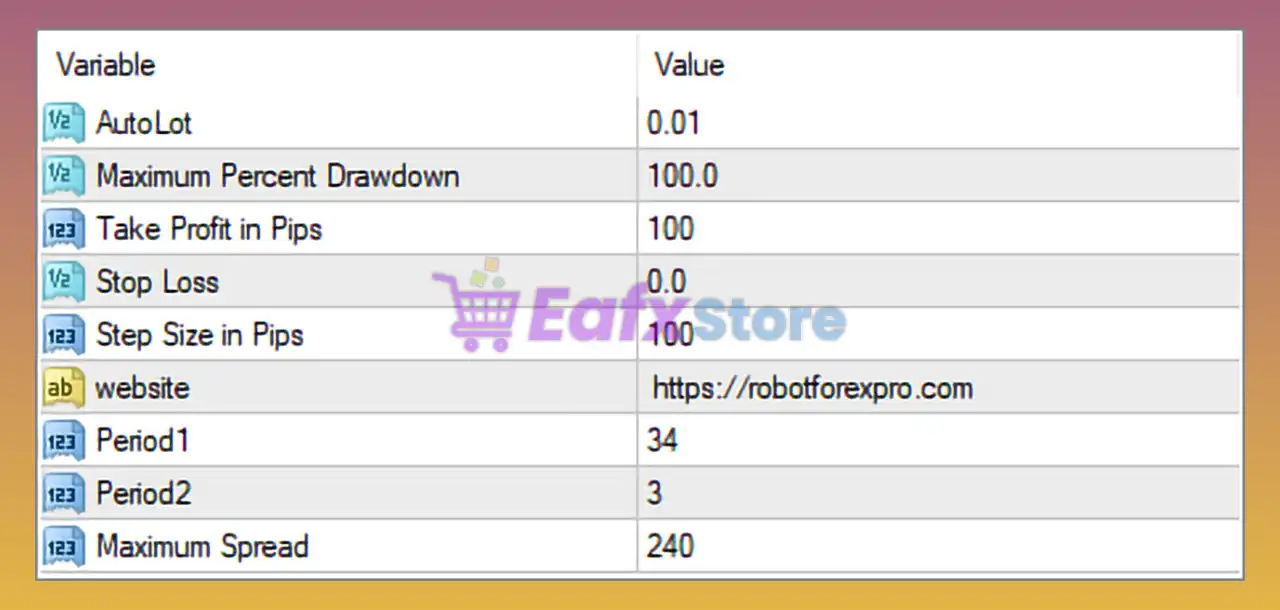
Below are the details of the parameters in the advisor’s trading system settings table:
🔶 Money Management Settings
🔹 AutoLot = 0.01 — Sets the automatic starting lot size to 0.01 lots, allowing the EA to manage trade volume based on its internal logic.
🔹 Maximum Percent Drawdown = 100.0 — Defines the maximum allowable account drawdown at 100.0% before protective measures are triggered.
🔶 Profit & Risk Settings
🔹 Take Profit in Pips = 100 — Sets the profit target for each trade to 100 pips.
🔹 Stop Loss = 0.0 — Disables the fixed Stop Loss; a value of 0.0 means no predefined stop loss is applied.
🔹 Step Size in Pips = 100 — Sets the spacing between trade levels or grid entries to 100 pips.
🔶 Indicator & Signal Parameters
🔹 Period1 = 34 — Primary indicator calculation period set to 34, used for market trend or signal generation.
🔹 Period2 = 3 — Secondary indicator calculation period set to 3, typically used for faster signal confirmation.
🔶 Spread Protection Settings
🔹 Maximum Spread = 240 — Restricts trading when the market spread exceeds 240 points, helping avoid costly trade entries during unfavorable conditions.
🔢 Conclusion
RFP Gold Scalping EA is a lightweight yet practical scalping Expert Advisor that focuses on automated lot management, spread protection and indicator-driven trading decisions.
With configurable profit targets, flexible risk controls, and customizable indicator periods, the EA can be adapted to various trading environments while maintaining a straightforward setup process.
🔢 FAQs
❓ What is the purpose of the AutoLot setting in RFP Gold Scalping EA?
AutoLot determines the initial automated trading volume, which is currently set to 0.01 lots.
❓ Why is the Stop Loss set to 0.0?
A value of 0.0 indicates that no fixed Stop Loss is being used, allowing the EA to rely on its internal trade management logic.
❓ What does Maximum Spread = 240 mean?
The EA will avoid opening new trades when the market spread exceeds 240 points, helping reduce trading costs during volatile conditions.
❓ How do Period1 and Period2 affect trading signals?
Period1 = 34 and Period2 = 3 are indicator calculation periods that influence trend detection and entry signal timing.
❓ Is RFP Gold Scalping EA suitable for Gold trading?
Yes. As its name suggests, the EA is primarily designed for Gold scalping strategies, although compatibility may vary depending on broker conditions and account settings.
Get RFP Gold Scalping EA MT4
Download RFP Gold Scalping EA MT4 with its set files, read the full product details and requirements here: RFP Gold Scalping EA MT4 →