🔄 Introduction to GOLD BREAKOUTS EA MT5
GOLD BREAKOUTS EA MT5 is an automated breakout trading Expert Advisor (EA) developed for the MetaTrader 5 platform, specifically optimized for gold (XAUUSD) trading. The EA focuses on identifying breakout opportunities while maintaining configurable risk management and visual panel controls. With profile-based trading modes and percentage risk calculation, GOLD BREAKOUTS EA is designed for traders seeking a simple yet effective breakout trading solution.
🔄 Full Parameters
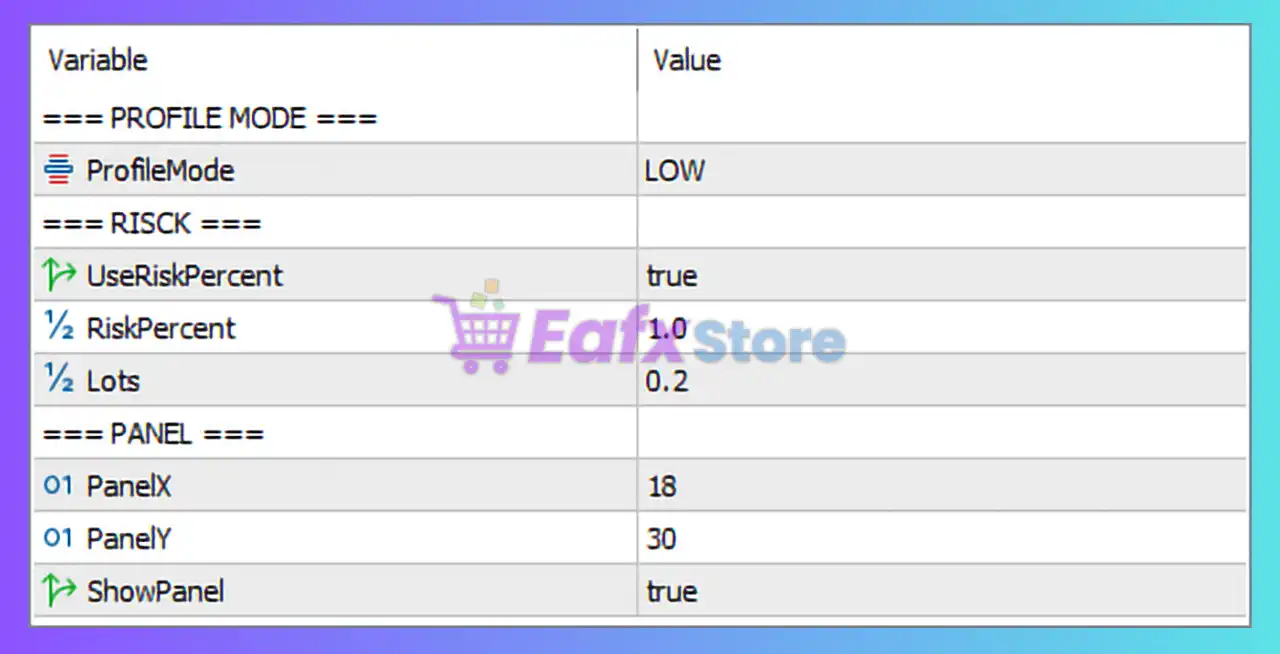
=== PROFILE MODE ===
- ProfileMode = LOW: Sets the trading profile to LOW risk mode, focusing on more conservative trade execution.
=== RISCK ===
- UseRiskPercent = true: Enables percentage-based risk management for automatic lot sizing.
- RiskPercent = 1.0: Risks 1.0% of account balance per trade.
- Lots = 0.2: Defines the fixed lot size as 0.2 when fixed lot mode is used.
=== PANEL ===
- PanelX = 18: Sets the horizontal position of the on-chart panel to 18 pixels.
- PanelY = 30: Sets the vertical position of the on-chart panel to 30 pixels.
- ShowPanel = true: Enables the display of the information panel on the chart.
🔄 Conclusion
The GOLD BREAKOUTS EA MT5 settings provide a clean and beginner-friendly framework for automated gold breakout trading. With a LOW risk profile, percentage-based money management, and customizable panel positioning, the EA is designed for traders who want simplified configuration with controlled risk exposure. Understanding these settings can help improve execution consistency and optimize trading performance.
🔄 FAQs
❓ What does ProfileMode = LOW mean?
It means the EA is configured for a conservative or lower-risk trading approach.
❓ Why is UseRiskPercent = true important?
It enables automatic lot sizing based on account balance risk percentage.
❓ What does RiskPercent = 1.0 do?
It limits each trade’s risk to 1.0% of account balance.
❓ Why is Lots = 0.2 included if risk percent is enabled?
The fixed lot value can still be used when percentage-based risk management is disabled.
❓ What is the purpose of ShowPanel = true?
It displays the EA information panel directly on the trading chart.