Introduction to EA Gold MT5
EA Gold MT5 is a fully automated gold trading Expert Advisor (EA) designed for the MetaTrader 5 platform. The EA combines automatic lot sizing, spread filtering, economic news protection, break-even management, and time/day trading filters to create a structured and risk-controlled trading environment.
With support for dynamic Take Profit (TP) smoothing and advanced news event handling, EA Gold MT5 is suitable for traders seeking disciplined XAUUSD automation.
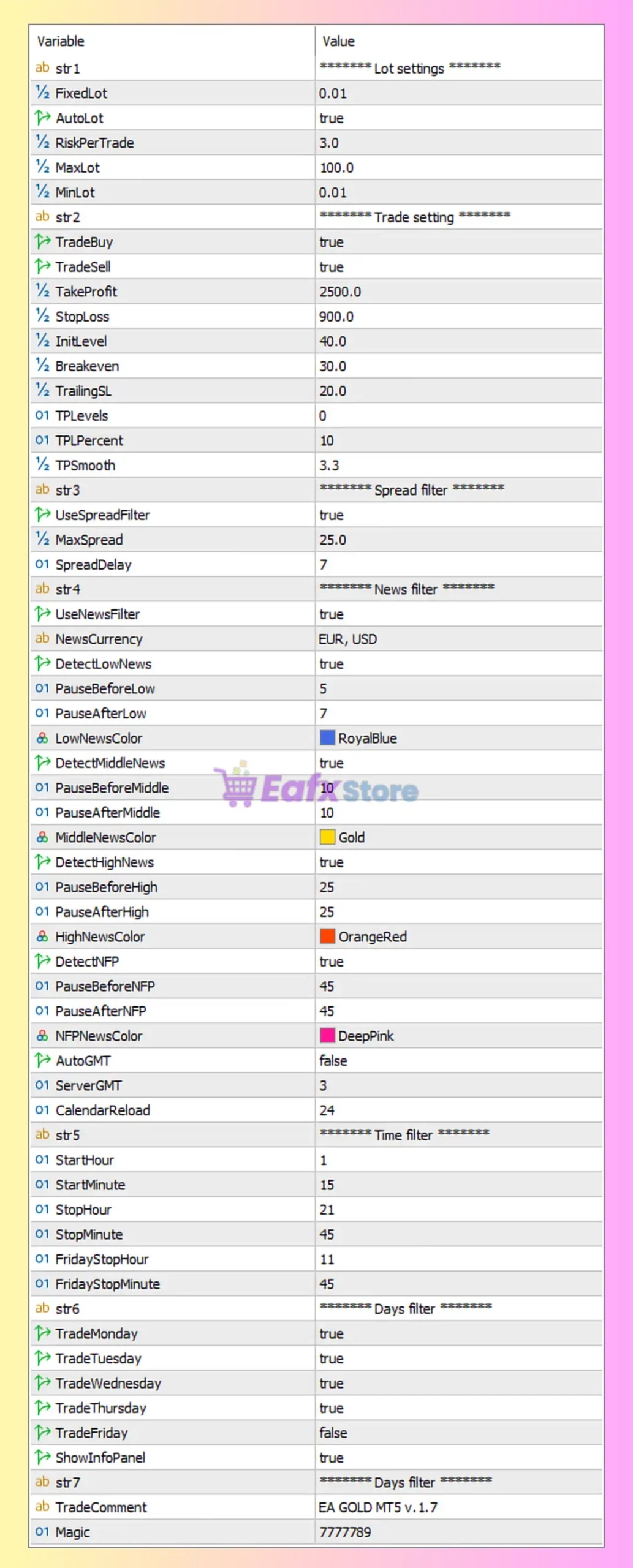
Full Parameters
******** Lot settings ********
- FixedLot = 0.01: Sets the fixed trading lot size to 0.01 lots.
- AutoLot = true: Enables automatic lot size calculation based on risk settings.
- RiskPerTrade = 3.0: Risks 3.0% of account balance per trade.
- MaxLot = 100.0: Maximum allowed trading lot size capped at 100.0 lots.
- MinLot = 0.01: Minimum trading lot size set to 0.01 lots.
******** Trade setting ********
- TradeBuy = true: Allows the EA to open BUY positions.
- TradeSell = true: Allows the EA to open SELL positions.
- TakeProfit = 2500.0: Sets the Take Profit target to 2500.0 points.
- StopLoss = 900.0: Defines the Stop Loss level at 900.0 points.
- InitLevel = 40.0: Initial trade trigger or level setting configured at 40.0 points.
- Breakeven = 30.0: Activates break-even protection after reaching 30.0 points in profit.
- TrailingSL = 20.0: Enables trailing stop functionality with a trailing distance of 20.0 points.
- TPLevels = 0: Multi-level Take Profit functionality disabled because value is 0.
- TPPercent = 10: Take Profit percentage allocation set to 10%.
- TPSmooth = 3.3: Uses Take Profit smoothing factor of 3.3 for trade management adjustments.
******** Spread filter ********
- UseSpreadFilter = true: Enables spread filtering before opening trades.
- MaxSpread = 25.0: Maximum allowed spread set to 25.0 points.
- SpreadDelay = 7: Delays trading for 7 units/time intervals after spread conditions are met.
******** News filter ********
- UseNewsFilter = true: Enables economic news event filtering.
- NewsCurrency = EUR, USD: Filters news events related to EUR and USD currencies.
- DetectLowNews = true: Enables detection of low-impact news events.
- PauseBeforeLow = 5: Pauses trading 5 minutes before low-impact news.
- PauseAfterLow = 7: Resumes trading 7 minutes after low-impact news.
- LowNewsColor = RoyalBlue: Displays low-impact news events in RoyalBlue color.
- DetectMiddleNews = true: Enables detection of medium-impact news events.
- PauseBeforeMiddle = 10: Pauses trading 10 minutes before medium-impact news.
- PauseAfterMiddle = 10: Resumes trading 10 minutes after medium-impact news.
- MiddleNewsColor = Gold: Displays medium-impact news events in Gold color.
- DetectHighNews = true: Enables detection of high-impact news events.
- PauseBeforeHigh = 25: Pauses trading 25 minutes before high-impact news.
- PauseAfterHigh = 25: Resumes trading 25 minutes after high-impact news.
- HighNewsColor = OrangeRed: Displays high-impact news events in OrangeRed color.
- DetectNFP = true: Enables special detection for Non-Farm Payroll (NFP) events.
- PauseBeforeNFP = 45: Pauses trading 45 minutes before NFP releases.
- PauseAfterNFP = 45: Resumes trading 45 minutes after NFP events.
- NFPNewsColor = DeepPink: Displays NFP events in DeepPink color.
- AutoGMT = false: Disables automatic GMT offset detection.
- ServerGMT = 3: Broker server GMT offset manually set to GMT+3.
- CalendarReload = 24: Refreshes economic calendar data every 24 units/time intervals.
******** Time filter ********
- StartHour = 1: Trading begins at 01:00 server time.
- StartMinute = 15: Trading starts at minute 15.
- StopHour = 21: Trading stops at 21:00 server time.
- StopMinute = 45: Trading stops at minute 45.
- FridayStopHour = 11: Friday trading stops at 11:00 server time.
- FridayStopMinute = 45: Friday trading stops at minute 45.
******** Days filter ********
- TradeMonday = true: Enables trading on Monday.
- TradeTuesday = true: Enables trading on Tuesday.
- TradeWednesday = true: Enables trading on Wednesday.
- TradeThursday = true: Enables trading on Thursday.
- TradeFriday = false: Disables trading on Friday.
- ShowInfoPanel = true: Displays the EA information panel on the chart.
******** Common settings ********
- TradeComment = EA GOLD MT5 v.1.7: Adds “EA GOLD MT5 v.1.7” as the comment for executed trades.
- Magic = 7777789: Unique identifier (7777789) used to manage EA trades independently.
Conclusion
The EA Gold MT5 settings provide a professional framework for automated gold trading with integrated risk management, spread filtering and advanced economic news protection.
By combining automatic lot sizing, time/day trading filters, and dynamic take profit management, the EA helps traders maintain disciplined execution under varying market conditions.
Understanding these settings can improve strategy optimization, risk control and long-term trading consistency.
FAQs
❓ What does AutoLot = true do?
It automatically calculates lot size based on account balance and risk percentage.
❓ Why is UseNewsFilter = true important?
It prevents trading during important economic news events that may cause volatility.
❓ What is the purpose of Breakeven = 30.0?
It moves Stop Loss to break-even after the trade gains 30.0 points.
❓ Why is TradeFriday = false used?
It disables trading on Friday to avoid weekend gaps and unstable market conditions.
❓ What does Magic = 7777789 mean?
It uniquely identifies trades opened by EA Gold MT5 for proper trade management.