Gold Scalping EA MT4 Settings: Full Parameter Analysis for Optimal Trading

🔶 What is Gold Scalping EA for MT4?
Gold Scalping EA is a high-frequency automated trading system specifically designed for scalping gold (XAUUSD) on the MetaTrader 4 (MT4) platform. This Expert Advisor (EA) focuses on capturing small, quick price movements by executing multiple trades within short timeframes.
📌📌📌 Buy this Gold Scalping EA MT4 product here 📌📌📌
The EA combines scalping logic, trailing stop management, multi-order handling, and ZigZag-based market structure detection to identify entry and exit opportunities. With its flexible configuration, traders can control risk, trade frequency, and execution behavior.
🔶 Basic Trading Parameters
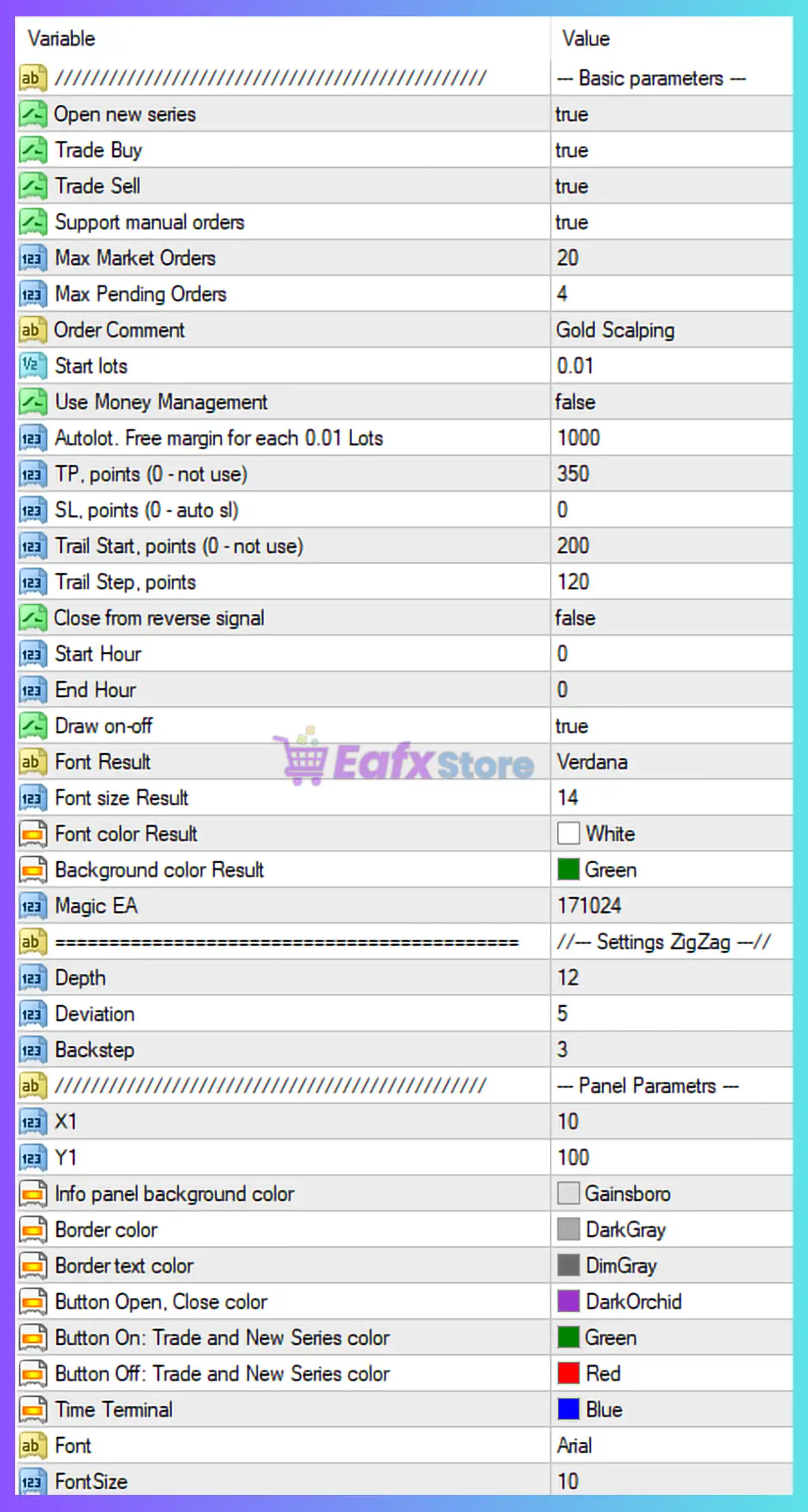
These are the core settings that control trade execution and behavior.
| Parameter | Value | Description |
|---|---|---|
| Open new series | true | Allows the EA to start new trading cycles. |
| Trade Buy | true | Enables buy orders. |
| Trade Sell | true | Enables sell orders. |
| Support manual orders | true | EA can manage manually opened trades. |
| Max Market Orders | 20 | Maximum number of active trades. |
| Max Pending Orders | 4 | Maximum number of pending orders. |
| Order Comment | Gold Scalping | Label for all EA trades. |
➡️ Analysis
The EA supports both buy and sell scalping strategies simultaneously, with the ability to manage up to 20 open trades, indicating a high-frequency, multi-position approach.
🔶 Lot Size & Money Management
These parameters control position sizing and risk exposure.
| Parameter | Value | Description |
|---|---|---|
| Start lots | 0.01 | Initial trade size. |
| Use Money Management | false | Fixed lot size is used. |
| Autolot (Free margin per 0.01) | 1000 | Lot scaling rule (inactive unless enabled). |
➡️ Analysis
The EA uses a fixed lot size (0.01), making it suitable for:
- Small accounts
- Conservative trading setups
- Testing environments
🔶 Take Profit & Stop Loss Settings
These define how trades are closed for profit or loss.
| Parameter | Value | Description |
|---|---|---|
| TP (points) | 350 | Take profit level. |
| SL (points) | 0 | No stop loss applied. |
➡️ Analysis
- Take profit = 350 points targets quick scalping gains
- No stop loss increases risk, relying on trade management or market reversal
This is typical in grid/scalping strategies, but requires careful monitoring.
🔶 Trailing Stop Settings
Trailing stops are used to secure profits dynamically.
| Parameter | Value | Description |
|---|---|---|
| Trail Start | 200 | Profit level to activate trailing stop. |
| Trail Step | 120 | Distance for trailing movement. |
➡️ Analysis
Once trades reach 200 points profit, trailing begins, helping:
- Lock in gains
- Extend profits in trending conditions
🔶 Trade Behavior & Timing
These settings control trade execution timing.
| Parameter | Value | Description |
|---|---|---|
| Close from reverse signal | false | Trades are not closed on opposite signals. |
| Start Hour | 0 | Trading starts at midnight. |
| End Hour | 0 | No time restriction (24/7 trading). |
➡️ Analysis
The EA is configured for continuous trading, allowing it to capture opportunities across all sessions.
🔶 ZigZag Indicator Settings
ZigZag is used for identifying market structure and reversals.
| Parameter | Value | Description |
|---|---|---|
| Depth | 12 | Minimum number of bars for swing detection. |
| Deviation | 5 | Minimum price movement to form a swing. |
| Backstep | 3 | Minimum bars between swing points. |
➡️ Analysis
These settings help the EA:
- Detect market swings and reversals
- Improve entry timing
- Avoid noise in price action
🔶 Panel & Visualization Settings
These parameters control the EA’s on-chart interface.
| Parameter | Value | Description |
|---|---|---|
| Draw on-off | true | Enables visual panel. |
| Font Result | Verdana | Font for display. |
| Font Size Result | 14 | Text size for results. |
| Magic EA | 171024 | Unique trade identifier. |
➡️ Additional UI Customization
- Background color: Green
- Button colors: Green (active), Red (inactive), Blue (time)
- Panel layout and border customization
➡️ Analysis
The panel provides real-time monitoring, improving usability and transparency.
🔶 Key Characteristics of This Configuration
The Gold Scalping EA is configured as:
- High-frequency scalping system
- Multi-order trading (up to 20 positions)
- No stop loss strategy
- Trailing stop profit protection
- ZigZag-based entry logic
- 24/7 trading operation
🔶 Advantages of the Current Setup
➡️ High Trade Frequency
Allows capturing multiple small profits throughout the day.
➡️ Flexible Trade Management
Trailing stops help secure profits dynamically.
➡️ Market Structure Awareness
ZigZag improves entry accuracy.
➡️ Beginner-Friendly Lot Size
0.01 lots reduce initial risk exposure.
🔶 Potential Risks to Consider
- No stop loss increases drawdown risk
- High number of open trades can increase exposure
- Continuous trading may include low-liquidity periods
🔶 Conclusion
The Gold Scalping EA MT4 settings reveal a trading strategy designed for fast-paced, high-frequency gold trading, combining multi-order execution, trailing stop management, and ZigZag-based market analysis.
Key highlights include:
- 0.01 fixed lot size for controlled entry
- 350-point take profit with no stop loss
- Trailing stop activation at 200 points
- Up to 20 simultaneous trades
- ZigZag indicator for structure detection
- 24/7 trading without time restrictions
Overall, this EA is suitable for traders who prefer scalping strategies with frequent trades and active management. However, due to the absence of a stop loss, it is recommended to use proper account sizing, VPS stability, and additional risk controls to ensure long-term performance and account safety.