

This guide walks through the inputs of Stable Gold Scalping EA MT5 with the values recommended for live trading. The set files that come with the EA already contain these settings, so you can load them in one click and adjust only what your broker or account needs.
🔢 Stable Gold Scalping EA MT5 – Complete Settings Guide and Parameter Explanation
Stable Gold Scalping EA is a professional MetaTrader 5 Expert Advisor designed for XAUUSD (Gold) trading using Smart Money Concepts (SMC), Liquidity Sweep detection, Fair Value Gap (FVG) analysis, Break of Structure (BOS) confirmation and trend filtering.
The EA combines advanced market structure analysis with automated risk management, break-even protection, trailing stops, and trading session filters to provide a disciplined and scalable Gold scalping solution.

🔢 Installation Panel Parameters
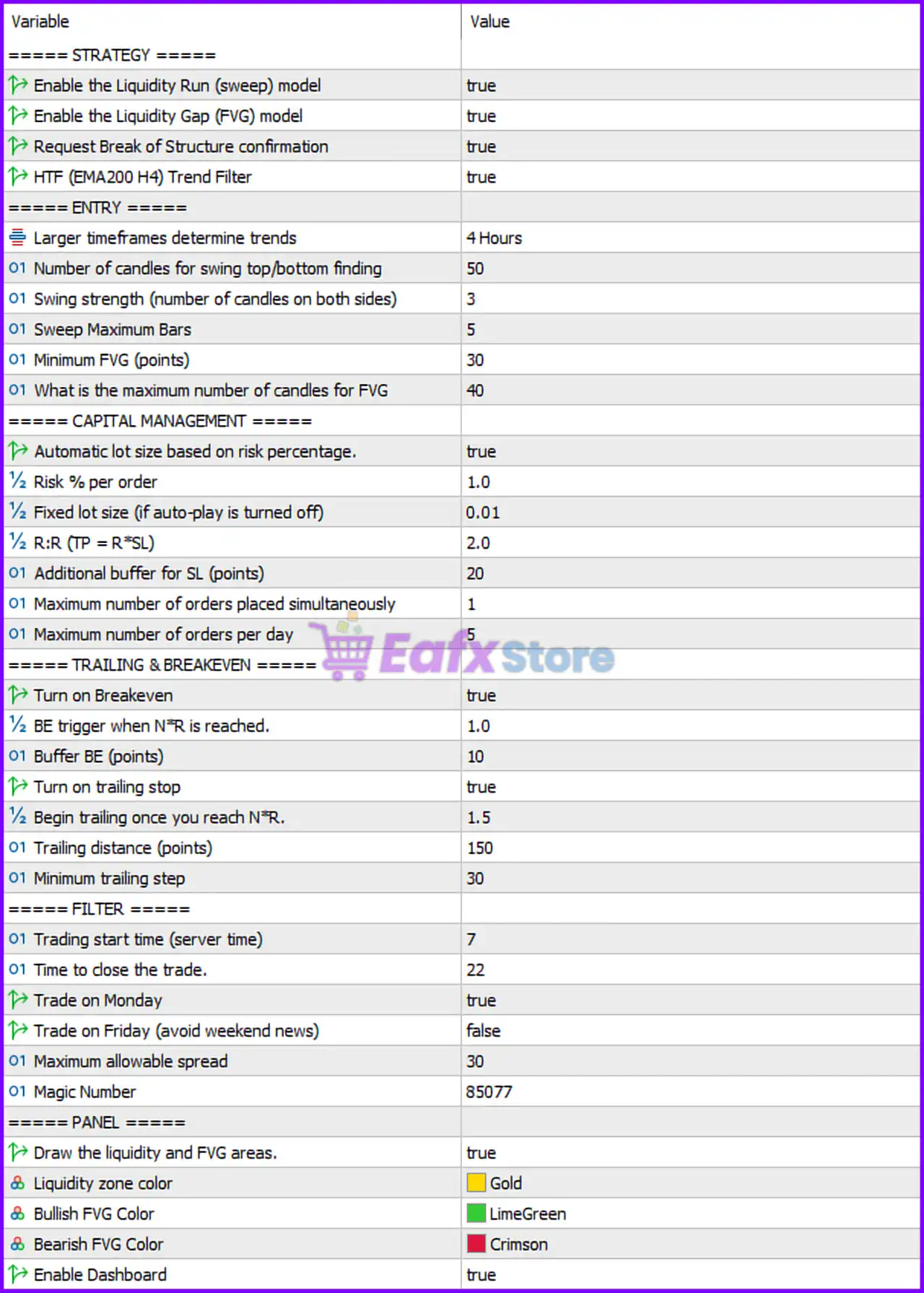
Below are the details of the parameters in the advisor’s trading system settings table:
🔶 Strategy Settings
🔹 Enable the Liquidity Run (Sweep) Model: Set to true, enabling liquidity sweep detection to identify stop-hunt and liquidity grab opportunities before trade entries.
🔹 Enable the Liquidity Gap (FVG) Model: Set to true, allowing the EA to identify and trade Fair Value Gap (FVG) market inefficiencies.
🔹 Request Break of Structure Confirmation: Set to true, requiring Break of Structure (BOS) confirmation before opening positions.
🔹 HTF (EMA200 H4) Trend Filter: Set to true, enabling the higher timeframe trend filter based on the EMA200 on the H4 chart.
🔶 Entry Settings
🔹 Larger Timeframes Determine Trends: Configured at 4 Hours, meaning the H4 timeframe is used to determine the primary market trend.
🔹 Number of Candles for Swing Top/Bottom Finding: Set to 50, defining the lookback period used to identify swing highs and swing lows.
🔹 Swing Strength (Number of Candles on Both Sides): Configured at 3, requiring three candles on each side to confirm a valid swing point.
🔹 Sweep Maximum Bars: Set to 5, defining the maximum number of candles allowed for liquidity sweep validation.
🔹 Minimum FVG (Points): Configured at 30 points, requiring Fair Value Gaps to be at least 30 points in size before being considered valid.
🔹 Maximum Number of Candles for FVG: Set to 40, limiting the FVG detection range to the last 40 candles.
🔶 Capital Management Settings
🔹 Automatic Lot Size Based on Risk Percentage: Set to true, enabling dynamic lot sizing according to account risk.
🔹 Risk % Per Order: Configured at 1.0%, defining the percentage of account capital risked on each trade.
🔹 Fixed Lot Size (If Auto-Play Is Turned Off): Set to 0.01 lots, used when automatic lot calculation is disabled.
🔹 R:R (TP = R × SL): Configured at 2.0, meaning the Take Profit target is two times the Stop Loss distance.
🔹 Additional Buffer for SL (Points): Set to 20 points, adding extra protection beyond the calculated Stop Loss level.
🔹 Maximum Number of Orders Placed Simultaneously: Configured at 1, limiting the EA to one active trade at a time.
🔹 Maximum Number of Orders Per Day: Set to 5, restricting daily trade frequency.
🔶 Trailing & Breakeven Settings
🔹 Turn On Breakeven: Set to true, enabling automatic Stop Loss movement to breakeven.
🔹 BE Trigger When N×R Is Reached: Configured at 1.0, activating breakeven when the trade reaches a 1R profit level.
🔹 Buffer BE (Points): Set to 10 points, moving the Stop Loss beyond the entry price by 10 points when breakeven is triggered.
🔹 Turn On Trailing Stop: Set to true, enabling dynamic profit protection.
🔹 Begin Trailing Once You Reach N×R: Configured at 1.5, activating trailing stop management after reaching 1.5R profit.
🔹 Trailing Distance (Points): Set to 150 points, defining the distance between price and trailing Stop Loss.
🔹 Minimum Trailing Step: Configured at 30 points, defining the minimum movement required before updating the trailing stop.
🔶 Trading Filter Settings
🔹 Trading Start Time (Server Time): Set to 7, allowing the EA to begin trading at 07:00 server time.
🔹 Time to Close the Trade: Configured at 22, requiring positions to be closed by 22:00 server time.
🔹 Trade on Monday: Set to true, allowing trading activity on Mondays.
🔹 Trade on Friday (Avoid Weekend News): Set to false, disabling trading on Fridays to reduce weekend gap risk.
🔹 Maximum Allowed Spread: Configured at 30 points, preventing new trades when spreads exceed 30 points.
🔹 Magic Number: Set to 85077, serving as the unique identifier for all trades managed by the EA.
🔶 Panel & Visual Settings
🔹 Draw the Liquidity and FVG Areas: Set to true, displaying liquidity zones and Fair Value Gap areas directly on the chart.
🔹 Liquidity Zone Color: Configured as Gold, highlighting liquidity areas with a gold color.
🔹 Bullish FVG Color: Set to LimeGreen, displaying bullish Fair Value Gaps in green.
🔹 Bearish FVG Color: Configured as Crimson, displaying bearish Fair Value Gaps in red.
🔹 Enable Dashboard: Set to true, activating the on-chart dashboard for monitoring EA performance and market conditions.
🔢 Conclusion
Stable Gold Scalping EA is a sophisticated Gold trading robot that combines Liquidity Sweeps, Fair Value Gaps (FVG), Break of Structure (BOS), and EMA200 trend filtering into a structured Smart Money Concepts trading framework.
With key settings such as Risk Per Order 1.0%, R:R Ratio 2.0, Maximum 1 Active Order, Maximum 5 Trades Per Day, and Magic Number 85077, the EA focuses on high-quality trade selection while maintaining strict risk management. Its integrated breakeven, trailing stop, spread filter, and session controls make it a powerful solution for disciplined XAUUSD scalping.
🔢 FAQs
❓ What is Stable Gold Scalping EA MT5?
Stable Gold Scalping EA MT5 is an automated MetaTrader 5 Expert Advisor that trades Gold using Smart Money Concepts, Liquidity Sweeps, Fair Value Gaps, and Break of Structure confirmations.
❓ How does the Liquidity Sweep model work?
The Liquidity Sweep model identifies stop-hunt and liquidity grab events, helping the EA locate potential reversal or continuation opportunities before entering trades.
❓ What is the purpose of the FVG filter?
The Fair Value Gap (FVG) filter detects market imbalances and only allows entries when valid FVG structures meeting the 30-point minimum size requirement are present.
❓ How much risk does the EA use per trade?
The default configuration uses 1.0% risk per order, with automatic lot sizing enabled.
❓ Why is trading disabled on Friday?
The setting Trade on Friday = false helps reduce exposure to weekend news events, market closures, and potential opening price gaps on Monday.
Get Stable Gold Scalping EA MT5
Download Stable Gold Scalping EA MT5 with its set files, read the full product details and requirements here: Stable Gold Scalping EA MT5 →