

The Grail Funding Crusher EA Overview
The Grail Funding Crusher EA is a cutting-edge Forex trading expert advisor meticulously designed to deliver outstanding performance on both Metatrader 4 (MT4) and Metatrader 5 (MT5) platforms. This professional EA integrates state-of-the-art technologies to conquer the stringent requirements of global PropFirm companies, offering traders a reliable solution for consistent profitability.
- View backtest transaction results: Click Here
Installation panel Parameters
Below are the details of the parameters in the advisor’s trading system settings table:
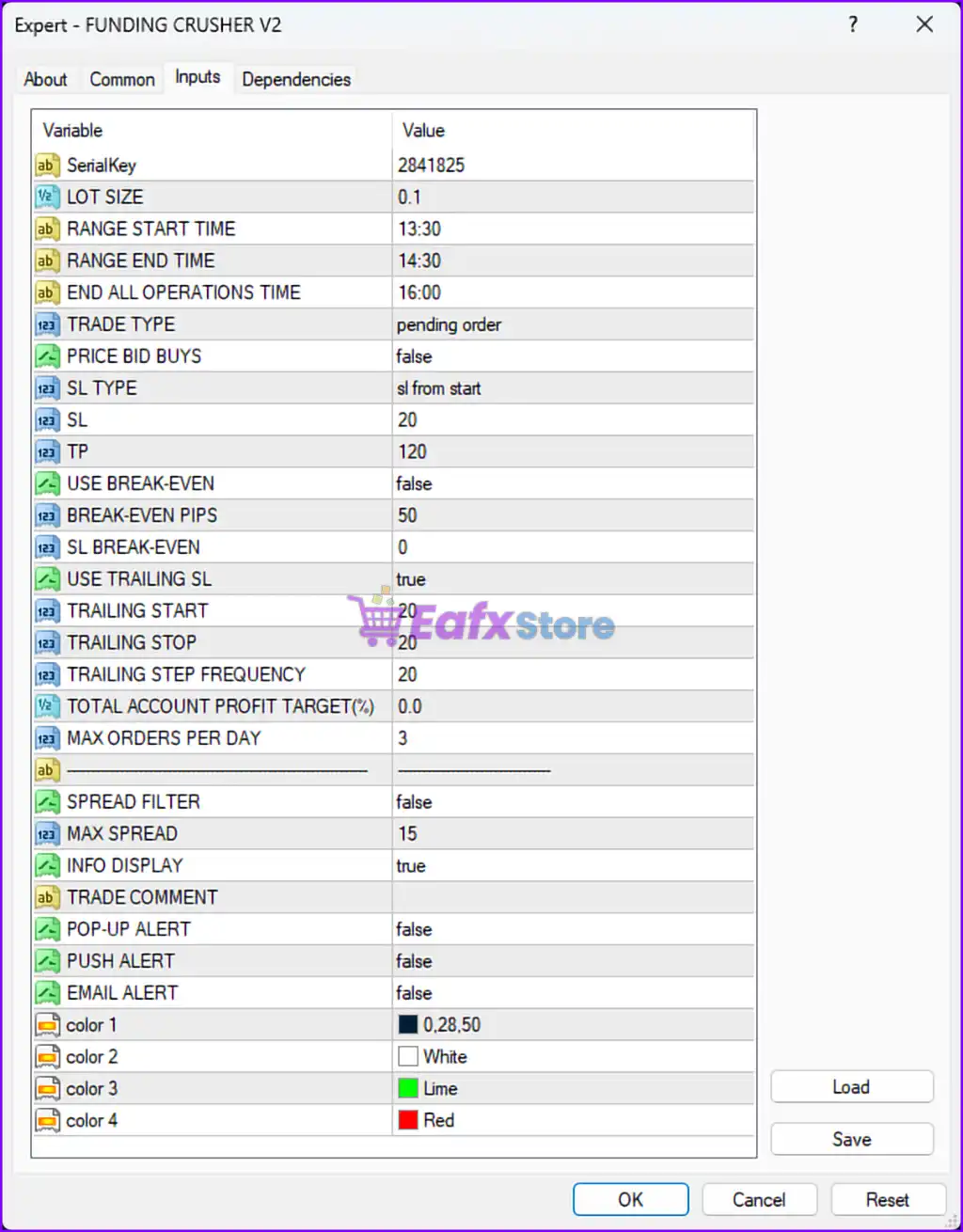
1. General Settings:
- SerialKey: 2841825 - A unique identifier or license key for the EA.
- LOT SIZE: 0.1 - The fixed lot size for trades. Adjust according to account size and risk appetite.
2. Time Management:
- RANGE START TIME: 13:30 - Defines the start of the time range for trade setups.
- RANGE END TIME: 14:30 - Defines the end of the time range for trade setups.
- END ALL OPERATIONS TIME: 16:00 - The EA stops all trading activities at this time.
3. Trade Type:
- TRADE TYPE: pending order - The EA places pending orders instead of market execution orders.
4. Stop Loss and Take Profit:
- PRICE BID BUYS: false - Likely related to bid price behavior for buy orders. Disabled by default.
- SL TYPE: sl from start - The stop-loss is calculated from the starting point of the trade.
- SL (Stop Loss): 20 - Sets the stop-loss level to 20 pips.
- TP (Take Profit): 120 - Sets the take-profit level to 120 pips, creating a 1:6 risk-reward ratio.
5. Break-Even Settings:
- USE BREAK-EVEN: false - Break-even functionality is disabled by default.
- BREAK-EVEN PIPS: 50 - If enabled, moves the stop-loss to break-even after the trade reaches 50 pips in profit.
- SL BREAK-EVEN: 0 - No additional pips added to the break-even stop-loss level.
6. Trailing Stop Settings:
- USE TRAILING SL: true - Enables trailing stop functionality to lock in profits as the trade moves in your favor.
- TRAILING START: 20 - The trailing stop activates once the trade gains 20 pips.
- TRAILING STOP: 20 - Sets the trailing stop distance to 20 pips.
- TRAILING STEP FREQUENCY: 20 - Adjusts the trailing stop level in steps of 20 pips.
7. Profit Management:
- TOTAL ACCOUNT PROFIT TARGET (%): 0.0 - Disables a specific profit target as a percentage of the account balance.
- MAX ORDERS PER DAY: 3 - Limits the number of trades to a maximum of 3 per day to control overtrading.
8. Spread Filter:
- SPREAD FILTER: false - The EA does not filter trades based on market spreads.
- MAX SPREAD: 15 - Defines the maximum spread allowed for trade execution, although the filter is disabled.
9. Alerts and Notifications:
- INFO DISPLAY: true - Enables information display on the chart.
- TRADE COMMENT: (Not specified) - Adds a custom comment for trades executed by the EA.
- POP-UP ALERT: false - Disables on-screen pop-up alerts for trading signals.
- PUSH ALERT: false - Push notifications are disabled.
- EMAIL ALERT: false - Email notifications are disabled.
Analysis and Recommendations
- Risk-Reward Balance:
- The SL is set at 20 pips, while the TP is 120 pips, resulting in a favorable 1:6 risk-reward ratio. Ensure market conditions support this aggressive TP setting.
- Time Management:
- Trading is restricted to a specific time range (13:30–16:00). This is likely optimized for high-liquidity periods or specific market sessions. Adjust based on the pair and market activity.
- Trailing Stop:
- The trailing stop is well-configured to secure profits after the trade gains 20 pips. However, the step frequency of 20 pips may leave room for significant profit loss before adjustment.
- Trade Limitations:
- Limiting daily trades to 3 helps prevent overtrading and excessive drawdowns.
- Break-Even Settings:
- Break-even is disabled but can be useful to lock in profits earlier. Enable and test the break-even settings, especially in volatile markets.
- Spread Control:
- The spread filter is disabled, but the maximum spread is set to 15. Consider enabling the filter to avoid trades during high-spread conditions, especially around news events.
- Alerts:
- Alerts and notifications are disabled. Enable email or push alerts if you wish to monitor trade activity without constant chart observation.
- Customization:
- Visual elements are customizable, which is helpful for traders who rely on on-screen information.
Conclusion: Why The Grail Funding Crusher EA is the Ultimate Trading Solution
The Grail Funding Crusher EA stands out as a professional and reliable choice for traders looking to achieve consistent success in the forex market. Designed for both Metatrader 4 (MT4) and Metatrader 5 (MT5), this expert advisor integrates cutting-edge technology to help traders overcome the rigorous challenges posed by Prop Firm companies.
With its exceptional features, such as a maximum drawdown of just 1%, monthly profits of 15-20%, and fully automated operations, The Grail Funding Crusher EA minimizes risk while maximizing efficiency. Unlike other trading tools, it avoids risky strategies like HFT, Martingale, and Grid, making it a safe option for traders at any level.
Proven by a 100% success rate across various Prop Firms and impressive live and backtest results, this EA delivers sustainable growth. For instance, with an initial capital of $1,000, it achieved $5,800 in profits within five months, maintaining a risk level of only 12%.
Whether you’re navigating Prop Firm challenges or trading live accounts, The Grail Funding Crusher EA is versatile, compliant, and universally compatible with companies that support EA usage. It also offers preset configurations for different investment levels, ensuring an optimized experience for all users.
Invest in your trading future today with The Grail Funding Crusher EA and experience unparalleled performance, stability, and success. Don’t miss out on this revolutionary tool—join the membership now and unlock the full potential of your trading endeavors.