

This guide walks through the inputs of IS Purple EA MT4 with the values recommended for live trading. The set files that come with the EA already contain these settings, so you can load them in one click and adjust only what your broker or account needs.
🔢 IS Purple EA MT4 – Easy-to-Read Inputs Guide
IS Purple EA MT4 is an automated Expert Advisor designed for MetaTrader 4, with a configuration focused on risk control, position sizing, profit targets, trailing management, trading schedules, and price-distance settings.
Public product information describes IS Purple EA as a scalping and grid-oriented system, with configurable risk management and short-term trade management. The supplied Inputs panel provides a compact set of parameters that can be used to control lot sizing, loss protection, profit-taking, trading hours, trade spacing, and EA identification.
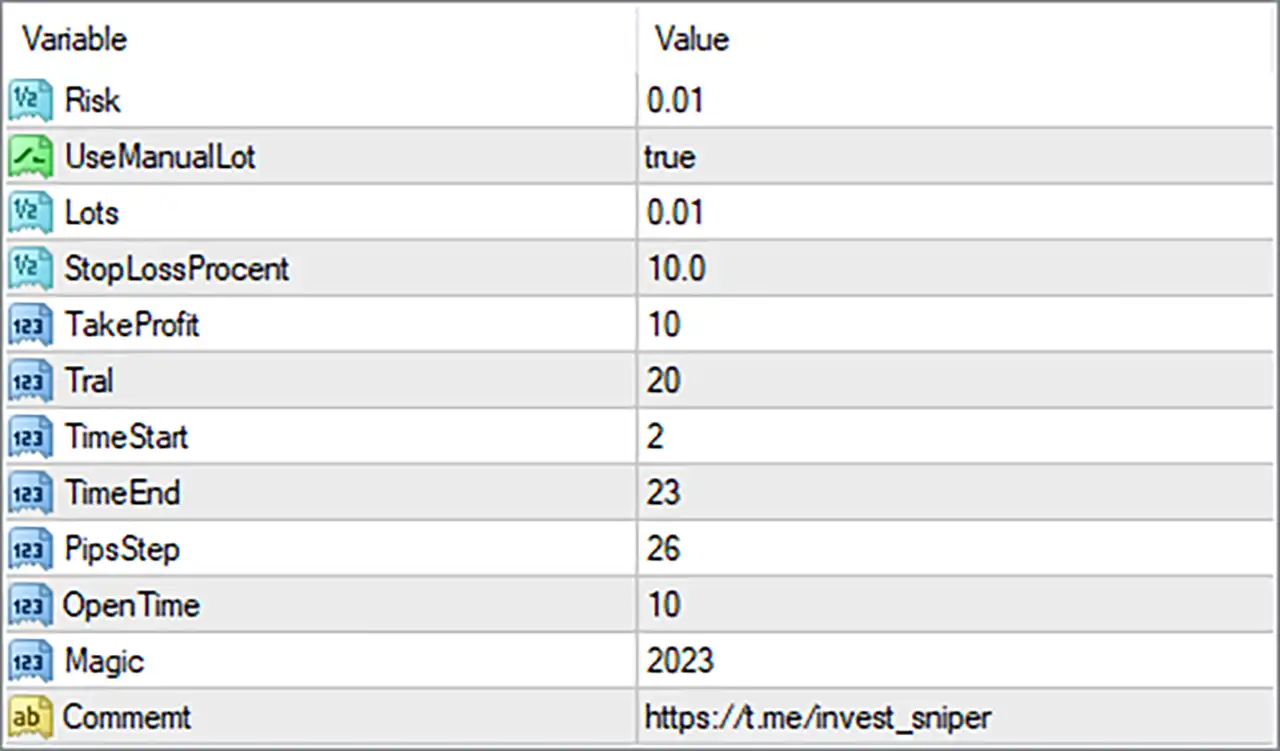
🔢 Risk & Lot Management
0.01. When interpreted as a fractional risk value, 0.01 corresponds to 1%; the exact internal calculation depends on the EA's proprietary money-management logic.🔹 UseManualLot = true — Enables manual lot sizing, allowing the EA to use the value specified in the Lots parameter instead of relying exclusively on automatic risk-based lot calculation.
🔹 Lots = 0.01 — Sets the manually selected trading volume to 0.01 lots when UseManualLot = true.
🔢 Stop Loss & Take Profit
10.0. This parameter is designed to control the maximum loss threshold according to the EA's percentage-based Stop Loss logic. Public descriptions of IS Purple EA also identify 10% as its configurable percentage-based loss protection setting.🔹 TakeProfit = 10 — Sets the Take Profit target to 10 pips. When the applicable trade reaches the configured profit objective, the EA can close the position according to its trade-management logic.
🔹 Trail = 20 — Sets the trailing-stop distance to 20 pips. The trailing mechanism can follow favorable price movement and help protect accumulated profit.
🔢 Trading Schedule
2.🔹 TimeEnd = 23 — Sets the end of the permitted trading period at hour 23, creating a configured operating window from 02:00 to 23:00.
🔢 Grid & Trade Spacing
26 pips. In the EA's grid-oriented trade logic, this parameter controls the minimum pip spacing used when additional trading positions or entries are considered. Public product information also lists 26 pips as the default PipStep setting.🔹 OpenTime = 10 — Sets the configured opening-time interval to 10. This parameter controls a time-based condition associated with opening or re-opening trades; the exact internal implementation is determined by the EA's source code.
🔢 Trade Identification
2023 to the EA's trades. This allows MetaTrader 4 to distinguish positions managed by IS Purple EA from trades belonging to other EAs or manual orders.Get IS Purple EA MT4
Download IS Purple EA MT4 with its set files, read the full product details and requirements here: IS Purple EA MT4 →