
This guide walks through the inputs of SpaceX Gold Pro EA MT4 with the values recommended for live trading. The set files that come with the EA already contain these settings, so you can load them in one click and adjust only what your broker or account needs.
🔢 SpaceX Gold Pro EA – Complete Settings Guide for Automated Gold Trading
SpaceX Gold Pro EA is a professional automated gold trading Expert Advisor (EA) designed for MetaTrader 4 platforms.
The EA focuses on XAUUSD scalping and swing trading strategies using advanced technical analysis, Elliott Wave patterns, Fibonacci resistance systems, money management tools and news filtering protection.
With customizable trailing stop settings, recovery systems, and trading session controls, SpaceX Gold Pro provides traders with a powerful solution for automated gold trading.
🔢 Installation Panel Parameters
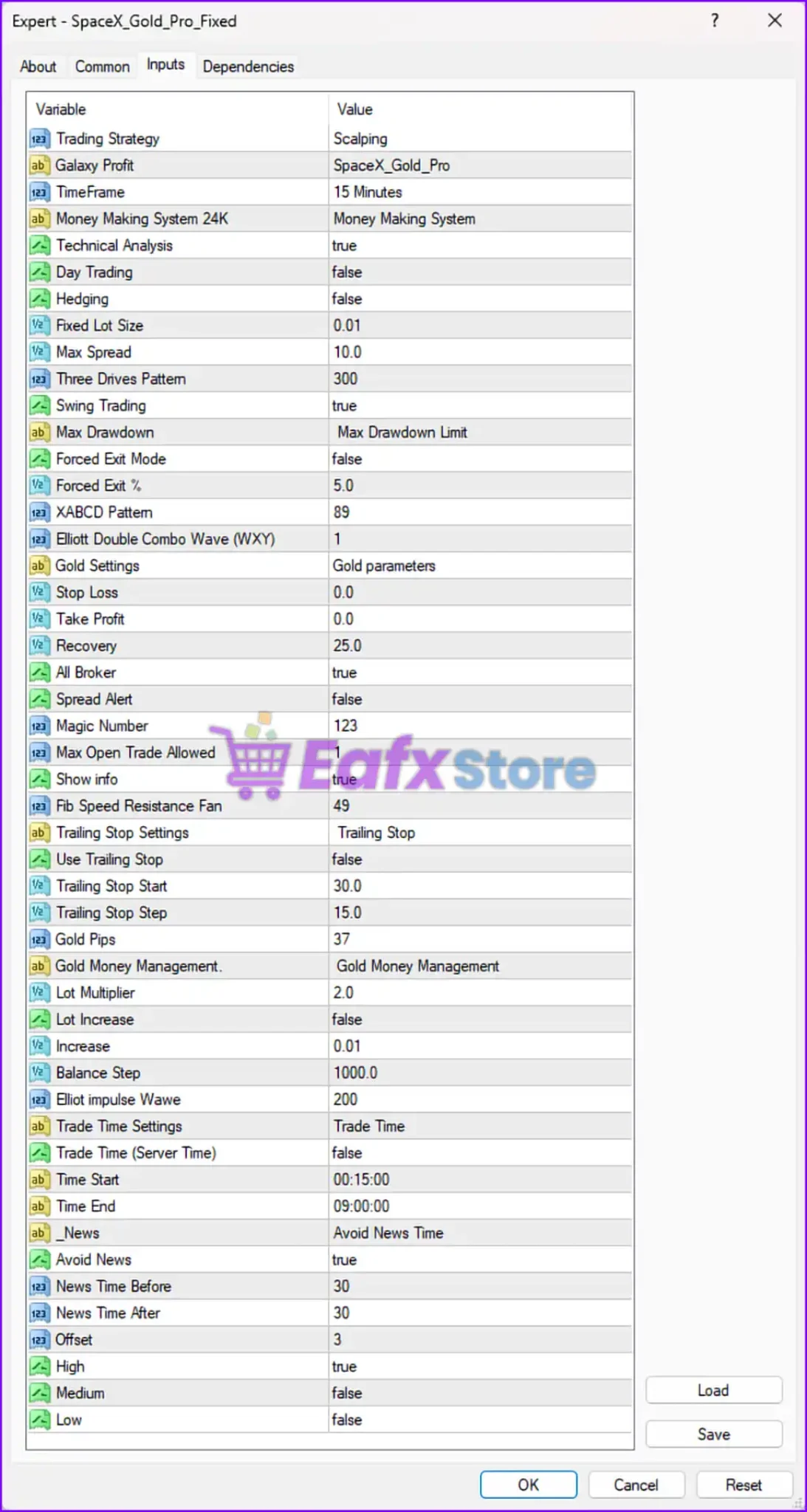
Below are the details of the parameters in the advisor’s trading system settings table:
🔶 General Trading Settings
🔹 Trading Strategy = Scalping — Configures the EA to use a scalping-based trading strategy.
🔹 Galaxy Profit = SpaceX_Gold_Pro — Defines the internal strategy or profile name as “SpaceX_Gold_Pro”.
🔹 TimeFrame = 15 Minutes — Sets the recommended trading timeframe to M15 (15-Minute chart).
🔹 Money Making System 24K = Money Making System — Enables the integrated money management and profit-generation system.
🔹 Technical Analysis = true — Activates technical analysis-based trade execution.
🔹 Day Trading = false — Disables intraday-only trading mode.
🔹 Hedging = false — Disables hedging functionality.
🔹 Fixed Lot Size = 0.01 — Sets the default fixed lot size to 0.01 lots.
🔹 Max Spread = 10.0 — Limits the maximum allowable spread to 10.0 points/pips.
🔹 Three Drives Pattern = 300 — Configures the Three Drives harmonic pattern sensitivity to 300.
🔹 Swing Trading = true — Enables swing trading functionality.
🔶 Risk & Drawdown Settings
🔹 Max Drawdown = Max Drawdown Limit — Activates the maximum drawdown protection system.
🔹 Forced Exit Mode = false — Disables forced automatic trade closure.
🔹 Forced Exit % = 5.0 — Sets the forced exit threshold to 5.0% if enabled.
🔶 Pattern Recognition Settings
🔹 XABCD Pattern = 89 — Configures the XABCD harmonic pattern parameter to 89.
🔹 Elliott Double Combo Wave (WXY) = 1 — Enables Elliott Wave Double Combo (WXY) pattern analysis.
🔶 Gold Trading Parameters
🔹 Gold Settings = Gold parameters — Displays the gold-specific trading parameter section.
🔹 Stop Loss = 0.0 — Disables fixed Stop Loss protection.
🔹 Take Profit = 0.0 — Disables fixed Take Profit targets.
🔹 Recovery = 25.0 — Sets the recovery management parameter to 25.0.
🔹 All Broker = true — Enables compatibility with all broker types.
🔹 Spread Alert = false — Disables spread warning alerts.
🔹 Magic Number = 123 — Assigns the unique Magic Number 123 for identifying EA trades.
🔹 Max Open Trade Allowed = 1 — Limits the EA to only 1 simultaneous open trade.
🔹 Show info = true — Displays trading information directly on the chart.
🔹 Fib Speed Resistance Fan = 49 — Configures Fibonacci Speed Resistance Fan analysis to 49.
🔶 Trailing Stop Settings
🔹 Trailing Stop Settings = Trailing Stop — Displays the trailing stop configuration section.
🔹 Use Trailing Stop = false — Disables the trailing stop mechanism.
🔹 Trailing Stop Start = 30.0 — Activates trailing stop after 30.0 points/pips profit if enabled.
🔹 Trailing Stop Step = 15.0 — Adjusts trailing stop in increments of 15.0 points/pips.
🔹 Gold Pips = 37 — Defines the gold pip calculation parameter as 37.
🔶 Gold Money Management Settings
🔹 Gold Money Management = Gold Money Management — Displays the gold money management section.
🔹 Lot Multiplier = 2.0 — Multiplies lot sizes by 2.0 during scaling or recovery sequences.
🔹 Lot Increase = false — Disables automatic lot size increases.
🔹 Increase = 0.01 — Defines the lot increment step as 0.01 lots.
🔹 Balance Step = 1000.0 — Adjusts lot scaling based on every 1000.0 balance increment.
🔹 Elliot impulse Wave = 200 — Configures Elliott Impulse Wave sensitivity to 200.
🔶 Trade Time Settings
🔹 Trade Time Settings = Trade Time — Displays the trade scheduling section.
🔹 Trade Time (Server Time) = false — Disables server-time-based trading sessions.
🔹 Time Start = 00:15:00 — Sets trading session start time to 00:15:00.
🔹 Time End = 09:00:00 — Sets trading session end time to 09:00:00.
🔶 News Filter Settings
🔹 News = Avoid News Time — Displays the economic news filter section.
🔹 Avoid News = true — Enables avoidance of trading during major news events.
🔹 News Time Before = 30 — Stops trading 30 minutes before news releases.
🔹 News Time After = 30 — Resumes trading 30 minutes after news releases.
🔹 Offset = 3 — Sets the broker/server GMT offset to 3.
🔹 High = true — Filters high-impact economic news events.
🔹 Medium = false — Disables filtering for medium-impact news events.
🔹 Low = false — Disables filtering for low-impact news events.
🔢 Conclusion
SpaceX Gold Pro EA is a feature-rich automated gold trading robot designed for MetaTrader traders who focus on XAUUSD scalping and swing trading strategies.
The EA combines technical analysis, Elliott Wave systems, Fibonacci resistance tools, and advanced money management to improve trade accuracy and risk control.
With customizable news filters, recovery systems, and spread protection, SpaceX Gold Pro EA provides a flexible solution for traders seeking automated gold trading performance and market adaptability.
🔢 FAQs
❓ What is SpaceX Gold Pro EA?
SpaceX Gold Pro EA is an automated gold trading Expert Advisor designed for MetaTrader platforms, focused on XAUUSD scalping and swing trading.
❓ What timeframe is recommended for SpaceX Gold Pro EA?
The EA is configured to trade on the M15 (15-Minute) timeframe.
❓ Does SpaceX Gold Pro EA include news filtering?
Yes, the EA includes an economic news filter that blocks trading 30 minutes before and after high-impact news events.
❓ Can SpaceX Gold Pro EA use trailing stops?
Yes, the EA supports trailing stop management, although it is currently disabled in the displayed settings.
❓ How many trades can SpaceX Gold Pro EA open simultaneously?
The EA is configured to allow only 1 open trade at a time.
Get SpaceX Gold Pro EA MT4
Download SpaceX Gold Pro EA MT4 with its set files, read the full product details and requirements here: SpaceX Gold Pro EA MT4 →