

This guide walks through the inputs of Scalping Enslaver EA MT4 with the values recommended for live trading. The set files that come with the EA already contain these settings, so you can load them in one click and adjust only what your broker or account needs.
🔢 Scalping Enslaver EA MT4 – Complete Settings & Configuration Guide
Scalping Enslaver EA MT4 is an automated scalping Expert Advisor designed to combine Buy & Sell rotation, adaptive lot sizing, progressive position management, technical filters, news protection, and scheduled trading. Its configuration provides detailed control over trade frequency, position distance, lot growth, risk limits, market volatility filtering, and trading sessions.
The settings shown below represent the complete configuration visible in the supplied image, with all values, numbers, modes, and on/off states preserved exactly.
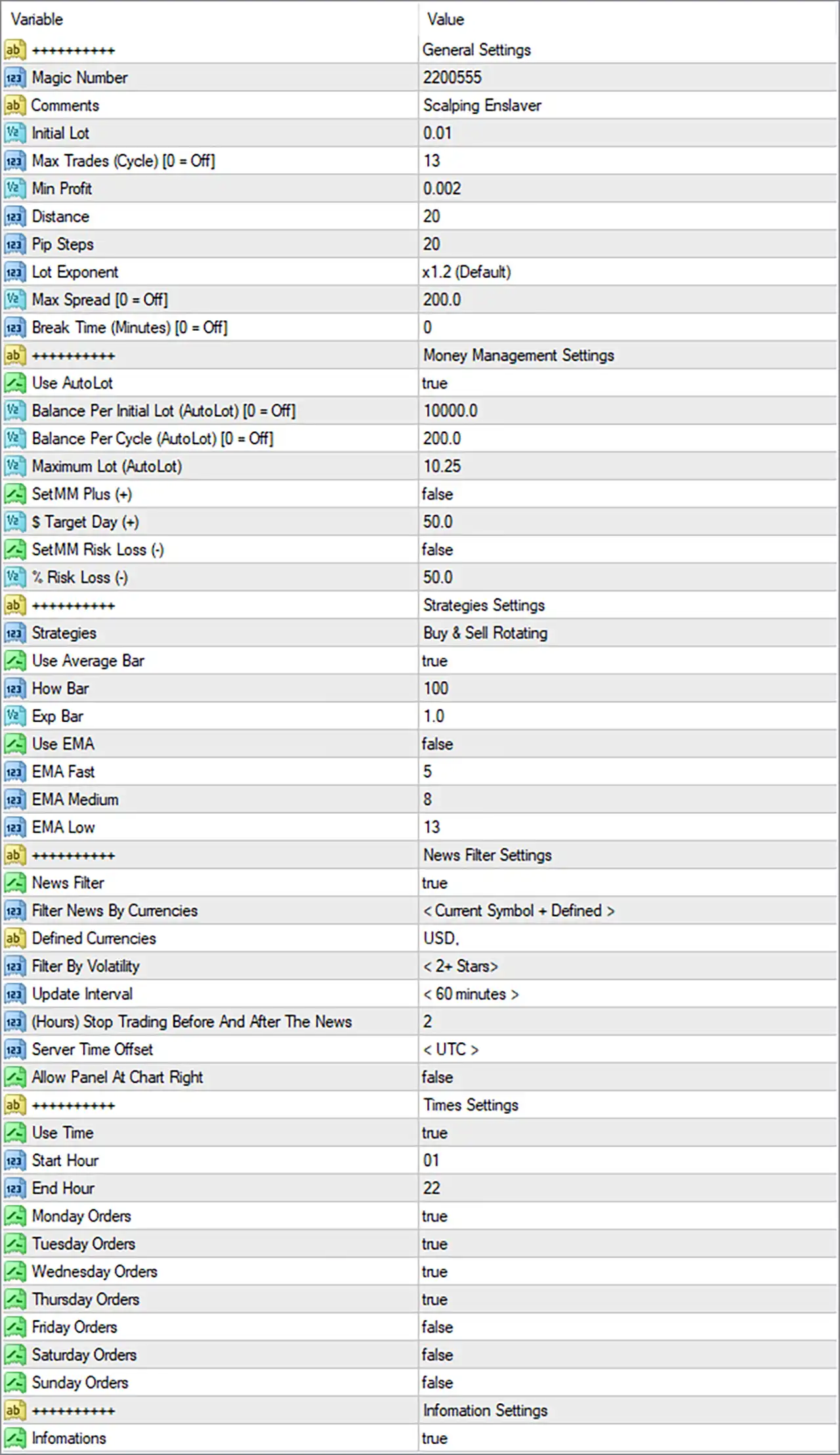
🔄 General Settings
🔹 Magic Number = 2200555 — Unique identifier used by the EA to distinguish its own trades from other trading systems or manual positions.
🔹 Comments = Scalping Enslaver — Defines the trade/order comment attached to positions created by the EA.
🔹 Initial Lot = 0.01 — Sets the initial trading volume to 0.01 lot before any automatic lot calculation or progression is applied.
🔹 Max Trades (Cycle) [0 = Off] = 13 — Limits the number of trades within one trading cycle to 13; 0 would disable this limit.
🔹 Min Profit = 0.002 — Defines the minimum profit threshold required by the EA's profit-management logic.
🔹 Distance = 20 — Sets the configured distance between applicable trades/orders to 20 points according to the EA's internal distance calculation.
🔹 Pip Steps = 20 — Sets the step distance to 20 pips/points according to the EA's internal pip-step calculation.
🔹 Lot Exponent = x1.2 (Default) — Uses a 1.2× lot progression factor when the EA increases position size according to its scaling logic.
🔹 Max Spread [0 = Off] = 200.0 — Restricts trading when spread exceeds 200.0; 0 would turn the spread restriction off.
🔹 Break Time (Minutes) [0 = Off] = 0 — Sets the trading break duration to 0 minutes, meaning the break-time function is disabled.
🔄 Money Management Settings
🔹 Use AutoLot = true — Enables automatic lot-size calculation.
🔹 Balance Per Initial Lot (AutoLot) [0 = Off] = 10000.0 — Defines 10000.0 units of account balance as the reference amount for the initial automatic lot calculation; 0 would disable this AutoLot parameter.
🔹 Balance Per Cycle (AutoLot) [0 = Off] = 200.0 — Defines 200.0 balance units as the reference increment for automatic lot calculation per cycle; 0 would disable this parameter.
🔹 Maximum Lot (AutoLot) = 10.25 — Caps the automatically calculated position size at 10.25 lots.
🔹 SetMM Plus (+) = false — Disables the additional positive money-management adjustment.
🔹 $ Target Day (+) = 50.0 — Sets the daily positive target parameter to 50.0 in account-currency terms.
🔹 SetMM Risk Loss (-) = false — Disables the additional money-management risk-loss adjustment.
🔹 % Risk Loss (-) = 50.0 — Sets the risk-loss parameter to 50.0% when the corresponding SetMM Risk Loss (-) feature is activated.
🔄 Strategies Settings
🔹 Strategies = Buy & Sell Rotating — Configures the EA to rotate between Buy and Sell trading directions according to its strategy logic.
🔹 Use Average Bar = true — Enables the Average Bar calculation/filter used by the EA's strategy logic.
🔹 How Bar = 100 — Sets the number of bars used for the Average Bar calculation/reference to 100.
🔹 Exp Bar = 1.0 — Sets the expansion-bar parameter to 1.0.
🔹 Use EMA = false — Disables the EMA-based strategy filter.
🔹 EMA Fast = 5 — Sets the Fast EMA period to 5; it is currently inactive because Use EMA = false.
🔹 EMA Medium = 8 — Sets the Medium EMA period to 8; it is currently inactive because Use EMA = false.
🔹 EMA Low = 13 — Sets the Low EMA period to 13; it is currently inactive because Use EMA = false.
🔄 News Filter Settings
🔹 News Filter = true — Enables the economic-news filtering system.
🔹 Filter News By Currencies = < Current Symbol + Defined > — Configures news filtering to consider both the current trading symbol and explicitly defined currencies.
🔹 Defined Currencies = USD. — Adds USD as the explicitly defined currency for news filtering.
🔹 Filter By Volatility = < 2+ Stars > — Configures the EA to filter news events according to a volatility rating of 2+ Stars.
🔹 Update Interval = < 60 minutes > — Sets the news-calendar update interval to 60 minutes.
🔹 (Hours) Stop Trading Before And After The News = 2 — Configures the EA to stop trading 2 hours before and 2 hours after qualifying news events.
🔹 Server Time Offset = < UTC > — Uses UTC as the configured server-time offset reference for the news filter.
🔹 Allow Panel At Chart Right = false — Disables positioning the information panel at the right side of the chart.
🔄 Times Settings
🔹 Use Time = true — Enables the EA's trading-time restriction.
🔹 Start Hour = 01 — Sets the trading start hour to 01.
🔹 End Hour = 22 — Sets the trading end hour to 22.
🔹 Monday Orders = true — Allows the EA to place orders on Monday.
🔹 Tuesday Orders = true — Allows the EA to place orders on Tuesday.
🔹 Wednesday Orders = true — Allows the EA to place orders on Wednesday.
🔹 Thursday Orders = true — Allows the EA to place orders on Thursday.
🔹 Friday Orders = false — Prevents the EA from placing orders on Friday.
🔹 Saturday Orders = false — Prevents the EA from placing orders on Saturday.
🔹 Sunday Orders = false — Prevents the EA from placing orders on Sunday.
🔄 Information Settings
🔹 Infomations = true — Enables the EA's information/display functionality.
🔢 Key Configuration Highlights
🔹 Automatic position sizing is active: Use AutoLot = true, with Balance Per Initial Lot = 10000.0 and Maximum Lot = 10.25.
🔹 The EA uses progressive lot sizing: Lot Exponent = x1.2 (Default) provides a 1.2× progression factor when the relevant strategy logic increases lot size.
🔹 The trading cycle is limited: Max Trades (Cycle) = 13, preventing the cycle from exceeding the configured 13 trades.
🔹 The EMA filter is inactive: Although EMA Fast = 5, EMA Medium = 8, and EMA Low = 13 are configured, Use EMA = false, so the EMA filter is not currently enabled.
🔹 News protection is active: News Filter = true, with USD defined and < 2+ Stars > volatility filtering.
🔹 News trading protection is substantial: The EA is configured to stop trading 2 hours before and after qualifying news events.
🔹 Trading is restricted by schedule: The active window is 01–22, with orders enabled Monday through Thursday and disabled Friday through Sunday.
🔹 Friday trading is disabled: Friday Orders = false, even though the general trading schedule is otherwise active.
🔹 Spread protection is configured: Max Spread = 200.0, while 0 would turn this restriction off.
🔹 Break Time is disabled: Break Time = 0, meaning no configured trading break is applied.
🔢 Conclusion
Scalping Enslaver EA MT4 offers a highly configurable framework for automated scalping, combining rotational Buy/Sell strategy logic, automatic lot sizing, progressive position management, Average Bar analysis, news filtering, and scheduled trading.
The supplied configuration is particularly notable for AutoLot = true, Maximum Lot = 10.25, Lot Exponent = x1.2, and Max Trades (Cycle) = 13. At the same time, the EA has active news protection, filtering 2+ Star events and using a 2-hour trading pause before and after qualifying news.
Trading is currently enabled from 01 to 22, Monday through Thursday, while Friday, Saturday, and Sunday are disabled. The EMA system is configured with periods 5, 8, and 13, but remains disabled through Use EMA = false.
Because automatic lot scaling and a 10.25-lot maximum can materially affect exposure, traders should carefully evaluate the EA's position-sizing behavior, maximum cycle size, spread conditions, and news protection through backtesting and demo testing before considering live deployment.
🔢 FAQs
❓ What is the initial lot size of Scalping Enslaver EA MT4?
The configured Initial Lot is 0.01. However, Use AutoLot = true, so the actual trading volume can be calculated automatically according to the AutoLot settings.
❓ What is the maximum automatic lot size?
The Maximum Lot (AutoLot) is set to 10.25 lots.
❓ Does Scalping Enslaver EA MT4 use an EMA filter?
No. Use EMA = false. The EMA parameters are nevertheless configured as EMA Fast = 5, EMA Medium = 8, and EMA Low = 13.
❓ Does the EA have an economic news filter?
Yes. News Filter = true, with USD defined, < 2+ Stars > volatility filtering, a < 60 minutes > update interval, and 2 hours of trading protection before and after qualifying news.
❓ Which days does the EA currently trade?
Trading is enabled from 01 to 22 on Monday, Tuesday, Wednesday, and Thursday. Friday Orders = false, Saturday Orders = false, and Sunday Orders = false.
Get Scalping Enslaver EA MT4
Download Scalping Enslaver EA MT4 with its set files, read the full product details and requirements here: Scalping Enslaver EA MT4 →