

This guide walks through the inputs of King Sniper EA MT5 with the values recommended for live trading. The set files that come with the EA already contain these settings, so you can load them in one click and adjust only what your broker or account needs.
🔢 King Sniper EA MT5 – Complete Settings Guide & Parameter Explanation
King Sniper EA is an automated MetaTrader 5 trading robot designed for precision entry trading using pending orders, risk-based position sizing, stop-loss automation, trailing stop management and optional news filtering.
The EA focuses on controlled risk exposure, time-filtered trading sessions, and adaptive order placement to help traders manage market volatility efficiently.
🔢 Installation Panel Parameters
Below are the details of the parameters in the advisor’s trading system settings table:
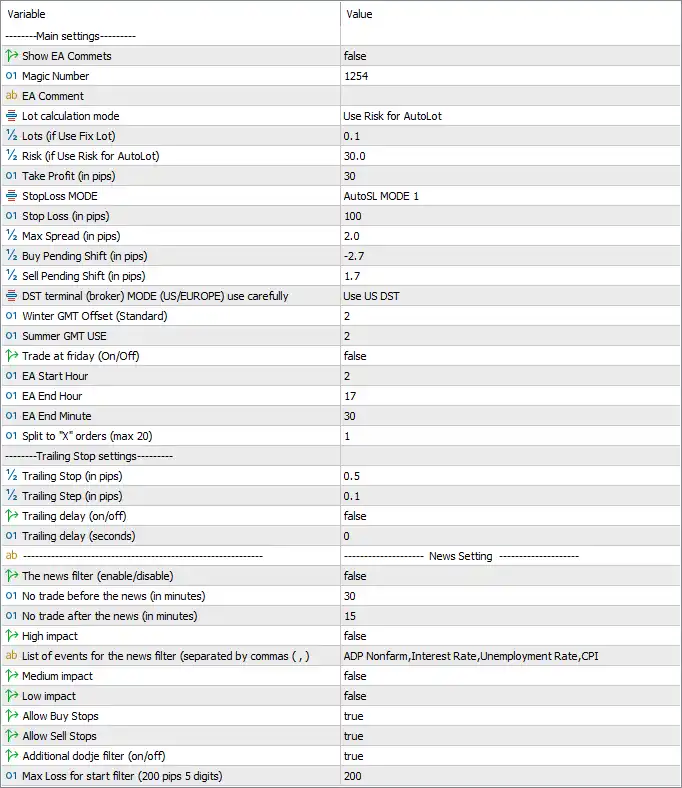
🔶 Main Settings
🔹 Show EA Coments = false — Disables the display of EA comments directly on the chart.
🔹 Magic Number = 1254 — Unique identifier used by the EA to manage and distinguish its trades.
🔹 EA Comment = (empty) — No custom trade comment has been assigned.
🔶 Lot & Risk Management Settings
🔹 Lot calculation mode = Use Risk for AutoLot — The EA automatically calculates lot size based on the specified risk percentage.
🔹 Lots (if Use Fix Lot) = 0.1 — Fixed lot size of 0.1 lots is used when Fixed Lot mode is selected.
🔹 Risk (if Use Risk for AutoLot) = 30.0 — AutoLot calculation uses a risk level of 30.0%.
🔶 Profit & Stop Loss Settings
🔹 Take Profit (in pips) = 30 — Each trade targets a profit of 30 pips.
🔹 StopLoss MODE = AutoSL MODE 1 — The EA uses Auto Stop Loss Mode 1 for stop-loss calculations.
🔹 Stop Loss (in pips) = 100 — Stop loss distance is set to 100 pips.
🔶 Spread & Pending Order Settings
🔹 Max Spread (in pips) = 2.0 — Trading is allowed only when the spread is 2.0 pips or lower.
🔹 Buy Pending Shift (in pips) = -2.7 — Buy pending orders are shifted by -2.7 pips from the calculated entry level.
🔹 Sell Pending Shift (in pips) = 1.7 — Sell pending orders are shifted by 1.7 pips from the calculated entry level.
🔶 Time & DST Settings
🔹 DST terminal (broker) MODE (US/EUROPE) use carefully = Use US DST — The EA adjusts trading schedules according to United States Daylight Saving Time rules.
🔹 Winter GMT Offset (Standard) = 2 — Broker winter GMT offset is set to GMT+2.
🔹 Summer GMT USE = 2 — Summer GMT offset value is configured as 2.
🔶 Trading Session Settings
🔹 Trade at friday (On/Off) = false — Trading on Friday is disabled.
🔹 EA Start Hour = 2 — Trading begins at hour 02:00.
🔹 EA End Hour = 17 — Trading ends at hour 17:00.
🔹 EA End Minute = 30 — Trading session ends at minute 30.
🔹 Split to "X" orders (max 20) = 1 — Orders are not split; only 1 order is placed per signal.
🔶 Trailing Stop Settings
🔹 Trailing Stop (in pips) = 0.5 — Trailing stop distance is 0.5 pips.
🔹 Trailing Step (in pips) = 0.1 — Trailing stop updates every 0.1 pips.
🔹 Trailing delay (on/off) = false — Trailing stop delay function is disabled.
🔹 Trailing delay (seconds) = 0 — No delay is applied before trailing stop activation.
🔶 News Filter Settings
🔹 The news filter (enable/disable) = false — News filtering system is disabled.
🔹 No trade before the news (in minutes) = 30 — If enabled, trading would stop 30 minutes before news releases.
🔹 No trade after the news (in minutes) = 15 — If enabled, trading would resume 15 minutes after news releases.
🔹 High impact = false — High-impact news filtering is disabled.
🔹 List of events for the news filter (separated by commas) = ADP Nonfarm, Interest Rate, Unemployment Rate, CPI — News events monitored by the filter.
🔹 Medium impact = false — Medium-impact news filtering is disabled.
🔹 Low impact = false — Low-impact news filtering is disabled.
🔶 Order Type Settings
🔹 Allow Buy Stops = true — The EA is allowed to place Buy Stop pending orders.
🔹 Allow Sell Stops = true — The EA is allowed to place Sell Stop pending orders.
🔶 Additional Filter Settings
🔹 Additional dodge filter (on/off) = true — Additional protective trade-entry filter is enabled.
🔹 Max Loss for start filter (200 pips 5 digits) = 200 — The filter activates using a maximum loss threshold of 200 points.
🔢 Configuration Summary
🔹 Magic Number: 1254.
🔹 Lot Mode: AutoLot using Risk Percentage.
🔹 Risk Percentage: 30.0%.
🔹 Fixed Lot Size: 0.1.
🔹 Take Profit: 30 pips.
🔹 Stop Loss: 100 pips.
🔹 Max Spread: 2.0 pips.
🔹 Trading Session: 02:00 – 17:30.
🔹 Friday Trading: Disabled.
🔹 Trailing Stop: 0.5 pips.
🔹 Trailing Step: 0.1 pips.
🔹 Buy Stops: Enabled.
🔹 Sell Stops: Enabled.
🔹 News Filter: Disabled.
🔹 Additional Dodge Filter: Enabled.
🔢 Conclusion
King Sniper EA MT5 is a precision-focused trading robot that combines risk-based AutoLot sizing, pending-order execution, strict spread control, time-session filtering and trailing-stop management.
In the current configuration, the EA uses a 30-pip Take Profit, 100-pip Stop Loss, 2.0-pip maximum spread filter, and operates only between 02:00 and 17:30, while avoiding Friday trading. These settings make it suitable for traders seeking disciplined entry execution and controlled risk management.
Get King Sniper EA MT5
Download King Sniper EA MT5 with its set files, read the full product details and requirements here: King Sniper EA MT5 →