

This guide walks through the inputs of The King Hedging Forex EA MT4 Unlimited with the values recommended for live trading. The set files that come with the EA already contain these settings, so you can load them in one click and adjust only what your broker or account needs.
🔢 The King Hedging Forex EA MT4 Settings Guide
The King Hedging Forex EA MT4 is an automated Forex trading Expert Advisor designed with configurable lot sizing, risk management, Take Profit, spread filtering, trading-time controls, position-size limits, and hedging-oriented trade management.
The EA provides both fixed and automatic lot settings, a configurable lot multiplication mode, step-based trade management, and a Magic Number for identifying its positions. With parameters covering Auto Lots, Max Risk, Take Profit, Max Spread, Max Lots, Multiplication Mode, Step, and Multiple Total, traders can customize the EA according to their preferred trading and account-management approach.
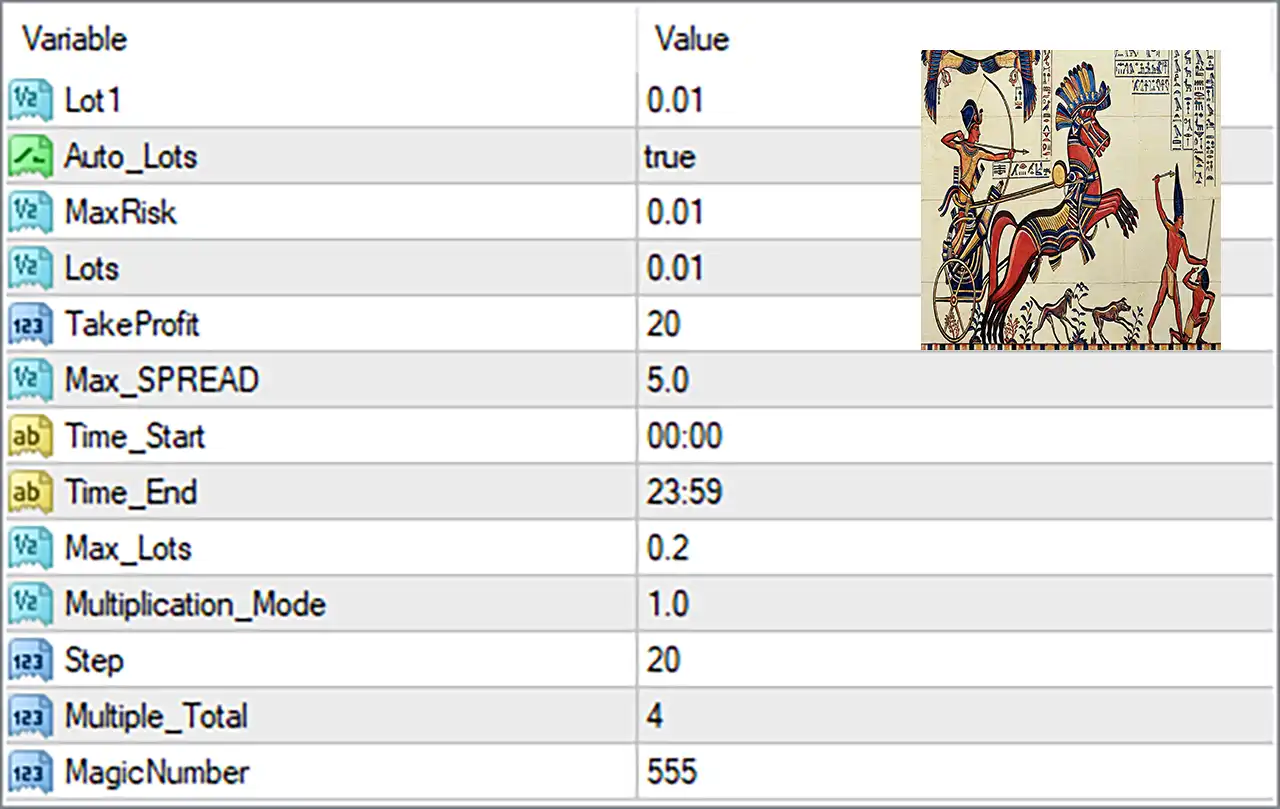
🔢 The King Hedging Forex EA MT4 Input Settings
⚙️ Lot and Risk Settings
🔹 Lot 1 = 0.01 — Sets the initial or primary trading lot size to 0.01 lots, defining the starting position volume.
🔹 Auto_Lots = true — Enables automatic lot-size calculation, allowing the EA to determine the trading volume according to its programmed lot-management logic.
🔹 MaxRisk = 0.01 — Sets the configured maximum risk parameter to 0.01, controlling the risk value used by the EA's automatic lot-sizing system.
🔹 Lots = 0.01 — Sets the configured lot size to 0.01 lots, providing the base volume used by the EA.
🔹 Max_Lots = 0.2 — Limits the maximum trading lot size to 0.2 lots, preventing the configured position volume from exceeding this value.
⚙️ Take Profit and Spread Settings
🔹 TakeProfit = 20 — Sets the Take Profit target to 20, defining the configured profit-taking distance used by the EA.
🔹 Max_SPREAD = 5.0 — Sets the maximum allowed spread to 5.0, helping prevent trade execution when market spread conditions exceed the configured threshold.
⚙️ Trading Time Settings
🔹 Time_Start = 00:00 — Sets the beginning of the configured trading period to 00:00.
🔹 Time_End = 23:59 — Sets the end of the configured trading period to 23:59, providing an almost full-day trading window.
⚙️ Lot Multiplication and Trade Management
🔹 Multiplication_Mode = 1.0 — Sets the lot multiplication mode parameter to 1.0, controlling the configured position-size multiplication behavior.
🔹 Step = 20 — Sets the trade-management step value to 20, defining the configured interval used by the EA's step-based trading logic.
🔹 Multiple_Total = 4 — Sets the total multiplication parameter to 4, defining the configured total value used by the EA's multiplication/trade-management system.
⚙️ Trade Identification
🔹 MagicNumber = 555 — Assigns the unique Magic Number 555, allowing the EA to identify and manage trades associated with The King Hedging Forex EA separately from other trading systems.
⚙️ The King Hedging Forex EA MT4 Lot Size Management
The displayed configuration combines automatic lot sizing with a defined position-size limit. Auto_Lots = true enables automatic lot calculation, while Lot 1 = 0.01 and Lots = 0.01 establish 0.01 lots as the configured base trading volume.
The EA also has MaxRisk = 0.01 and Max_Lots = 0.2. The maximum lot parameter limits the configured position volume to 0.2 lots, while the automatic lot function determines the applicable trading volume according to the EA's internal calculation logic.
The Multiplication_Mode = 1.0, Step = 20, and Multiple_Total = 4 parameters provide additional controls for the EA's position-size and trade-management behavior.
⚙️ The King Hedging Forex EA MT4 Trading Conditions
The EA is configured with TakeProfit = 20, defining the displayed Take Profit parameter. It also uses Max_SPREAD = 5.0 as the maximum spread setting, providing a market-condition filter for trade execution.
The configured trading schedule runs from 00:00 to 23:59:
🔹 Trading Start = 00:00 — The EA's configured trading period begins at midnight.
🔹 Trading End = 23:59 — The EA's configured trading period ends at 23:59.
This configuration provides a broad daily trading window, subject to the EA's internal trading conditions and broker availability.
⚙️ The King Hedging Forex EA MT4 Hedging and Position Management
The EA name and configuration indicate a hedging-oriented trading approach, while the visible Inputs provide the parameters controlling position sizing and trade progression. Multiplication_Mode = 1.0, Step = 20, and Multiple_Total = 4 are particularly important for understanding how the configured trade-size progression operates.
Because the exact internal calculation formula is not visible in the Inputs screenshot, these parameters should be interpreted according to their labels and configured values rather than assuming a specific multiplication formula. Traders should consult the EA manual or test the settings in MT4 to verify the exact behavior of subsequent positions.
⚙️ The King Hedging Forex EA MT4 Key Configuration Summary
🔹 Base Lot Size = 0.01 — Both Lot 1 and Lots are configured at 0.01.
🔹 Automatic Lot Sizing = Enabled — Auto_Lots = true activates automatic position-size calculation.
🔹 Max Risk = 0.01 — The displayed risk parameter is configured at 0.01.
🔹 Take Profit = 20 — The displayed Take Profit value is 20.
🔹 Maximum Spread = 5.0 — Trading is configured with a maximum spread value of 5.0.
🔹 Maximum Lot Size = 0.2 — The maximum configured position size is 0.2 lots.
🔹 Trading Window = 00:00–23:59 — The EA is configured to operate throughout the displayed daily trading period.
🔹 Multiplication Mode = 1.0 — The configured multiplication parameter is 1.0.
🔹 Step = 20 — The configured step value is 20.
🔹 Multiple Total = 4 — The configured total multiplication parameter is 4.
🔹 Magic Number = 555 — The EA identifies its trades using Magic Number 555.
🔢 Conclusion
The King Hedging Forex EA MT4 provides a compact but configurable set of parameters for automated Forex trading and position management. The displayed setup combines automatic lot sizing, a 0.01 base lot, 0.01 MaxRisk, 20 TakeProfit, 5.0 Max_SPREAD, and a 0.2 Max_Lots limit.
The EA is configured with a trading period from 00:00 to 23:59, while Multiplication_Mode = 1.0, Step = 20, and Multiple_Total = 4 control additional aspects of its trade and position-management logic. The MagicNumber = 555 provides a unique identifier for the EA's trades.
Before using the EA on a live account, traders should test the complete configuration under their broker's spread, execution, and margin conditions. Particular attention should be given to Auto_Lots, MaxRisk, Max_Lots, and the multiplication-related parameters because these settings can influence position exposure and overall account risk.
Get The King Hedging Forex EA MT4 Unlimited
Download The King Hedging Forex EA MT4 Unlimited with its set files, read the full product details and requirements here: The King Hedging Forex EA MT4 Unlimited →