



🔢 Madness EA MT5 Settings Explained – Complete Parameter Guide
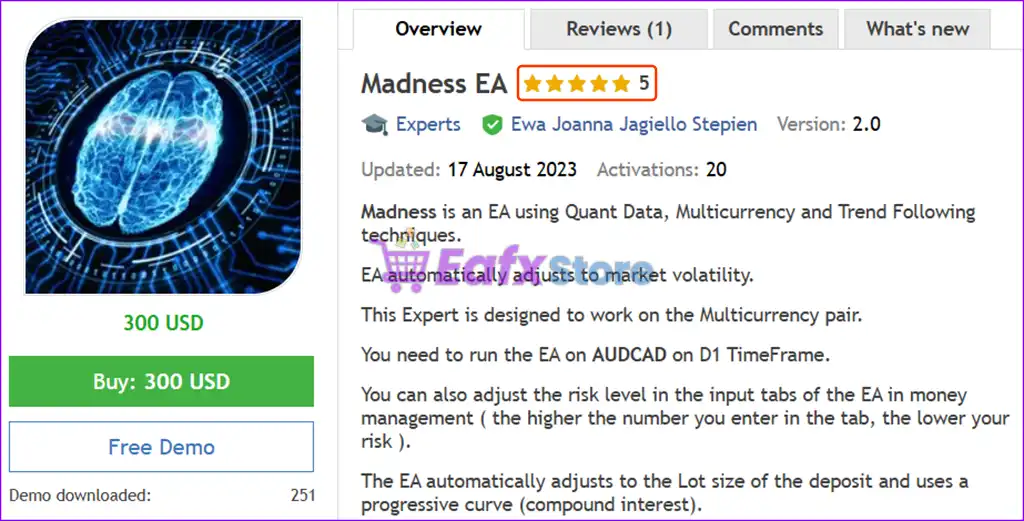
Madness EA is an automated MetaTrader 5 Expert Advisor (EA) that combines trend analysis, currency strength filtering, averaging management and built-in risk protection.
With configurable Take Profit, Trailing Stop, Drawdown protection, Currency Strength filters, and lot management, the EA offers traders a flexible framework for automated Forex trading while maintaining comprehensive risk control.
🔢 Installation Panel Parameters
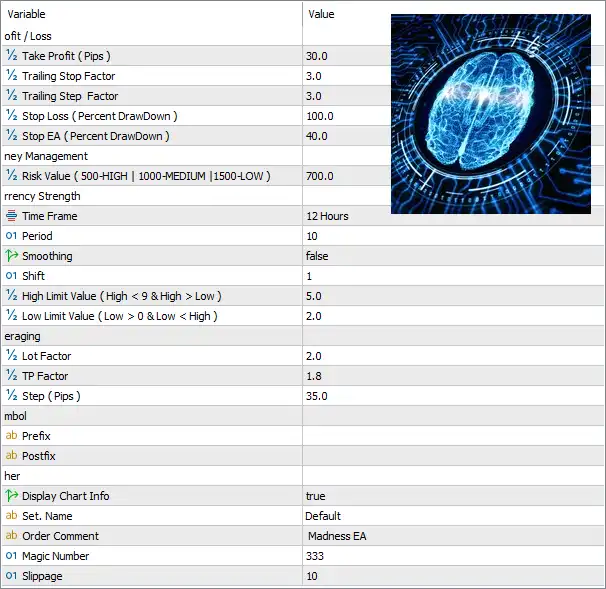
Below are the details of the parameters in the advisor’s trading system settings table:
🔶 Profit / Loss Settings
🔹 Take Profit (Pips) = 30.0 – Sets the default Take Profit target to 30.0 pips for each completed trade.
🔹 Trailing Stop Factor = 3.0 – Defines the multiplier used to calculate the Trailing Stop distance dynamically.
🔹 Trailing Step Factor = 3.0 – Sets the multiplier used for each Trailing Stop adjustment as the market moves in favor of the trade.
🔹 Stop Loss (Percent DrawDown) = 100.0 – Closes positions if the account reaches a maximum drawdown of 100.0%.
🔹 Stop EA (Percent DrawDown) = 40.0 – Automatically stops the EA from opening new trades once the account reaches a 40.0% drawdown.
🔶 Money Management
🔹 Risk Value (500-HIGH | 1000-MEDIUM | 1500-LOW) = 700.0 – Sets the internal money management risk level to 700.0, representing a risk level between the recommended HIGH (500) and MEDIUM (1000) profiles.
🔶 Currency Strength Settings
🔹 Time Frame = 12 Hours – Uses the 12-hour timeframe for Currency Strength analysis.
🔹 Period = 10 – Calculates Currency Strength using a lookback period of 10.
🔹 Smoothing = false – Disables smoothing in the Currency Strength calculation.
🔹 Shift = 1 – Uses data shifted by 1 candle for indicator calculations.
🔹 High Limit Value (High < 9 & High > Low) = 5.0 – Sets the upper Currency Strength threshold to 5.0 for identifying strong currencies.
🔹 Low Limit Value (Low > 0 & Low < High) = 2.0 – Sets the lower Currency Strength threshold to 2.0 for identifying weak currencies.
🔶 Averaging Settings
🔹 Lot Factor = 2.0 – Multiplies the lot size by 2.0 for each averaging position.
🔹 TP Factor = 1.8 – Uses a 1.8 multiplier when calculating the Take Profit level for averaged positions.
🔹 Step (Pips) = 35.0 – Opens the next averaging position every 35.0 pips of adverse price movement.
🔶 Symbol Settings
🔹 Prefix = (blank) – No broker-specific symbol prefix is required.
🔹 Postfix = (blank) – No broker-specific symbol suffix is required.
🔶 Other Settings
🔹 Display Chart Info = true – Displays the EA information panel and trading statistics directly on the chart.
🔹 Set. Name = Default – Loads the default preset configuration.
🔹 Order Comment = Madness EA – Adds the comment "Madness EA" to every order opened by the Expert Advisor.
🔹 Magic Number = 333 – Assigns the unique Magic Number 333 for identifying trades managed by the EA.
🔹 Slippage = 10 – Allows a maximum execution slippage of 10 points during order placement.
🔢 Conclusion
Madness EA MT5 is a versatile automated trading system that combines Currency Strength analysis, averaging logic, dynamic trailing stops, and configurable risk management into a single Expert Advisor. Its flexible parameters allow traders to fine-tune trade entries, money management, drawdown protection, and averaging behavior, making it suitable for both conservative and aggressive automated trading strategies on MetaTrader 5.
🔢 FAQs
❓ What is the default Take Profit in Madness EA MT5?
The default Take Profit is set to 30.0 pips.
❓ How does the Risk Value parameter work?
The Risk Value controls the EA's internal money management. Lower values represent higher risk, while higher values produce a more conservative trading approach.
❓ Does Madness EA MT5 use Currency Strength analysis?
Yes. The EA analyzes Currency Strength using a 12-hour timeframe with a 10-period calculation by default.
❓ Can Madness EA MT5 perform averaging trades?
Yes. The EA supports averaging with configurable Lot Factor, TP Factor, and 35.0-pip averaging intervals.
❓ Does Madness EA MT5 include drawdown protection?
Yes. The EA can stop opening new trades after a 40.0% drawdown and includes configurable drawdown-based Stop Loss protection for enhanced account safety.


