

This guide walks through the inputs of Naked Bitcoin Scalper EA MT5 with the values recommended for live trading. The set files that come with the EA already contain these settings, so you can load them in one click and adjust only what your broker or account needs.
🔢 Naked Bitcoin Scalper EA MT5 – Complete Settings Guide and Parameter Explanation
Naked Bitcoin Scalper EA is a professional Bitcoin trading Expert Advisor (EA) for MetaTrader 5 that combines multiple trading strategies, higher timeframe trend confirmation, market condition filtering and advanced risk management into one automated system.
The EA supports Sniper Breakout, Ultra Breakout, Momentum, and Order Block strategies while providing flexible stop-loss management, prop firm protection, trading session controls, and dashboard monitoring for optimized BTC trading performance.

🔢 Naked Bitcoin Scalper EA MT5 Parameters Explained
Below are the details of the parameters in the advisor’s trading system settings table:
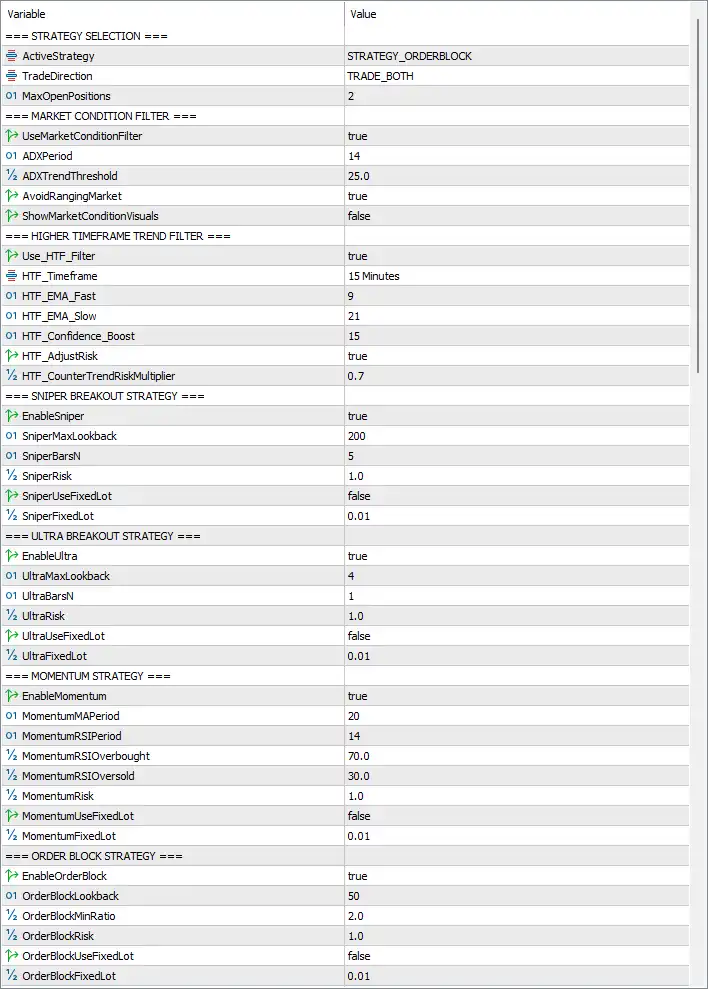
🔶 Strategy Selection
🔹 ActiveStrategy = STRATEGY_ORDERBLOCK – Selects the Order Block Strategy as the active trading model.
🔹 TradeDirection = TRADE_BOTH – Allows both Buy and Sell trades.
🔹 MaxOpenPositions = 2 – Maximum number of simultaneously open positions is 2.
🔶 Market Condition Filter
🔹 UseMarketConditionFilter = true – Enables market condition filtering before opening trades.
🔹 ADXPeriod = 14 – Uses an ADX period of 14 to evaluate market strength.
🔹 ADXTrendThreshold = 25.0 – Trend is considered valid when ADX exceeds 25.0.
🔹 AvoidRangingMarket = true – Prevents trading during sideways or ranging markets.
🔹 ShowMarketConditionVisuals = false – Market condition visualization is disabled.
🔶 Higher Timeframe Trend Filter
🔹 Use_HTF_Filter = true – Enables higher timeframe trend confirmation.
🔹 HTF_Timeframe = 15 Minutes – Uses the M15 timeframe as the higher timeframe filter.
🔹 HTF_EMA_Fast = 9 – Fast EMA period is 9.
🔹 HTF_EMA_Slow = 21 – Slow EMA period is 21.
🔹 HTF_Confidence_Boost = 15 – Adds 15 confidence points when HTF trend aligns.
🔹 HTF_AdjustRisk = true – Automatically adjusts position risk based on HTF trend.
🔹 HTF_CounterTrendRiskMultiplier = 0.7 – Counter-trend trades use a 0.7 risk multiplier.
🔶 Sniper Breakout Strategy
🔹 EnableSniper = true – Enables the Sniper Breakout strategy.
🔹 SniperMaxLookback = 200 – Looks back 200 bars for breakout analysis.
🔹 SniperBarsN = 5 – Uses 5 bars for breakout confirmation.
🔹 SniperRisk = 1.0 – Risk allocation is 1.0%.
🔹 SniperUseFixedLot = false – Uses dynamic position sizing instead of fixed lots.
🔹 SniperFixedLot = 0.01 – Fixed lot size would be 0.01 if enabled.
🔶 Ultra Breakout Strategy
🔹 EnableUltra = true – Enables the Ultra Breakout strategy.
🔹 UltraMaxLookback = 4 – Uses a 4-bar breakout lookback.
🔹 UltraBarsN = 1 – Requires 1 confirmation bar.
🔹 UltraRisk = 1.0 – Risk allocation is 1.0%.
🔹 UltraUseFixedLot = false – Dynamic lot sizing is enabled.
🔹 UltraFixedLot = 0.01 – Fixed lot size is 0.01 if activated.
🔶 Momentum Strategy
🔹 EnableMomentum = true – Enables the Momentum trading strategy.
🔹 MomentumMAPeriod = 20 – Moving Average period is 20.
🔹 MomentumRSIPeriod = 14 – RSI period is 14.
🔹 MomentumRSIOverbought = 70.0 – RSI overbought level is 70.0.
🔹 MomentumRSIOversold = 30.0 – RSI oversold level is 30.0.
🔹 MomentumRisk = 1.0 – Uses 1.0% risk allocation.
🔹 MomentumUseFixedLot = false – Dynamic lot sizing is enabled.
🔹 MomentumFixedLot = 0.01 – Fixed lot size is 0.01 if enabled.
🔶 Order Block Strategy
🔹 EnableOrderBlock = true – Enables Order Block trading logic.
🔹 OrderBlockLookback = 50 – Uses a 50-bar lookback.
🔹 OrderBlockMinRatio = 2.0 – Minimum Order Block ratio is 2.0.
🔹 OrderBlockRisk = 1.0 – Risk allocation is 1.0%.
🔹 OrderBlockUseFixedLot = false – Uses automatic lot sizing.
🔹 OrderBlockFixedLot = 0.01 – Fixed lot size is 0.01 if enabled.
🔶 Unified Trading Parameters (Percentage-Based)
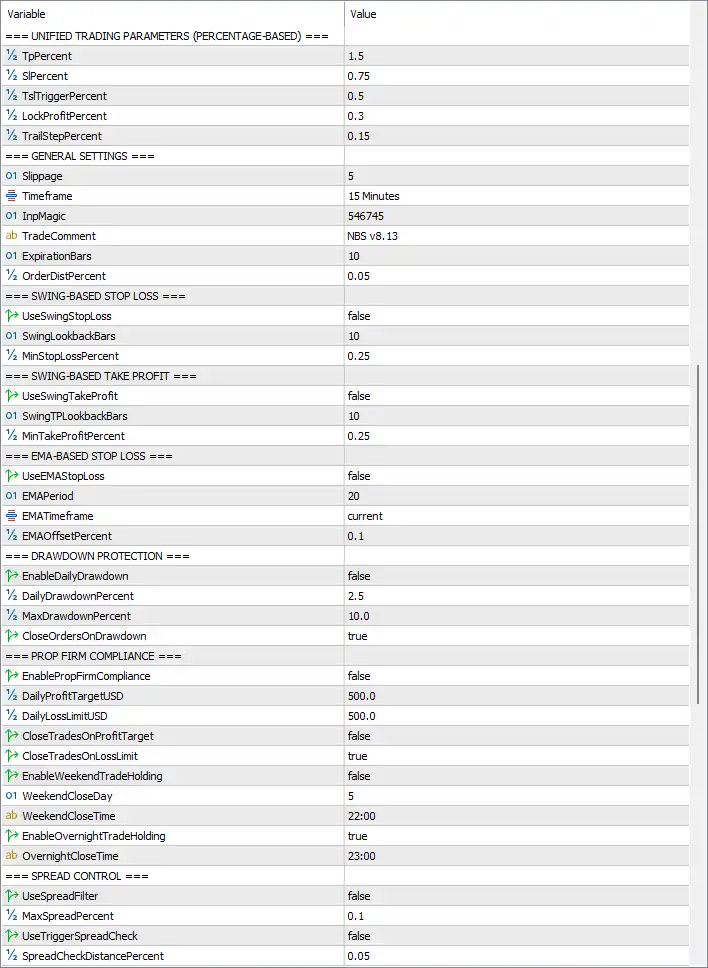
🔹 TpPercent = 1.5 – Take Profit target equals 1.5%.
🔹 SlPercent = 0.75 – Stop Loss equals 0.75%.
🔹 TsTriggerPercent = 0.5 – Trailing Stop activates after 0.5% profit.
🔹 LockProfitPercent = 0.3 – Locks profit after reaching 0.3%.
🔹 TrailStepPercent = 0.15 – Trailing Stop moves in 0.15% increments.
🔶 General Settings
🔹 Slippage = 5 – Maximum allowed slippage is 5 points.
🔹 Timeframe = 15 Minutes – EA operates on the M15 timeframe.
🔹 InpMagic = 546745 – Unique Magic Number for trade identification.
🔹 TradeComment = NBS v8.13 – Comment attached to all EA trades.
🔹 ExpirationBars = 10 – Pending orders expire after 10 bars.
🔹 OrderDistPercent = 0.05 – Pending order distance equals 0.05%.
🔶 Swing-Based Stop Loss
🔹 UseSwingStopLoss = false – Swing-based Stop Loss is disabled.
🔹 SwingLookbackBars = 10 – Uses 10 bars when enabled.
🔹 MinStopLossPercent = 0.25 – Minimum Stop Loss equals 0.25%.
🔶 Swing-Based Take Profit
🔹 UseSwingTakeProfit = false – Swing-based Take Profit is disabled.
🔹 SwingTPLookbackBars = 10 – Uses 10 bars for TP calculation.
🔹 MinTakeProfitPercent = 0.25 – Minimum Take Profit equals 0.25%.
🔶 EMA-Based Stop Loss
🔹 UseEMAStopLoss = false – EMA Stop Loss is disabled.
🔹 EMAPeriod = 20 – EMA period is 20.
🔹 EMATimeframe = current – Uses the current chart timeframe.
🔹 EMAOffsetPercent = 0.1 – EMA Stop Loss offset equals 0.1%.
🔶 Drawdown Protection
🔹 EnableDailyDrawdown = false – Daily drawdown protection is disabled.
🔹 DailyDrawdownPercent = 2.5 – Daily loss limit is 2.5% if enabled.
🔹 MaxDrawdownPercent = 10.0 – Maximum account drawdown is 10.0%.
🔹 CloseOrdersOnDrawdown = true – Closes positions when maximum drawdown is reached.
🔶 Prop Firm Compliance
🔹 EnablePropFirmCompliance = false – Prop Firm mode is disabled.
🔹 DailyProfitTargetUSD = 500.0 – Daily profit target is 500 USD.
🔹 DailyLossLimitUSD = 500.0 – Daily loss limit is 500 USD.
🔹 CloseTradesOnProfitTarget = false – Trades continue after reaching profit target.
🔹 CloseTradesOnLossLimit = true – Trading stops after daily loss limit.
🔹 EnableWeekendTradeHolding = false – Weekend position holding is disabled.
🔹 WeekendCloseDay = 5 – Weekend closing occurs on day 5 (Friday).
🔹 WeekendCloseTime = 22:00 – Weekend closing time is 22:00.
🔹 EnableOvernightTradeHolding = true – Overnight positions are allowed.
🔹 OvernightCloseTime = 23:00 – Overnight close time is 23:00.
🔶 Spread Control
🔹 UseSpreadFilter = false – Spread filter is disabled.
🔹 MaxSpreadPercent = 0.1 – Maximum spread threshold is 0.1%.
🔹 UseTriggerSpreadCheck = false – Entry spread validation is disabled.
🔹 SpreadCheckDistancePercent = 0.05 – Spread check distance equals 0.05%.
🔶 Trading Day Filter
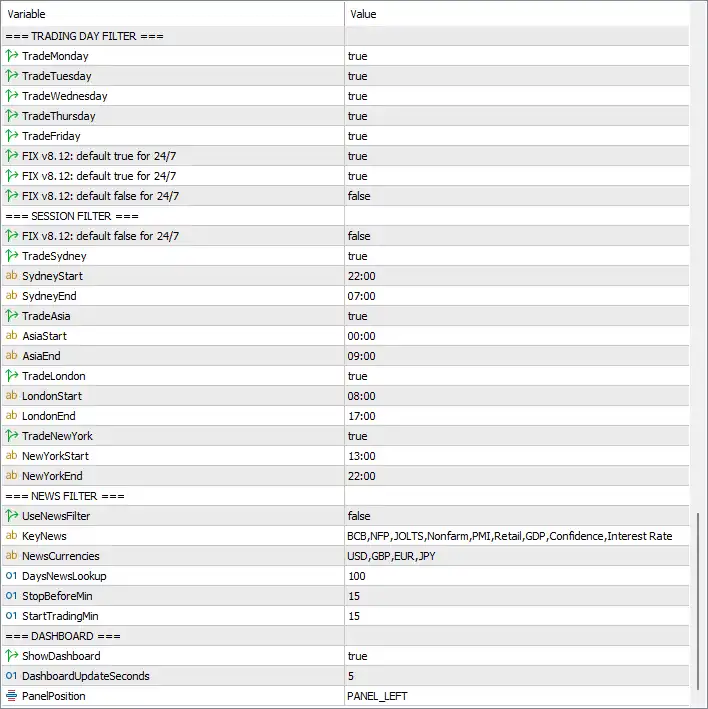
🔹 TradeMonday = true – Trading is allowed on Monday.
🔹 TradeTuesday = true – Trading is allowed on Tuesday.
🔹 TradeWednesday = true – Trading is allowed on Wednesday.
🔹 TradeThursday = true – Trading is allowed on Thursday.
🔹 TradeFriday = true – Trading is allowed on Friday.
🔹 FIX v8.12: default true for 24/7 = true – First 24/7 compatibility option is enabled.
🔹 FIX v8.12: default true for 24/7 = true – Second 24/7 compatibility option is enabled.
🔹 FIX v8.12: default false for 24/7 = false – Third 24/7 compatibility option remains disabled.
🔶 Session Filter
🔹 FIX v8.12: default false for 24/7 = false – Session filtering remains active.
🔹 TradeSydney = true – Sydney session trading enabled.
🔹 SydneyStart = 22:00 – Sydney session starts at 22:00.
🔹 SydneyEnd = 07:00 – Sydney session ends at 07:00.
🔹 TradeAsia = true – Asian session enabled.
🔹 AsiaStart = 00:00 – Asian session begins at 00:00.
🔹 AsiaEnd = 09:00 – Asian session ends at 09:00.
🔹 TradeLondon = true – London session enabled.
🔹 LondonStart = 08:00 – London opens at 08:00.
🔹 LondonEnd = 17:00 – London closes at 17:00.
🔹 TradeNewYork = true – New York session enabled.
🔹 NewYorkStart = 13:00 – New York opens at 13:00.
🔹 NewYorkEnd = 22:00 – New York closes at 22:00.
🔶 News Filter
🔹 UseNewsFilter = false – News filter is disabled.
🔹 KeyNews = BCB,NFP,JOLTS,Nonfarm,PMI,Retail,GDP,Confidence,Interest Rate – List of monitored high-impact economic events.
🔹 NewsCurrencies = USD,GBP,EUR,JPY – News monitoring applies to USD, GBP, EUR, and JPY.
🔹 DaysNewsLookup = 100 – Loads news for the previous 100 days.
🔹 StopBeforeMin = 15 – Stops trading 15 minutes before major news.
🔹 StartTradingMin = 15 – Trading resumes 15 minutes after news.
🔶 Dashboard
🔹 ShowDashboard = true – Displays the trading dashboard.
🔹 DashboardUpdateSeconds = 5 – Dashboard refreshes every 5 seconds.
🔹 PanelPosition = PANEL_LEFT – Dashboard is positioned on the left side of the chart.
🔢 Conclusion
Naked Bitcoin Scalper EA is a comprehensive automated Bitcoin trading system that combines four independent trading strategies with higher timeframe confirmation, market condition filtering, advanced percentage-based risk management, drawdown protection, prop firm compliance options, session filtering, and dashboard monitoring. Its extensive customization options allow traders to fine-tune every aspect of the trading process, making it suitable for both conservative and aggressive Bitcoin trading strategies.
🔢 FAQs
❓ What strategies are included in Naked Bitcoin Scalper EA MT5?
The EA includes Sniper Breakout, Ultra Breakout, Momentum, and Order Block strategies, with the active strategy selectable through the settings.
❓ Does the EA support higher timeframe confirmation?
Yes. It includes an HTF EMA filter using configurable EMA periods and automatic risk adjustment based on trend direction.
❓ Can I customize Stop Loss and Take Profit methods?
Yes. The EA supports percentage-based, swing-based, and EMA-based Stop Loss and Take Profit configurations.
❓ Does Naked Bitcoin Scalper EA MT5 include risk protection?
Yes. It provides drawdown protection, daily risk controls, prop firm compliance settings, spread filtering, and session management.
❓ Can the EA trade during specific market sessions only?
Yes. You can independently enable or disable trading during the Sydney, Asian, London, and New York sessions, as well as configure trading days and news filters.
Get Naked Bitcoin Scalper EA MT5
Download Naked Bitcoin Scalper EA MT5 with its set files, read the full product details and requirements here: Naked Bitcoin Scalper EA MT5 →