

This guide walks through the inputs of The Bitcoin Core EA MT5 with the values recommended for live trading. The set files that come with the EA already contain these settings, so you can load them in one click and adjust only what your broker or account needs.
🔢 The Bitcoin Core EA MT5 Settings Guide
The Bitcoin Core EA MT5 is a versatile automated trading Expert Advisor designed for Bitcoin trading with configurable risk management, time filtering, Prop Firm protection, multiple entry models and flexible exit management.
The supplied configuration shows a diversified approach with 10 entry models enabled, automatic risk sizing set to Medium, a 4.0% daily loss protection, and multiple exit mechanisms.
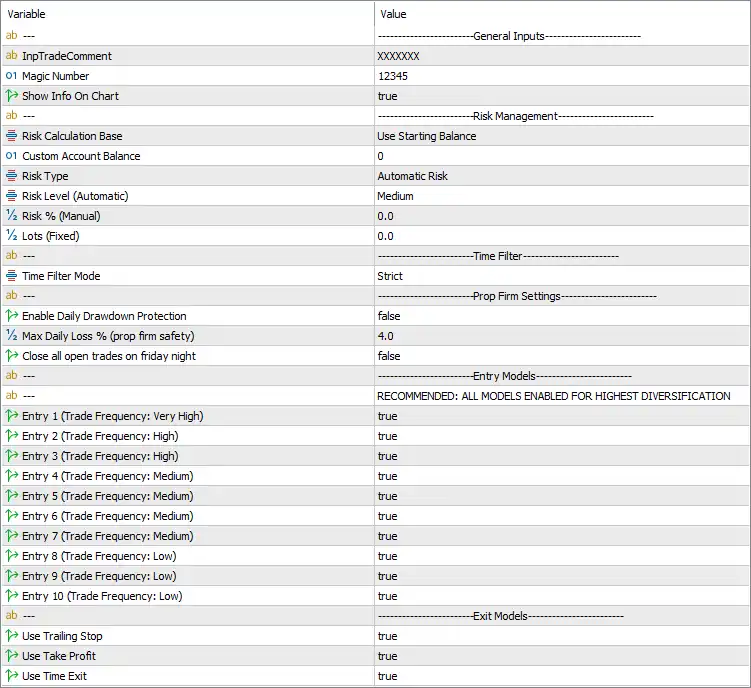
🔶 General Inputs
🔹 InpTradeComment = XXXXXXX – Sets the custom trade comment to “XXXXXXX”, allowing EA-generated positions to be identified in the trading terminal.
🔹 Magic Number = 12345 – Uses 12345 as the unique identifier for trades managed by The Bitcoin Core EA MT5.
🔹 Show Info On Chart = true – Displays the EA's information panel or trading information directly on the chart.
🔶 Risk Management
🔹 Risk Calculation Base = Use Starting Balance – Calculates the EA's risk parameters using the account's starting balance as the reference.
🔹 Custom Account Balance = 0 – No custom account balance is specified; the EA therefore uses its selected automatic balance reference.
🔹 Risk Type = Automatic Risk – Enables automatic risk management instead of manually specifying the risk percentage or fixed lot size.
🔹 Risk Level (Automatic) = Medium – Selects the Medium automatic risk profile for position sizing and risk management.
🔹 Risk % (Manual) = 0.0 – Manual percentage-based risk is set to 0.0 and is not active while Risk Type = Automatic Risk is selected.
🔹 Lots (Fixed) = 0.0 – Fixed-lot trading is set to 0.0 lots, indicating that fixed-lot sizing is not being used in the current automatic-risk configuration.
🔶 Time Filter
🔹 Time Filter Mode = Strict – Selects the Strict time-filter mode, allowing the EA to apply its configured trading-time restrictions strictly.
Note: The supplied settings image shows the Time Filter Mode as Strict, but does not display a separate enable/disable parameter or specific trading hours.
🔶 Prop Firm Settings
🔹 Enable Daily Drawdown Protection = false – Disables the EA's daily drawdown protection in the current configuration.
🔹 Max Daily Loss % (prop firm safety) = 4.0 – Defines a maximum daily loss threshold of 4.0% when the Prop Firm daily drawdown protection is enabled.
🔹 Close all open trades on friday night = false – Disables automatic closing of all open positions on Friday night.
🔶 Entry Models
The EA provides 10 separate entry models, ranging from very-high-frequency to low-frequency strategies. All 10 are currently enabled, creating a highly diversified entry configuration.
🔹 Entry 1 (Trade Frequency: Very High) = true – Enables Entry Model 1, categorized as Very High trading frequency.
🔹 Entry 2 (Trade Frequency: High) = true – Enables Entry Model 2, categorized as High trading frequency.
🔹 Entry 3 (Trade Frequency: High) = true – Enables Entry Model 3, categorized as High trading frequency.
🔹 Entry 4 (Trade Frequency: Medium) = true – Enables Entry Model 4, categorized as Medium trading frequency.
🔹 Entry 5 (Trade Frequency: Medium) = true – Enables Entry Model 5, categorized as Medium trading frequency.
🔹 Entry 6 (Trade Frequency: Medium) = true – Enables Entry Model 6, categorized as Medium trading frequency.
🔹 Entry 7 (Trade Frequency: Medium) = true – Enables Entry Model 7, categorized as Medium trading frequency.
🔹 Entry 8 (Trade Frequency: Low) = true – Enables Entry Model 8, categorized as Low trading frequency.
🔹 Entry 9 (Trade Frequency: Low) = true – Enables Entry Model 9, categorized as Low trading frequency.
🔹 Entry 10 (Trade Frequency: Low) = true – Enables Entry Model 10, categorized as Low trading frequency.
🔶 Entry Model Frequency Structure
🔹 Very High Frequency: Entry 1 is enabled.
🔹 High Frequency: Entries 2 and 3 are enabled.
🔹 Medium Frequency: Entries 4, 5, 6, and 7 are enabled.
🔹 Low Frequency: Entries 8, 9, and 10 are enabled.
🔹 Diversification Setting: The panel recommends “ALL MODELS ENABLED FOR HIGHEST DIVERSIFICATION”, and the current configuration follows that recommendation.
🔶 Exit Models
🔹 Use Trailing Stop = true – Enables trailing Stop Loss management to protect profits as positions move favorably.
🔹 Use Take Profit = true – Enables Take Profit functionality for automatically closing trades at their configured profit targets.
🔹 Use Time Exit = true – Enables time-based position exits, allowing trades to be closed according to the EA's internal time-exit rules.
🔢 The Bitcoin Core EA MT5 – Key Configuration Summary
🔹 Trade Comment: XXXXXXX
🔹 Magic Number: 12345
🔹 Chart Information: Enabled
🔹 Risk Calculation Base: Starting Balance
🔹 Risk Type: Automatic Risk
🔹 Automatic Risk Level: Medium
🔹 Manual Risk: 0.0%
🔹 Fixed Lot: 0.0
🔹 Time Filter Mode: Strict
🔹 Daily Drawdown Protection: Disabled
🔹 Maximum Daily Loss: 4.0%
🔹 Friday Position Closure: Disabled
🔹 Entry Models Enabled: 10/10
🔹 Very High-Frequency Entries: 1
🔹 High-Frequency Entries: 2
🔹 Medium-Frequency Entries: 4
🔹 Low-Frequency Entries: 3
🔹 Trailing Stop: Enabled
🔹 Take Profit: Enabled
🔹 Time Exit: Enabled
🔢 How The Bitcoin Core EA MT5 Settings Work Together
The current configuration emphasizes automatic risk management and strategy diversification. Instead of using a fixed lot or manually defined risk percentage, the EA uses Automatic Risk → Medium.
The Risk Calculation Base is set to Use Starting Balance, while Custom Account Balance = 0, Risk % (Manual) = 0.0, and Lots (Fixed) = 0.0 indicate that the manual alternatives are not the active sizing method under the current configuration.
The EA has all 10 entry models enabled, covering frequencies from Very High through Low. This matches the displayed recommendation to enable all models for the highest diversification.
For risk protection, the panel defines Max Daily Loss = 4.0%, but Enable Daily Drawdown Protection = false. Therefore, the 4.0% value is configured as a safety threshold but is not currently activated by that protection switch.
The exit framework is fully enabled, with Trailing Stop, Take Profit, and Time Exit all set to true.
🔢 Conclusion
The Bitcoin Core EA MT5 offers a flexible automated trading framework centered on multi-strategy diversification, automatic risk management, and multiple exit mechanisms.
The supplied configuration enables all 10 entry models, providing a mix of Very High, High, Medium, and Low-frequency trading approaches. Risk sizing is set to Automatic Risk → Medium, while the EA uses the starting balance as its risk-calculation reference.
One important configuration detail is the 4.0% Max Daily Loss setting. Because Enable Daily Drawdown Protection = false, this threshold is currently configured but not actively enforcing the daily drawdown protection mechanism.
For trade management, Trailing Stop = true, Use Take Profit = true, and Use Time Exit = true, giving the EA three enabled exit-management components.
Before using The Bitcoin Core EA MT5 on a live or Prop Firm account, traders should verify how the selected Medium risk level, starting-balance calculation, entry-model combination, and 4.0% daily-loss threshold behave under the specific broker and account conditions. Forward testing is recommended before live deployment.
🔢 FAQs
❓ How many entry strategies are enabled in The Bitcoin Core EA MT5?
All 10 entry models are enabled. The configuration therefore follows the displayed recommendation to use all models for the highest diversification.
❓ What is the current automatic risk level?
The EA is configured with Risk Type = Automatic Risk and Risk Level (Automatic) = Medium.
❓ Is the 4.0% daily drawdown protection active?
No. The threshold is set to 4.0%, but Enable Daily Drawdown Protection = false, so the protection is currently disabled.
❓ Does The Bitcoin Core EA MT5 support multiple exit methods?
Yes. Trailing Stop, Take Profit, and Time Exit are all enabled with true.
❓ What is the Magic Number of The Bitcoin Core EA MT5?
The configured Magic Number is 12345, which identifies positions managed by this EA.
Get The Bitcoin Core EA MT5
Download The Bitcoin Core EA MT5 with its set files, read the full product details and requirements here: The Bitcoin Core EA MT5 →