

Introduction
Nas Hunter EA is an automated trading Expert Advisor (EA) designed for the MetaTrader 5 platform. It features configurable risk management, automated lot sizing, trading filters, weekend protection, and Non-Farm Payroll (NFP) news management.

The EA includes multiple selectable trading strategies, allowing users to enable or disable individual strategy modules according to their trading preferences. Its Risk-Based lot-sizing method, Global Risk Multiplier, and individual fixed lot settings provide additional flexibility in managing trading exposure.
Nas Hunter EA MT5 also incorporates a trailing stop delay option, weekend trading restrictions, automated NFP order management, and an information panel for monitoring its operation. These settings help traders customize automated trading behavior and manage trading activities around important market events.
Nas Hunter EA MT5 Settings Explained
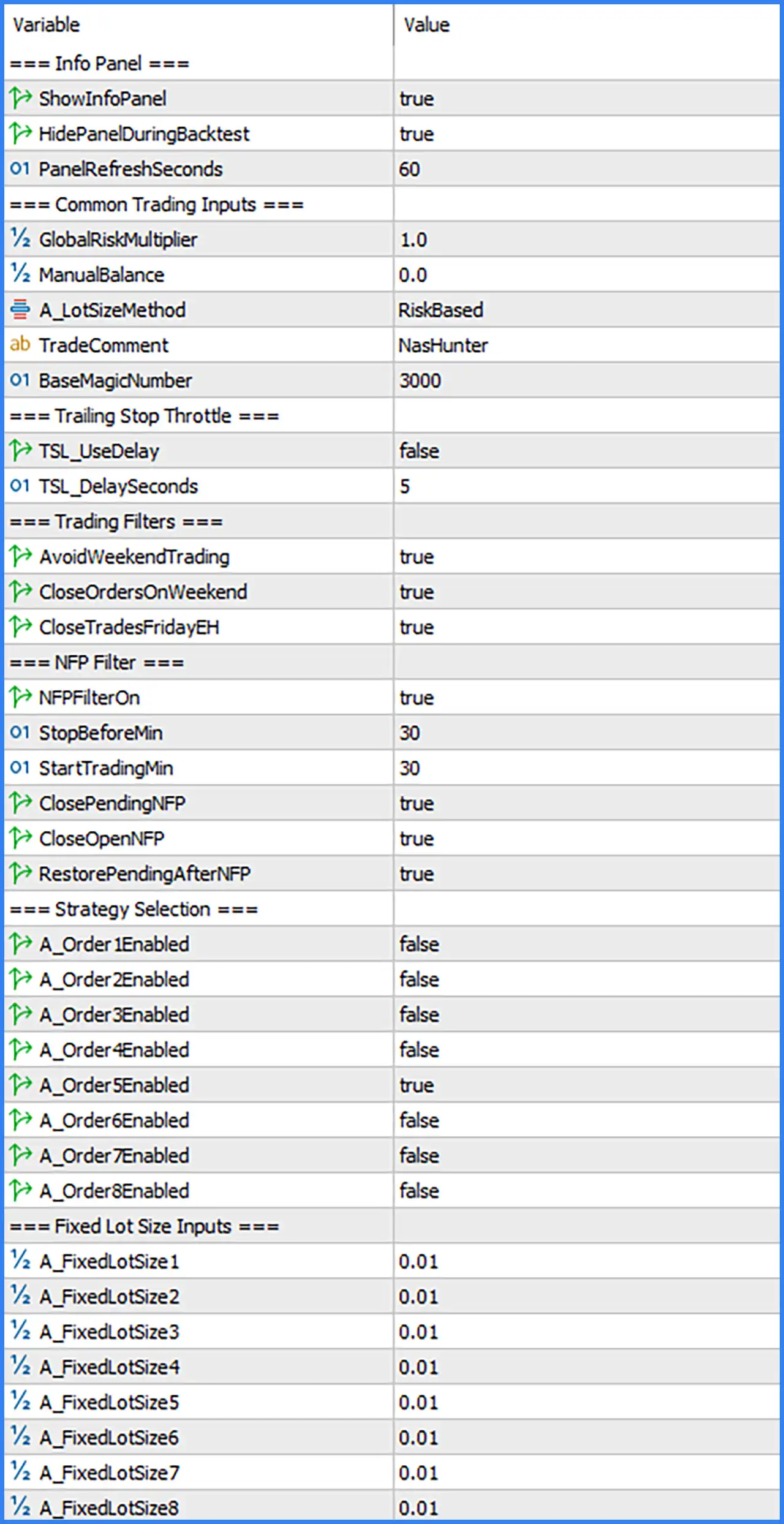
1. Information Panel Settings
🔹 ShowInfoPanel = true – Enables the information panel on the trading chart, allowing users to monitor the EA's displayed information and trading status.
🔹 HidePanelDuringBacktest = true – Hides the information panel during Strategy Tester backtesting, keeping the testing chart cleaner and reducing unnecessary visual elements.
🔹 PanelRefreshSeconds = 60 – Sets the information panel refresh interval to 60 seconds, determining how frequently the displayed information is updated.
2. Common Trading Inputs
🔹 GlobalRiskMultiplier = 1.0 – Sets the global risk multiplier to 1.0, providing the baseline risk adjustment factor for the EA's trading and position-sizing calculations.
🔹 ManualBalance = 0.0 – Sets the manual balance reference to 0.0, indicating that no additional manual account balance value is entered through this parameter.
🔹 A_LotSizeMethod = RiskBased – Selects Risk-Based lot sizing, allowing the EA to calculate trading volume according to its configured risk management logic rather than relying exclusively on fixed lot sizes.
🔹 TradeComment = NasHunter – Sets the order comment to NasHunter, making it easier to identify trades opened by this Expert Advisor in the MetaTrader 5 trading history.
🔹 BaseMagicNumber = 3000 – Assigns 3000 as the base Magic Number, providing an identifier for distinguishing and managing the EA's trading orders.
3. Trailing Stop Throttle Settings
🔹 TSL_UseDelay = false – Disables the trailing stop delay function, meaning the additional delay mechanism for trailing stop modifications is not activated under the supplied configuration.
🔹 TSL_DelaySeconds = 5 – Sets the trailing stop modification delay to 5 seconds when the delay function is enabled, controlling the waiting interval between applicable trailing stop operations.
4. Trading Filters Settings
🔹 AvoidWeekendTrading = true – Enables weekend trading restrictions, helping prevent the EA from initiating trading activity during the configured weekend period.
🔹 CloseOrdersOnWeekend = true – Enables the weekend order-closing function, allowing the EA to close applicable orders when its weekend protection conditions are triggered.
🔹 CloseTradesFridayEH = true – Enables Friday end-of-week trade closing, allowing the EA to close applicable trading positions before the weekend according to its internal Friday closing schedule.
5. NFP News Filter Settings
🔹 NFPFilterOn = true – Enables the Non-Farm Payroll (NFP) news filter, allowing the EA to apply special trading restrictions around important US employment data releases.
🔹 StopBeforeMin = 30 – Sets the pre-news restriction period to 30 minutes, defining how long before the relevant NFP event the EA applies its configured trading protection.
🔹 StartTradingMin = 30 – Sets the post-news waiting period to 30 minutes, determining the configured waiting time before normal trading activity can resume.
🔹 ClosePendingNFP = true – Enables the automatic closing or cancellation of pending orders around NFP news events to reduce exposure to potentially volatile market conditions.
🔹 CloseOpenNFP = true – Enables the closing of open trading positions when the EA's NFP protection conditions are activated.
🔹 RestorePendingAfterNFP = true – Enables the restoration of applicable pending orders after the NFP protection period, allowing the EA to resume its configured pending-order management.
6. Strategy Selection Settings
🔹 A_Order1Enabled = false – Disables Strategy Order 1, preventing this individual strategy module from being selected for automated trading.
🔹 A_Order2Enabled = false – Disables Strategy Order 2, excluding this strategy module from the EA's active trading configuration.
🔹 A_Order3Enabled = false – Disables Strategy Order 3, preventing the EA from using this strategy module under the supplied settings.
🔹 A_Order4Enabled = false – Disables Strategy Order 4, keeping this strategy module inactive during automated trading.
🔹 A_Order5Enabled = true – Enables Strategy Order 5, making it the only activated strategy module among the eight available strategy selection inputs.
🔹 A_Order6Enabled = false – Disables Strategy Order 6, preventing this strategy module from participating in the EA's trading operations.
🔹 A_Order7Enabled = false – Disables Strategy Order 7, keeping this individual strategy module inactive.
🔹 A_Order8Enabled = false – Disables Strategy Order 8, excluding this strategy module from the currently enabled strategy configuration.
7. Fixed Lot Size Inputs
🔹 A_FixedLotSize1 = 0.01 – Sets the fixed lot size for Strategy 1 to 0.01 lots, defining its configured trading volume if the corresponding strategy uses fixed lot sizing.
🔹 A_FixedLotSize2 = 0.01 – Sets the fixed lot size for Strategy 2 to 0.01 lots, providing its individual position-volume setting.
🔹 A_FixedLotSize3 = 0.01 – Sets the fixed lot size for Strategy 3 to 0.01 lots, establishing the configured trading volume for this strategy.
🔹 A_FixedLotSize4 = 0.01 – Sets the fixed lot size for Strategy 4 to 0.01 lots, defining its individual fixed-volume parameter.
🔹 A_FixedLotSize5 = 0.01 – Sets the fixed lot size for Strategy 5 to 0.01 lots, specifying the configured position size for the only enabled strategy module.
🔹 A_FixedLotSize6 = 0.01 – Sets the fixed lot size for Strategy 6 to 0.01 lots, providing its predefined trading volume if activated.
🔹 A_FixedLotSize7 = 0.01 – Sets the fixed lot size for Strategy 7 to 0.01 lots, defining its individual volume configuration.
🔹 A_FixedLotSize8 = 0.01 – Sets the fixed lot size for Strategy 8 to 0.01 lots, establishing its configured position volume if this strategy is enabled.
Conclusion
Nas Hunter EA MT5 provides a configurable automated trading environment with risk-based position sizing, multiple strategy selection options, weekend protection, and NFP news filtering.
The supplied configuration uses GlobalRiskMultiplier = 1.0, RiskBased lot sizing, and BaseMagicNumber = 3000. Its strategy selection settings enable only A_Order5Enabled, while the other seven strategy modules remain disabled.
All eight individual fixed lot size parameters are configured at 0.01 lots. Additionally, the EA enables weekend protection and NFP news management, with a 30-minute restriction before and after the scheduled news event.
These features provide flexibility in managing trading operations and limiting exposure during potentially volatile market periods. However, traders should verify the EA's actual order-closing and pending-order restoration behavior through backtesting and demo trading before using it on a live account.