

Introduction
The Range Reaper EA is a multi-market automated trading Expert Advisor (EA) designed for MetaTrader 5. It supports diversified portfolio trading across Forex, cryptocurrencies, commodities, and stock indices, with configurable risk allocation for each trading instrument.

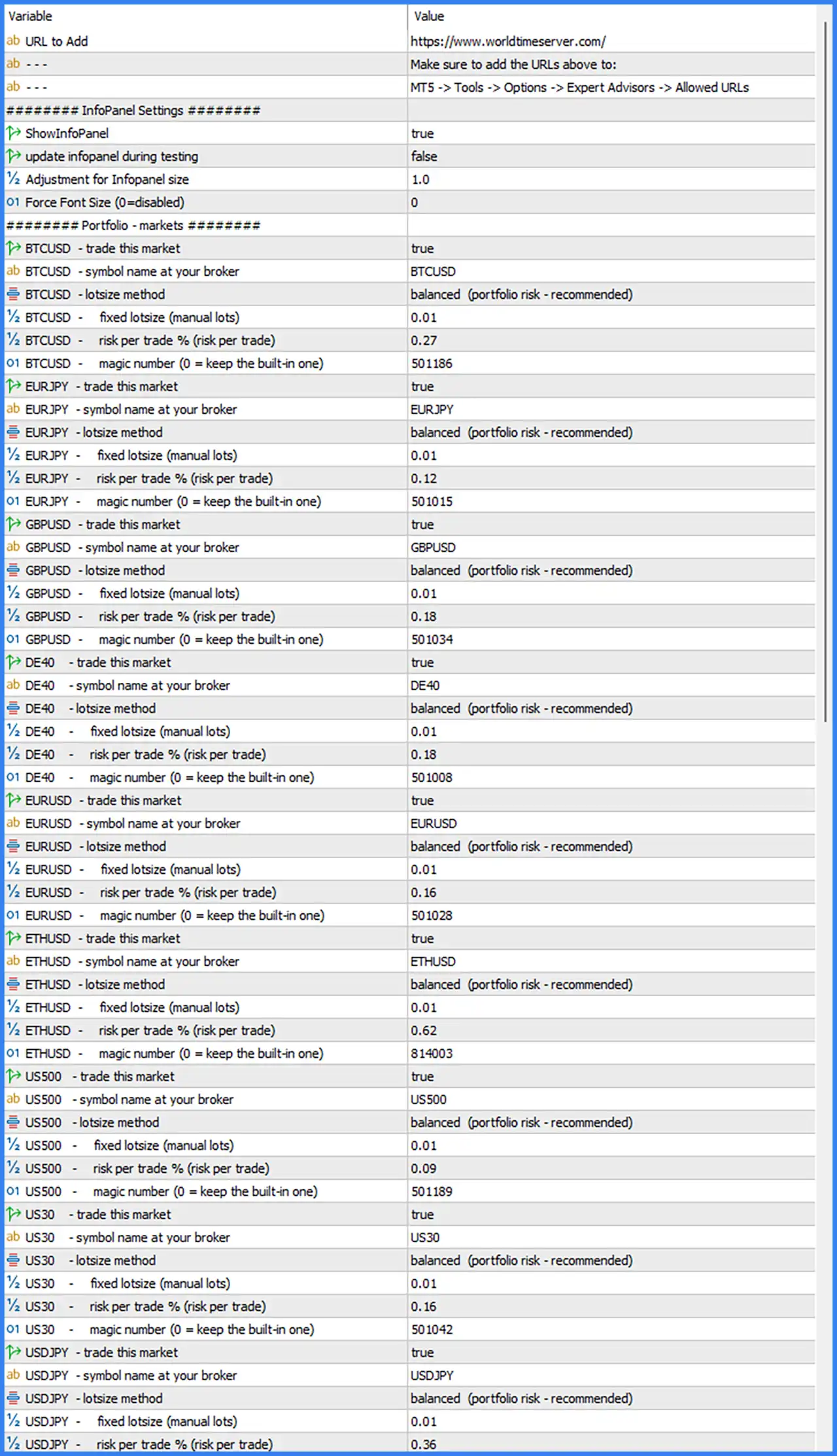
The EA provides individual trading controls for 11 markets, including BTCUSD, EURJPY, GBPUSD, DE40, EURUSD, ETHUSD, US500, US30, USDJPY, USTEC, and XAUUSD. Each market has its own symbol configuration, lot-sizing method, fixed lot size, risk percentage, and Magic Number.
Additional protection features include NFP, Interest Rate, and CPI news filters, allowing traders to configure how positions and pending orders are managed around important economic announcements.
The Range Reaper EA MT5 Settings Explained
1. URL and Information Panel Settings
🔹 URL to Add = https://www.worldtimeserver.com/ – Specifies the external website URL that must be added to the allowed URLs list in MetaTrader 5 for the EA's related time-server functionality.
🔹 URL Authorization Instructions – Add the specified URL through MT5 → Tools → Options → Expert Advisors → Allowed URLs to authorize the EA to access the external website.
🔹 ShowInfoPanel = true – Enables the information panel on the trading chart, allowing traders to monitor the EA's displayed information and operating status.
🔹 update infopanel during testing = false – Disables information panel updates during backtesting, reducing unnecessary chart-refresh operations while testing the EA.
🔹 Adjustment for Infopanel size = 1.0 – Sets the information panel size adjustment multiplier to 1.0, representing the default scaling configuration.
🔹 Force Font Size (0=disabled) = 0 – Disables the forced font-size setting, allowing the information panel to use its default font sizing.
2. Portfolio Market Settings
The following parameters configure individual trading instruments. All 11 markets are enabled, and each uses the Balanced lot-sizing method with a recommended portfolio-risk configuration.
BTCUSD Settings
🔹 BTCUSD – trade this market = true – Enables automated trading on Bitcoin against the US Dollar (BTCUSD).
🔹 BTCUSD – symbol name at your broker = BTCUSD – Defines BTCUSD as the broker's symbol name used by the EA to identify the trading instrument.
🔹 BTCUSD – lotsize method = balanced (portfolio risk - recommended) – Selects the Balanced position-sizing method, designed to allocate trading risk within the EA's portfolio configuration.
🔹 BTCUSD – fixed lotsize (manual lots) = 0.01 – Sets the manual fixed lot size to 0.01 lots for BTCUSD when the corresponding fixed-lot method is used.
🔹 BTCUSD – risk per trade % (risk per trade) = 0.27 – Sets the configured BTCUSD risk allocation to 0.27% per trade under the selected risk-based position-sizing configuration.
🔹 BTCUSD – magic number (0 = keep the built-in one) = 501186 – Assigns Magic Number 501186 to BTCUSD positions for individual trade identification and management.
EURJPY Settings
🔹 EURJPY – trade this market = true – Enables automated trading on the Euro against the Japanese Yen (EURJPY).
🔹 EURJPY – symbol name at your broker = EURJPY – Sets the broker symbol identification to EURJPY.
🔹 EURJPY – lotsize method = balanced (portfolio risk - recommended) – Selects Balanced lot sizing for EURJPY, following the EA's recommended portfolio-risk allocation method.
🔹 EURJPY – fixed lotsize (manual lots) = 0.01 – Sets the manual fixed trading volume to 0.01 lots for EURJPY.
🔹 EURJPY – risk per trade % (risk per trade) = 0.12 – Configures the EURJPY risk allocation at 0.12% per trade.
🔹 EURJPY – magic number (0 = keep the built-in one) = 501015 – Assigns Magic Number 501015 to EURJPY trades for independent order identification.
GBPUSD Settings
🔹 GBPUSD – trade this market = true – Enables automated trading on the British Pound against the US Dollar (GBPUSD).
🔹 GBPUSD – symbol name at your broker = GBPUSD – Defines GBPUSD as the broker's trading symbol.
🔹 GBPUSD – lotsize method = balanced (portfolio risk - recommended) – Selects the Balanced portfolio-risk lot-sizing method for GBPUSD.
🔹 GBPUSD – fixed lotsize (manual lots) = 0.01 – Sets the manual fixed lot size to 0.01 lots for GBPUSD.
🔹 GBPUSD – risk per trade % (risk per trade) = 0.18 – Sets the configured GBPUSD risk allocation to 0.18% per trade.
🔹 GBPUSD – magic number (0 = keep the built-in one) = 501034 – Assigns Magic Number 501034 to GBPUSD orders for trade identification.
DE40 Settings
🔹 DE40 – trade this market = true – Enables automated trading on the DE40 German stock market index.
🔹 DE40 – symbol name at your broker = DE40 – Defines DE40 as the broker's symbol name for the German index.
🔹 DE40 – lotsize method = balanced (portfolio risk - recommended) – Selects Balanced position sizing for DE40 using the EA's recommended portfolio-risk method.
🔹 DE40 – fixed lotsize (manual lots) = 0.01 – Sets the manual fixed trading volume to 0.01 lots for DE40.
🔹 DE40 – risk per trade % (risk per trade) = 0.18 – Sets the configured DE40 risk allocation to 0.18% per trade.
🔹 DE40 – magic number (0 = keep the built-in one) = 501008 – Assigns Magic Number 501008 to DE40 positions for independent order identification.
EURUSD Settings
🔹 EURUSD – trade this market = true – Enables automated trading on the Euro against the US Dollar (EURUSD).
🔹 EURUSD – symbol name at your broker = EURUSD – Defines EURUSD as the broker's trading symbol.
🔹 EURUSD – lotsize method = balanced (portfolio risk - recommended) – Selects the Balanced portfolio-risk lot-sizing method for EURUSD.
🔹 EURUSD – fixed lotsize (manual lots) = 0.01 – Sets the manual fixed trading volume to 0.01 lots for EURUSD.
🔹 EURUSD – risk per trade % (risk per trade) = 0.16 – Configures EURUSD risk allocation at 0.16% per trade.
🔹 EURUSD – magic number (0 = keep the built-in one) = 501028 – Assigns Magic Number 501028 to EURUSD orders for trade identification and management.
ETHUSD Settings
🔹 ETHUSD – trade this market = true – Enables automated trading on Ethereum against the US Dollar (ETHUSD).
🔹 ETHUSD – symbol name at your broker = ETHUSD – Defines ETHUSD as the broker's symbol name for Ethereum trading.
🔹 ETHUSD – lotsize method = balanced (portfolio risk - recommended) – Selects Balanced lot sizing for ETHUSD using the recommended portfolio-risk configuration.
🔹 ETHUSD – fixed lotsize (manual lots) = 0.01 – Sets the manual fixed lot size to 0.01 lots for ETHUSD.
🔹 ETHUSD – risk per trade % (risk per trade) = 0.62 – Sets the configured ETHUSD risk allocation to 0.62% per trade.
🔹 ETHUSD – magic number (0 = keep the built-in one) = 814003 – Assigns Magic Number 814003 to ETHUSD positions for individual trade identification.
US500 Settings
🔹 US500 – trade this market = true – Enables automated trading on the US500 stock market index.
🔹 US500 – symbol name at your broker = US500 – Defines US500 as the broker's symbol name for this index.
🔹 US500 – lotsize method = balanced (portfolio risk - recommended) – Selects Balanced portfolio-risk position sizing for US500.
🔹 US500 – fixed lotsize (manual lots) = 0.01 – Sets the manual fixed trading volume to 0.01 lots for US500.
🔹 US500 – risk per trade % (risk per trade) = 0.09 – Sets the configured US500 risk allocation to 0.09% per trade.
🔹 US500 – magic number (0 = keep the built-in one) = 501189 – Assigns Magic Number 501189 to US500 orders for independent trade identification.
US30 Settings
🔹 US30 – trade this market = true – Enables automated trading on the US30 stock market index.
🔹 US30 – symbol name at your broker = US30 – Defines US30 as the broker's trading symbol for the Dow Jones index.
🔹 US30 – lotsize method = balanced (portfolio risk - recommended) – Selects the Balanced portfolio-risk lot-sizing method for US30.
🔹 US30 – fixed lotsize (manual lots) = 0.01 – Sets the manual fixed trading volume to 0.01 lots for US30.
🔹 US30 – risk per trade % (risk per trade) = 0.16 – Configures the US30 risk allocation at 0.16% per trade.
🔹 US30 – magic number (0 = keep the built-in one) = 501042 – Assigns Magic Number 501042 to US30 positions for order identification.
USDJPY Settings
🔹 USDJPY – trade this market = true – Enables automated trading on the US Dollar against the Japanese Yen (USDJPY).
🔹 USDJPY – symbol name at your broker = USDJPY – Defines USDJPY as the broker's trading symbol.
🔹 USDJPY – lotsize method = balanced (portfolio risk - recommended) – Selects Balanced position sizing for USDJPY using the recommended portfolio-risk configuration.
🔹 USDJPY – fixed lotsize (manual lots) = 0.01 – Sets the manual fixed trading volume to 0.01 lots for USDJPY.
🔹 USDJPY – risk per trade % (risk per trade) = 0.36 – Sets the configured USDJPY risk allocation to 0.36% per trade.
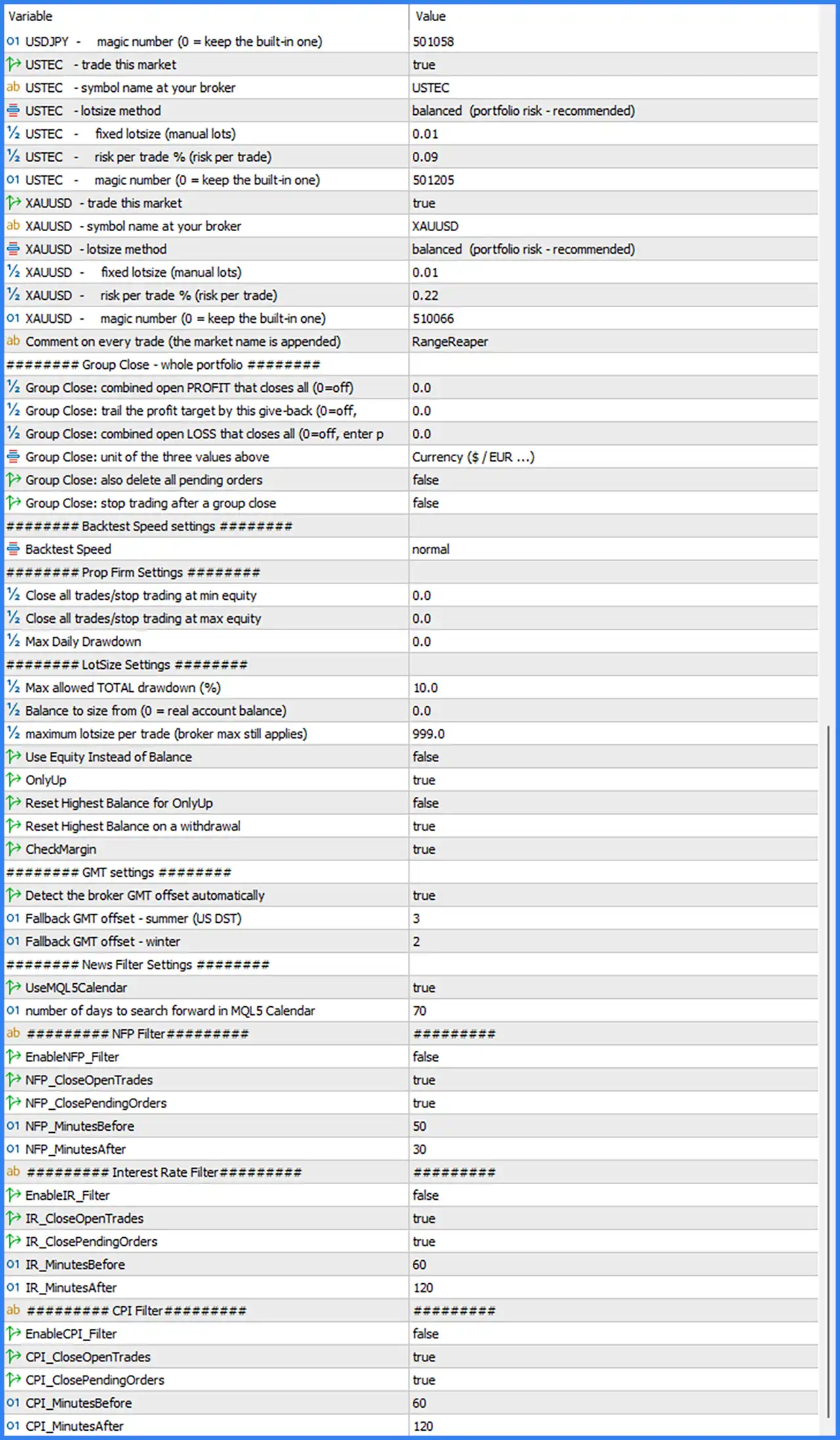
🔹 USDJPY – magic number (0 = keep the built-in one) = 501058 – Assigns Magic Number 501058 to USDJPY trades for independent order identification.
USTEC Settings
🔹 USTEC – trade this market = true – Enables automated trading on the USTEC technology stock market index.
🔹 USTEC – symbol name at your broker = USTEC – Defines USTEC as the broker's symbol name for this index.
🔹 USTEC – lotsize method = balanced (portfolio risk - recommended) – Selects the Balanced portfolio-risk lot-sizing method for USTEC.
🔹 USTEC – fixed lotsize (manual lots) = 0.01 – Sets the manual fixed lot size to 0.01 lots for USTEC.
🔹 USTEC – risk per trade % (risk per trade) = 0.09 – Sets the configured USTEC risk allocation to 0.09% per trade.
🔹 USTEC – magic number (0 = keep the built-in one) = 501205 – Assigns Magic Number 501205 to USTEC positions for trade identification.
XAUUSD Settings
🔹 XAUUSD – trade this market = true – Enables automated trading on Gold against the US Dollar (XAUUSD).
🔹 XAUUSD – symbol name at your broker = XAUUSD – Defines XAUUSD as the broker's symbol name for Gold trading.
🔹 XAUUSD – lotsize method = balanced (portfolio risk - recommended) – Selects Balanced position sizing for Gold using the recommended portfolio-risk allocation method.
🔹 XAUUSD – fixed lotsize (manual lots) = 0.01 – Sets the manual fixed trading volume to 0.01 lots for XAUUSD.
🔹 XAUUSD – risk per trade % (risk per trade) = 0.22 – Sets the configured XAUUSD risk allocation to 0.22% per trade.
🔹 XAUUSD – magic number (0 = keep the built-in one) = 510066 – Assigns Magic Number 510066 to Gold positions for individual order identification and management.
3. General Trade Comment
🔹 Comment on every trade (the market name is appended) = RangeReaper – Sets RangeReaper as the common trade comment prefix. The corresponding market name is automatically appended to help identify which instrument generated each order.
4. Group Close – Whole Portfolio Settings
🔹 Group Close: combined open PROFIT that closes all (0=off) = 0.0 – Sets the combined portfolio profit target to 0.0, disabling this monetary group-profit closing threshold.
🔹 Group Close: trail the profit target by this give-back (0=off) = 0.0 – Sets the group-profit give-back amount to 0.0, disabling the trailing give-back adjustment for the combined portfolio profit target.
🔹 Group Close: combined open LOSS that closes all (0=off) = 0.0 – Sets the combined portfolio loss threshold to 0.0, disabling this particular group-loss closing trigger.
🔹 **Group Close: unit of the three values above = Currency ($ / EUR ...) ** – Specifies the measurement unit for the three group-closing parameters as account currency, such as USD or EUR.
🔹 Group Close: also delete all pending orders = false – Disables automatic deletion of all pending orders when a group-closing condition is triggered.
🔹 Group Close: stop trading after a group close = false – Disables the option to stop further trading after a group-level closing event, allowing the EA to continue operating according to its other trading conditions.
5. Backtest Speed Settings
🔹 Backtest Speed = normal – Selects Normal backtesting speed, defining the configured testing mode for the EA in the MetaTrader 5 Strategy Tester.
6. Prop Firm Settings
🔹 Close all trades/stop trading at min equity = 0.0 – Sets the minimum equity protection threshold to 0.0, meaning no specific minimum-equity closing threshold is configured through this input.
🔹 Close all trades/stop trading at max equity = 0.0 – Sets the maximum equity protection threshold to 0.0, disabling this particular equity-based closing target.
🔹 Max Daily Drawdown = 0.0 – Sets the maximum daily drawdown parameter to 0.0, indicating that no specific daily drawdown limit is configured through this input.
7. Lot Size Settings
🔹 Max allowed TOTAL drawdown (%) = 10.0 – Sets the maximum allowed total account drawdown to 10.0%, establishing the configured overall drawdown limit for the EA's lot-sizing and risk-management system.
🔹 Balance to size from (0 = real account balance) = 0.0 – Sets the custom balance reference to 0.0, instructing the EA to use the real account balance instead of a manually specified balance amount.
🔹 maximum lotsize per trade (broker max still applies) = 999.0 – Sets the EA's maximum configured lot size per trade to 999.0 lots, while the broker's own maximum volume restrictions still apply.
🔹 Use Equity Instead of Balance = false – Disables equity-based capital calculation, meaning the balance rather than account equity is used as the relevant capital reference.
🔹 OnlyUp = true – Enables the OnlyUp function, configuring the EA to use its upward-only balance reference behavior within its lot-sizing system.
🔹 Reset Highest Balance for OnlyUp = false – Disables the manual reset of the highest recorded balance used by the OnlyUp function.
🔹 Reset Highest Balance on a withdrawal = true – Enables automatic resetting of the highest balance reference when an account withdrawal is detected.
🔹 CheckMargin = true – Enables margin checking, allowing the EA to check available margin as part of its trading and position-sizing operations.
8. GMT Settings
🔹 Detect the broker GMT offset automatically = true – Enables automatic detection of the broker's GMT offset, helping the EA synchronize its time-related operations with broker server time.
🔹 Fallback GMT offset - summer (US DST) = 3 – Sets the fallback GMT offset to UTC+3 during the US Daylight Saving Time period when automatic GMT detection is unavailable or requires a fallback value.
🔹 Fallback GMT offset - winter = 2 – Sets the fallback GMT offset to UTC+2 during the winter period when the automatic detection mechanism cannot provide the required time offset.
9. News Filter Settings
🔹 UseMQL5Calendar = true – Enables integration with the MQL5 Economic Calendar, allowing the EA to retrieve scheduled economic events for its news-filter functionality.
🔹 number of days to search forward in MQL5 Calendar = 70 – Sets the economic calendar search horizon to 70 days ahead, determining how far into the future the EA searches for scheduled news events.
10. NFP Filter Settings
🔹 EnableNFP_Filter = false – Disables the dedicated Non-Farm Payroll (NFP) filter, meaning its specific NFP protection rules are not activated under the supplied configuration.
🔹 NFP_CloseOpenTrades = true – Enables the configured closing action for open trades around NFP events when the NFP filter is activated.
🔹 NFP_ClosePendingOrders = true – Enables the configured closing or removal of pending orders around NFP events when the corresponding filter is activated.
🔹 NFP_MinutesBefore = 50 – Sets the NFP pre-event protection period to 50 minutes, defining how long before the scheduled announcement the configured action can be applied.
🔹 NFP_MinutesAfter = 30 – Sets the NFP post-event protection period to 30 minutes, defining the waiting or protection interval after the announcement.
11. Interest Rate Filter Settings
🔹 EnableIR_Filter = false – Disables the dedicated Interest Rate news filter, so the specific interest-rate protection mechanism is inactive under the supplied configuration.
🔹 IR_CloseOpenTrades = true – Enables the configured closing of open trades around interest-rate announcements when the Interest Rate filter is activated.
🔹 IR_ClosePendingOrders = true – Enables the configured closing or removal of pending orders around interest-rate events when the filter is activated.
🔹 IR_MinutesBefore = 60 – Sets the interest-rate pre-event protection period to 60 minutes.
🔹 IR_MinutesAfter = 120 – Sets the interest-rate post-event protection period to 120 minutes.
12. CPI Filter Settings
🔹 EnableCPI_Filter = false – Disables the dedicated Consumer Price Index (CPI) news filter, meaning its specific CPI protection mechanism is inactive under the supplied configuration.
🔹 CPI_CloseOpenTrades = true – Enables the configured closing of open trading positions around CPI announcements when the CPI filter is activated.
🔹 CPI_ClosePendingOrders = true – Enables the configured closing or removal of pending orders around CPI announcements when the corresponding filter is activated.
🔹 CPI_MinutesBefore = 60 – Sets the CPI pre-event protection period to 60 minutes.
🔹 CPI_MinutesAfter = 120 – Sets the CPI post-event protection period to 120 minutes.
Conclusion
The Range Reaper EA MT5 provides a comprehensive multi-asset portfolio trading configuration with individual risk allocation, automated lot sizing, portfolio-wide management, and economic calendar integration.
The supplied configuration enables all 11 available markets, covering Forex pairs, cryptocurrencies, Gold, and stock indices. Every instrument uses the Balanced portfolio-risk lot-sizing method, with individual risk allocations ranging from 0.09% to 0.62% per trade.
Its overall drawdown setting is configured at 10.0%, while the Group Close profit and loss thresholds are set to 0.0, disabling those specific portfolio-wide closing triggers.