
🔶 Introduction to Naxarius EA for MetaTrader 5
Naxarius EA is an automated trading system designed for the MetaTrader 5 (MT5) platform. This Expert Advisor (EA) focuses on precision-based trade execution combined with flexible risk management, making it suitable for both conservative and moderate-risk traders.
📌📌📌 Buy this Naxarius EA MT5 product here 📌📌📌
The EA integrates key features such as automatic lot sizing, risk percentage control, stop loss/take profit management, and time synchronization, allowing traders to automate their strategies while maintaining control over risk exposure.
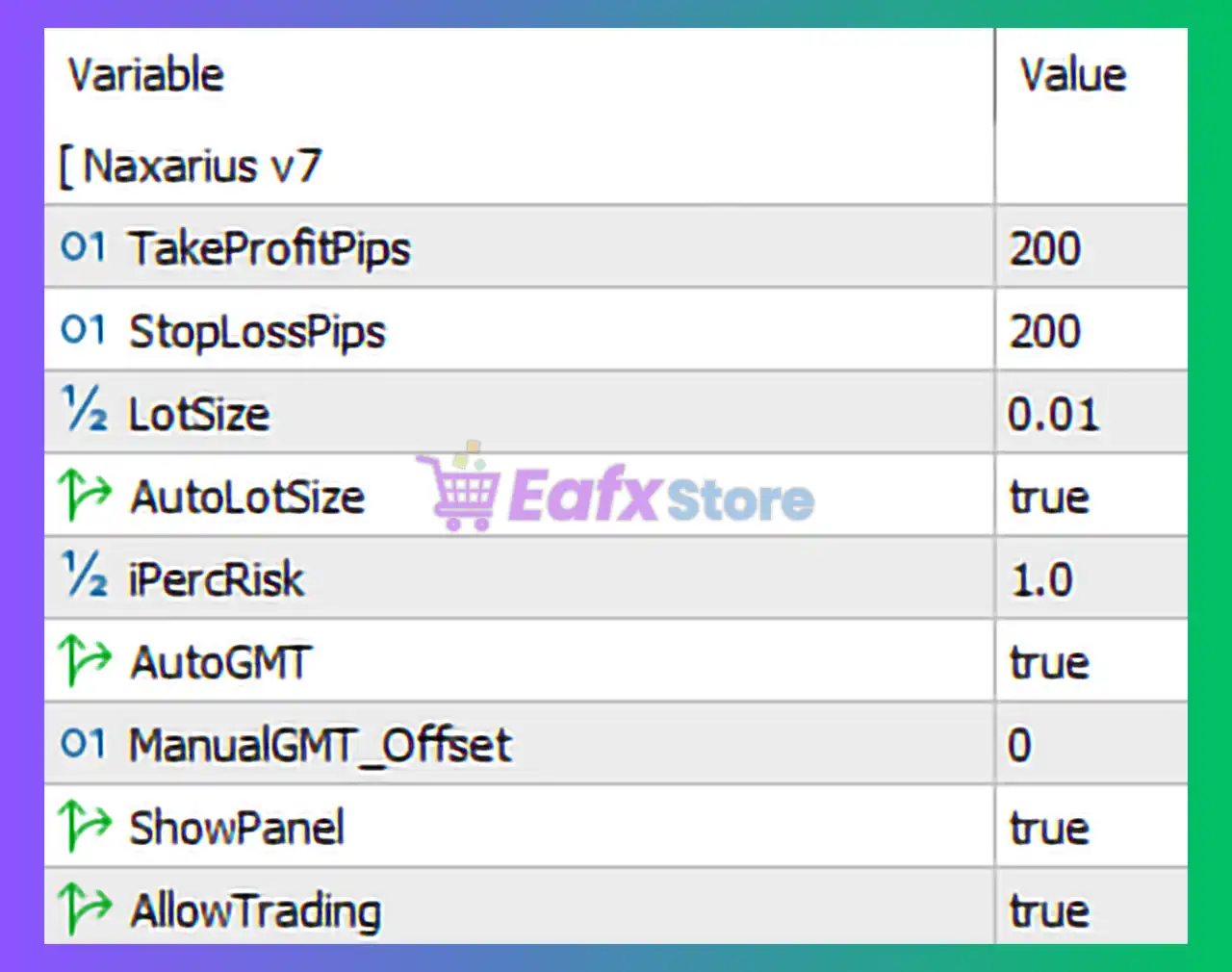
🔶 Core Trading Parameters
These settings define how the EA executes trades and manages risk at the position level.
| Parameter | Value | Description |
|---|---|---|
| TakeProfitPips | 200 | Target profit per trade measured in pips. |
| StopLossPips | 200 | Maximum loss allowed per trade in pips. |
| LotSize | 0.01 | Fixed lot size if auto lot is disabled. |
➡️ Analysis
The EA uses a 1:1 risk-reward ratio, where both take profit and stop loss are set to 200 pips. This creates a balanced trading approach, where each trade aims for equal profit and risk.
The default lot size of 0.01 indicates a low-risk entry level, ideal for small accounts or testing environments.
🔶 Risk Management Settings
This section is critical for controlling account exposure and position sizing.
| Parameter | Value | Description |
|---|---|---|
| AutoLotSize | true | Enables automatic lot sizing based on account balance. |
| iPercRisk | 1.0 | Risk percentage per trade (1% of account balance). |
➡️ Analysis
With AutoLotSize enabled, the EA dynamically calculates position sizes based on account equity.
- 1% risk per trade is considered conservative and sustainable
- Helps protect the account during losing streaks
- Ideal for long-term trading strategies
This setup is well-suited for traders who prioritize capital preservation over aggressive growth
🔶 Time & Execution Settings
These parameters ensure proper synchronization with broker time and control trading activity.
| Parameter | Value | Description |
|---|---|---|
| AutoGMT | true | Automatically detects broker server time offset. |
| ManualGMT_Offset | 0 | Manual time adjustment (not used when AutoGMT is enabled). |
➡️ Analysis
Using AutoGMT = true allows the EA to automatically adjust to the broker’s server time. This is important for:
- Accurate trade timing
- Session-based strategies
- Avoiding misalignment during daylight saving changes
🔶 Interface & Trading Permissions
These settings control visibility and whether the EA is allowed to execute trades.
| Parameter | Value | Description |
|---|---|---|
| ShowPanel | true | Displays EA information panel on the chart. |
| AllowTrading | true | Enables the EA to open and manage trades. |
➡️ Analysis
- The visual panel helps traders monitor performance and trade activity in real time
- AllowTrading = true ensures the EA is actively trading (otherwise it would only analyze the market)
🔶 Key Characteristics of This Configuration
Based on the provided settings, the Naxarius EA operates with the following profile:
- Balanced risk-reward ratio (1:1)
- Low risk per trade (1%)
- Automatic lot sizing enabled
- Fully automated trading execution
- Time synchronization handled automatically
This makes the EA suitable for:
- Beginner traders
- Long-term portfolio strategies
- Low-risk automated trading setups
- VPS deployment for continuous operation
🔶 Advantages of the Current Setup
➡️ Strong Risk Control:
Using 1% risk per trade ensures that the account can withstand multiple losing trades without significant drawdown.
➡️ Automation-Friendly:
With AutoLotSize and AutoGMT enabled, the EA requires minimal manual intervention.
➡️ Balanced Strategy Design:
Equal stop loss and take profit levels provide consistent trade structure and predictable outcomes.
➡️ Beginner-Friendly Configuration:
The simplicity of settings makes it easy to understand and deploy.
🔶 Conclusion
The Naxarius EA MT5 settings (SyntaxArchitect version) present a well-balanced and risk-controlled automated trading system. With features like automatic lot sizing, 1% risk management, and equal stop loss/take profit levels, the EA is designed for stable and sustainable trading performance.
Key highlights include:
- 200 pip take profit and stop loss (1:1 ratio)
- 1% risk per trade for capital protection
- Auto lot sizing for dynamic position management
- Automatic GMT synchronization
- Fully enabled trading system with monitoring panel
Overall, the Naxarius EA is ideal for traders seeking a low-risk, automated trading solution with consistent behavior. By adjusting parameters such as risk percentage or TP/SL levels, traders can further optimize the EA to match their individual trading goals and market conditions.