

Inputs Settings Guide - Explanation of every parameter in the Inputs tab
• Pips: all distances (Range, SL, TP, Tp_from_Bep, StartTrail, Trailing) are in pips. On a 5-digit EURUSD quote, 21 pips = 0.00210. The EA converts automatically for 3- and 5-digit brokers.
• Server time: all hours are in broker server time, which is the time shown in the MetaTrader Market Watch window.
• true / false: switches accept true or false.
• Reference balance: the balance at the moment the EA is initialised (attached, or restarted by changing inputs or the symbol). The money-based stops and targets are measured against it.
• Spelling: some input names (for example Star_ModifTp_Bep, maPereode, Target_Persen) keep their original spelling. Do not correct them, otherwise saved .set files will no longer match.
Header Lines
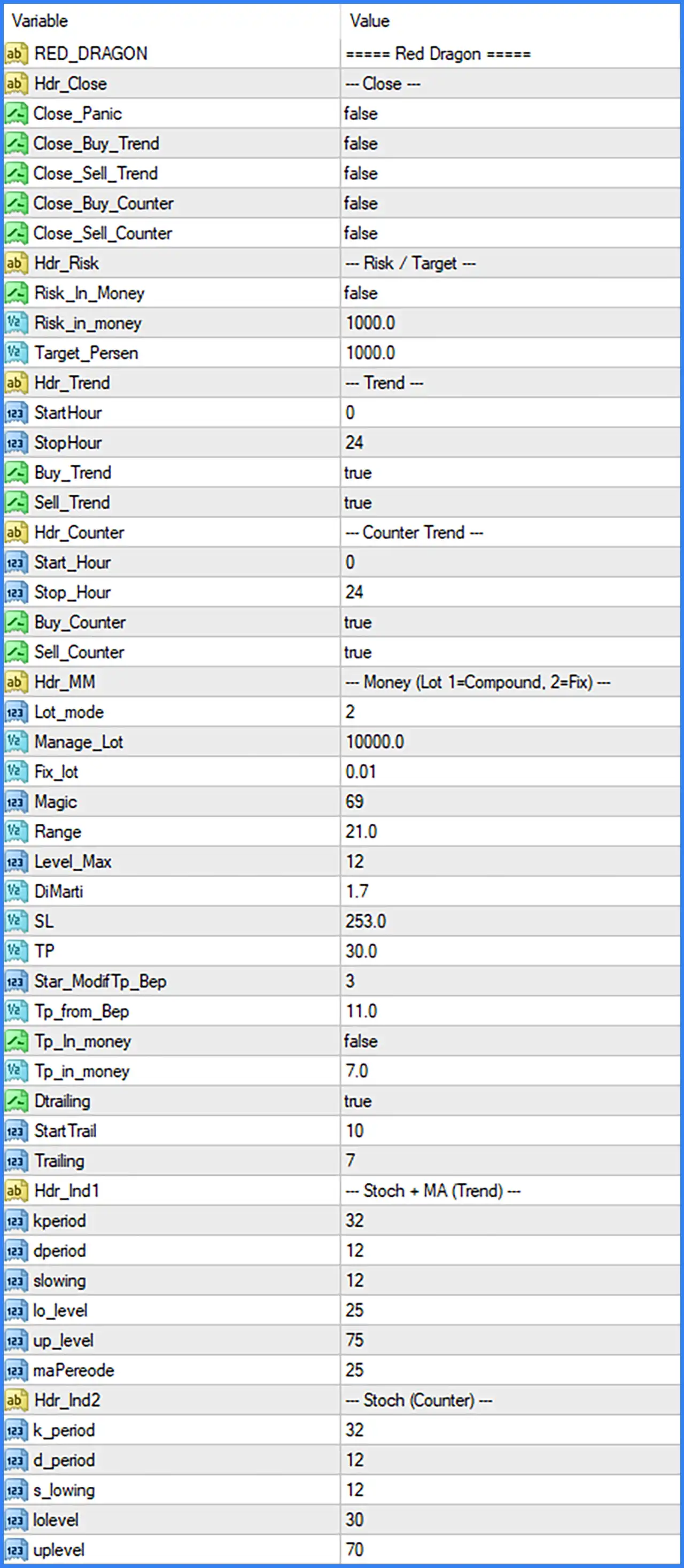
• RED_DRAGON (Default: "===== Red Dragon ====="): Title line at the top of the Inputs window. Tip: Label only. It has no effect on trading.
• Hdr_Close, Hdr_Risk, Hdr_Trend, Hdr_Counter, Hdr_MM, Hdr_Ind1, Hdr_Ind2 (Default: text separators): Separator lines such as "--- Close ---" that divide the Inputs into sections. Tip: Labels only. They have no effect on trading.
Close Switches
These five switches let you close orders directly from the Inputs window. While a switch is true, the EA closes the related orders on every tick and does not open new ones for that series. Set it back to false to resume.
• Close_Panic (Default: false): Emergency stop. Closes every order of all four series and stops the EA from opening new orders. Tip: Use for a complete stop. Set to false again to restart the EA.
• Close_Buy_Trend (Default: false): Closes the Trend Buy series and keeps it from reopening. Tip: Stops only this one series.
• Close_Sell_Trend (Default: false): Closes the Trend Sell series and keeps it from reopening. Tip: Stops only this one series.
• Close_Buy_Counter (Default: false): Closes the Counter Buy series and keeps it from reopening. Tip: Stops only this one series.
• Close_Sell_Counter (Default: false): Closes the Counter Sell series and keeps it from reopening. Tip: Stops only this one series.
Tip: The on-chart panel has its own CLOSE ALL, CLOSE BUY and CLOSE SELL buttons. Those buttons close orders once and do not change these inputs.
Risk and Target
Money-based protection for the whole EA. The reference balance is the balance recorded when the EA was initialised.
• Risk_In_Money (Default: false): Turns the equity stop on. When true and equity falls to the reference balance minus Risk_in_money, all orders are closed. Tip: After it triggers, the condition normally stays true, so the EA remains idle until it is re-initialised (re-attached or restarted).
• Risk_in_money (Default: 1000.0): Loss amount, in account currency, that triggers the equity stop. Only used when Risk_In_Money is true. Tip: Set it to the maximum loss you can accept. The default 1000 is far too large for a small account.
• Target_Persen (Default: 1000.0): Equity profit target in percent. When equity reaches the reference balance plus this percentage, all orders are closed and the EA stops trading. Tip: The default 1000 % effectively disables the target. A value of 10 stops the EA after 10 % growth. Re-initialise the EA to continue.
Trend Mode
Controls when the trend strategy (Trend Buy and Trend Sell series) may open new series. Orders already open and grid additions are not limited by the time window.
• StartHour (Default: 0): Server hour at which the trend strategy may start opening new series (inclusive). Tip: 0 with a StopHour of 24 means all day.
• StopHour (Default: 24): Server hour at which the trend strategy stops opening new series (exclusive). Tip: If StartHour is larger than StopHour the window crosses midnight, for example 22 to 6.
• Buy_Trend (Default: true): Allows the Trend Buy series. Tip: Set to false to disable Buy trades in trend mode.
• Sell_Trend (Default: true): Allows the Trend Sell series. Tip: Set to false to disable Sell trades in trend mode.
Counter-Trend Mode
Controls the counter-trend strategy (Counter Buy and Counter Sell series). It works exactly like trend mode, with its own hours and switches.
• Start_Hour (Default: 0): Server hour at which the counter-trend strategy may start opening new series (inclusive). Tip: 0 with a Stop_Hour of 24 means all day.
• Stop_Hour (Default: 24): Server hour at which the counter-trend strategy stops opening new series (exclusive). Tip: A Start_Hour larger than Stop_Hour crosses midnight.
• Buy_Counter (Default: true): Allows the Counter Buy series. Tip: Set to false to disable it.
• Sell_Counter (Default: true): Allows the Counter Sell series. Tip: Set to false to disable it.
• Start 0 / Stop 24: Trades all day.
• Start 7 / Stop 20: New series may open from 07:00 until 19:59 server time.
• Start 22 / Stop 6: New series may open overnight, from 22:00 until 05:59 server time.
Money Management and Lot Size
• Lot_mode (Default: 2): Lot calculation mode. 1 = compound (lot grows with the balance). 2 = fixed lot. Tip: Any other value stops the EA and shows "invalid Lot_Mode" on the chart.
• Manage_Lot (Default: 10000.0): Used only in compound mode. Start lot = account balance divided by this value. Tip: Example: balance 5,000 with 100,000 gives 0.05 lot. With the default 10,000, a 10,000 balance gives 1.00 lot, which is very aggressive.
• Fix_lot (Default: 0.01): Start lot of each series in fixed mode. Tip: Begin with the smallest lot and increase only after testing.
8. Grid and Martingale
• Magic (Default: 69): Base Magic Number. The four series use Magic + 9, + 99, + 999 and + 9999 (78, 168, 1068 and 10068 by default). Tip: Must not clash with the Magic Numbers of other EAs on the same account.
• Range (Default: 21.0): Distance in pips between grid orders. A new order opens when price is this far against the latest order of the series. Tip: Larger values give a wider, safer grid but fewer recoveries.
• Level_Max (Default: 12): Maximum number of orders in one series (the first order plus the grid additions). Tip: Lower values reduce the maximum exposure considerably.
• DiMarti (Default: 1.7): Lot multiplier for every additional grid order. 1.7 means each order is 1.7 times the previous one. Tip: The most important risk setting. 1.0 means no multiplication.
Risk reminder: With a 0.01 start lot, DiMarti 1.7 and Level_Max 12 the deepest order is roughly 3.7 lots and the whole series roughly 9 lots. Reduce either value to make the system less aggressive.
Stop Loss, Take Profit and Trailing
• SL (Default: 253.0): Stop loss in pips from each order's own entry price. Tip: Do not set it to 0. Values below the broker's minimum stop level are raised to that minimum.
• TP (Default: 30.0): Take profit in pips from each order's own entry price. Used while the series has fewer than Star_ModifTp_Bep orders. Tip: Setting TP or Tp_from_Bep to 0 switches off the EA's take-profit management.
• Star_ModifTp_Bep (Default: 3): Number of orders in a series at which the take profit changes from per-order to the shared breakeven take profit. Tip: With 3, orders 1 and 2 use TP; from order 3 the whole series uses Tp_from_Bep.
• Tp_from_Bep (Default: 11.0): Take profit in pips above (Buy) or below (Sell) the series' average breakeven price. Tip: Smaller values close baskets sooner with less profit.
• Tp_In_money (Default: false): Turns on the profit-in-money exit for the whole EA. Tip: When true and Tp_in_money is reached, all orders of the four series are closed.
• Tp_in_money (Default: 7.0): Total floating profit, in account currency, at which all four series are closed. Only used when Tp_In_money is true. Tip: Scale it to your lot size and account currency.
• Dtrailing (Default: true): Turns the trailing stop on or off. Tip: Keep it on to lock in profit on strong moves.
• StartTrail (Default: 10): Profit in pips (measured from the series' average price) at which trailing starts. Tip: Must be reached before the stop loss begins to follow price.
• Trailing (Default: 7): Distance in pips between price and the trailing stop loss. Tip: Raised to the broker's minimum stop level if smaller.
Indicator Settings - Trend Mode
Used by the trend strategy: an LWMA (close price) and a Stochastic Oscillator (SMA method, Low/High price field, main line), both calculated on the chart's timeframe.
• kperiod (Default: 32): Stochastic %K period. Tip: Longer values give smoother, slower signals.
• dperiod (Default: 12): Stochastic %D period. Tip: The EA reads only the Stochastic main line, so this value has little or no effect on signals.
• slowing (Default: 12): Stochastic slowing (smoothing of %K). Tip: Higher values reduce noise but delay signals.
• lo_level (Default: 25): Lower Stochastic level. A Trend Sell needs the Stochastic above this level. Tip: Keeps Sell entries away from already oversold markets.
• up_level (Default: 75): Upper Stochastic level. A Trend Buy needs the Stochastic below this level. Tip: Keeps Buy entries away from already overbought markets.
• maPereode (Default: 25): LWMA period (close price). Buy needs the last close above the LWMA, Sell needs it below. Tip: Original spelling is kept. Shorter periods react faster.
Indicator Settings - Counter-Trend Mode
Used by the counter-trend strategy, which relies only on its own Stochastic Oscillator.
• k_period (Default: 32): Stochastic %K period. Tip: Independent from the trend-mode value.
• d_period (Default: 12): Stochastic %D period. Tip: Little or no effect, because only the main line is used.
• s_lowing (Default: 12): Stochastic slowing. Tip: Higher values give smoother readings.
• lolevel (Default: 30): Oversold level. A Counter Buy opens when the Stochastic is below it. Tip: Lower values give fewer but more extreme signals.
• uplevel (Default: 70): Overbought level. A Counter Sell opens when the Stochastic is above it. Tip: Higher values give fewer but more extreme signals.
On-Chart Panel (not an input)
The panel at the top-right of the chart is controlled with the mouse, not with the Inputs tab.
• Floating P/L card: Shows current floating profit/loss of all four series in money and in percent of balance.
• Balance / Equity / Margin level: Live account information. Margin level shows -- when no positions use margin.
• BUY / SELL orders: Number of open Buy and Sell orders of the EA on this symbol.
• Status: RUNNING, or PAUSED when new entries are paused.
• PAUSE / RESUME NEW ENTRIES: Stops or allows new first orders. Series that are already open keep running their grid and exits.
• CLOSE ALL ORDERS: Closes all orders of the four series on the chart symbol after confirmation.
• CLOSE BUY / CLOSE SELL: Closes only the Buy or only the Sell orders after confirmation.
• - / + button: Minimizes the panel to its title bar, or expands it again.
Conservative Demo Preset
A starting point for testing on a demo account. These values are not a guarantee of profit and should be adapted to your deposit and risk tolerance.
• Fix_lot - Test value: 0.01; Reason: Smallest lot for evaluation.
• DiMarti - Test value: 1.3 - 1.5; Reason: Slower lot growth through the grid.
• Level_Max - Test value: 6 - 8; Reason: Limits the maximum number of orders and exposure.
• Risk_In_Money - Test value: true; Reason: Activates the equity stop.
• Risk_in_money - Test value: Amount you can afford to lose; Reason: Hard limit for the account.
• Dtrailing - Test value: true; Reason: Locks in profit once a basket is in profit.
• Buy_Counter / Sell_Counter - Test value: false (first test); Reason: Test trend mode alone first, then add counter-trend.
Troubleshooting - EA Does Not Open Trades
• AutoTrading is off: the toolbar button must be green and "Allow live trading" ticked on the Common tab.
• Outside the trading hours: check StartHour / StopHour and Start_Hour / Stop_Hour.
• A close switch is true: Close_Panic or one of the Close_* inputs is set to true.
• Paused from the panel: the status shows PAUSED. Press RESUME NEW ENTRIES.
• Target or equity stop was triggered: Target_Persen or Risk_In_Money closed everything. Re-attach the EA to continue.
• Invalid lot mode: Lot_mode must be 1 or 2.
• No signal yet: entries wait for the indicator conditions described in the Product Overview.
• Margin or broker limits: not enough free margin, hedging not allowed, or the symbol is not EURUSD-compatible.