

Introduction
Double Earning EA is an automated trading Expert Advisor (EA) designed for MetaTrader 4, featuring configurable trade execution, pip-based profit targets, Stop Loss management, and execution control parameters.
The EA includes settings for maximum drawdown, money management, price correction, trading action thresholds, and virtual stop management. It also provides execution timing controls through confirmation and sleep intervals, helping traders customize how the robot processes trading signals and executes orders.
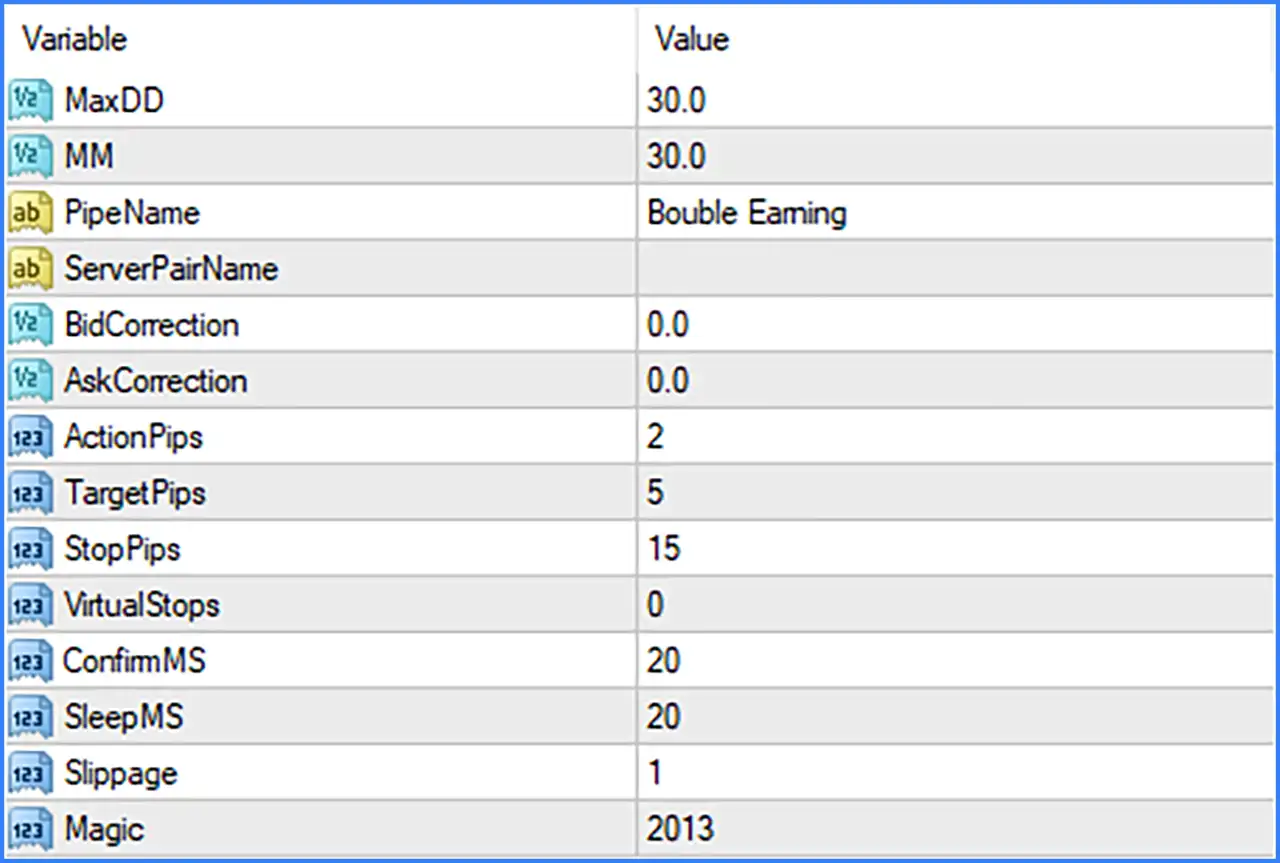
Understanding the Double Earning EA MT4 settings is essential for configuring its trading behavior, managing potential risks, and adjusting trade execution according to broker conditions. Below is a complete explanation of all parameters and their default values from the supplied Inputs configuration.
Risk Management Settings
🔹 MaxDD: 30.0 – Sets the maximum drawdown reference value to 30.0, defining the configured drawdown threshold for the EA's risk management system.
🔹 MM: 30.0 – Sets the Money Management (MM) parameter to 30.0, providing a configurable value for the EA's money management system.
Trading Identification and Connection Settings
🔹 PipeName: Double Earning – Defines the pipe name as Double Earning, identifying the EA's configured communication or trading interface.
🔹 ServerPairName: Blank – Leaves the server pair name empty by default, allowing the EA to use its internal or externally configured symbol identification, depending on its implementation.
Price Correction Settings
🔹 BidCorrection: 0.0 – Sets the Bid price correction value to 0.0, meaning no additional adjustment is applied to the Bid price through this parameter.
🔹 AskCorrection: 0.0 – Sets the Ask price correction value to 0.0, meaning no additional adjustment is applied to the Ask price through this parameter.
Trading Strategy and Pip Management
🔹 ActionPips: 2 – Sets the action threshold to 2 pips, defining the configured price movement required for the EA's trading action logic.
🔹 TargetPips: 5 – Sets the Take Profit target to 5 pips, establishing the configured profit objective for individual trades.
🔹 StopPips: 15 – Sets the Stop Loss distance to 15 pips, defining the configured price movement against a position before its protective exit level is reached.
🔹 VirtualStops: 0 – Sets the virtual stop parameter to 0, indicating that no numerical virtual stop distance is configured by default.
Trade Execution and Timing Settings
🔹 ConfirmMS: 20 – Sets the confirmation interval to 20 milliseconds, controlling the configured waiting period used by the EA's trade confirmation process.
🔹 SleepMS: 20 – Sets the execution sleep interval to 20 milliseconds, defining the configured pause between internal processing or execution operations.
🔹 Slippage: 1 – Sets the maximum permitted execution slippage to 1 point or broker-defined execution unit, helping control the difference between requested and executed prices.
Order Identification Settings
🔹 Magic: 2013 – Assigns the Magic Number 2013 to the EA, allowing MetaTrader 4 to identify and distinguish its orders from trades opened by other Expert Advisors or manually.
Conclusion
Double Earning EA MT4 provides a compact set of trading configuration parameters focused on pip-based trade management, execution timing, price correction, and risk control.
The supplied default configuration includes a 5-pip Take Profit, a 15-pip Stop Loss, a 2-pip ActionPips threshold, and a maximum drawdown reference of 30.0. Its execution settings include a 20-millisecond confirmation interval, a 20-millisecond sleep interval, and slippage set to 1.
Before using Double Earning EA MT4 on a live account, traders should carefully review the MaxDD and MM parameters, confirm the meaning and units of the risk settings, and test the EA under their broker's execution conditions.