
Rofiknur EA is a grid-style Expert Advisor (EA) for MetaTrader 4 that uses martingale-style scaling, profit targeting, and custom time filtering. Below is a comprehensive breakdown of its configuration and trading logic:
==>> Buy this unlimited Rofiknur EA MT4 product here
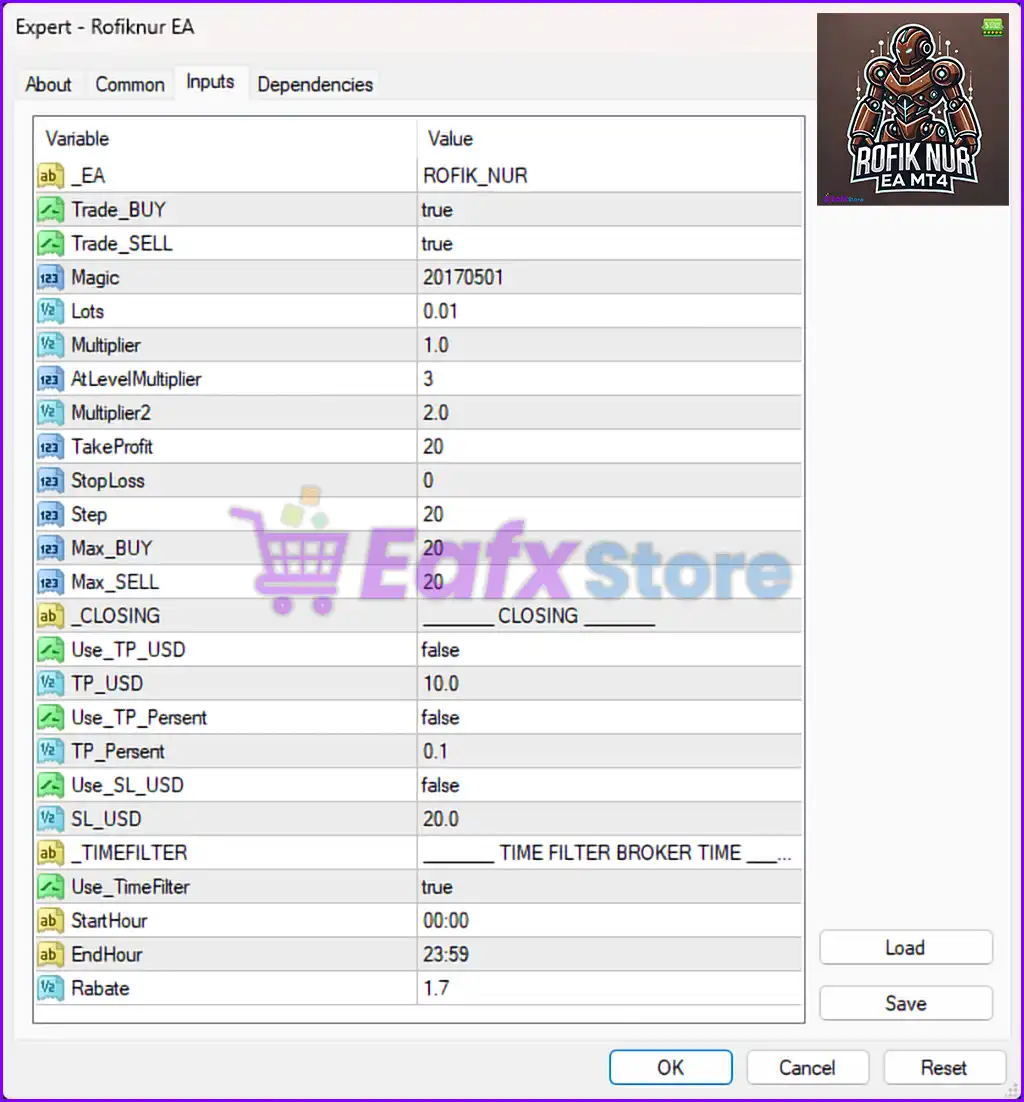
⚙️ General EA Configuration
| Parameter | Value |
|---|---|
| _EA | ROFIK_NUR – Internal identifier of the EA |
| Trade_BUY | true – EA is allowed to open Buy positions |
| Trade_SELL | true – EA is allowed to open Sell positions |
| Magic | 20170501 – Unique ID for trade tracking |
| Lots | 0.01 – Initial lot size per order |
✅ This EA supports both buy and sell logic and is configured to start with a minimal lot size, ideal for micro accounts or low-risk starts.
🔁 Martingale Logic
| Parameter | Value |
|---|---|
| Multiplier | 1.0 – Standard multiplier (not increasing lot size for grid) |
| AtLevelMultiplier | 3 – Lot multiplier starts applying from the 3rd level/order |
| Multiplier2 | 2.0 – Second multiplier applied from the specified level |
📉 This configuration suggests martingale-style grid trading begins after the 3rd trade, increasing the lot size exponentially after initial positions.
🎯 Take Profit and Stop Loss Settings
| Parameter | Value |
|---|---|
| TakeProfit | 20 pips – TP per position (unless overridden by TP in USD/%) |
| StopLoss | 0 – No fixed pip-based SL set (can be overridden by $ or %) |
| Step | 20 pips – Distance between grid entries |
📌 The EA does not use a static SL but focuses on grid recovery. Step size is moderate, minimizing tight clustering of positions.
📈 Maximum Open Positions
| Parameter | Value |
|---|---|
| Max_BUY | 20 – Maximum buy positions allowed at a time |
| Max_SELL | 20 – Maximum sell positions allowed at a time |
📊 The EA supports up to 40 open trades simultaneously (20 buy + 20 sell), suited for volatile ranging markets.
💰 USD-Based Target & Risk Management
| Parameter | Value |
|---|---|
| Use_TP_USD | false – Profit target in USD is disabled |
| TP_USD | 10.0 – Profit target (if enabled) |
| Use_TP_Persent | false – Percentage profit-based TP disabled |
| TP_Persent | 0.1% – Would close trades when 0.1% profit is achieved (if enabled) |
| Use_SL_USD | false – USD-based stop loss disabled |
| SL_USD | 20.0 – Stop loss in USD (not active) |
⚠️ These risk controls are currently disabled. If enabled, the EA would close all trades based on total profit/loss in either dollar value or percentage.
⏱️ Time Filter Settings
| Parameter | Value |
|---|---|
| Use_TimeFilter | true – EA will trade only during set hours |
| StartHour | 00:00 – Start of trading window (broker time) |
| EndHour | 23:59 – End of trading window (basically 24/7) |
🕒 The time filter is enabled but set to cover the entire day, so the EA runs continuously unless changed.
💵 Additional Setting
| Parameter | Value |
|---|---|
| Rabate | 1.7 – Likely used to track expected rebate per lot from the broker |
✅ Summary of Strategy Logic
- Grid & martingale EA with scaling after 3rd level
- Fixed lot entry with optional multipliers
- Customizable TP in pips, dollars, or percentage (though disabled)
- Can run 24/7 with full buy/sell logic
- No stop loss by default (dangerous unless manually monitored or capped)
- Maximum of 40 open positions
- Works best in ranging or mean-reverting markets