
🧩 What is SafeGold Scalper EA?
SafeGold Scalper EA MT5 is an automated Gold (XAUUSD) scalping Expert Advisor (EA) designed to capture short-term impulsive price movements with predefined stop loss, take profit, and recovery logic. The settings clearly show a non-martingale, fixed-risk scalping strategy focused on capital protection and controlled exposure.
📌📌📌 Buy this unlimited SafeGold Scalper EA MT5 product here 📌📌📌
This EA is positioned as a safer alternative to grid or martingale systems, targeting traders who prefer defined risk per trade.
🧩 Core Identification Setting
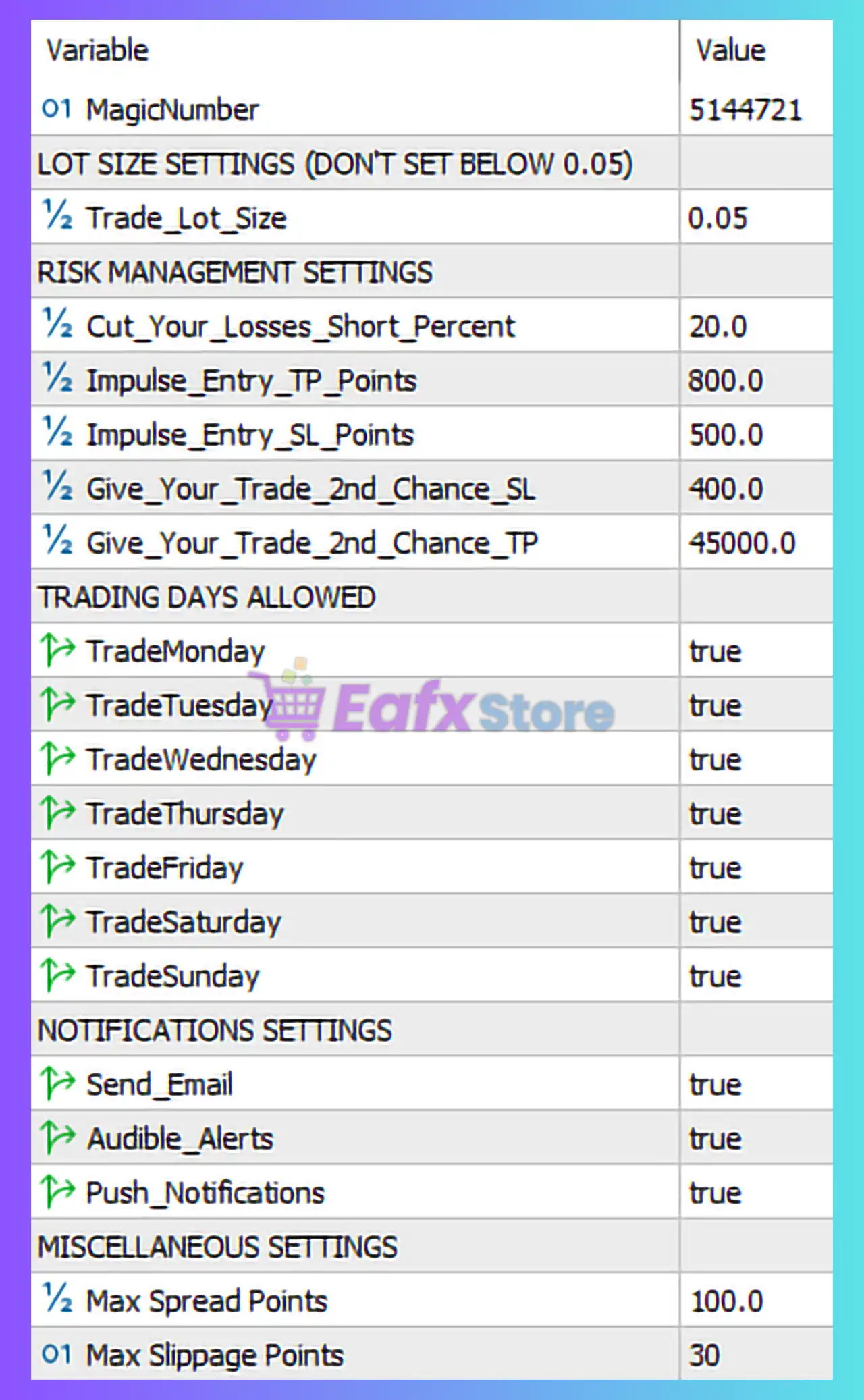
🔶 Magic Number
- MagicNumber: 5144721
👉 Purpose: Ensures that SafeGold Scalper EA manages only its own trades, avoiding conflicts with other EAs or manual positions on the same MT5 account.
✔️ Essential for multi-EA environments.
🧩 Lot Size Settings (Risk Foundation)
🔶 Trade Lot Size
- Trade_Lot_Size: 0.05
- Minimum Allowed: 0.05 (as noted)
👉 Interpretation: This EA uses a fixed lot size, not dynamic or percentage-based. A starting lot of 0.05 is moderate and conservative, suitable for small to medium accounts, especially when trading Gold volatility.
✔️ Predictable risk per trade.
❌ Not adaptive to account growth unless manually adjusted.
🧩 Risk Management Settings (Key Strength)
🔶 Cut Loss Mechanism
- Cut_Your_Losses_Short_Percent: 20%
👉 Interpretation: If losses exceed 20% of a defined threshold, the EA forces early exit, preventing catastrophic drawdowns.
✔️ Strong capital protection.
✔️ Ideal for prop firm rules.
🔶 Impulse Entry Logic
- Impulse_Entry_TP_Points: 800
- Impulse_Entry_SL_Points: 500
👉 Interpretation: The EA targets short, explosive Gold price moves with a favorable risk-to-reward ratio (≈1:1.6).
✔️ Well-balanced TP/SL.
✔️ Optimized for Gold volatility.
✔️ Suitable for scalping and news momentum.
🔶 Second Chance Trade Mechanism
- Give_Your_Trade_2nd_Chance_SL: 400
- Give_Your_Trade_2nd_Chance_TP: 45,000
👉 Interpretation: This feature allows a recovery or re-entry logic, giving trades another opportunity to reach profit after a partial stop. The very large TP suggests this acts more as a trade survival mechanism than a typical scalping target.
✔️ Improves win rate.
❌ Can extend trade duration unexpectedly.
🧩 Trading Days Configuration
🔶 Active Trading Days
- Monday ✔️
- Tuesday ✔️
- Wednesday ✔️
- Thursday ✔️
- Friday ✔️
- Saturday ✔️
- Sunday ✔️
👉 Interpretation: The EA is allowed to trade every day, including weekends. While Gold typically has limited weekend liquidity, this ensures no missed opportunities on brokers offering extended sessions.
⚠️ Weekend spreads may widen.
✔️ Maximum market coverage.
🧩 Notifications & Monitoring
🔶 Alerts & Notifications
- Email Alerts: Enabled
- Audible Alerts: Enabled
- Push Notifications: Enabled
👉 Interpretation: SafeGold Scalper EA provides full real-time monitoring, ideal for traders who want transparency and immediate awareness of trade actions.
✔️ Professional monitoring setup.
✔️ Suitable for remote trading.
🧩 Execution & Broker Protection Settings
🔶 Spread & Slippage Control
- Max Spread Points: 100
- Max Slippage Points: 30
👉 Interpretation: These filters protect the EA from bad execution conditions, especially during high volatility or low liquidity periods.
✔️ Prevents overpaying spread.
✔️ Reduces slippage risk.
✔️ Enhances consistency.
🧩 Final Verdict – Is SafeGold Scalper EA MT5 Worth Using?
🔶 Strengths
✅ Fixed stop loss and take profit (no martingale).
✅ Strong built-in risk protection.
✅ Optimized for XAUUSD scalping.
✅ Clear impulse-based entry logic.
✅ Suitable for prop firm challenges.
🔶 Weaknesses
❌ Fixed lot size (manual scaling required).
❌ Weekend trading may increase spread risk.
❌ Second-chance logic can prolong exposure.
🔥 Conclusion
SafeGold Scalper EA MT5 is a low-to-medium risk Gold scalping robot designed for traders who prioritize capital protection and defined risk. Unlike grid or martingale EAs, it uses fixed stop loss, impulse-based entries, and strict execution filters, making it suitable for funded accounts, prop firms, and conservative traders. When used with a reliable broker and proper lot sizing, SafeGold Scalper EA offers a balanced approach between safety and profitability.