
🔶 Introduction to Shark Expert Advisor (EA)
Shark Expert Advisor (EA) is an automated trading system designed for the MetaTrader 4 (MT4) platform. It helps traders execute trades based on predefined algorithms, eliminating emotional decision-making and enabling consistent strategy execution.
📌📌📌 Buy this Shark Expert Advisor MT4 product here 📌📌📌
This Expert Advisor (EA) focuses on multi-timeframe analysis, risk management, and trade automation, making it suitable for both beginner and advanced traders who want to optimize their forex trading performance.
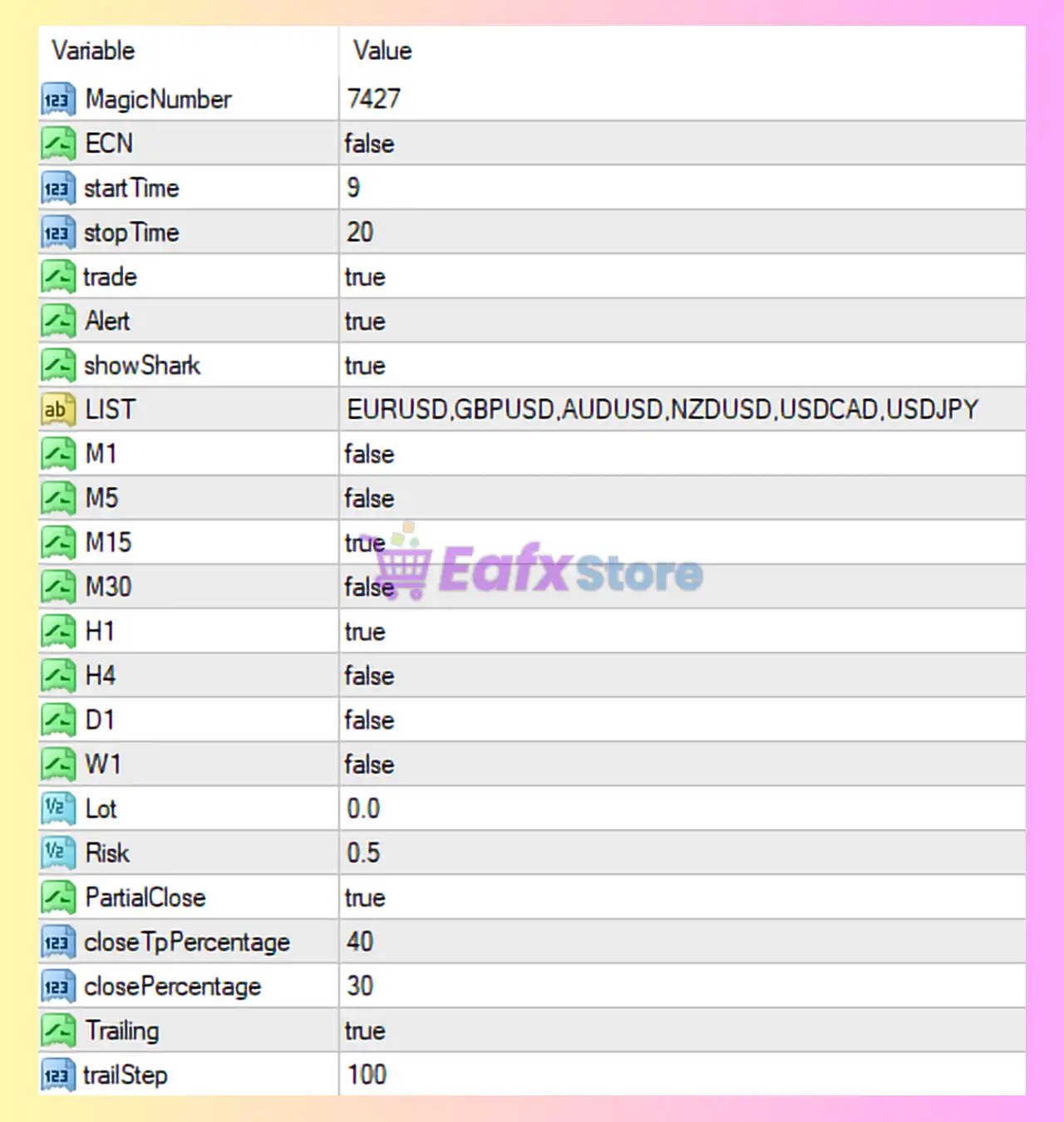
🔶 Detailed Analysis of Shark Expert Advisor Settings
🧩 General Trading Settings
| Parameter | Value | Description |
|---|---|---|
| MagicNumber | 7427 | Unique identifier for trades opened by this EA. Helps distinguish trades from other EAs or manual trades. |
| ECN | false | Indicates whether the broker is ECN. If true, EA avoids setting SL/TP at order open. |
| startTime | 9 | Trading start hour (server time). |
| stopTime | 20 | Trading stop hour (server time). |
| trade | true | Enables or disables trading. |
| Alert | true | Sends alerts when signals occur. |
| showShark | true | Displays Shark indicators/visual elements on chart. |
👉 Insight:
This EA is configured to trade only during specific hours (9–20), which helps avoid low-liquidity or volatile sessions.
🧩 Currency Pairs & Timeframes
| Parameter | Value |
|---|---|
| LIST | EURUSD, GBPUSD, AUDUSD, NZDUSD, USDCAD, USDJPY |
Enabled Timeframes:
| Timeframe | Status |
|---|---|
| M1 | false |
| M5 | false |
| M15 | true |
| M30 | false |
| H1 | true |
| H4 | false |
| D1 | false |
| W1 | false |
👉 Insight:
- The EA operates primarily on M15 and H1, which suggests a short-to-medium-term strategy.
- Avoiding lower timeframes like M1/M5 reduces noise and false signals.
🧩 Risk & Lot Management
| Parameter | Value | Description |
|---|---|---|
| Lot | 0.0 | Auto lot sizing enabled (lot calculated based on risk). |
| Risk | 0.5 | Risk percentage per trade (0.5%). |
👉 Insight:
- Using 0.5% risk per trade is considered very conservative, suitable for long-term capital preservation.
- Auto lot sizing ensures consistency across trades.
🧩 Trade Management Settings
| Parameter | Value | Description |
|---|---|---|
| PartialClose | true | Enables partial closing of trades. |
| closeTPpercentage | 40 | Percentage of position closed at TP. |
| closePercentage | 30 | Likely partial close trigger level. |
👉 Insight:
- Partial close helps lock in profits early, reducing risk exposure.
- This is ideal for volatile markets.
🧩 Trailing Stop Settings
| Parameter | Value | Description |
|---|---|---|
| Trailing | true | Enables trailing stop. |
| trailStep | 100 | Distance (in points) for trailing stop adjustment. |
👉 Insight:
- A trailing step of 100 points indicates a moderate trailing strategy, allowing trades to breathe while protecting profits.
🔶 Overall Strategy Evaluation
🧩 Strengths
- Conservative risk management (0.5%)
- Multi-timeframe confirmation (M15 + H1)
- Partial close + trailing stop = strong profit protection
- Time-filtered trading reduces unnecessary exposure
🧩 Potential Limitations
- Limited to specific trading hours (may miss opportunities)
- No higher timeframe (H4/D1) trend confirmation
- Fixed trailing step may not adapt to volatility
🔶 Conclusion
The Shark Expert Advisor MT4 configuration shown in your setup reflects a balanced and conservative trading approach. By combining low risk (0.5%), multi-timeframe filtering (M15 & H1), and advanced trade management (partial close + trailing stop), the EA is designed to prioritize capital protection and steady growth.
This setup is particularly suitable for traders who prefer:
- Long-term consistency over aggressive gains
- Reduced drawdowns
- Structured and disciplined automated trading
If optimized further (e.g., adapting trailing stop to volatility or adding higher timeframe filters), this EA could become even more robust in varying market conditions.