

Introduction
US Odyssey FTMO MT4 is an automated trading Expert Advisor (EA) designed for the MetaTrader 4 platform. It features configurable risk management, multiple indicator settings, automated trade execution, daily profit targets, and account protection controls.

The EA provides flexible money management options, including starting lot size, lot multiplication, and lot increments. It also incorporates three Odyssey indicator configurations, adjustable trading distances, maximum trade limits, spread filtering, and daily protection mechanisms.
For traders interested in automated trading and prop firm environments, understanding the US Odyssey FTMO settings is essential for configuring trading exposure, controlling daily risk, and managing trading activity according to individual account requirements.
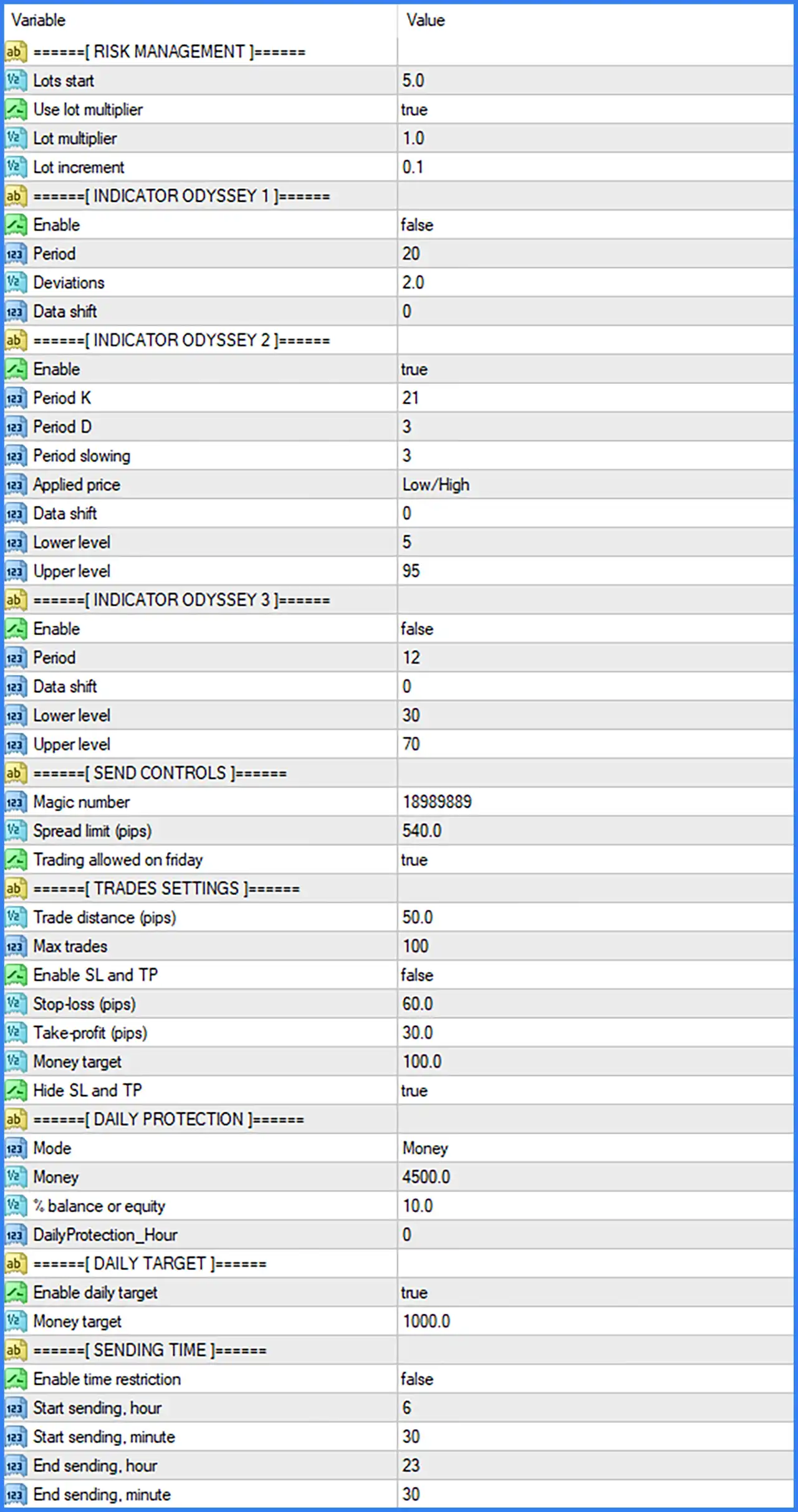
Risk Management Settings
🔹 Lots start = 5.0: Sets the initial trading lot size to 5.0 lots, defining the starting position volume used by the EA when opening its trades.
🔹 Use lot multiplier = true: Enables the lot multiplication function, allowing the EA to increase trading volume according to the configured Lot multiplier.
🔹 Lot multiplier = 1.0: Sets the lot multiplication factor to 1.0, meaning the configured multiplier does not increase the lot size when applied.
🔹 Lot increment = 0.1: Sets the lot increment value to 0.1, defining the additional trading volume used by the EA's lot-sizing mechanism.
Indicator Odyssey 1 Settings
🔹 Enable = false: Disables Indicator Odyssey 1, preventing this indicator configuration from being used as an active component of the EA's trading logic.
🔹 Period = 20: Sets the indicator calculation period to 20, defining the number of periods used by the indicator's calculation.
🔹 Deviations = 2.0: Sets the deviation parameter to 2.0, defining the configured deviation value used in the indicator's calculations.
🔹 Data shift = 0: Sets the indicator data shift to 0, meaning no additional horizontal shift is applied to the indicator data.
Indicator Odyssey 2 Settings
🔹 Enable = true: Enables Indicator Odyssey 2, allowing this indicator configuration to participate in the EA's trading calculations and signal evaluation.
🔹 Period K = 21: Sets the K period to 21, defining the calculation period for the indicator's %K component.
🔹 Period D = 3: Sets the D period to 3, determining the smoothing or signal calculation period for the indicator's %D component.
🔹 Period slowing = 3: Sets the slowing parameter to 3, controlling the smoothing process used in the indicator's calculations.
🔹 Applied price = Low/High: Uses Low/High prices as the applied price configuration for the indicator, determining the price data used in its calculations.
🔹 Data shift = 0: Sets the indicator data shift to 0, keeping the indicator values aligned with their original chart positions.
🔹 Lower level = 5: Sets the lower indicator threshold to 5, defining the configured lower boundary used by the indicator to evaluate market conditions.
🔹 Upper level = 95: Sets the upper indicator threshold to 95, defining the configured upper boundary used by the indicator to evaluate market conditions.
Indicator Odyssey 3 Settings
🔹 Enable = false: Disables Indicator Odyssey 3, meaning this indicator configuration is not activated in the default EA settings.
🔹 Period = 12: Sets the indicator calculation period to 12, defining the number of periods used to calculate its indicator values.
🔹 Data shift = 0: Sets the indicator data shift to 0, ensuring that no additional horizontal shift is applied to the indicator output.
🔹 Lower level = 30: Sets the lower indicator threshold to 30, defining the configured lower boundary for evaluating market conditions.
🔹 Upper level = 70: Sets the upper indicator threshold to 70, defining the configured upper boundary for evaluating market conditions.
Send Controls Settings
🔹 Magic number = 18989889: Assigns Magic Number 18989889 to trades opened by US Odyssey FTMO MT4, allowing the EA to identify and manage its own positions separately from other trading systems.
🔹 Spread limit (pips) = 540.0: Sets the maximum spread parameter to 540.0 pips, defining the configured spread threshold used by the EA when evaluating whether trading conditions are acceptable.
🔹 Trading allowed on friday = true: Enables Friday trading, allowing the EA to execute trades on Fridays when its other trading conditions and restrictions are satisfied.
Trades Settings
🔹 Trade distance (pips) = 50.0: Sets the trading distance to 50.0 pips, defining the configured minimum or required distance used by the EA when managing trade entries.
🔹 Max trades = 100: Sets the maximum trade limit to 100, defining the maximum number of trades that the EA is configured to manage according to its internal order management rules.
🔹 Enable SL and TP = false: Disables the standard Stop Loss and Take Profit functionality, meaning the EA does not activate these conventional exit settings through this option.
🔹 Stop-loss (pips) = 60.0: Sets the Stop Loss distance to 60.0 pips, defining the configured protective distance when the SL and TP function is enabled.
🔹 Take-profit (pips) = 30.0: Sets the Take Profit distance to 30.0 pips, defining the configured profit-taking distance when the SL and TP function is enabled.
🔹 Money target = 100.0: Sets the monetary profit target to 100.0, defining the configured financial target used by the EA's trade management system.
🔹 Hide SL and TP = true: Enables hidden Stop Loss and Take Profit functionality, allowing the EA to manage the configured exit levels internally rather than displaying conventional SL and TP levels directly on the broker's order records, depending on its implementation.
Daily Protection Settings
🔹 Mode = Money: Selects Money mode for daily protection, meaning the EA uses a monetary threshold as its configured daily protection reference.
🔹 Money = 4500.0: Sets the monetary protection threshold to 4500.0, defining the configured financial limit used by the daily protection mechanism when Money mode is selected.
🔹 % balance or equity = 10.0: Sets the percentage-based protection parameter to 10.0%, providing an alternative daily protection threshold calculated using account balance or equity.
🔹 DailyProtection_Hour = 0: Sets the daily protection hour to 0, defining the configured hour associated with the EA's daily protection timing or reset mechanism.
Daily Target Settings
🔹 Enable daily target = true: Enables the daily profit target function, allowing US Odyssey FTMO MT4 to apply its configured daily profit objective when managing trading activity.
🔹 Money target = 1000.0: Sets the daily monetary profit target to 1000.0, defining the configured financial objective for the EA's daily target mechanism.
Sending Time Settings
🔹 Enable time restriction = false: Disables the trading time restriction, allowing the EA to operate without enforcing the configured Start sending and End sending schedule.
🔹 Start sending hour = 6: Sets the starting trading hour to 6, defining the hour when the EA is permitted to begin sending trading orders if the time restriction is enabled.
🔹 Start sending minute = 30: Sets the starting trading minute to 30, establishing the configured trading start time at 06:30.
🔹 End sending hour = 23: Sets the ending trading hour to 23, defining the hour when the EA's permitted trading session ends if the time restriction is enabled.
🔹 End sending minute = 30: Sets the ending trading minute to 30, establishing the configured trading cutoff time at 23:30.