

Introduction
Dragon Multi EA MT4 is an automated trading Expert Advisor (EA) designed for the MetaTrader 4 platform. It features a multi-strategy trading configuration with customizable lot sizing, risk management, order limitations, breakeven functionality, and trading-day controls.
The EA provides flexible parameters for managing trading risk, setting Stop Loss (SL) and Take Profit (TP) distances, controlling order exposure, and determining which weekdays are available for automated trading. It also includes a dedicated Prop Firm setting, making it possible to configure the EA for trading environments with specific account requirements.
Understanding the Dragon Multi EA MT4 settings helps traders customize trade execution, manage potential drawdowns, and adjust trading activity according to their preferred risk management approach.
General Trading Settings
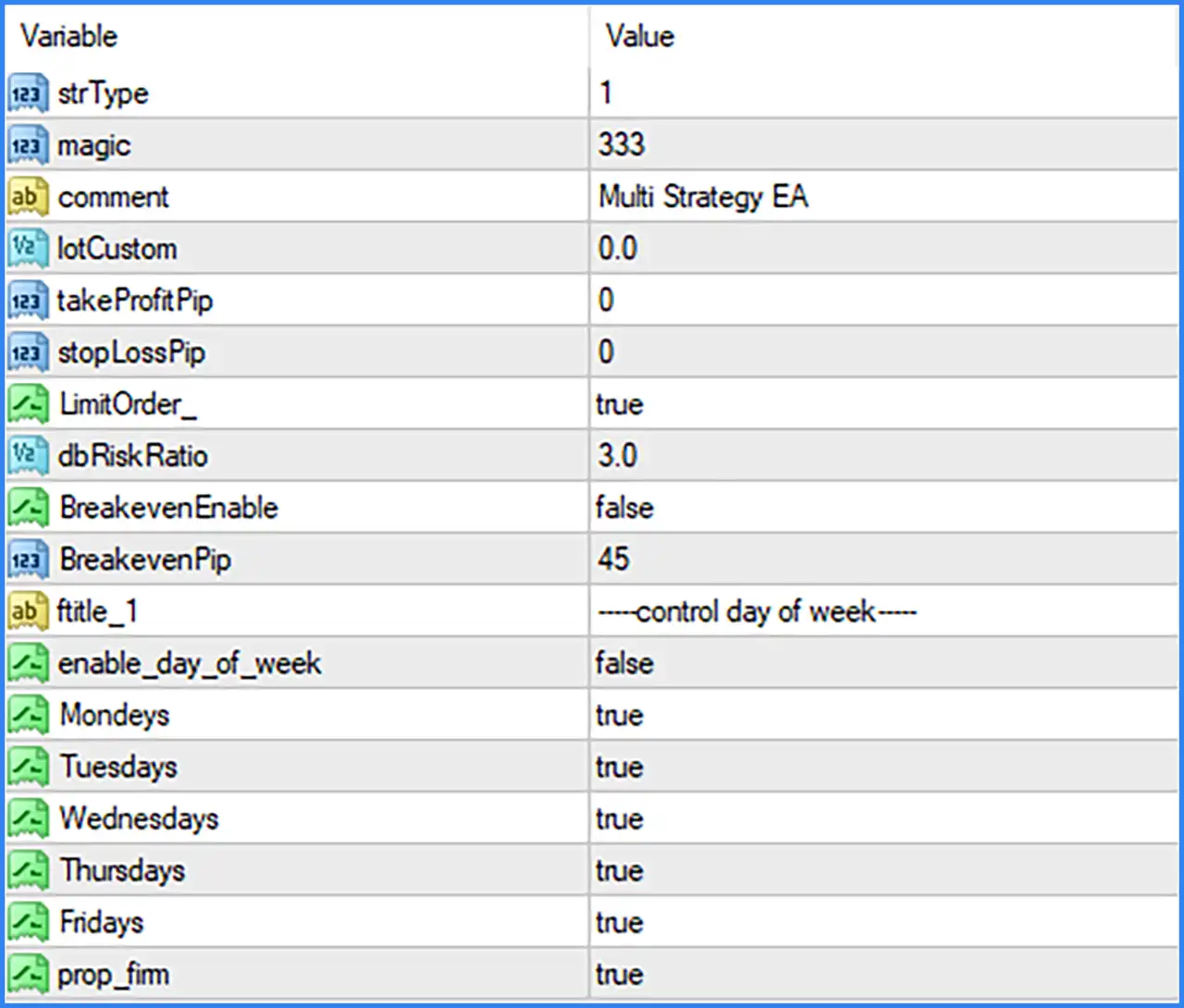
🔹 strType = 1: Sets the trading strategy type to 1, selecting the corresponding predefined strategy configuration used by Dragon Multi EA MT4.
🔹 magic = 333: Assigns Magic Number 333 to trades opened by the EA, allowing it to identify and manage its own trading positions separately from manual trades or other Expert Advisors.
🔹 comment = Multi Strategy EA: Sets the trade comment to "Multi Strategy EA", allowing traders to identify orders generated by Dragon Multi EA MT4 in the MetaTrader 4 trading terminal.
🔹 lotCustom = 0.0: Sets the custom lot-size parameter to 0.0. This value may indicate that a manually specified custom lot size is not being used, allowing the EA's alternative position-sizing mechanism to determine trading volume.
Take Profit and Stop Loss Settings
🔹 takeProfitPip = 0: Sets the Take Profit distance to 0 pips, indicating that no fixed pip-based Take Profit target is configured through this parameter.
🔹 stopLossPip = 0: Sets the Stop Loss distance to 0 pips, indicating that no fixed pip-based Stop Loss is configured through this parameter.
Order Management Settings
🔹 LimitOrder_ = true: Enables the order limitation function, allowing Dragon Multi EA MT4 to apply its internal restrictions when managing or opening trading orders.
🔹 dbRiskRatio = 3.0: Sets the risk ratio parameter to 3.0, defining the configured risk value used by the EA's internal risk management calculations.
Breakeven Settings
🔹 BreakevenEnable = false: Disables the automatic Breakeven function, meaning the EA will not activate its breakeven management mechanism under the default configuration.
🔹 BreakevenPip = 45: Sets the Breakeven activation threshold to 45 pips, defining the configured profit distance at which the EA may move a position's Stop Loss toward its entry price when BreakevenEnable is activated.
Day of Week Trading Settings
🔹 fitile_1 = control day of week: Section heading for configuring the weekdays on which Dragon Multi EA MT4 is permitted to operate.
🔹 enable_day_of_week = false: Disables the weekday trading filter, meaning the individual weekday settings are not applied as active trading restrictions under the default configuration.
🔹 Mondeys = true: Enables Monday as an allowed trading day when the weekday filter is activated.
🔹 Tuesdays = true: Enables Tuesday as an allowed trading day when the weekday filter is activated.
🔹 Wednesdays = true: Enables Wednesday as an allowed trading day when the weekday filter is activated.
🔹 Thursdays = true: Enables Thursday as an allowed trading day when the weekday filter is activated.
🔹 Fridays = true: Enables Friday as an allowed trading day when the weekday filter is activated.
Prop Firm Settings
🔹 prop_fim = true: Enables the Prop Firm setting, activating the corresponding prop firm-related configuration within Dragon Multi EA MT4. The exact restrictions or additional risk controls associated with this parameter depend on the EA's internal implementation.