Introduction to Wall Street Robot MT4
Wall Street Robot MT4 is a well-known automated forex trading Expert Advisor (EA) designed for the MetaTrader 4 platform. It focuses on low-risk, high-probability trades using advanced algorithms, session filters and precise money management rules. This EA is especially popular among traders who want consistent performance with controlled drawdown and customizable parameters.
Wall Street Robot MT4 Settings Explained (Full Parameters)
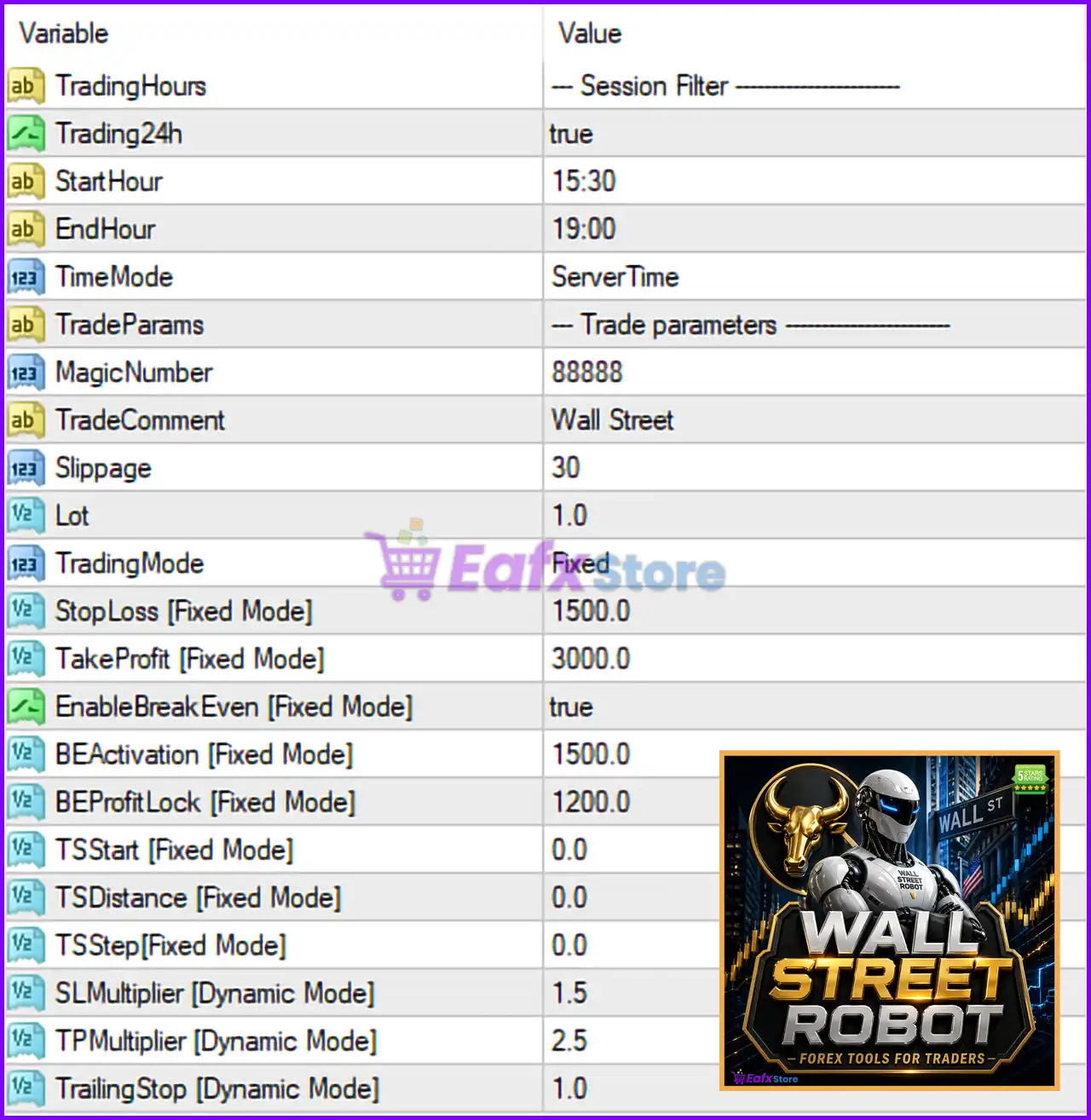
- TradingHours = — Session Filter ——————: This is a section header used to group all trading session-related parameters for easier navigation.
- Trading24h = true: Enables 24-hour trading; when set to true, the EA can open trades at any time of the day without restriction.
- StartHour = 15:30: Defines the exact time (server time) when the EA is allowed to start trading.
- EndHour = 19:00: Specifies the time (server time) when the EA must stop opening new trades.
- TimeMode = ServerTime: Determines the time reference used by the EA; in this case, it uses the broker’s server time.
- TradeParams = — Trade parameters ——————: Section label grouping all trading execution and identification settings.
- MagicNumber = 88888: A unique identifier used by the EA to distinguish its trades from other EAs or manual trades.
- TradeComment = Wall Street: A custom comment attached to each trade, useful for tracking and analysis in the trading history.
- Slippage = 30: Maximum allowed slippage (in points) when executing orders; higher values allow more flexibility during volatile conditions.
- Lot = 1.0: Fixed lot size used for each trade; determines the volume of each position opened.
- TradingMode = Fixed: Specifies that the EA uses fixed risk parameters instead of dynamic or adaptive ones.
- StopLoss [Fixed Mode] = 1500.0: The stop loss value in points when using fixed mode; limits potential losses per trade.
- TakeProfit [Fixed Mode] = 3000.0: The take profit value in points in fixed mode; defines the profit target per trade.
- EnableBreakEven [Fixed Mode] = true: Activates break-even functionality, moving stop loss to entry price after certain conditions are met.
- BEActivation [Fixed Mode] = 1500.0: Distance in points required before the break-even feature is triggered.
- BEProfitLock [Fixed Mode] = 1200.0: Locks in a portion of profit (in points) when break-even is activated.
- TSStart [Fixed Mode] = 0.0: The starting point for trailing stop in fixed mode; 0.0 means trailing stop is disabled or not initiated.
- TSDistance [Fixed Mode] = 0.0: Distance (in points) between price and trailing stop; inactive if set to 0.0.
- TSStep [Fixed Mode] = 0.0: Step size (in points) for updating the trailing stop; also inactive when set to 0.0.
- SLMultiplier [Dynamic Mode] = 1.5: Multiplier applied to stop loss when dynamic mode is enabled; adjusts SL based on market conditions.
- TPMultiplier [Dynamic Mode] = 2.5: Multiplier used to calculate take profit dynamically.
- TrailingStop [Dynamic Mode] = 1.0: Defines trailing stop behavior in dynamic mode; controls how aggressively profits are locked.
Conclusion
The Wall Street Robot MT4 settings offer a powerful combination of flexibility and control, allowing traders to fine-tune trading sessions, risk management and execution behavior. Whether using fixed or dynamic modes, each parameter plays a critical role in shaping the EA’s performance. Understanding and optimizing these settings can significantly improve trading consistency and risk control.
FAQs
❓ What is the best TradingHours setup for Wall Street Robot MT4?
The optimal setup depends on your broker and strategy, but many traders prefer limiting trading to low-volatility sessions.
❓ What does MagicNumber = 88888 do?
It uniquely identifies trades opened by this EA, preventing conflicts with other strategies or manual trades.
❓ Should I use Fixed or Dynamic TradingMode?
Fixed mode is more predictable, while dynamic mode adapts to market conditions and may improve performance.
❓ Why is my trailing stop not working?
Because TSStart, TSDistance, and TSStep are set to 0.0, which effectively disables Trailing Stop in fixed mode.
❓ How does BreakEven improve trading performance?
It reduces risk by moving Stop Loss (SL) to a safer level once the trade reaches a certain profit threshold.