New Smarthedge EA is an advanced hedging Expert Advisor (EA) designed for MetaTrader 4 (MT4), combining correlation trading, smart lot scaling, delta-based entries and equity control. It helps traders balance risk across multiple symbols while optimizing entry timing using spread, correlation, and profit thresholds.
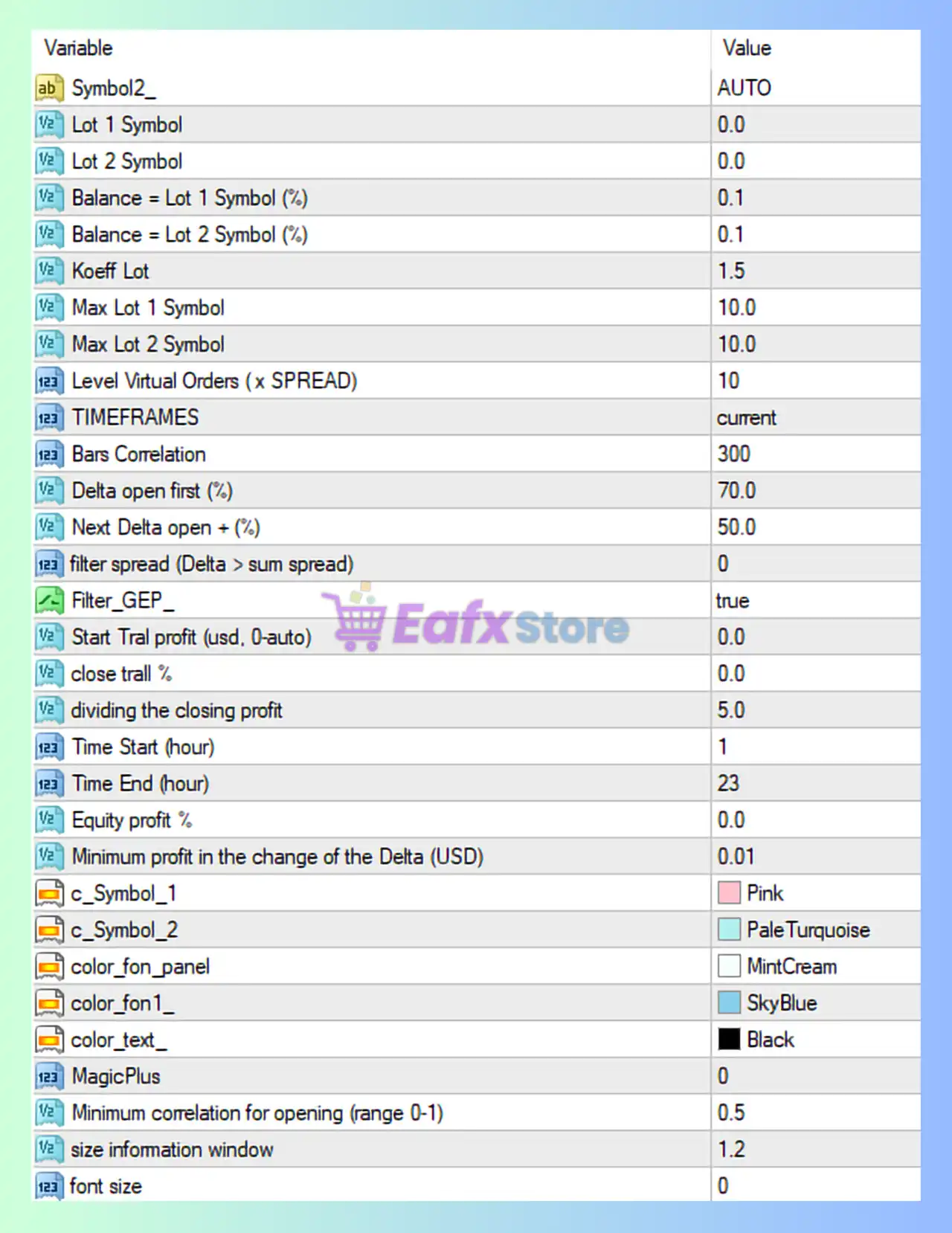
✅ New Smarthedge EA MT4 – Complete Settings Breakdown
🔢 Symbol & Lot Configuration
- Symbol2_ = AUTO – Automatically selects the second symbol for hedging correlation.
- Lot 1 Symbol = 0.0 – Fixed lot size for Symbol 1 is disabled (uses dynamic calculation).
- Lot 2 Symbol = 0.0 – Fixed lot size for Symbol 2 is disabled.
- Balance – Lot 1 Symbol (%) = 0.1 – Uses 0.1% of balance to calculate lot size for Symbol 1.
- Balance – Lot 2 Symbol (%) = 0.1 – Uses 0.1% of balance for Symbol 2 lot size.
- Koeff Lot = 1.5 – Multiplier coefficient applied to lot scaling between symbols.
- Max Lot 1 Symbol = 10.0 – Maximum lot size allowed for Symbol 1 is 10.0.
- Max Lot 2 Symbol = 10.0 – Maximum lot size allowed for Symbol 2 is 10.0.
🔢 Virtual Orders & Timeframe
- Level Virtual Orders (x SPREAD) = 10 – Virtual grid levels are spaced based on 10x spread.
- TIMEFRAMES = current – Uses the current chart timeframe for calculations.
- Bars Correlation = 300 – Uses 300 bars to calculate correlation between symbols.
🔢 Delta & Trade Logic
- Delta open first (%) = 70.0 – Opens first trade when delta divergence reaches 70.0%.
- Next Delta open + (%) = 50.0 – Opens additional trades when delta increases by 50.0%.
- filter spread (Delta > sum spread) = 0 – Spread filter based on delta is disabled.
- Filter_GEP = true – Enables filtering using GEP (Gap Entry Protection).
🔢 Profit & Trailing Settings
- Start Trailing profit (usd, 0=auto) = 0.0 – Trailing starts automatically (0.0 means auto mode).
- close trail % = 0.0 – No percentage-based trailing close applied.
- dividing the closing profit = 5.0 – Profit is divided into 5.0 parts for partial closing logic.
🔢 Trading Time Control
- Time Start (hour) = 1 – Trading begins at hour 1 (01:00).
- Time End (hour) = 23 – Trading ends at hour 23 (23:00).
🔢 Equity & Profit Conditions
- Equity profit % = 0.0 – No equity-based profit target is set.
- Minimum profit in the change of the Delta (USD) = 0.01 – Minimum profit threshold per delta change is 0.01 USD.
🔢 Visual & Interface Settings
- c_Symbol_1 = Pink – Color used for Symbol 1 display is Pink.
- c_Symbol_2 = PaleTurquoise – Color used for Symbol 2 display is PaleTurquoise.
- color_fon_panel = MintCream – Panel background color is MintCream.
- color_fon_1 = SkyBlue – Secondary background color is SkyBlue.
- color_text_ = Black – Text color displayed is Black.
🔢 Advanced & Correlation Settings
- MagicPlus = 0 – Additional magic number offset is disabled (0).
- Minimum correlation for opening (range 0-1) = 0.5 – Requires at least 0.5 correlation to open trades.
🔢 Display Settings
- size information window = 1.2 – Information panel size scale is set to 1.2.
- font size = 0 – Default font size is used (0 = auto).
✅ Summary
The New Smarthedge EA MT4 settings are optimized for correlation hedging strategies, using parameters like Bars Correlation = 300, Delta open first = 70.0, and Minimum correlation = 0.5 to identify divergence opportunities. Combined with balance-based lot sizing (0.1%) and Koeff Lot = 1.5, this EA delivers controlled exposure and adaptive trade scaling.