



🔢 Algo Gold EA MT4 – Complete Settings Guide & Parameter Explanation
Algo Gold EA is an automated trading robot designed for MetaTrader 4, focusing on gold trading with built-in position management, profit targeting, trade limitation controls and chart monitoring features.
The EA allows traders to control lot sizing, maximum trade exposure, trading sessions, and visual reporting directly on the chart, making it suitable for both manual supervision and fully automated trading environments.

🔢 Algo Gold EA MT4 Settings Explained
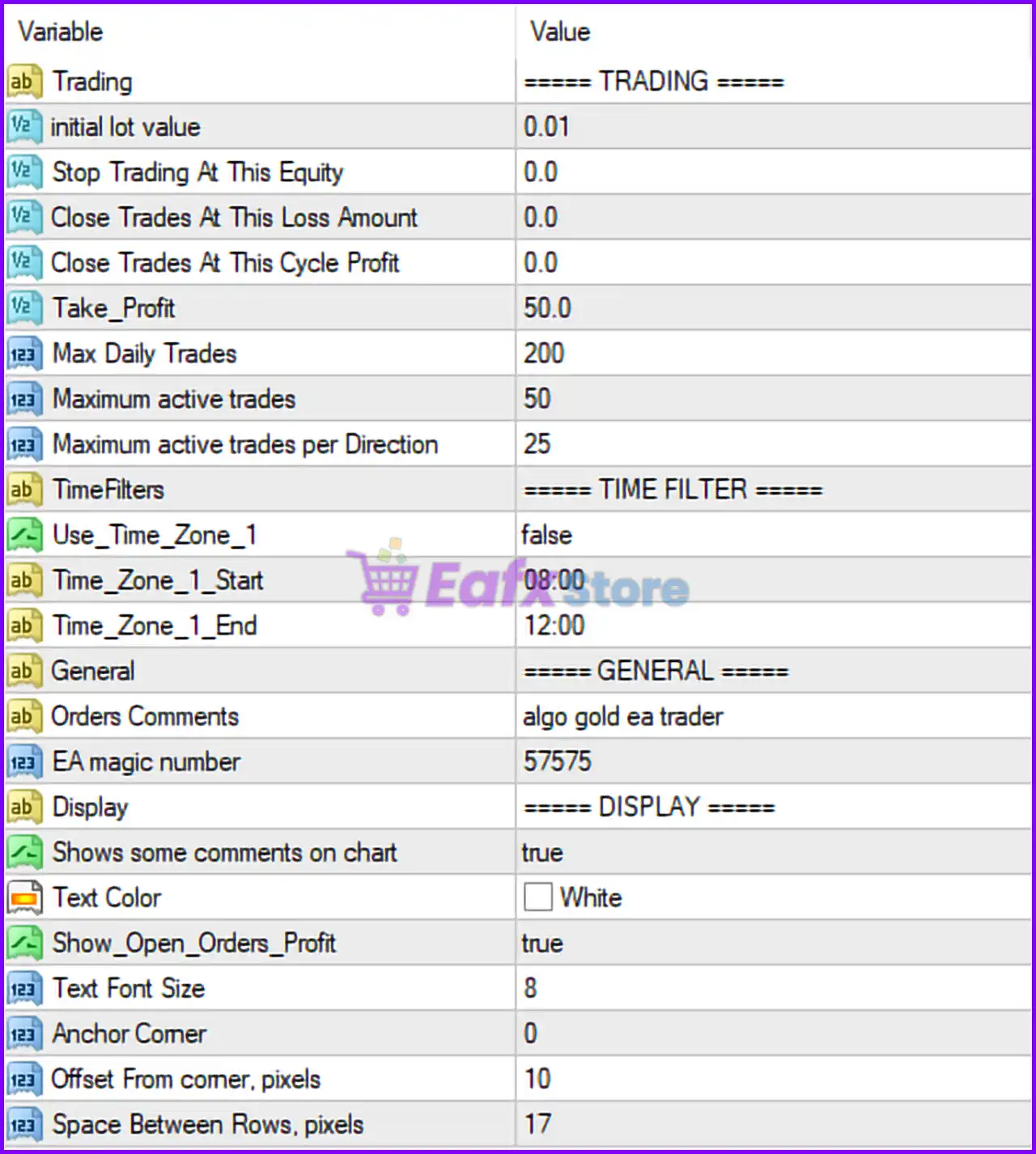
Below are the details of the parameters in the advisor’s trading system settings table:
🔶 Trading Settings
🔹 initial lot value = 0.01 — Sets the starting trade volume to 0.01 lots for the EA's first position.
🔹 Stop Trading At This Equity = 0.0 — Disables equity-based trading suspension; the EA will not stop opening new trades based on account equity.
🔹 Close Trades At This Loss Amount = 0.0 — Disables automatic closure of all positions when a specified loss amount is reached.
🔹 Close Trades At This Cycle Profit = 0.0 — Disables basket or cycle profit closure functionality because the value is set to 0.0.
🔹 Take_Profit = 50.0 — Sets the default take-profit target to 50.0 points/pips according to the EA's internal trading logic.
🔹 Max Daily Trades = 200 — Limits the EA to a maximum of 200 trades per trading day.
🔹 Maximum active trades = 50 — Allows up to 50 simultaneously open positions at any given time.
🔹 Maximum active trades per Direction = 25 — Restricts open positions to 25 Buy trades and 25 Sell trades maximum per direction.
🔶 Time Filter Settings
🔹 Use_Time_Zone_1 = false — Disables the first time-based trading session filter.
🔹 Time_Zone_1_Start = 08:00 — Defines the beginning of the configured trading session at 08:00.
🔹 Time_Zone_1_End = 12:00 — Defines the end of the configured trading session at 12:00.
🔶 General Settings
🔹 Orders Comments = algo gold ea trader — Adds the custom order comment "algo gold ea trader" to all trades opened by the EA.
🔹 EA magic number = 57575 — Unique trade identifier used by the EA to distinguish and manage its own positions.
🔶 Display Settings
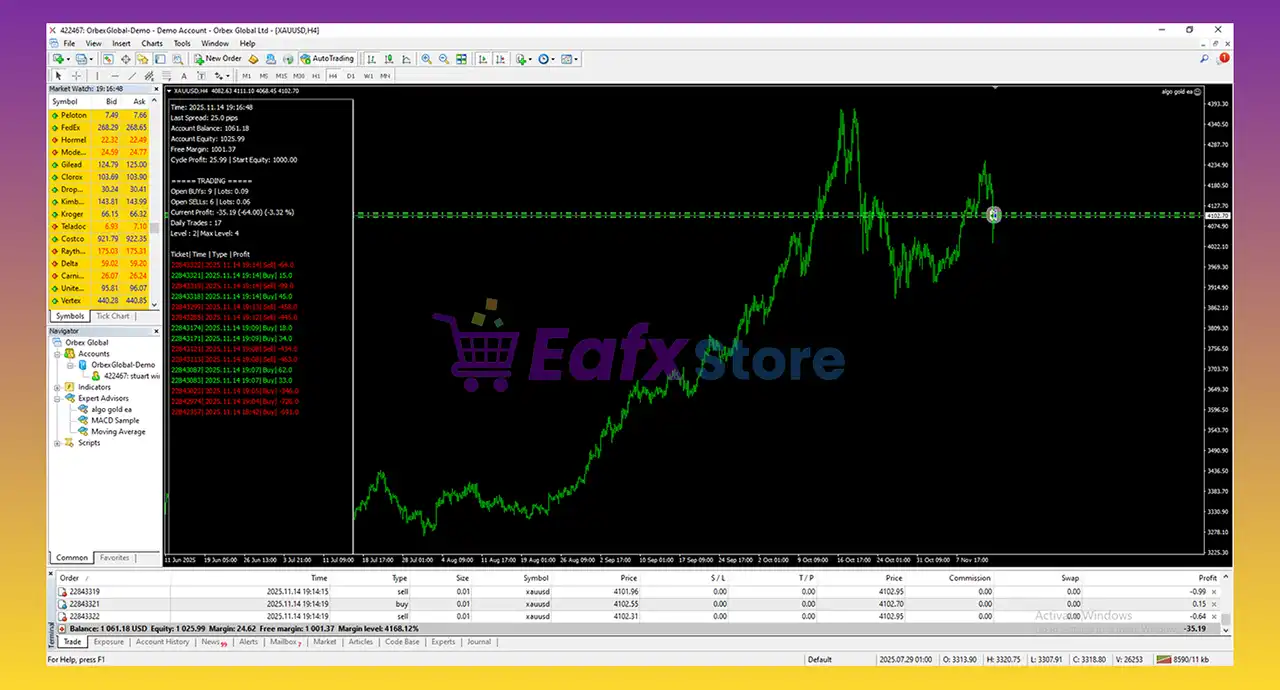
🔹 Shows some comments on chart = true — Enables the display of informational comments and EA statistics directly on the trading chart.
🔹 Text Color = White — Sets the chart information text color to White.
🔹 Show_Open_Orders_Profit = true — Displays the floating profit or loss of currently open trades on the chart.
🔹 Font Size = 8 — Sets the chart information panel font size to 8.
🔹 Anchor Corner = 0 — Positions the display panel in chart corner 0 (typically the upper-left corner in MT4).
🔹 Offset From corner, pixels = 10 — Places the information panel 10 pixels away from the selected chart corner.
🔹 Space Between Rows, pixels = 17 — Sets the vertical spacing between information rows to 17 pixels.
🔢 Algo Gold EA MT4 Configuration Summary
🔹 Starting Lot Size: 0.01 lots.
🔹 Take Profit Target: 50.0.
🔹 Maximum Daily Trades: 200.
🔹 Maximum Active Trades: 50.
🔹 Maximum Trades Per Direction: 25.
🔹 Trading Time Filter: Available but currently disabled.
🔹 Magic Number: 57575.
🔹 Chart Monitoring Panel: Enabled.
🔹 Open Profit Display: Enabled.
🔹 Custom Trade Comment: algo gold ea trader.
🔢 Conclusion
Algo Gold EA MT4 provides a balanced set of trading controls for automated gold trading. With a conservative 0.01 lot starting size, a 50.0 take-profit target, support for 50 simultaneous trades, and configurable session filters, the EA offers flexibility for different account sizes and risk profiles. Its built-in chart dashboard and order tracking features help traders monitor performance while maintaining full control over trading activity.
🔢 FAQs
❓ What is the default lot size in Algo Gold EA MT4?
The default starting lot size is 0.01 lots.
❓ How many trades can Algo Gold EA MT4 open at the same time?
The EA can maintain up to 50 active trades simultaneously.
❓ Does Algo Gold EA MT4 support time-based trading sessions?
Yes, it includes a time filter with 08:00 to 12:00, although it is currently disabled with Use_Time_Zone_1 = false.
❓ What is the purpose of Magic Number 57575?
The Magic Number 57575 uniquely identifies the EA's trades so it can manage them independently from other EAs.
❓ Can Algo Gold EA MT4 display trading information on the chart?
Yes, the settings Shows some comments on chart = true and Show_Open_Orders_Profit = true enable real-time information and profit monitoring directly on the chart.



