


🔢 Alphabet AI MT5 Settings Explained – Complete Parameter Guide
Alphabet AI MT5 is an automated MetaTrader 5 Expert Advisor designed to trade with configurable money management, recovery options, spread protection and flexible trade execution settings.
It allows traders to customize trading symbols, lot sizing methods, recovery logic, and risk parameters, making it suitable for various account sizes and trading styles while maintaining disciplined risk management.
🔢 Alphabet AI MT5 Parameters Explained
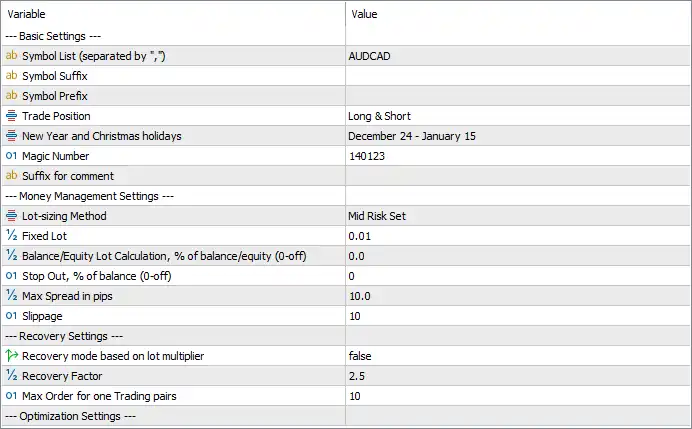
Below are the details of the parameters in the advisor’s trading system settings table:
🔄 Basic Settings
🔹 Symbol List (separated by ",") = AUDCAD – Specifies AUDCAD as the trading instrument monitored and traded by the EA.
🔹 Symbol Suffix = (blank) – Leaves the broker symbol suffix empty, meaning no additional suffix is applied unless required by the broker.
🔹 Symbol Prefix = (blank) – Leaves the broker symbol prefix empty, allowing the EA to use the standard symbol name.
🔹 Trade Position = Long & Short – Enables the EA to open both Buy (Long) and Sell (Short) positions.
🔹 New Year and Christmas Holidays = December 24 - January 15 – Suspends or adjusts trading during the holiday period from December 24 through January 15.
🔹 Magic Number = 140123 – Assigns Magic Number 140123 as the unique identifier for all trades managed by Alphabet AI MT5.
🔹 Suffix for Comment = (blank) – Leaves the trade comment suffix empty, so no additional text is appended to order comments.
🔄 Money Management Settings
🔹 Lot-sizing Method = Mid Risk Set – Uses the predefined Mid Risk Set money management profile to balance profitability and risk exposure.
🔹 Fixed Lot = 0.01 – Sets the default fixed trading volume to 0.01 lots.
🔹 Balance/Equity Lot Calculation, % of balance/equity (0 = off) = 0.0 – Disables automatic lot calculation based on account balance or equity because the value is 0.0.
🔹 Stop Out, % of balance (0 = off) = 0 – Disables the Stop Out protection based on account balance percentage by setting the value to 0.
🔹 Max Spread in pips = 10.0 – Prevents new trades from opening whenever the market spread exceeds 10.0 pips.
🔹 Slippage = 10 – Allows a maximum execution slippage of 10 points when placing or modifying orders.
🔄 Recovery Settings
🔹 Recovery mode based on lot multiplier = false – Disables the recovery system that increases position size using a lot multiplier.
🔹 Recovery Factor = 2.5 – Sets the recovery multiplier to 2.5, which will be used if the recovery mode is enabled.
🔹 Max Order for one Trading pair = 10 – Limits the maximum number of simultaneously open positions for a single trading pair to 10.
🔄 Optimization Settings
🔹 Optimization Settings – Reserved section for optimization-related parameters. No additional configurable values are displayed in the provided settings panel.
🔢 Conclusion
Alphabet AI MT5 offers a clean and practical configuration focused on stable automated trading. Its support for both long and short positions, predefined money management profiles, spread filtering, recovery controls, and trade limitations allows traders to customize risk according to their account size and trading objectives.
Properly configuring these parameters can improve execution quality while helping maintain consistent risk management.
🔢 FAQs
❓ What symbol is Alphabet AI MT5 configured to trade?
The current configuration is set to trade AUDCAD.
❓ Does Alphabet AI MT5 support both Buy and Sell trades?
Yes. The Trade Position = Long & Short setting allows the EA to open both Buy and Sell positions.
❓ How does the Mid Risk Set affect trading?
The Mid Risk Set applies a balanced money management profile intended to provide moderate risk exposure while maintaining consistent trading performance.
❓ What happens when the spread exceeds 10.0 pips?
The EA will avoid opening new positions whenever the market spread is greater than 10.0 pips, helping reduce trading costs during unfavorable market conditions.
❓ Is the recovery system enabled by default?
No. Recovery mode based on lot multiplier = false, so the recovery feature is disabled unless the user enables it, even though the Recovery Factor is configured as 2.5.



