


🔢 DreamCather MT5 Settings Explained – Complete Parameter Guide
DreamCather MT5 is an automated MetaTrader 5 Expert Advisor designed with flexible money management, trading session controls, spread protection, and customizable visual settings. Its configuration allows traders to optimize position sizing, control trading hours, manage execution quality, and personalize chart appearance for a more efficient automated trading experience.
🔢 DreamCather MT5 Parameters Explained
Below are the details of the parameters in the advisor’s trading system settings table:
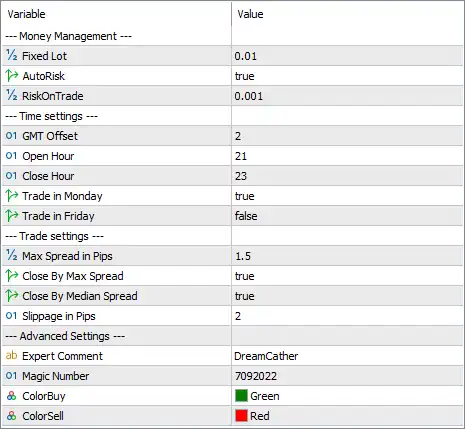
🔄 Money Management
🔹 Fixed Lot = 0.01 – Sets the default fixed trading volume to 0.01 lots for every new position when fixed lot sizing is used.
🔹 AutoRisk = true – Enables automatic risk-based lot calculation, allowing the EA to adjust position sizes according to the configured risk settings.
🔹 RiskOnTrade = 0.001 – Defines the risk per trade as 0.001, which the EA uses when AutoRisk is enabled to calculate appropriate lot sizes.
🔄 Time Settings
🔹 GMT Offset = 2 – Sets the broker/server time offset to GMT +2, ensuring trading sessions are synchronized correctly.
🔹 Open Hour = 21 – Allows the EA to begin opening new trades starting at 21:00 server time.
🔹 Close Hour = 23 – Stops opening new trades after 23:00 server time.
🔹 Trade in Monday = true – Enables automated trading on Monday.
🔹 Trade in Friday = false – Disables trading on Friday, helping avoid increased volatility before the weekend.
🔄 Trade Settings
🔹 Max Spread in Pips = 1.5 – Prevents the EA from opening new trades whenever the market spread exceeds 1.5 pips.
🔹 Close By Max Spread = true – Allows the EA to close positions if the spread becomes excessively high according to its internal spread protection logic.
🔹 Close By Median Spread = true – Enables closing trades when the spread deviates significantly from the normal median spread, improving execution quality.
🔹 Slippage in Pips = 2 – Sets the maximum acceptable execution slippage to 2 pips during order placement.
🔄 Advanced Settings
🔹 Expert Comment = DreamCather – Adds the trade comment "DreamCather" to all orders opened by the EA for easier identification.
🔹 Magic Number = 7092022 – Assigns the unique Magic Number 7092022 so the EA can independently manage its own trades.
🔹 ColorBuy = Green – Displays Buy trades using the Green color on the chart.
🔹 ColorSell = Red – Displays Sell trades using the Red color on the chart.
🔢 Conclusion
DreamCather MT5 provides a straightforward yet effective configuration focused on disciplined risk management and controlled automated trading. With automatic risk calculation, strict spread filtering, configurable trading hours, and customizable chart visualization, the EA offers traders a reliable framework for maintaining consistent execution while minimizing unnecessary market exposure.
🔢 FAQs
❓ What does AutoRisk do in DreamCather MT5?
AutoRisk automatically calculates the appropriate lot size based on the configured RiskOnTrade value, helping maintain consistent risk management.
❓ Why is Friday trading disabled by default?
Disabling Trade in Friday helps reduce exposure to unpredictable market volatility and weekend price gaps.
❓ What is the purpose of the Magic Number 7092022?
The Magic Number uniquely identifies trades opened by DreamCather MT5, preventing conflicts with other Expert Advisors.
❓ How does the Max Spread setting improve trading?
The Max Spread in Pips = 1.5 filter prevents new positions from opening during periods of expensive trading costs caused by wide spreads.
❓ Can I customize the appearance of Buy and Sell trades?
Yes. The EA allows Buy orders to be displayed in Green and Sell orders in Red, making trade direction easier to recognize on the chart.



