
🔢 Genesis AI EA MT5 Settings Explained – Complete Parameter Guide
Genesis AI EA is an intelligent multi-currency Expert Advisor for MetaTrader 5 that allows traders to automate trading across multiple currency pairs with flexible lot sizing, independent Magic Numbers, and customizable trade comments.
The EA supports dynamic position sizing while giving users full control over individual symbol configurations, making it suitable for both conservative and scalable trading strategies.
🔢 Genesis AI EA MT5 Parameters Explained
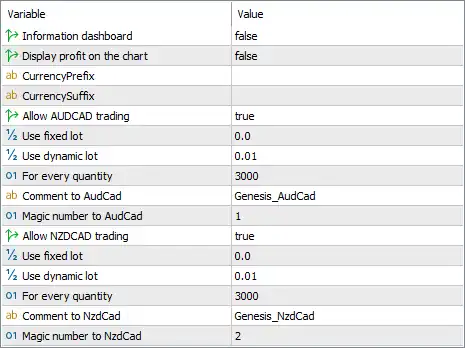
Below are the details of the parameters in the advisor’s trading system settings table:
🔶 General Settings
🔹 Information dashboard = false – Disables the on-chart information dashboard, keeping the trading chart clean and uncluttered.
🔹 Display profit on the chart = false – Disables the display of floating profit and loss information directly on the trading chart.
🔹 CurrencyPrefix = (blank) – Leaves the broker's symbol prefix empty, allowing the EA to use the default symbol names unless a custom prefix is required.
🔹 CurrencySuffix = (blank) – Leaves the broker's symbol suffix empty, allowing compatibility with brokers that do not use symbol suffixes.
🔶 AUDCAD Trading Settings
🔹 Allow AUDCAD trading = true – Enables automated trading for the AUDCAD currency pair.
🔹 Use fixed lot = 0.0 – Sets the fixed lot size to 0.0, effectively disabling fixed-lot trading for AUDCAD.
🔹 Use dynamic lot = 0.01 – Enables dynamic lot sizing with a base value of 0.01 lots, allowing position sizes to scale according to the EA's money management logic.
🔹 For every quantity = 3000 – Uses 3000 account currency units as the balance interval for calculating dynamic lot adjustments.
🔹 Comment to AudCad = Genesis_AudCad – Assigns the trade comment Genesis_AudCad to every AUDCAD position for easier trade identification.
🔹 Magic number to AudCad = 1 – Uses Magic Number 1 to uniquely identify and manage all AUDCAD trades opened by the EA.
🔶 NZDCAD Trading Settings
🔹 Allow NZDCAD trading = true – Enables automated trading for the NZDCAD currency pair.
🔹 Use fixed lot = 0.0 – Sets the fixed lot size to 0.0, meaning fixed-lot trading is disabled for NZDCAD.
🔹 Use dynamic lot = 0.01 – Uses a dynamic starting lot size of 0.01 lots for NZDCAD positions.
🔹 For every quantity = 3000 – Adjusts the dynamic lot size for every 3000 units of account balance according to the EA's money management algorithm.
🔹 Comment to NzdCad = Genesis_NzdCad – Adds the trade comment Genesis_NzdCad to all NZDCAD orders for clear identification.
🔹 Magic number to NzdCad = 2 – Assigns Magic Number 2 exclusively to NZDCAD trades so they can be managed independently.
🔢 Conclusion
Genesis AI EA MT5 is designed with simplicity and flexibility in mind, allowing traders to manage multiple currency pairs using separate Magic Numbers, symbol-specific comments, and dynamic position sizing. Its clean configuration makes it easy to deploy while still offering scalable money management for different account sizes. Properly configuring each symbol ensures efficient automated trading and better portfolio organization.
🔢 FAQs
❓ Which currency pairs are enabled by default in Genesis AI EA MT5?
The default configuration enables automated trading for both AUDCAD and NZDCAD.
❓ Why is the fixed lot size set to 0.0?
A value of 0.0 disables fixed-lot trading, allowing the EA to use the configured dynamic lot sizing instead.
❓ What does "For every quantity = 3000" mean?
It specifies that the EA adjusts its dynamic lot calculation for every 3000 units of account balance, helping positions scale with account growth.
❓ Why are different Magic Numbers used?
Each trading symbol has its own Magic Number (1 for AUDCAD and 2 for NZDCAD), allowing the EA to manage trades independently without conflicts.
❓ Can I use broker symbol prefixes or suffixes with Genesis AI EA MT5?
Yes. The CurrencyPrefix and CurrencySuffix fields can be customized if your broker uses modified symbol names, although they are left blank in the default configuration.