





Gold Vector Strategy MT5 + Sets (Latest version) - Unlimited

Subscriptions for Special Plan
- 30 EA package is more economical!
- Special package with 99%
- Download 1 EA/Day

Subscriptions for Premium Membership
- Download Unlimited in 1 Year
- Get 100% Discount
- Get free access to all

Subscriptions for Gold Membership
- 1 Year Membership
- Get 100% Discount
- Access EA+Indicator+Course
Frequently bought together 🎁
Add these products to enhance your purchase




What is Gold Vector Strategy EA?
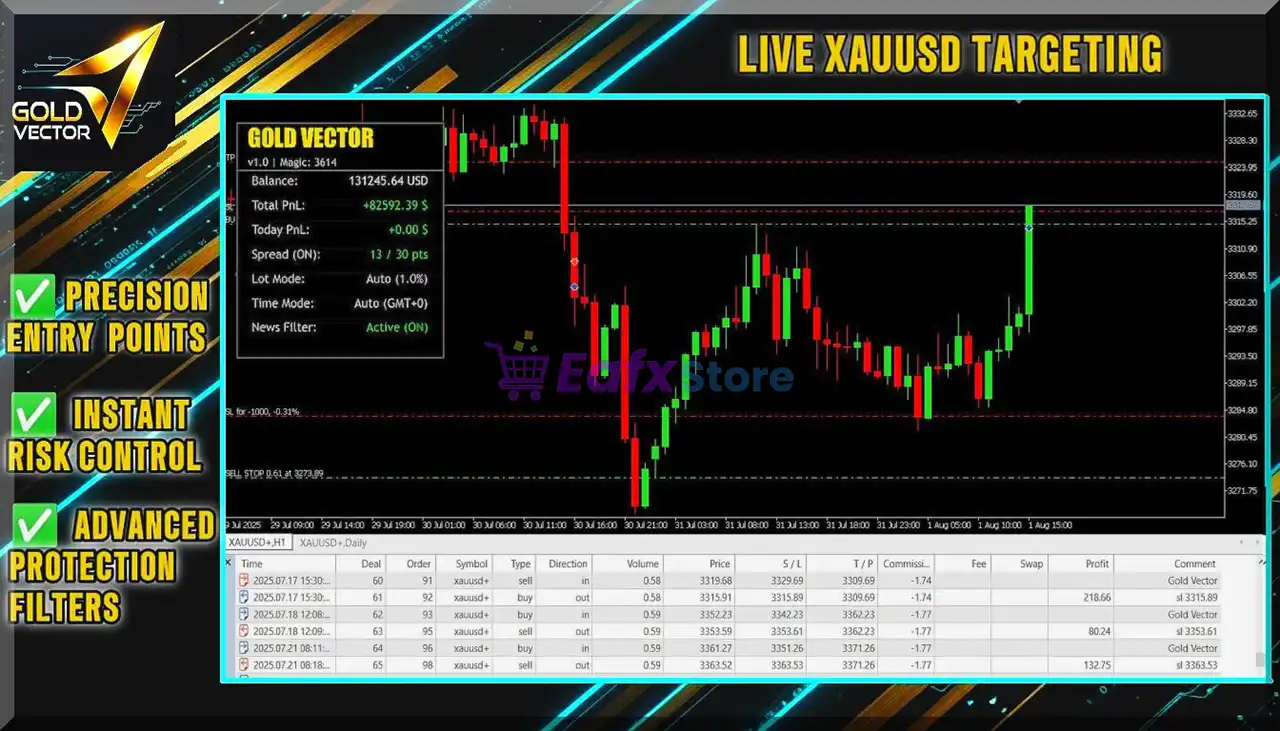
Gold Vector Strategy EA is a professional Expert Advisor (EA) designed for automated gold trading using a precision breakout scalping approach. Built specifically for the XAUUSD market, it focuses on stability, adaptability and disciplined risk management. By combining technical indicators, dynamic risk control, and high-probability breakout detection, the EA captures short-term market impulses while maintaining controlled exposure and consistent automated performance.
 Vendor Website: View here
About the Author
This product is compiled by Adam Zolei. This author has more than +9 years of experience working on MQL5 with many famous products such as Gold Vector Strategy MT5, Golden Nights MT5, RSI GridMaster EA MT5, Golden Thunder EA MT4, Gold Vector Strategy MT4 and others. Among them, Gold Vector Strategy EA is his best performing products.
Key Features of Gold Vector Strategy EA for MT5
🔹 Precision Breakout Entry System: Detects key price levels and places pending orders to capture fast breakout moves.
🔹 Dynamic Balance-Based Risk Control: Automatically calculates lot size according to account balance and risk level.
🔹 Integrated Spread and News Filters: Avoids trading during unstable spreads or high-impact economic events.
🔹 Advanced Trailing Stop Protection: Locks in profits automatically as price moves in a favorable direction.
🔹 Single-Trade Risk Management Logic: Maintains controlled exposure by managing only one active position.
Why Choose & Use Gold Vector Strategy EA?
🔹 Designed for XAUUSD Volatility: Optimized specifically for the dynamic behavior of gold markets.
🔹 Stable Automated Scalping Approach: Focuses on controlled risk rather than aggressive trading methods.
🔹 Small Account Friendly System: Efficient risk management allows trading with modest starting capital.
🔹 Professional Risk Protection Tools: Includes drawdown control, spread filters and news event protection.
🔹 Marketplace-Ready Gold Trading EA: Ideal for traders seeking a disciplined automated gold strategy.
Gold Vector Strategy MT5 Review
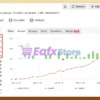
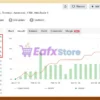
1. Gold Vector Strategy EA Myfxbook Results:
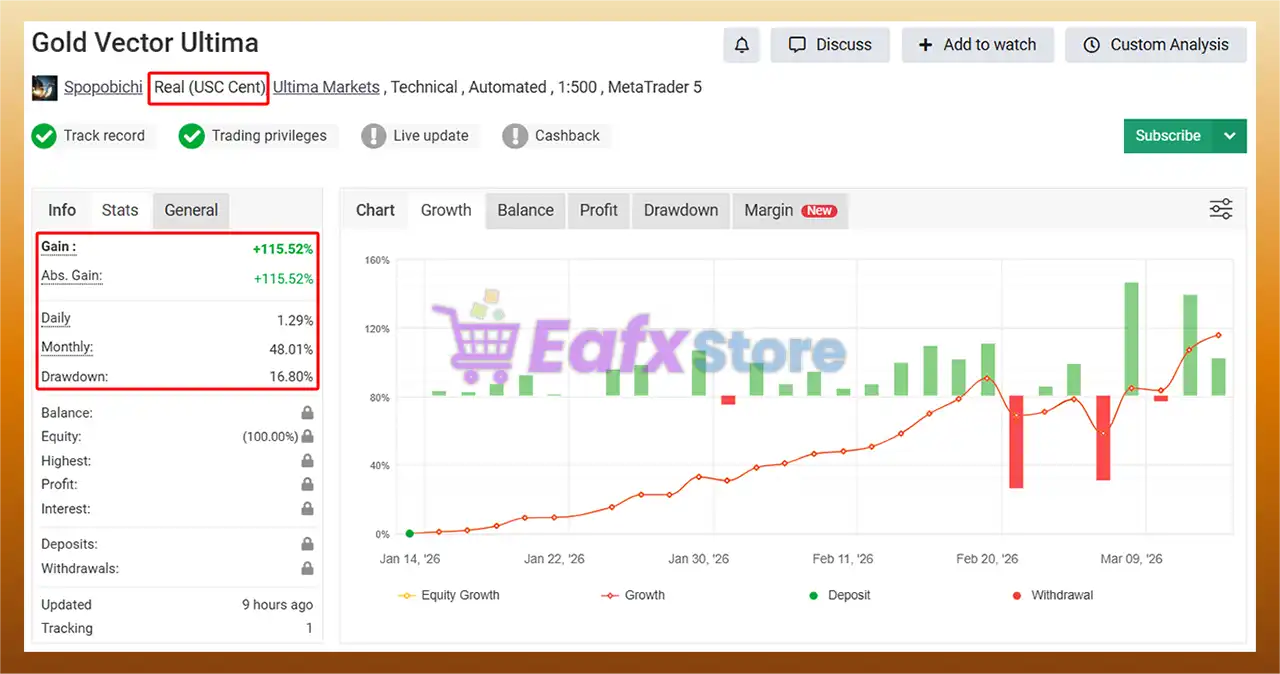
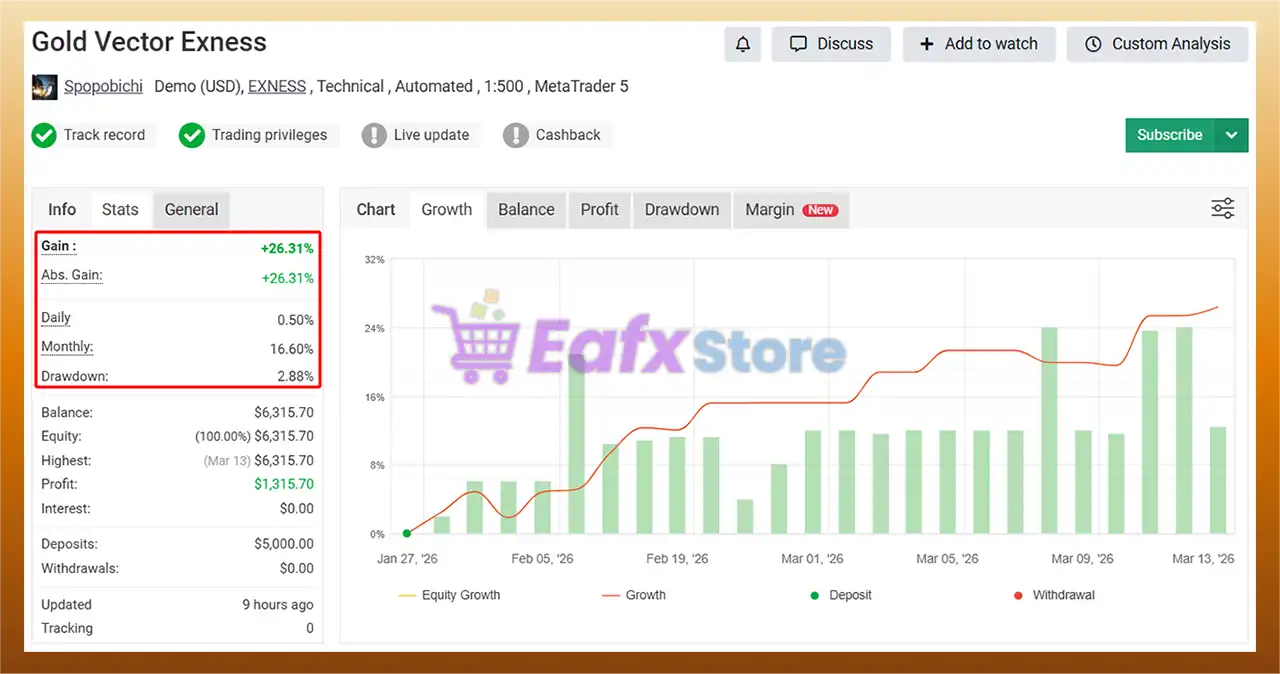
The Gold Vector Strategy EA has been verified by MyFxBook in the long term and has achieved impressive returns. The advisor shows good XAUUSD (Gold) trading potential and high profit rate.
 Total Gain: +115.52%
Average Daily Profit: 1.29%
Average Monthly Profit: 48.01%
Maximum Drawdown: 16.80%
Gold Vector Strategy EA MT5 Myfxbook
2. Gold Vector Strategy EA Signal Results:
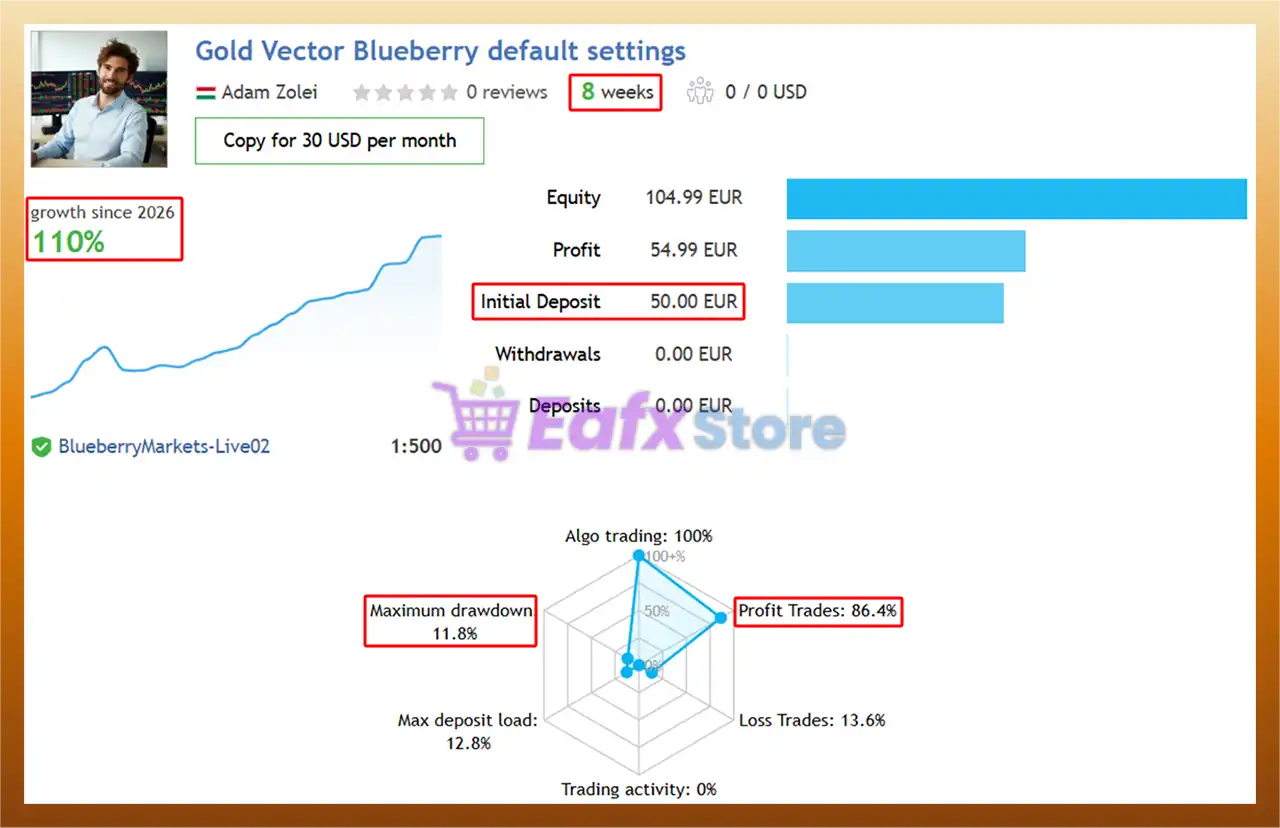
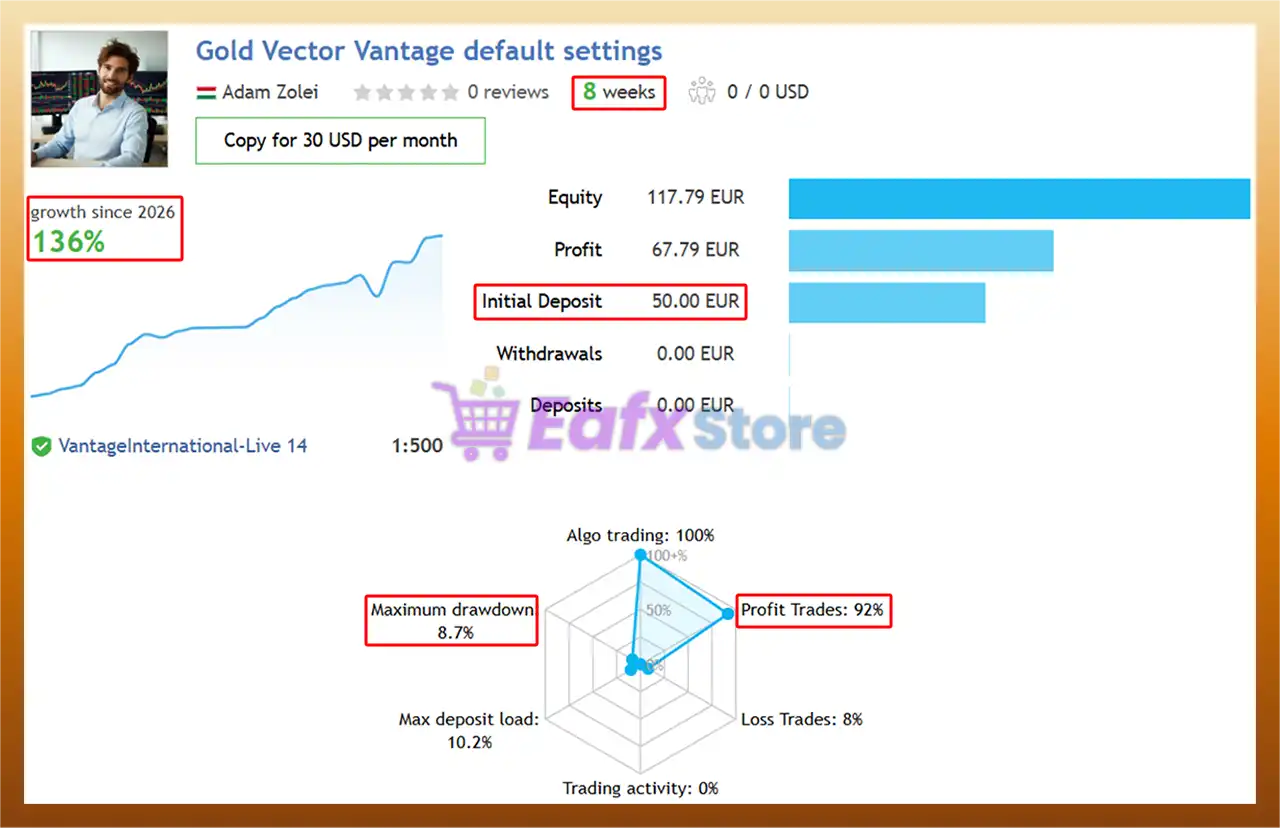
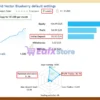
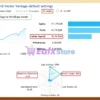
The Gold Vector Strategy EA achieved impressive profit performance when trading the XAUUSD (Gold) pair for 8 consecutive trading weeks.
🔶 Performance parameters when using the DEFAULT strategy on the Blueberry platform:
✅ Initial Deposit: €50
✅ Growth Rate: +110%
✅ Win Rate (% of total): 86.4%
✅ Maximum Drawdown: 11.8%
Gold Vector Strategy EA MT5 Signal Results
🔶 Performance parameters when using the DEFAULT strategy on the Vantage platform:
✅ Initial Deposit: €50
✅ Growth Rate: +136%
✅ Win Rate (% of total): 92%
✅ Maximum Drawdown: 8.7%
Gold Vector Strategy MT5 Signal Results
3. Gold Vector Strategy MT5 Backtests:
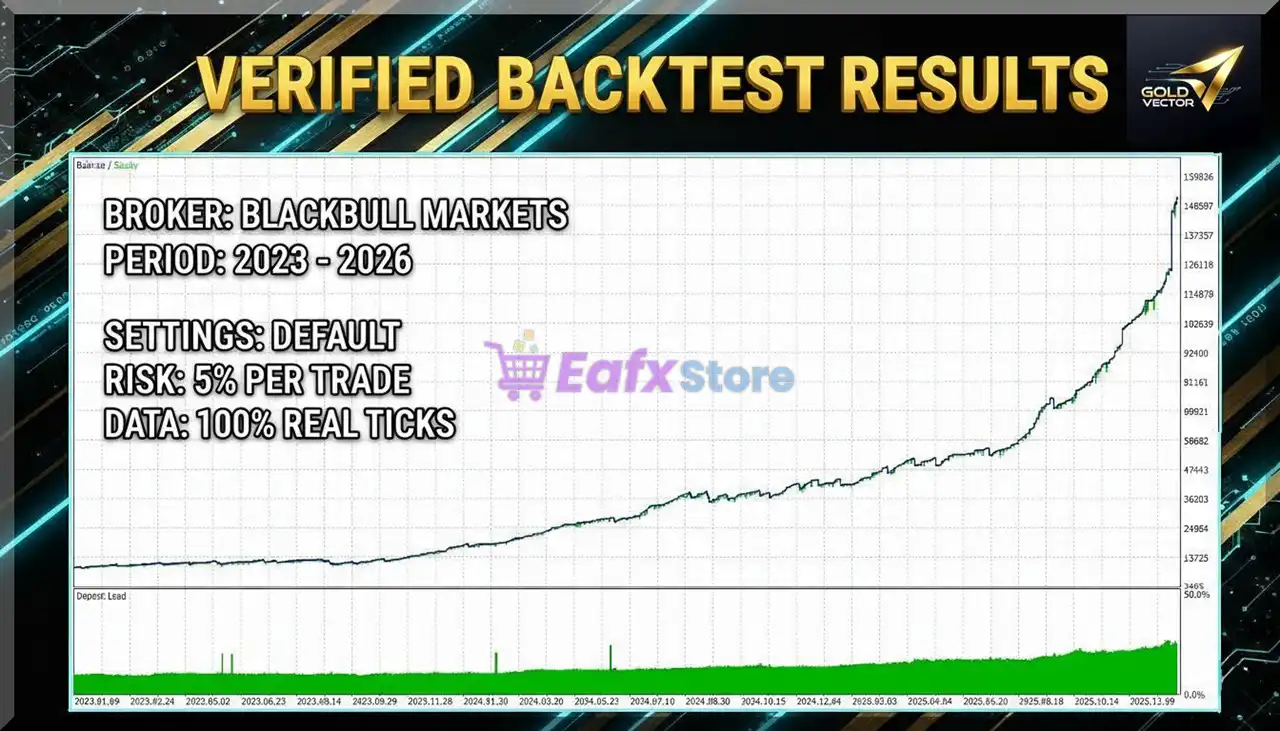
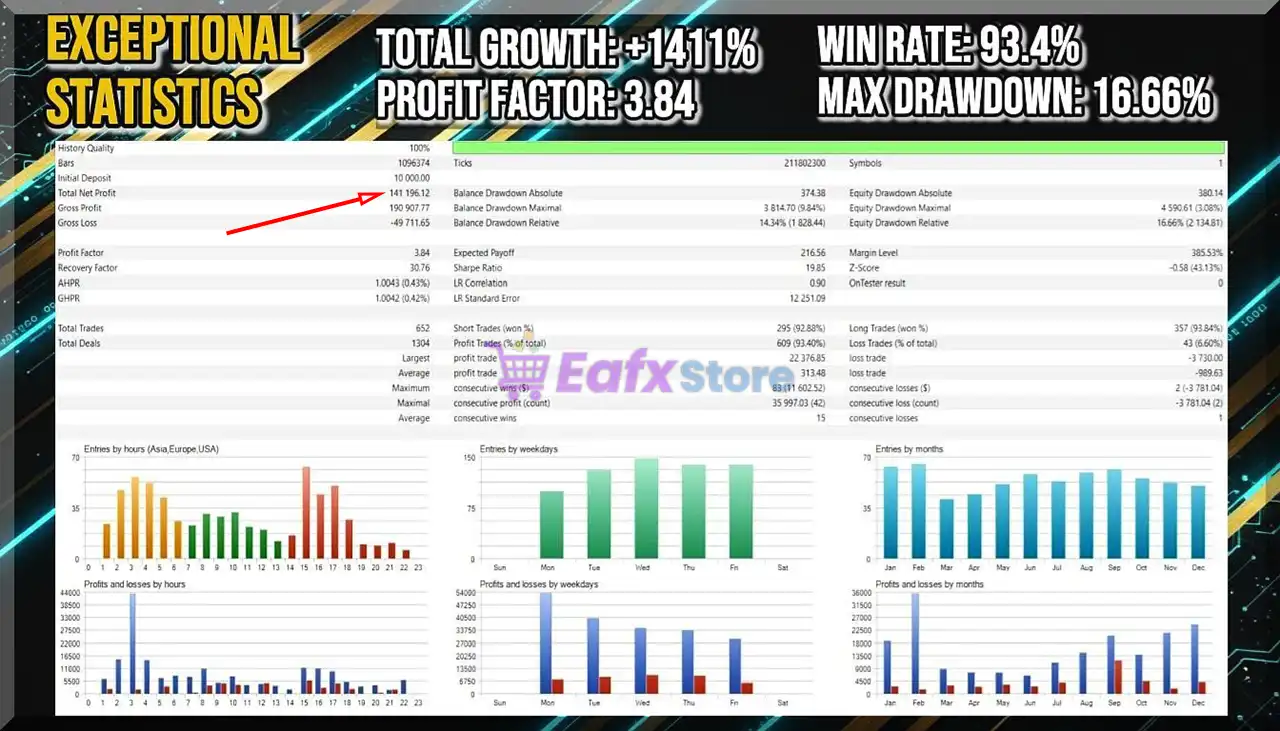
Gold Vector Strategy EA has achieved impressive profit performance over many years of trading reversion tests with Gold (XAUUSD). This EA demonstrates excellent ability to master the market and increase profits.
✅ Initial Deposit: $10,000
✅ Total Net Profit: $141,196.12
✅ Win Rate (% of total): 93.40%
✅ Maximum Drawdown: 9.84%
Gold Vector Strategy EA MT5 Backtest
What is the Gold Vector Strategy MT5 Trading Strategy?
🔹 Price Action Breakout Scalping Model: Trades rapid gold price movements after key level breakouts.
🔹 High Win Rate Short-Term Execution: Targets quick profits during strong market impulses.
🔹 Indicator-Assisted Market Analysis: Uses technical indicators to confirm volatility and trend conditions.
🔹 Pending Order Precision Entries: Positions orders near critical levels to capture momentum instantly.
🔹 Strict Stop Loss Risk Framework: Every trade includes predefined loss protection and trailing exits.
Is Gold Vector Strategy EA Safe?
Gold Vector Strategy EA shows significant potential in providing stable and reliable profits, making it a reliable tool in the forex market. The advisor is highly appreciated by the MQL5 community in many aspects and has won the trust of users.
 SEAN (2026.03.12): “Let me put straight and short, I ran this bot for one month. It got 8 trades, all Freaking wins securing ~15% gain against entire balance. And what matters more, the author keep improving it all the time. It deserve the best rating.”
Stefcrema (2026.03.11): “Excellent strategy if you prefer risk control and a high win rate. No overtrading; everything is planned, with pre-set, low-risk stop-loss and TP entry levels. Small trades are usually very fast and protected by trailing stops. Definitely a must-have EA at the right price. I recommend a raw spread account.”
Recommended settings
Recommended settings and parameters to pay attention to from developers and experts:
| Features | Type |
|---|---|
| Trading platform | MetaTrader 5 (MT5) |
| Time frames | Any |
| Currency pairs | XAUUSD (Gold) |
| Minimum / Recommended deposit | $50 |
| Minimum / Recommended leverage | $50 in accounts with 1:500 leverage & $500 in accounts with 1:20 leverage |
| Account type | ECN or RAW Spread account |
| Product type | Original version |
| Additional services | Unlock and Decompile |
| Recommended brokers | Exness Broker, Icmarkets Broker |
| Recommended VPS | MyfxVPS.com (Blue VPS, Golden VPS). Lowest Latency, 2 week Free Trial, 100% Free for 12-18 Months. |
Product Download Package?
The download package of the product suite includes:
Experts: Gold Vector Strategy.ex5
SetFiles: Gold_Vector_-_Standard_Broker.set
Reviewed by David Easton
Conclusion
In short, Gold Vector Strategy EA stands out as a professional algorithmic trading robot optimized for gold breakout scalping. Its combination of technical indicator confirmation, spread and news filters and balance-based lot sizing helps maintain consistent trading performance. Built for MetaTrader 5, this EA provides traders with a structured and dependable automated trading framework for XAUUSD markets.
 Gold Vector Strategy MT5 Settings Analysis
The Gold Vector Strategy EA is an automated trading system designed for the MetaTrader 5 (MT5) platform, primarily focused on trading gold (XAUUSD) and other high-volatility instruments. The Expert advisor (EA) uses algorithmic logic to identify trading opportunities and automatically manage positions based on predefined risk, money management, and market protection rules.
One of the key advantages of this EA is its comprehensive parameter configuration, allowing traders to control risk exposure, trade timing, spread conditions, and news filtering. Properly understanding these settings is essential to optimize performance and adapt the strategy to different account sizes or market conditions.
This article provides a detailed breakdown of the Gold Vector Strategy MT5 settings, explaining how each parameter affects trading behavior.
🔶 Installation Panel Parameters
Below are the details of the parameters in the advisor’s trading system settings table:
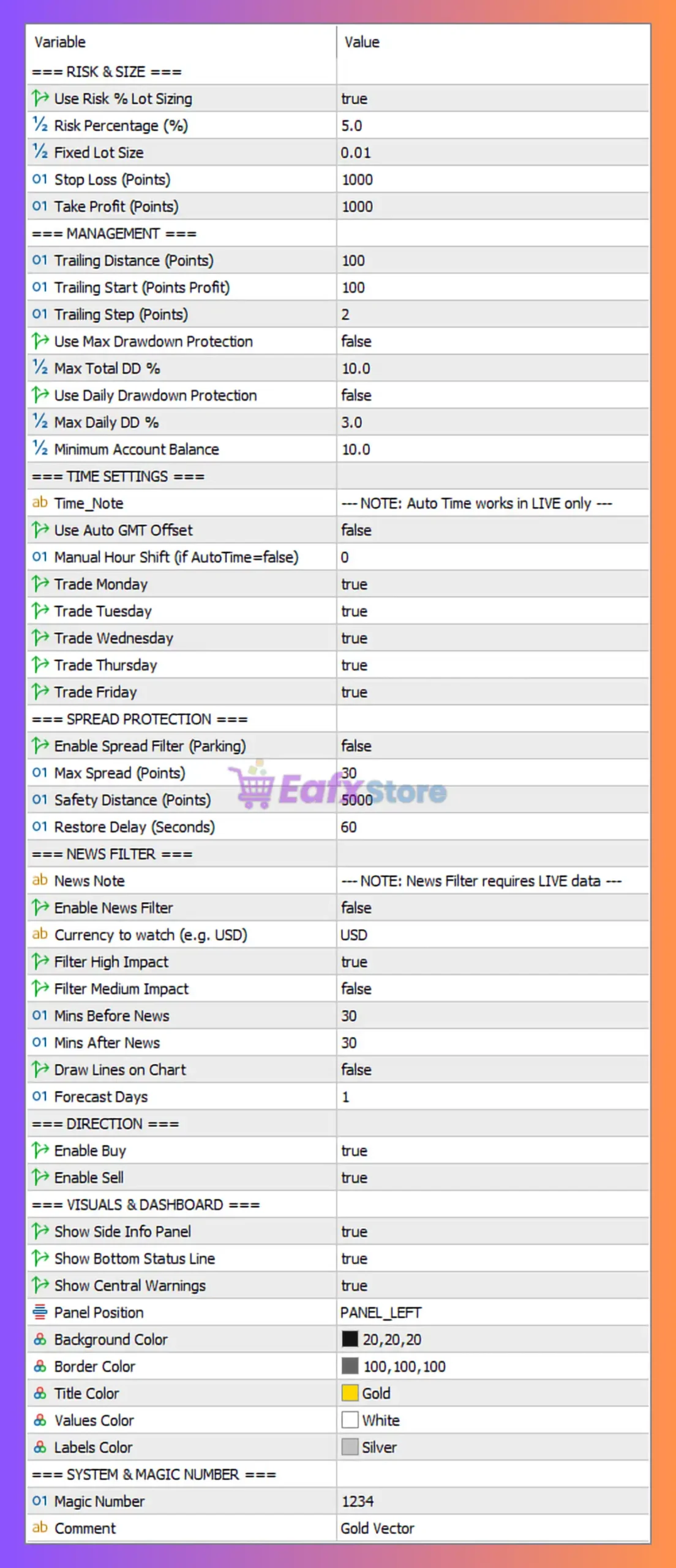
Gold Vector Strategy MT5 Settings Panel
Risk & Position Size Settings
These parameters control capital management and trade risk, which are crucial for long-term account stability.
| Parameter | Value | Description |
|---|---|---|
| Use Risk % Lot Sizing | true | Enables dynamic lot sizing based on account balance and risk percentage. |
| Risk Percentage (%) | 5.0 | The EA risks 5% of the account balance per trade. Higher values increase profit potential but also increase drawdown risk. |
| Fixed Lot Size | 0.01 | Used only if risk-based lot sizing is disabled. |
| Stop Loss (Points) | 1000 | Defines the maximum loss per trade in points. |
| Take Profit (Points) | 1000 | Target profit level set at the same distance as the stop loss. |
Analysis
The configuration indicates a 1:1 risk-reward ratio, where stop loss and take profit are equal. Using 5% risk per trade suggests an aggressive trading approach, suitable for high-growth strategies but potentially volatile during losing streaks.
Trade Management Settings
These parameters control how the EA manages trades after entry.
| Parameter | Value | Description |
|---|---|---|
| Trailing Distance (Points) | 100 | Distance from current price where trailing stop activates. |
| Trailing Start (Points Profit) | 100 | Profit required before trailing stop begins. |
| Trailing Step (Points) | 2 | Increment at which the trailing stop moves. |
| Use Max Drawdown Protection | false | Disables automatic protection against total drawdown. |
| Max Total DD % | 10 | Maximum allowed drawdown if protection is enabled. |
| Use Daily Drawdown Protection | false | Daily loss protection is disabled. |
| Max Daily DD % | 3 | Daily drawdown threshold (inactive). |
| Minimum Account Balance | 10 | Minimum account equity required for trading. |
Analysis
Trailing stop management allows the EA to lock in profits as price moves favorably. However, drawdown protection is disabled, meaning the EA will continue trading even during significant losses. Activating these protections could improve capital preservation.
Time Settings
These parameters define when the EA is allowed to trade.
| Parameter | Value | Description |
|---|---|---|
| Use Auto GMT Offset | false | EA will not automatically detect broker time zone. |
| Manual Hour Shift | 0 | No manual adjustment to trading hours. |
| Trade Monday | true | Trading allowed on Monday. |
| Trade Tuesday | true | Trading allowed on Tuesday. |
| Trade Wednesday | true | Trading allowed on Wednesday. |
| Trade Thursday | true | Trading allowed on Thursday. |
| Trade Friday | true | Trading allowed on Friday. |
Analysis
The EA is configured to trade throughout the entire trading week, which maximizes opportunities but also exposes the strategy to volatile market sessions such as news events.
Spread Protection Settings
Spread protection helps prevent trades during high transaction costs or unstable market conditions.
| Parameter | Value | Description |
|---|---|---|
| Enable Spread Filter | false | Spread protection is disabled. |
| Max Spread (Points) | 30 | Maximum allowed spread if filter is enabled. |
| Safety Distance (Points) | 5000 | Distance to prevent trades near dangerous price zones. |
| Restore Delay (Seconds) | 60 | Time delay before EA resumes trading after spread normalization. |
Analysis
Since the spread filter is disabled, the EA may open trades during high spread periods, such as market rollover or news events. Enabling this feature could improve trade execution quality.
News Filter Settings
Economic news events can significantly impact gold prices.
| Parameter | Value | Description |
|---|---|---|
| Enable News Filter | false | News filtering is disabled. |
| Currency to Watch | USD | Monitors USD-related economic events. |
| Filter High Impact | true | Would block trading during high-impact news. |
| Filter Medium Impact | false | Medium impact news ignored. |
| Minutes Before News | 30 | Stop trading 30 minutes before news release. |
| Minutes After News | 30 | Resume trading 30 minutes after. |
| Draw Lines on Chart | false | News markers disabled. |
| Forecast Days | 1 | EA checks economic calendar for the next day. |
Analysis
With the news filter disabled, the EA may trade during major economic announcements such as FOMC, NFP, or CPI, which could lead to unpredictable price spikes.
Trade Direction Settings
These settings define whether the EA can open buy or sell trades.
| Parameter | Value | Description |
|---|---|---|
| Enable Buy | true | EA can open long positions. |
| Enable Sell | true | EA can open short positions. |
Analysis
Allowing both buy and sell positions enables the EA to capture market opportunities in both bullish and bearish trends.
Visual Dashboard Settings
These parameters control the display interface on the chart.
| Parameter | Value | Description |
|---|---|---|
| Show Side Info Panel | true | Displays trading statistics panel. |
| Show Bottom Status Line | true | Shows EA status at bottom of chart. |
| Show Central Warnings | true | Displays warnings in center of chart. |
| Panel Position | PANEL_LEFT | Dashboard displayed on the left side. |
| Background Color | 20,20,20 | Dark background theme. |
| Border Color | 100,100,100 | Panel border color. |
| Title Color | Gold | Title text color. |
| Values Color | White | Parameter value color. |
| Labels Color | Silver | Label text color. |
Analysis
These settings improve visual monitoring of the EA, making it easier for traders to track system activity in real time.
System & Magic Number
This section defines trade identification and order labeling.
| Parameter | Value | Description |
|---|---|---|
| Magic Number | 1234 | Unique ID used to distinguish EA trades from other strategies. |
| Comment | Gold Vector | Label attached to each order. |
Analysis
The magic number ensures that the EA only manages its own trades, which is especially useful when multiple EAs run on the same trading account.
Conclusion
The Gold Vector Strategy MT5 settings show a configuration designed for active trading with moderate-to-high risk exposure. Key characteristics of the setup include:
- Dynamic risk management using 5% risk per trade
- Equal stop loss and take profit levels (1:1 risk-reward ratio)
- Trailing stop enabled to secure profits
- Both buy and sell trading allowed
- Spread filter and news filter currently disabled
While this configuration can generate high trading frequency and profit potential, it may also increase exposure to market volatility, news events, and spread spikes.
For improved stability, traders may consider:
- Enabling spread protection
- Activating drawdown protection
- Using the news filter for high-impact events
Overall, understanding and optimizing these parameters is essential to maximize the effectiveness of the Gold Vector Strategy EA on MT5 while maintaining proper risk control.
User Reviews
Only logged in customers who have purchased this product may leave a review.
❓ What trading strategy does Gold Vector Strategy MT5 use?
Gold Vector Strategy MT5 uses a breakout scalping strategy that captures fast price movements on XAUUSD by placing pending orders near key support and resistance levels.
❓ Which market is Gold Vector Strategy MT5 designed for?
Gold Vector Strategy MT5 is specifically designed for trading XAUUSD, focusing on the volatility and short-term impulses commonly seen in the gold market.
❓ What timeframe works best with Gold Vector Strategy MT5?
Gold Vector Strategy MT5 can operate on any timeframe, but traders usually optimize settings depending on gold volatility and their trading preferences.
❓ How does Gold Vector Strategy MT5 manage trading risk?
Gold Vector Strategy MT5 uses balance-based lot sizing, predefined Stop Loss levels, and trailing stops to maintain disciplined risk control.
❓ Does Gold Vector Strategy MT5 use pending orders?
Yes, Gold Vector Strategy MT5 places pending orders near important price levels to capture breakout momentum immediately after the market moves.
❓ What minimum deposit is recommended for Gold Vector Strategy MT5?
The recommended minimum deposit for Gold Vector Strategy MT5 is about $50 on high-leverage accounts, though higher balances may improve stability.
❓ Does Gold Vector Strategy MT5 include spread and news filters?
Yes, Gold Vector Strategy MT5 includes built-in spread and news filters to avoid trading during unstable market conditions.
❓ How many trades can Gold Vector Strategy MT5 open at the same time?
Gold Vector Strategy MT5 maintains controlled exposure by allowing only one active position at a time.
❓ What account types work best with Gold Vector Strategy MT5?
Gold Vector Strategy MT5 performs best on ECN or RAW Spread accounts where lower spreads and faster execution support scalping strategies.
❓ Why do traders choose Gold Vector Strategy MT5 for automated trading?
Many traders prefer Gold Vector Strategy MT5 because it offers precise breakout scalping, strict risk management, and optimized performance for gold markets.
-
 Original price was: $4,250.00.$249.00Current price is: $249.00.
 -
 Original price was: $2,000.00.$249.00Current price is: $249.00.
 -
 Original price was: $1,450.00.$249.00Current price is: $249.00.
 -
 Original price was: $2,000.00.$249.00Current price is: $249.00.
-
 0Original price was: $2,288.00.$249.00Current price is: $249.00.
 -
 0Original price was: $290.00.$179.00Current price is: $179.00.
 -
 1Original price was: $699.00.$249.00Current price is: $249.00.
 -
 0Original price was: $430.00.$249.00Current price is: $249.00.
There are no reviews yet.