


🔢 One Gold MT5 Settings Guide
One Gold MT5 is an automated Gold trading Expert Advisor designed with configurable Conservative and Intense trading modes, giving traders flexibility to adjust recovery behavior, position sizing, risk exposure, Take Profit, Stop Loss, trailing-stop management, trading schedules, spread limits, account-level profit/loss protection, and economic-news filtering.
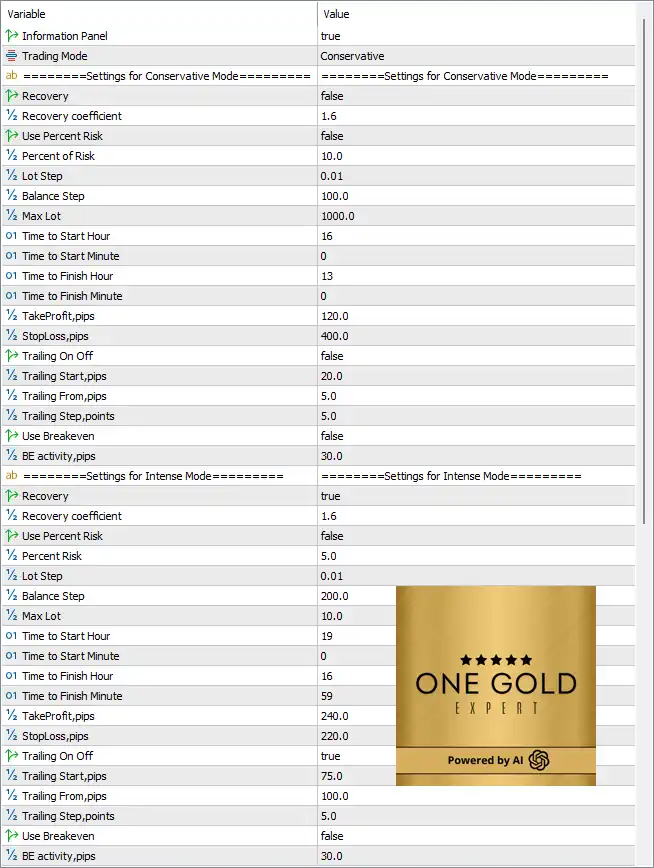
The displayed configuration provides two distinct risk profiles. Conservative Mode uses smaller maximum lot exposure and disables recovery, while Intense Mode enables recovery and uses different trading hours, Take Profit, Stop Loss, and trailing parameters. In addition, the EA includes global controls for leverage, execution, directional trading, virtual SL/TP, account profit/loss limits, and high-impact news protection.
🔢 One Gold MT5 Settings Explained
🔶 General & Conservative Mode Settings
🔹 Information Panel: true — Enables the EA's on-chart information panel for displaying trading and system information.
🔹 Trading Mode: Conservative — Sets the active trading mode to Conservative, meaning the EA uses the parameters configured under the Conservative Mode section.
Conservative Mode
🔹 Recovery: false — Disables the recovery mechanism in Conservative Mode.
🔹 Recovery coefficient: 1.6 — Sets the recovery coefficient to 1.6. Although recovery is currently disabled, this value remains configured for the recovery system.
🔹 Use Percent Risk: false — Disables percentage-based risk calculation in Conservative Mode.
🔹 Percent of Risk: 10.0 — Sets the configured risk percentage to 10.0. Because Use Percent Risk = false, this value is not the active position-sizing method.
🔹 Lot Step: 0.01 — Sets the lot-size increment to 0.01 lots.
🔹 Balance Step: 100.0 — Sets the balance step to 100.0 for the relevant lot-sizing calculation.
🔹 Max Lot: 1000.0 — Sets the maximum lot size in Conservative Mode to 1000.0 lots.
🔹 Time to Start Hour: 16 — Sets the Conservative Mode trading start hour to 16:00.
🔹 Time to Start Minute: 0 — Sets the Conservative Mode trading start minute to 0, giving a start time of 16:00.
🔹 Time to Finish Hour: 13 — Sets the Conservative Mode trading finish hour to 13:00.
🔹 Time to Finish Minute: 0 — Sets the Conservative Mode trading finish minute to 0, giving a finish time of 13:00.
🔹 TakeProfit,pips: 120.0 — Sets the Conservative Mode Take Profit distance to 120.0 pips.
🔹 StopLoss,pips: 400.0 — Sets the Conservative Mode Stop Loss distance to 400.0 pips.
🔹 Trailing On Off: false — Disables the trailing-stop system in Conservative Mode.
🔹 Trailing Start,pips: 20.0 — Sets the trailing-stop activation threshold to 20.0 pips if trailing is enabled.
🔹 Trailing From,pips: 5.0 — Sets the trailing distance/reference to 5.0 pips.
🔹 Trailing Step,points: 5.0 — Sets the trailing update step to 5.0 points.
🔹 Use Breakeven: false — Disables break-even management in Conservative Mode.
🔹 BE activity,pips: 30.0 — Sets the break-even activation level to 30.0 pips if break-even is enabled.
🔶 Intense Mode Settings
🔹 Recovery: true — Enables the recovery mechanism in Intense Mode.
🔹 Recovery coefficient: 1.6 — Sets the Intense Mode recovery coefficient to 1.6.
🔹 Use Percent Risk: false — Disables percentage-based risk sizing in Intense Mode.
🔹 Percent Risk: 5.0 — Sets the configured Intense Mode risk percentage to 5.0. Because percentage-risk sizing is disabled, this parameter is not the active sizing method.
🔹 Lot Step: 0.01 — Sets the Intense Mode lot-size increment to 0.01 lots.
🔹 Balance Step: 200.0 — Sets the Intense Mode balance step to 200.0.
🔹 Max Lot: 10.0 — Sets the maximum Intense Mode lot size to 10.0 lots.
🔹 Time to Start Hour: 19 — Sets the Intense Mode start hour to 19:00.
🔹 Time to Start Minute: 0 — Sets the Intense Mode start minute to 0, producing a start time of 19:00.
🔹 Time to Finish Hour: 16 — Sets the Intense Mode finish hour to 16:00.
🔹 Time to Finish Minute: 59 — Sets the Intense Mode finish minute to 59, producing a finish time of 16:59.
🔹 TakeProfit,pips: 240.0 — Sets the Intense Mode Take Profit distance to 240.0 pips.
🔹 StopLoss,pips: 220.0 — Sets the Intense Mode Stop Loss distance to 220.0 pips.
🔹 Trailing On Off: true — Enables the trailing-stop system in Intense Mode.
🔹 Trailing Start,pips: 75.0 — Activates trailing management after 75.0 pips of favorable movement.
🔹 Trailing From,pips: 100.0 — Sets the trailing reference/distance to 100.0 pips.
🔹 Trailing Step,points: 5.0 — Sets the trailing update step to 5.0 points.
🔹 Use Breakeven: false — Disables break-even management in Intense Mode.
🔹 BE activity,pips: 30.0 — Sets the break-even activation level to 30.0 pips if the feature is enabled.
🔶 Global Trading & Execution Settings
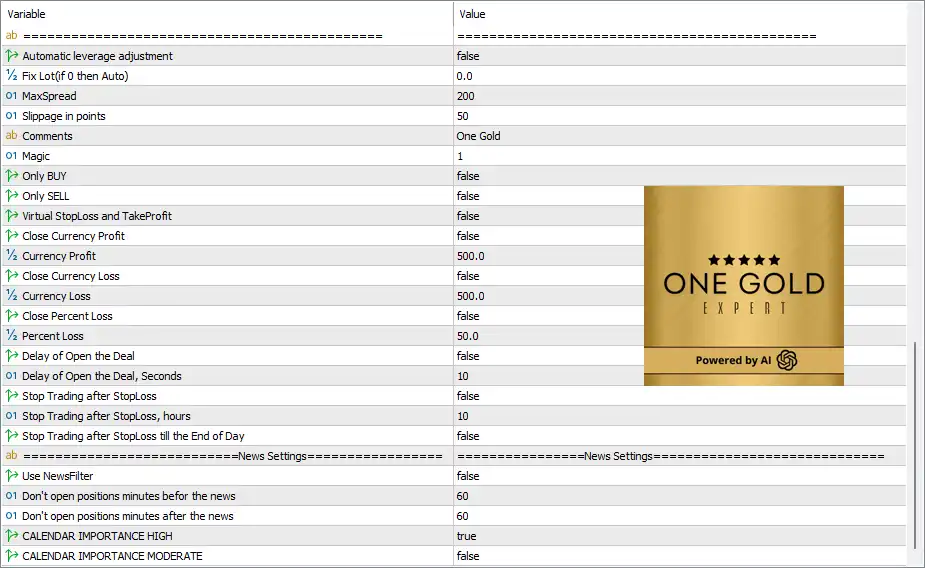
🔹 Automatic leverage adjustment: false — Disables automatic adjustment of trading parameters according to account leverage.
🔹 Fix Lot (if 0 then Auto): 0.0 — Sets the fixed lot value to 0.0. According to the parameter description, 0 = Auto, so the EA is configured to use its automatic lot-sizing logic rather than a manually fixed lot through this field.
🔹 MaxSpread: 200 — Sets the maximum permitted spread to 200 according to the EA's spread-control logic.
🔹 Slippage in points: 50 — Sets the maximum configured execution slippage to 50 points.
🔹 Comments: One Gold — Sets the trade comment to One Gold, making positions generated by the EA easier to identify.
🔹 Magic: 1 — Sets the EA's Magic Number to 1 for trade identification and management.
🔹 Only BUY: false — Disables Buy-only mode, allowing the EA to trade Sell positions as well.
🔹 Only SELL: false — Disables Sell-only mode, allowing the EA to trade Buy positions as well.
🔹 Virtual StopLoss and TakeProfit: false — Disables virtual Stop Loss and Take Profit management.
🔶 Account Profit & Loss Protection
🔹 Close Currency Profit: false — Disables automatic closing based on a currency-denominated profit target.
🔹 Currency Profit: 500.0 — Sets the currency profit target to 500.0 if the corresponding protection is enabled.
🔹 Close Currency Loss: false — Disables automatic closing based on a currency-denominated loss threshold.
🔹 Currency Loss: 500.0 — Sets the currency loss threshold to 500.0 if the corresponding protection is enabled.
🔹 Close Percent Loss: false — Disables automatic closing based on a percentage loss threshold.
🔹 Percent Loss: 50.0 — Sets the percentage-loss threshold to 50.0% if the corresponding protection is enabled.
🔶 Trade Execution Delay & Stop-Loss Protection
🔹 Delay of Open the Deal: false — Disables the delay before opening a trade.
🔹 Delay of Open the Deal, Seconds: 10 — Sets the trade-opening delay to 10 seconds if the delay feature is enabled.
🔹 Stop Trading after StopLoss: false — Disables the function that stops new trading after a Stop Loss event.
🔹 Stop Trading after StopLoss, hours: 10 — Sets the post-Stop-Loss trading suspension period to 10 hours if the feature is enabled.
🔹 Stop Trading after StopLoss till the End of Day: false — Disables stopping trading until the end of the trading day after a Stop Loss event.
🔶 News Settings
🔹 Use NewsFilter: false — Disables the economic-news filter in the current configuration.
🔹 Don't open positions minutes before the news: 60 — Configures the EA to avoid opening new positions 60 minutes before a relevant news event when the news filter is enabled.
🔹 Don't open positions minutes after the news: 60 — Configures the EA to avoid opening new positions for 60 minutes after a relevant news event when the news filter is enabled.
🔹 CALENDAR IMPORTANCE HIGH: true — Enables filtering for high-importance economic-calendar events when the news filter is active.
🔹 CALENDAR IMPORTANCE MODERATE: false — Disables filtering for moderate-importance economic-calendar events.
🔶 Conservative vs. Intense Mode
🔹 Conservative Mode Recovery: false — Conservative Mode does not use the recovery function.
🔹 Intense Mode Recovery: true — Intense Mode enables recovery with a 1.6 recovery coefficient.
🔹 Conservative Mode Max Lot: 1000.0 — The displayed maximum lot parameter is 1000.0 lots.
🔹 Intense Mode Max Lot: 10.0 — Intense Mode has a displayed maximum lot of 10.0 lots.
🔹 Conservative Mode Take Profit: 120.0 pips — Uses a 120.0-pip Take Profit.
🔹 Intense Mode Take Profit: 240.0 pips — Uses a larger 240.0-pip Take Profit.
🔹 Conservative Mode Stop Loss: 400.0 pips — Uses a 400.0-pip Stop Loss.
🔹 Intense Mode Stop Loss: 220.0 pips — Uses a 220.0-pip Stop Loss.
🔹 Conservative Mode Trailing: false — Trailing management is disabled.
🔹 Intense Mode Trailing: true — Trailing management is enabled.
🔹 Conservative Mode Break-Even: false — Break-even management is disabled.
🔹 Intense Mode Break-Even: false — Break-even management is also disabled in Intense Mode.
🔢 Key Configuration Highlights
🔹 Active Trading Mode: The EA is currently set to Trading Mode = Conservative.
🔹 Conservative Risk Profile: Recovery and trailing are disabled, with 120.0 pips Take Profit and 400.0 pips Stop Loss.
🔹 Intense Risk Profile: Recovery is enabled, with 240.0 pips Take Profit, 220.0 pips Stop Loss, and trailing enabled.
🔹 Recovery Coefficient: Both modes use a 1.6 recovery coefficient, although recovery itself is disabled in Conservative Mode.
🔹 Lot Step: Both modes use a 0.01 lot step.
🔹 Spread Protection: The global maximum spread is configured at 200.
🔹 Execution Control: Maximum slippage is set to 50 points.
🔹 Directional Trading: Both Only BUY = false and Only SELL = false, so the EA is not restricted to one direction.
🔹 Profit Protection: Currency-profit closing is disabled, but the configured target is 500.0.
🔹 Loss Protection: Currency-loss closing is disabled, with Currency Loss = 500.0.
🔹 Percentage Protection: Percentage-loss closing is disabled, while Percent Loss = 50.0% remains configured.
🔹 News Protection: The news filter is currently disabled, but the EA is configured to avoid opening positions 60 minutes before and 60 minutes after news.
🔹 News Importance: High-importance news = true, while Moderate-importance news = false.
🔢 Conclusion
One Gold MT5 offers a flexible automated Gold-trading configuration with two distinct operating profiles: Conservative Mode and Intense Mode. This structure allows traders to select between a more restrained configuration and a more active recovery-oriented setup.
The displayed active mode is Conservative, where recovery and trailing are disabled, Take Profit is 120.0 pips, and Stop Loss is 400.0 pips. Intense Mode, by comparison, enables recovery with a 1.6 coefficient, uses 240.0 pips Take Profit, 220.0 pips Stop Loss, and activates trailing after 75.0 pips.
The global configuration adds further controls, including MaxSpread = 200, Slippage = 50 points, Magic = 1, Currency Profit = 500.0, Currency Loss = 500.0, Percent Loss = 50.0, and a 60-minute pre-news and 60-minute post-news protection window. However, the associated profit, loss, and news-protection functions are currently disabled where their state parameters are set to false.
For live deployment, traders should carefully evaluate the difference between the two modes, particularly the recovery setting, maximum lot values, Stop Loss/Take Profit ratios, trailing parameters, and account-level protection settings. Backtesting and forward testing on a demo account are recommended before applying these configurations to a live Gold trading account.
🔢 FAQs
❓ What trading mode is currently selected for One Gold MT5?
The displayed Trading Mode is Conservative, so the EA currently uses the Conservative Mode parameters.
❓ What are the Take Profit and Stop Loss settings in Conservative Mode?
Conservative Mode uses TakeProfit = 120.0 pips and StopLoss = 400.0 pips. Trailing and recovery are both disabled in this mode.
❓ What is different about Intense Mode?
Intense Mode enables Recovery = true with a 1.6 recovery coefficient, uses 240.0 pips Take Profit, 220.0 pips Stop Loss, and enables trailing with a 75.0-pip start, 100.0-pip trailing distance, and 5.0-point step.
❓ Does One Gold MT5 use automatic news protection?
The news filter is currently disabled with Use NewsFilter = false. If enabled, the EA is configured not to open positions 60 minutes before and 60 minutes after relevant news, with high-importance news enabled and moderate-importance news disabled.
❓ What are the account-level profit and loss protection settings?
The EA has Currency Profit = 500.0, Currency Loss = 500.0, and Percent Loss = 50.0, but the corresponding automatic closing functions are currently set to false, so these thresholds are not active in the displayed configuration.



