


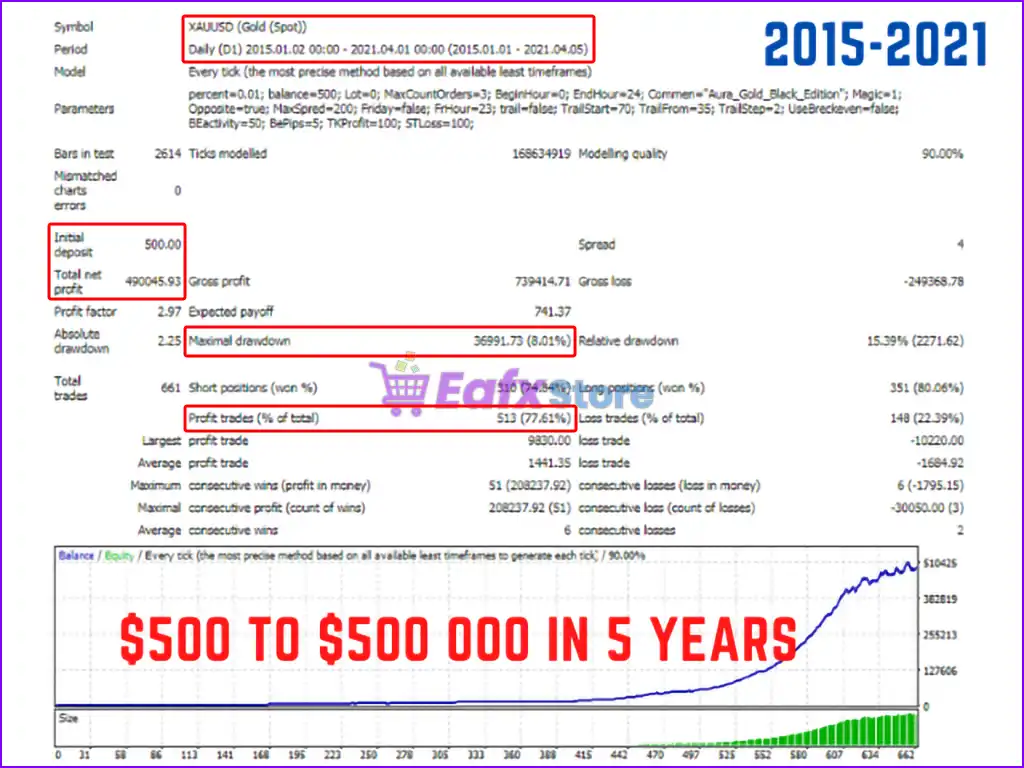
Aura Black Edition MT5 Settings Explained – Full Configuration Guide
Aura Black Edition MT5 is a fully automated Expert Advisor (EA) for MetaTrader 5 designed for advanced Forex and Gold trading strategies. The EA combines recovery systems, trailing stop management, range filtering, risk percentage controls and news protection to deliver flexible automated trading performance.
Aura Black Edition MT5 is suitable for traders looking for customizable risk management and multi-session trading automation with advanced filtering capabilities.
Aura Black Edition MT5 Full Settings Explanation
Below are the details of the parameters in the advisor’s trading system settings table:
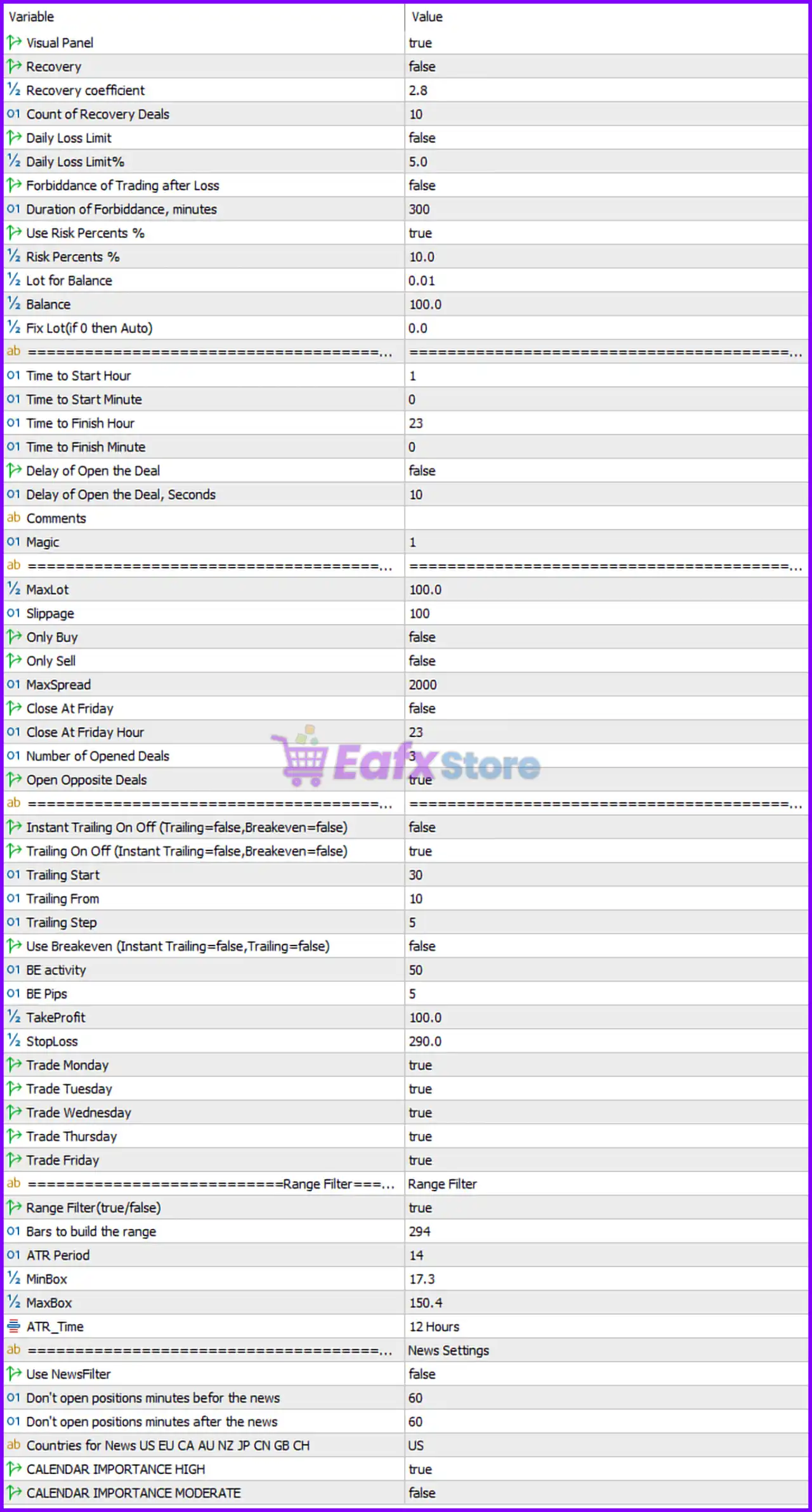
General & Recovery Settings
🔹 Visual Panel = true: Enables the visual information panel displayed on the chart.
🔹 Recovery = false: Disables the recovery trading system.
🔹 Recovery coefficient = 2.8: Sets the lot multiplier coefficient for recovery trades to 2.8.
🔹 Count of Recovery Deals = 10: Maximum number of recovery trades allowed is 10.
🔹 Daily Loss Limit = false: Disables the daily loss limit protection feature.
🔹 Daily Loss Limit % = 5.0: Sets the maximum daily loss limit to 5.0%.
🔹 Forbiddance of Trading after Loss = false: Trading is not blocked after a losing trade.
🔹 Duration of Forbiddance, minutes = 300: Trading pause duration after loss is 300 minutes if enabled.
Risk Management Settings
🔹 Use Risk Percents % = true: Enables percentage-based risk management.
🔹 Risk Percents % = 10.0: Risks 10.0% of account balance per trade.
🔹 Lot for Balance = 0.01: Uses 0.01 lot per specified balance amount.
🔹 Balance = 100.0: Reference balance value used for lot calculation is 100.0.
🔹 Fix Lot (if 0 then Auto) = 0.0: Fixed lot size is disabled; EA uses automatic lot sizing.
Trading Time Settings
🔹 Time to Start Hour = 1: Trading begins at broker server hour 1.
🔹 Time to Start Minute = 0: Trading starts at minute 0.
🔹 Time to Finish Hour = 23: Trading ends at broker server hour 23.
🔹 Time to Finish Minute = 0: Trading stops at minute 0.
🔹 Delay of Open the Deal = false: Disables delayed order execution.
🔹 Delay of Open the Deal, Seconds = 10: Delay time for opening trades is 10 seconds if enabled.
Trade Identification Settings
🔹 Comments =: Comment field used for identifying EA trades.
🔹 Magic = 1: Unique Magic Number assigned to the EA trades is 1.
Trading Execution Settings
🔹 MaxLot = 100.0: Maximum allowed trading lot size is 100.0.
🔹 Slippage = 100: Maximum slippage allowed during execution is 100 points.
🔹 Only Buy = false: EA is not restricted to Buy trades only.
🔹 Only Sell = false: EA is not restricted to Sell trades only.
🔹 MaxSpread = 2000: Maximum allowed market spread is 2000 points.
🔹 Close At Friday = false: Trades are not automatically closed on Friday.
🔹 Close At Friday Hour = 23: Friday closing hour is set to 23.
🔹 Number of Opened Deals = 3: Maximum number of simultaneously opened trades is 3.
🔹 Open Opposite Deals = true: Allows opening opposite-direction trades simultaneously.
Trailing Stop & Breakeven Settings
🔹 Instant Trailing On Off (Trailing=false, Breakeven=false) = false: Instant trailing feature is disabled.
🔹 Trailing On Off (Instant Trailing=false, Breakeven=false) = true: Standard trailing stop feature is enabled.
🔹 Trailing Start = 30: Trailing stop activates after 30 points of profit.
🔹 Trailing From = 10: Trailing stop begins tracking from 10 points.
🔹 Trailing Step = 5: Trailing stop updates every 5 points.
🔹 Use Breakeven (InstantTrailing=false, Trailing=false) = false: Breakeven functionality is disabled.
🔹 BE activity = 50: Breakeven activation level is 50 points.
🔹 BE Pips = 5: Breakeven offset distance is 5 pips.
Stop Loss & Take Profit Settings
🔹 TakeProfit = 100.0: Default Take Profit target is 100.0 points.
🔹 StopLoss = 290.0: Default Stop Loss distance is 290.0 points.
Trading Days Settings
🔹 Trade Monday = true: Trading is enabled on Monday.
🔹 Trade Tuesday = true: Trading is enabled on Tuesday.
🔹 Trade Wednesday = true: Trading is enabled on Wednesday.
🔹 Trade Thursday = true: Trading is enabled on Thursday.
🔹 Trade Friday = true: Trading is enabled on Friday.
Range Filter Settings
🔹 Range Filter = Range Filter: Section title for range-based market filtering.
🔹 Range Filter (true/false) = true: Enables the range filter system.
🔹 Bars to build the range = 294: Uses 294 candles to calculate the market range.
🔹 ATR Period = 14: ATR indicator period is set to 14.
🔹 MinBox = 17.3: Minimum acceptable range box size is 17.3.
🔹 MaxBox = 150.4: Maximum acceptable range box size is 150.4.
🔹 ATR_Time = 12 Hours: ATR calculations are based on the 12 Hours timeframe.
News Filter Settings
🔹 News Settings = News Settings: Section title for economic news filtering.
🔹 Use NewsFilter = false: News filter functionality is disabled.
🔹 Don't open positions minutes before the news = 60: Blocks new trades 60 minutes before news events.
🔹 Don't open positions minutes after the news = 60: Blocks new trades 60 minutes after news events.
🔹 Countries for News US EU CA AU NZ JP CN GB CH = US: Filters news events related to the US.
🔹 CALENDAR IMPORTANCE HIGH = true: High-impact news events are filtered.
🔹 CALENDAR IMPORTANCE MODERATE = false: Moderate-impact news events are ignored.
Conclusion
Aura Black Edition MT5 is a powerful automated trading solution featuring advanced recovery logic, trailing stop management, range filtering, and flexible risk controls. With support for percentage-based money management, multiple trade filters, and configurable trading sessions, the EA provides traders with a highly customizable environment for MetaTrader 5 automated trading.
FAQs
❓ What is Aura Black Edition MT5?
Aura Black Edition MT5 is an automated Expert Advisor for MetaTrader 5 designed for Forex and Gold trading automation.
❓ Does Aura Black Edition MT5 use recovery trading?
Yes, the EA supports recovery trading with a configurable recovery coefficient and recovery deal count.
❓ Can Aura Black Edition MT5 trade both Buy and Sell positions?
Yes, both Buy and Sell trading are enabled by default.
❓ Does Aura Black Edition MT5 include a news filter?
Yes, the EA includes a configurable economic news filter system.
❓ What is the default Take Profit and Stop Loss setting?
The default Take Profit is 100.0 points and the Stop Loss is 290.0 points.