



🔢 Quantum Athena X EA MT5 Settings: Complete Parameter Guide
Quantum Athena X EA is an automated trading system designed for XAUUSD (Gold) on MetaTrader 5, with a structured configuration system covering lot calculation, drawdown protection, trading direction, spread and slippage controls, trading-day filters, visual panel settings and safety management.
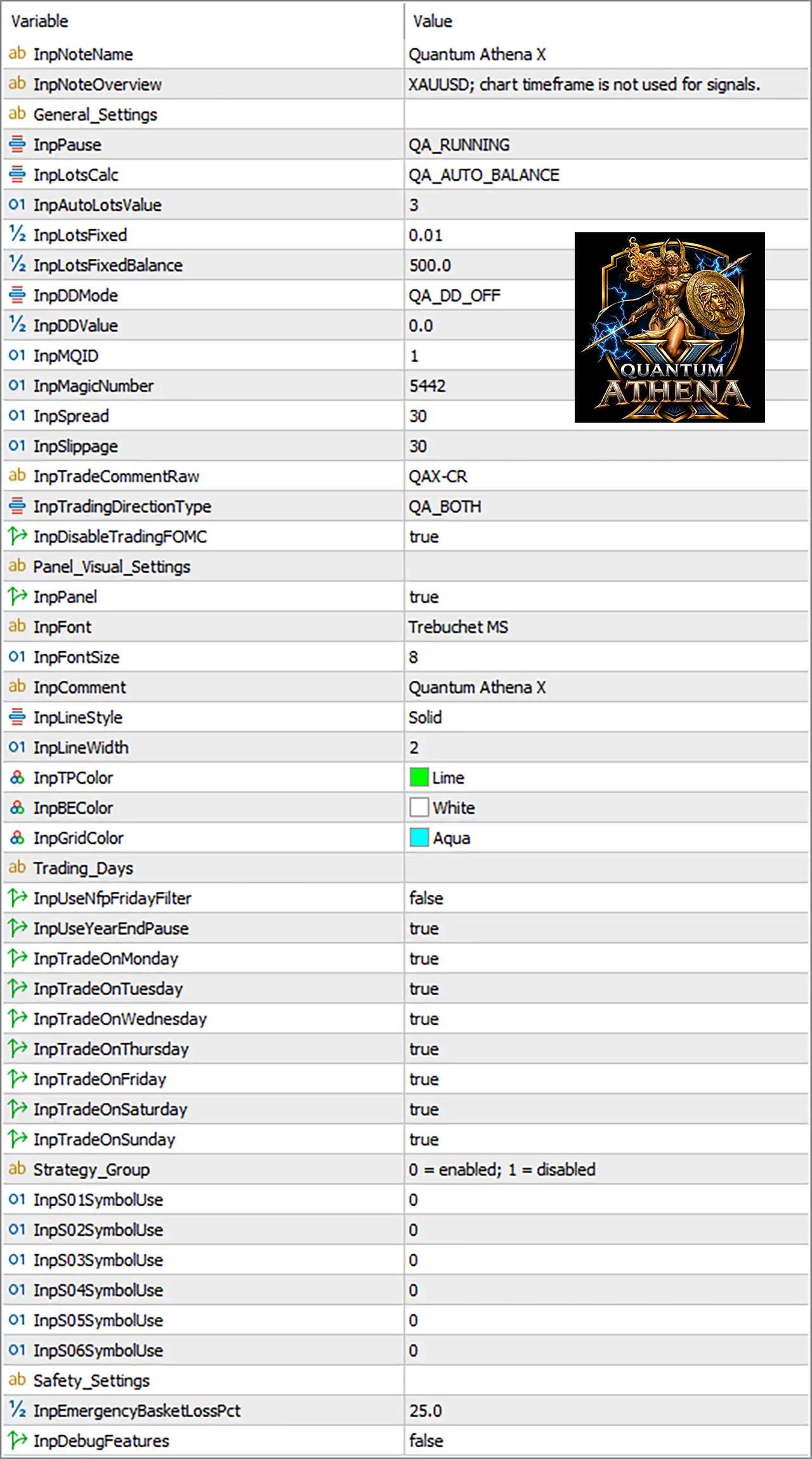
The configuration shown emphasizes automated position sizing, flexible trading controls, and risk-management options while allowing traders to customize execution and chart visualization.
🔢 Quantum Athena X EA MT5 Settings Explained
🔶 General Settings
🔹 InpNoteName = Quantum Athena X — Defines the EA/product name displayed in the configuration; the current value is Quantum Athena X.
🔹 InpNoteOverview = XAUUSD; chart timeframe is not used for signals. — Indicates that the EA is configured for XAUUSD and explicitly states that the chart timeframe is not used for generating signals.
🔹 General_Settings — A section header that groups the EA's main operational and general trading parameters.
🔹 InpPause = QA_RUNNING — Controls the EA's operational state; QA_RUNNING indicates that Quantum Athena X is configured to run normally.
🔹 InpLotsCalc = QA_AUTO_BALANCE — Selects the lot-calculation method; QA_AUTO_BALANCE means the EA uses an automatic balance-based lot-sizing mode rather than relying solely on a manually fixed lot.
🔹 InpAutoLotsValue = 3 — Sets the value used by the automatic lot-sizing system; the configured value is exactly 3.
🔹 InpLotsFixed = 0.01 — Defines the fixed lot size when fixed-lot calculation is used; the configured fixed position size is 0.01 lots.
🔹 InpLotsFixedBalance = 500.0 — Specifies the balance reference associated with the fixed-lot setting; the configured value is exactly 500.0.
🔹 InpDDMode = QA_DD_OFF — Controls the drawdown-management mode; QA_DD_OFF means the dedicated DD control is currently switched off.
🔹 InpDDValue = 0.0 — Defines the drawdown value when the DD-management function is used; the current setting is 0.0.
🔹 InpMQID = 1 — Sets the EA's MQID identifier; the configured value is 1.
🔹 InpMagicNumber = 5442 — Defines the unique Magic Number 5442 used by the EA to identify and manage its own trades.
🔹 InpSpread = 30 — Sets the maximum/configured spread parameter to 30, helping determine whether market spread conditions are acceptable for trading.
🔹 InpSlippage = 30 — Sets the permitted/configured execution slippage to 30, controlling the amount of price deviation tolerated during trade execution.
🔹 InpTradeCommentRaw = QAX-CR — Defines the trade comment attached to EA-generated orders; the configured comment is QAX-CR.
🔹 InpTradingDirectionType = QA_BOTH — Sets the allowed trading direction to QA_BOTH, meaning the EA can operate in both Buy and Sell directions.
🔹 InpDisableTradingFOMC = true — Enables the FOMC trading restriction; true means trading is configured to be disabled around FOMC-related events.
🔶 Panel & Visual Settings
🔹 Panel_Visual_Settings — A section header containing the EA's on-chart panel and visual presentation parameters.
🔹 InpPanel = true — Enables the EA's visual panel; true means the panel is displayed on the MT5 chart.
🔹 InpFont = Trebuchet MS — Sets the panel's font family to Trebuchet MS.
🔹 InpFontSize = 8 — Sets the panel font size to exactly 8.
🔹 InpComment = Quantum Athena X — Defines the comment/title displayed by the EA panel; the configured text is Quantum Athena X.
🔹 InpLineStyle = Solid — Sets the chart-line style to Solid.
🔹 InpLineWidth = 2 — Sets the width of the EA's visual lines to exactly 2.
🔹 InpTPColor = Lime — Sets the Take Profit (TP) line color to Lime.
🔹 InpBEColor = White — Sets the Break-Even (BE) line color to White.
🔹 InpGridColor = Aqua — Sets the grid/visual grid color to Aqua.
🔶 Trading Days
🔹 Trading_Days — A section header controlling which days of the week the EA is permitted to trade.
🔹 InpUseNfpFridayFilter = false — Disables the dedicated NFP Friday filter; false means the special NFP Friday restriction is not enabled.
🔹 InpUseYearEndPause = true — Enables the year-end trading pause; true means the EA is configured to apply its year-end pause mechanism.
🔹 InpTradeOnMonday = true — Monday trading is enabled.
🔹 InpTradeOnTuesday = true — Tuesday trading is enabled.
🔹 InpTradeOnWednesday = true — Wednesday trading is enabled.
🔹 InpTradeOnThursday = true — Thursday trading is enabled.
🔹 InpTradeOnFriday = true — Friday trading is enabled.
🔹 InpTradeOnSaturday = true — Saturday trading is enabled.
🔹 InpTradeOnSunday = true — Sunday trading is enabled.
🔶 Strategy Group & Symbol Settings
🔹 Strategy_Group = 0 = enabled; 1 = disabled — Defines the strategy-group control logic, where 0 = enabled and 1 = disabled.
🔹 InpS01SymbolUse = 0 — Strategy/Symbol Group S01 is set to 0, which according to the displayed definition means enabled.
🔹 InpS02SymbolUse = 0 — Strategy/Symbol Group S02 is set to 0, meaning enabled.
🔹 InpS03SymbolUse = 0 — Strategy/Symbol Group S03 is set to 0, meaning enabled.
🔹 InpS04SymbolUse = 0 — Strategy/Symbol Group S04 is set to 0, meaning enabled.
🔹 InpS05SymbolUse = 0 — Strategy/Symbol Group S05 is set to 0, meaning enabled.
🔹 InpS06SymbolUse = 0 — Strategy/Symbol Group S06 is set to 0, meaning enabled.
🔶 Safety Settings
🔹 Safety_Settings — A section header containing the EA's additional safety and emergency-risk controls.
🔹 InpEmergencyBasketLossPct = 25.0 — Sets the emergency basket-loss threshold to 25.0%, defining the configured percentage level at which the EA's emergency basket-loss protection can be triggered.
🔹 InpDebugFeatures = false — Disables debug features; false means diagnostic/debug functionality is not enabled during normal operation.
🔢 Conclusion
🔹 Quantum Athena X EA MT5 is configured primarily for XAUUSD, with QA_RUNNING enabled, QA_AUTO_BALANCE selected for lot calculation, and QA_BOTH allowing both Buy and Sell operations. The configuration also includes a 25.0% emergency basket-loss threshold, FOMC trading protection enabled, year-end protection enabled, and all seven displayed trading-day switches set to true.
🔹 From a configuration perspective, the settings provide a combination of automated position sizing, execution controls, event protection, trading-day management, visual customization, and emergency risk control. However, parameter values alone do not establish profitability or guarantee a particular level of risk; actual behavior can depend on the broker, account balance, contract specifications, spread, execution conditions, and the EA's internal strategy logic.



