







Pow Banker EA MT5 v8.991 + SetFiles (Original version)

Subscriptions for Special Plan
- 30 EA package is more economical!
- Special package with 99%
- Download 1 EA/Day

Subscriptions for Premium Membership
- Download Unlimited in 1 Year
- Get 100% Discount
- Get free access to all

Subscriptions for Gold Membership
- 1 Year Membership
- Get 100% Discount
- Access EA+Indicator+Course
Frequently bought together 🎁
Add these products to enhance your purchase



What is Pow Banker EA MT5?
Pow Banker EA MT5 is an advanced Expert Advisor (EA) for automated Forex trading with adaptive indicators, ATR-based calculations and intelligent chain management. The EA incorporates trend filters, capital protection, a trailing system, and flexible risk management to improve stability, adaptability and long-term automated trading performance.
🔶 Vendor Website: Click here
Key Features of Pow Banker EA MT5
🔹 ATR-Based Trade Sequencing: Uses adaptive ATR calculations for dynamic order spacing control.
🔹 Advanced Equity Protection: Supports profit locking, trailing systems, and equity safeguards.
🔹 Multi-Indicator Market Filters: Integrates RSI, EMA, ADX and Bollinger Bands analysis.
🔹 Flexible Long and Short Trading: Executes automated BUY and SELL trading sequences.
🔹 Smart News Protection System: Includes configurable filters for high-impact market events.
🔹 Adaptive Lot Management Logic: Uses sequence multipliers for scalable trading operations.
Why Choose & Use Pow Banker EA MT5?
🔹 Professional Automated Trading: Delivers structured Forex automation with advanced controls.
🔹 Flexible Risk Management Tools: Supports customizable equity and sequence protection.
🔹 Adaptive Multi-Market Capability: Performs efficiently in trending and ranging conditions.
🔹 Integrated Indicator Filtering: Enhances trade quality through layered technical analysis.
🔹 Advanced Sequence Control System: Combines trade delays and spacing for stable execution.
🔹 Marketplace-Ready Trading Solution: Suitable for traders seeking resilient automation.
Pow Banker EA MT5 Review
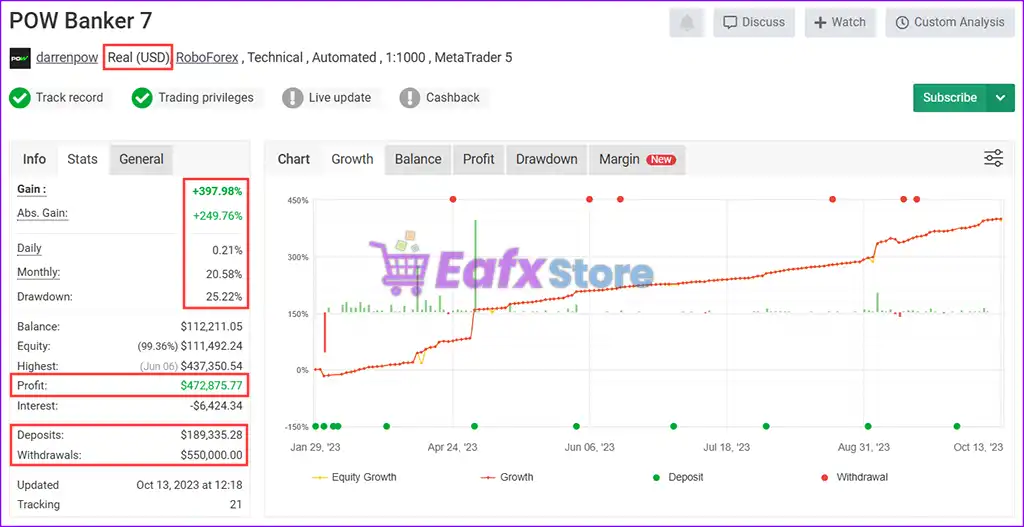
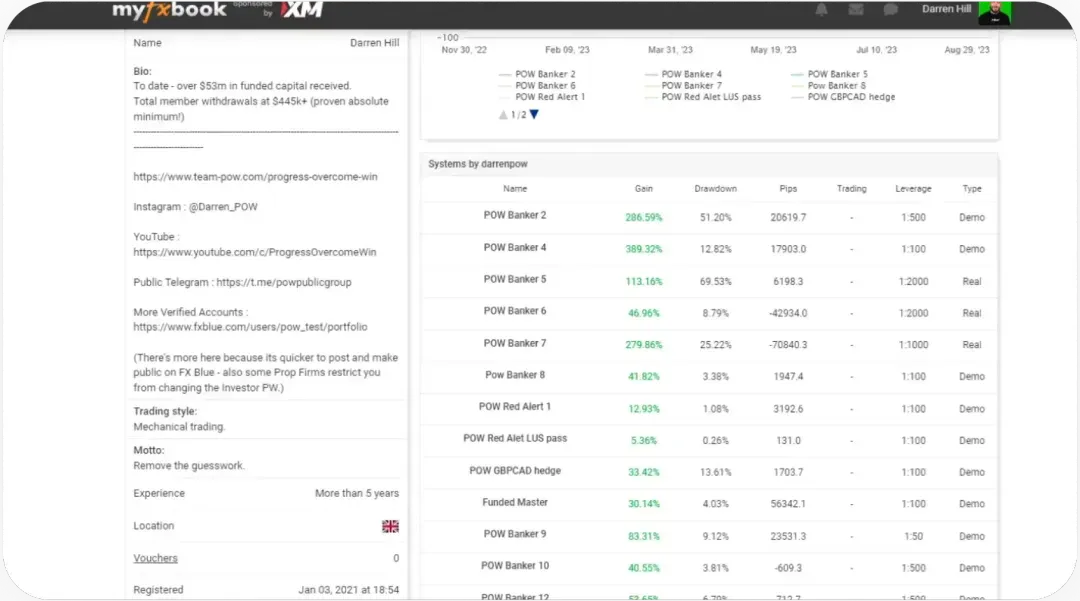
🔶 The POW Banker is a high-performance automated trading system running on MetaTrader 5 with 1:1000 leverage on a real USD account. This in-depth analysis breaks down the EA’s profitability, risk, and consistency based on live trading data.
✅ Total Gain: +397.98%
✅ Total Profit: $472,875.77
✅ Daily Growth: 0.21%
✅ Monthly Growth: 20.58%
✅ Maximum Drawdown: 25.22%
✅ Live Signal Results: View here
Pow Banker EA MT5 Myfxbook
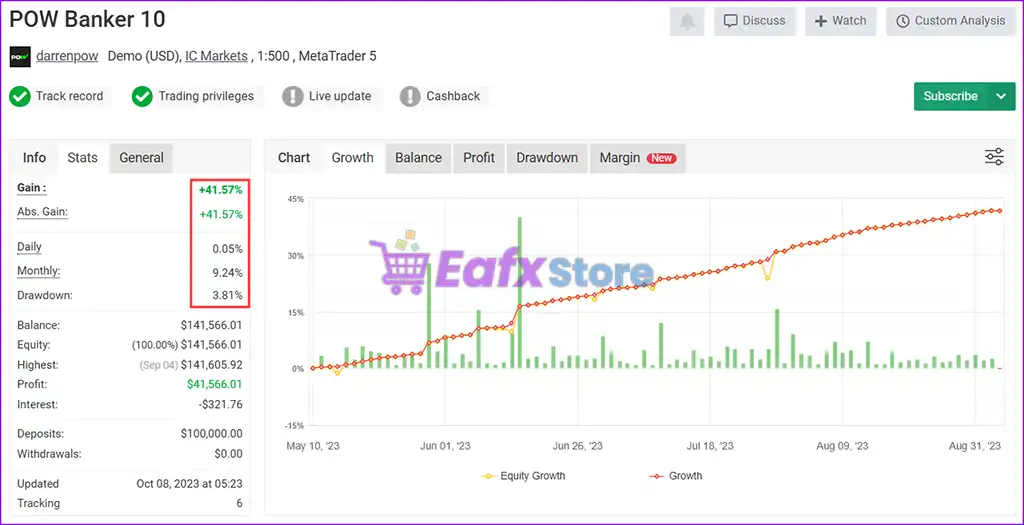
🔶 With a consistent 9.24% monthly return, the EA shows strong long-term profitability. The stable daily return of 0.05% suggests a low-risk algorithmic strategy designed for sustainable growth.
✅ Deposits: $100K
✅ Total Gain: +41.57%
✅ Total Profit: $41,566
✅ Monthly Growth: 9.24%
✅ Maximum Drawdown: 3.81%
✅ Signal Results: View here
Pow Banker EA Myfxbook
What is the Pow Banker EA MT5 Trading Strategy?
🔹 ATR Sequence Trading Logic: Expands trade sequences dynamically using ATR-based spacing.
🔹 Trend and Range Market Analysis: Combines EMA and ADX filters for market validation.
🔹 Indicator Confirmation Entries: Uses RSI and Bollinger Bands for additional signal control.
🔹 Dynamic Profit Locking System: Protects floating gains using trailing and lock-profit logic.
🔹 Adaptive Recovery Management: Supports structured recovery settings for market resilience.
🔹 Continuous Market Automation: Operates across multiple sessions with automated execution.
Trading Specifications
Recommended settings and parameters to pay attention to from developers and experts:
| Features | Type |
|---|---|
| Trading platform | MetaTrader 5 (MT5) |
| Minimum / Recommended deposit | $1,000 |
| Time frames | H1 (Any Times) |
| Currency pairs | EURUSD, USDJPY, USDCHF, USDCAD, GBPUSD, NZDUSD, AUDUSD, XAUUSD (Gold) |
| Setup files | Available |
| Product type | DLL Build 1731 |
| Additional services | Unlock And Decompile |
| Recommended brokers | Exness Broker, Icmarkets Broker |
| Recommended VPS | MyfxVPS.com ( Blue VPS, Golden VPS). Lowest Latency, 2 week Free Trial, 100% Free for 12-18 Months. |
➡️ Reviewed by David Easton
What’s in the Package?
The download package of the product suite includes:
1. Experts:
✅ POW_BANKER_EA_v8.991.ex5
2. SetFiles:
✅ FX SET 1.set
✅ FX SET 2.set
✅ Gold Hedging.set
✅ Hedging.set
✅ RSI Set File.set
✅ RSI.set
✅ trend.set
✅ trend and Range EMA.set
✅ trend and RSI Set.set
✅ trend and RSI.set
✅ trend Set Gold.set
Conclusion: Pow Banker EA – Game Changer in PropFirm Trading
In short, Pow Banker EA stands out as a revolutionary automated trading solution designed specifically for prop trading success. With its advanced risk management features, high win rate, and multi-strategy approach, this Expert Advisor (EA) ensures traders can maximize profits while maintaining optimal risk control. Whether you’re looking to pass FTMO challenges or achieve consistent returns in forex trading, Pow Banker EA provides the automation, precision, and adaptability needed to succeed in today’s fast-paced markets.
🔢 Pow Banker EA MT5 – Complete Settings Guide for Automated Forex Trading
Pow Banker EA MT5 is a professional automated Forex trading Expert Advisor (EA) developed for MetaTrader 5 (MT5). The EA combines sequence trading, ATR-based calculations, advanced lot sizing, equity protection, trend filtering, RSI, EMA, ADX, Bollinger Bands and news filtering systems.
Designed for flexible risk management and automated execution, Pow Banker EA MT5 helps traders optimize trading performance across multiple market conditions.

Pow Banker EA MT5 setting
🔢 Installation Panel Parameters
Below are the details of the parameters in the advisor’s trading system settings table:
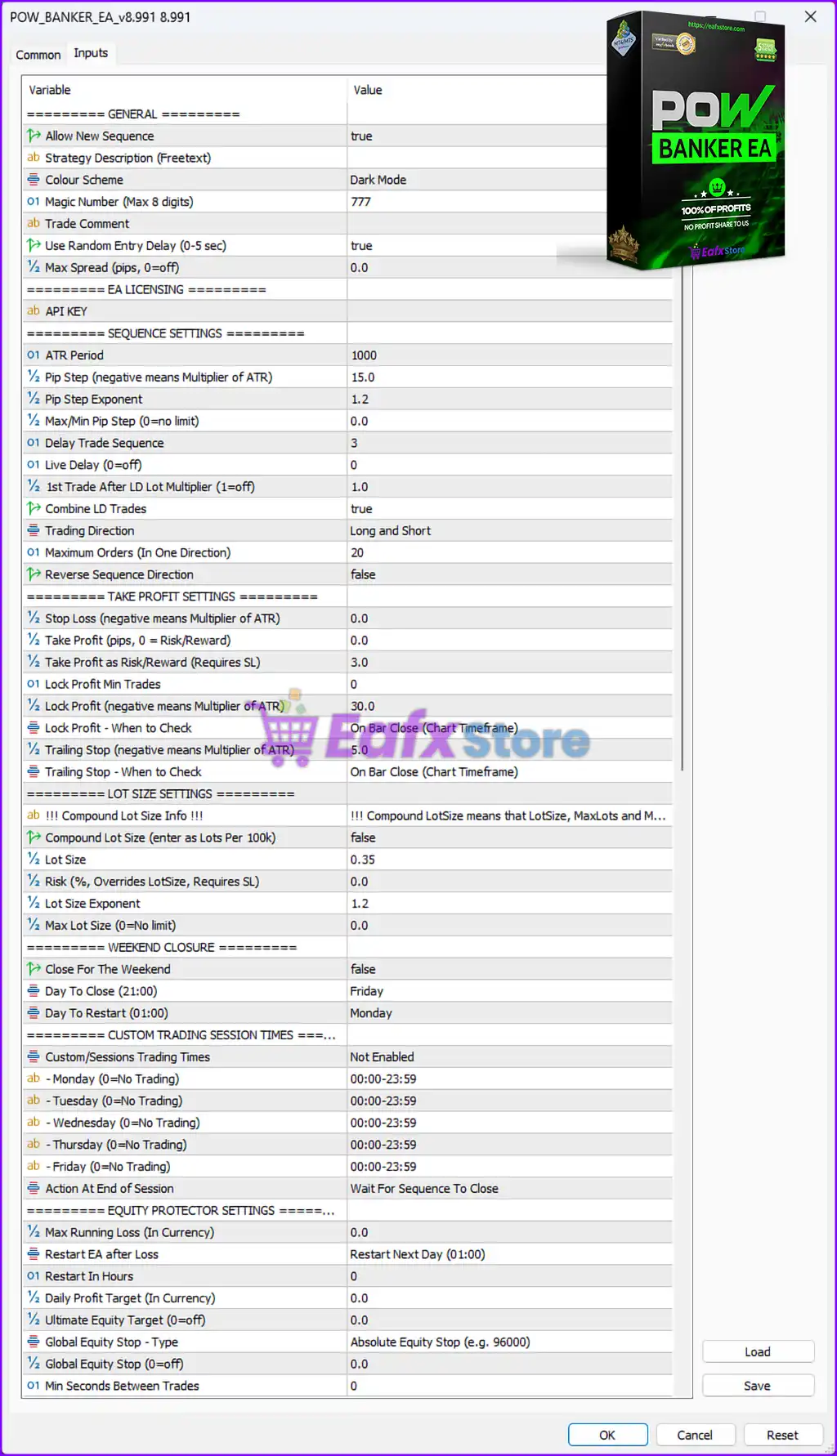
Pow Banker EA MT5 settings panel details
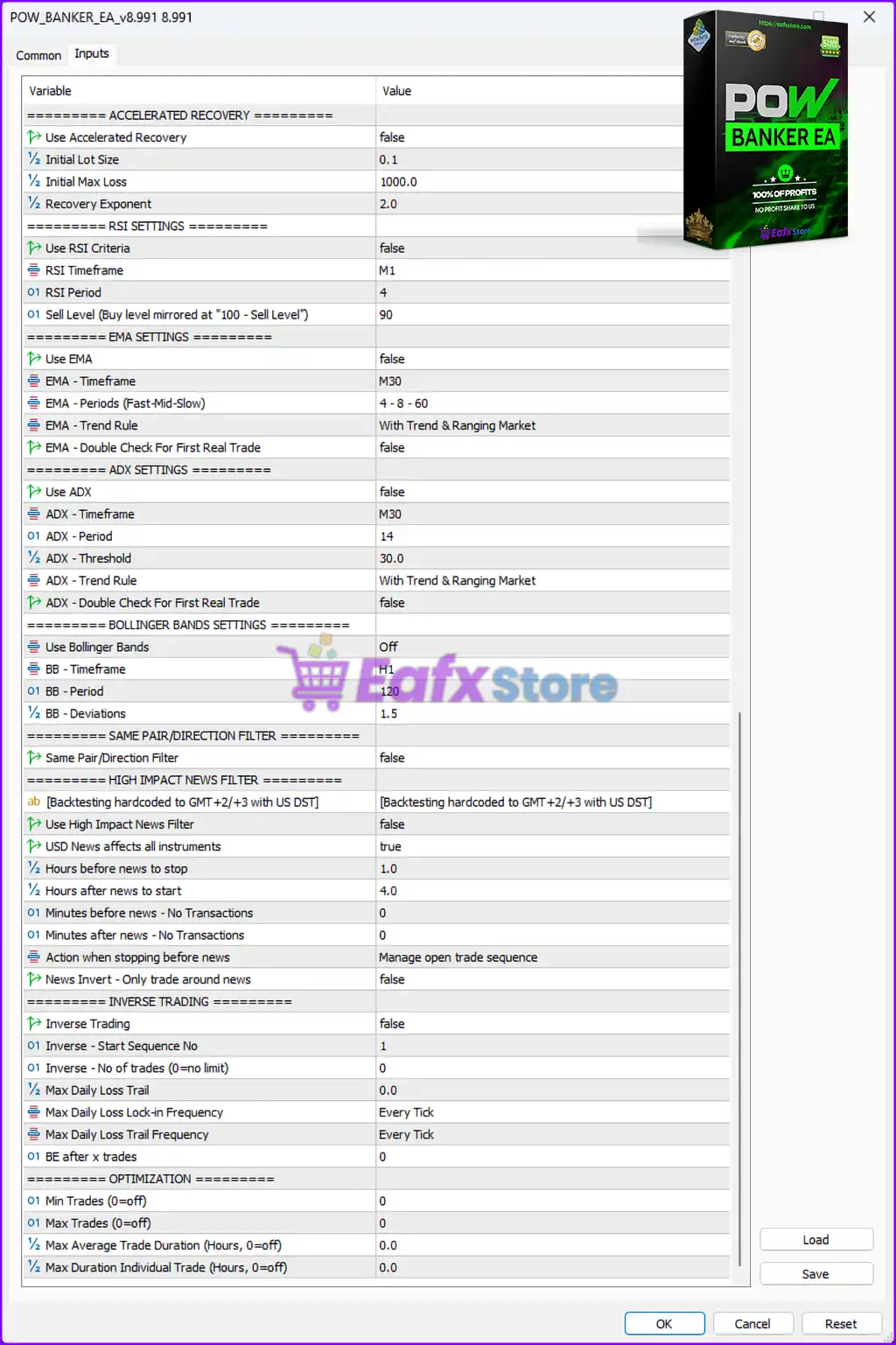
Pow Banker EA settings panel details
🔶 General Settings
🔹 Allow New Sequence = true — Allows the EA to start new trading sequences automatically.
🔹 Strategy Description (Freetext) — Reserved field for custom strategy notes or descriptions.
🔹 Colour Scheme = Dark Mode — Enables the Dark Mode interface theme.
🔹 Magic Number (Max 8 digits) = 777 — Assigns the unique Magic Number 777 to identify EA trades.
🔹 Trade Comment — Allows custom comments to be attached to trades.
🔹 Use Random Entry Delay (0-5 sec) = true — Randomizes trade entry timing between 0 and 5 seconds.
🔹 Max Spread (pips, 0=off) = 0.0 — Disables maximum spread filtering.
🔶 EA Licensing Settings
🔹 API KEY — Field used for EA activation and licensing authentication.
🔶 Sequence Settings
🔹 ATR Period = 1000 — Sets the ATR calculation period to 1000 candles.
🔹 Pip Step (negative means Multiplier of ATR) = 15.0 — Defines the pip distance between sequence orders as 15.0 pips.
🔹 Pip Step Exponent = 1.2 — Multiplies pip step distance by 1.2 for each additional order.
🔹 Max/Min Pip Step (0=no limit) = 0.0 — Removes pip step limitations.
🔹 Delay Trade Sequence = 3 — Delays the start of a new sequence by 3 units/time intervals.
🔹 Live Delay (0=off) = 0 — Disables live execution delay.
🔹 1st Trade After LD Lot Multiplier (1=off) = 1.0 — Keeps the first trade lot multiplier unchanged at 1.0.
🔹 Combine LD Trades = true — Combines delayed trades into one trading sequence.
🔹 Trading Direction = Long and Short — Allows both BUY and SELL trading directions.
🔹 Maximum Orders (In One Direction) = 20 — Limits maximum trades per direction to 20 orders.
🔹 Reverse Sequence Direction = false — Disables reverse trading sequence direction.
🔶 Take Profit Settings
🔹 Stop Loss (negative means Multiplier of ATR) = 0.0 — Disables Stop Loss protection.
🔹 Take Profit (pips, 0 = Risk/Reward) = 0.0 — Uses Risk/Reward mode instead of fixed Take Profit.
🔹 Take Profit as Risk/Reward (Requires SL) = 3.0 — Sets Take Profit at a 3.0 Risk/Reward ratio.
🔹 Lock Profit Min Trades = 0 — No minimum trade requirement for profit locking.
🔹 Lock Profit (negative means Multiplier of ATR) = 30.0 — Locks profits after reaching 30.0 ATR/pip conditions.
🔹 Lock Profit – When to Check = On Bar Close (Chart Timeframe) — Checks profit lock conditions after candle close.
🔹 Trailing Stop (negative means Multiplier of ATR) = 5.0 — Uses a trailing stop distance of 5.0.
🔹 Trailing Stop – When to Check = On Bar Close (Chart Timeframe) — Updates trailing stop on candle close.
🔶 Lot Size Settings
🔹 !!! Compound Lot Size Info !!! — Information section explaining compound lot size logic.
🔹 Compound Lot Size (enter as Lots Per 100k) = false — Disables compound lot sizing.
🔹 Lot Size = 0.35 — Sets fixed lot size to 0.35 lots.
🔹 Risk % (Overrides LotSize, Requires SL) = 0.0 — Disables percentage-based risk calculation.
🔹 Lot Size Exponent = 1.2 — Multiplies lot sizes by 1.2 for sequence orders.
🔹 Max Lot Size (0=No limit) = 0.0 — Removes maximum lot size limitation.
🔶 Weekend Closure Settings
🔹 Close For The Weekend = false — Keeps trading active during weekends if market is open.
🔹 Day To Close (21:00) = Friday — Sets Friday as the scheduled closing day.
🔹 Day To Restart (01:00) = Monday — Restarts trading on Monday at 01:00.
🔶 Custom Trading Session Settings
🔹 Custom/Sessions Trading Times = Not Enabled — Disables custom trading sessions.
🔹 Monday (0=No Trading) = 00:00-23:59 — Allows trading all day Monday.
🔹 Tuesday (0=No Trading) = 00:00-23:59 — Allows trading all day Tuesday.
🔹 Wednesday (0=No Trading) = 00:00-23:59 — Allows trading all day Wednesday.
🔹 Thursday (0=No Trading) = 00:00-23:59 — Allows trading all day Thursday.
🔹 Friday (0=No Trading) = 00:00-23:59 — Allows trading all day Friday.
🔹 Action At End of Session = Wait For Sequence To Close — Waits for current trade sequence completion before ending sessions.
🔶 Equity Protector Settings
🔹 Max Running Loss (In Currency) = 0.0 — Disables maximum running loss limitation.
🔹 Restart EA after Loss = Restart Next Day (01:00) — Restarts EA automatically the next day after losses.
🔹 Restart In Hours = 0 — No restart delay in hours.
🔹 Daily Profit Target (In Currency) = 0.0 — Disables daily profit target.
🔹 Ultimate Equity Target (0=off) = 0.0 — Disables ultimate equity target feature.
🔹 Global Equity Stop – Type = Absolute Equity Stop (e.g. 9600) — Uses absolute equity values for account protection.
🔹 Global Equity Stop (0=off) = 0.0 — Disables global equity stop.
🔹 Min Seconds Between Trades = 0 — No minimum delay between trades.
🔶 Accelerated Recovery Settings
🔹 Use Accelerated Recovery = false — Disables accelerated recovery mode.
🔹 Initial Lot Size = 0.1 — Sets initial recovery lot size to 0.1 lots.
🔹 Initial Max Loss = 1000.0 — Defines maximum recovery loss threshold at 1000.0.
🔹 Recovery Exponent = 2.0 — Multiplies recovery lot sizes by 2.0.
🔶 RSI Settings
🔹 Use RSI Criteria = false — Disables RSI filtering conditions.
🔹 RSI Timeframe = M1 — Sets RSI calculation timeframe to M1.
🔹 RSI Period = 4 — Uses RSI period value of 4.
🔹 Sell Level (Buy level mirrored at “100 – Sell Level”) = 90 — Sets RSI sell level to 90.
🔶 EMA Settings
🔹 Use EMA = false — Disables EMA trend filtering.
🔹 EMA – Timeframe = M30 — Uses M30 timeframe for EMA calculations.
🔹 EMA – Periods (Fast-Mid-Slow) = 4 – 8 – 60 — Uses EMA periods 4, 8, and 60.
🔹 EMA – Trend Rule = With Trend & Ranging Market — Applies EMA strategy in trending and ranging conditions.
🔹 EMA – Double Check For First Real Trade = false — Disables additional EMA confirmation.
🔶 ADX Settings
🔹 Use ADX = false — Disables ADX filtering.
🔹 ADX – Timeframe = M30 — Uses M30 timeframe for ADX calculations.
🔹 ADX – Period = 14 — Sets ADX period to 14.
🔹 ADX – Threshold = 30.0 — Uses ADX threshold value of 30.0.
🔹 ADX – Trend Rule = With Trend & Ranging Market — Applies ADX in both trending and ranging markets.
🔹 ADX – Double Check For First Real Trade = false — Disables ADX double confirmation.
🔶 Bollinger Bands Settings
🔹 Use Bollinger Bands = Off — Disables Bollinger Bands filtering.
🔹 BB – Timeframe = H1 — Uses H1 timeframe for Bollinger Bands calculations.
🔹 BB – Period = 120 — Sets Bollinger Bands period to 120.
🔹 BB – Deviations = 1.5 — Uses deviation level of 1.5.
🔶 Same Pair/Direction Filter
🔹 Same Pair/Direction Filter = false — Disables pair and direction filtering restrictions.
🔶 High Impact News Filter
🔹 [Backtesting hardcoded to GMT+2/+3 with US DST] — Uses GMT+2/+3 timezone for backtesting calculations.
🔹 Use High Impact News Filter = false — Disables high-impact news filtering.
🔹 USD News affects all instruments = true — Applies USD news filtering across all trading instruments.
🔹 Hours before news to stop = 1.0 — Stops trading 1.0 hour before news events.
🔹 Hours after news to start = 4.0 — Restarts trading 4.0 hours after news events.
🔹 Minutes before news – No Transactions = 0 — No additional transaction pause before news.
🔹 Minutes after news – No Transactions = 0 — No additional transaction pause after news.
🔹 Action when stopping before news = Manage open trade sequence — Continues managing existing trade sequences during news.
🔹 News Invert – Only trade around news = false — Disables inverse trading around news events.
🔶 Inverse Trading Settings
🔹 Inverse Trading = false — Disables inverse trading mode.
🔹 Inverse – Start Sequence No = 1 — Starts inverse sequence at order number 1.
🔹 Inverse – No of trades (0=no limit) = 0 — No limit on inverse trades.
🔹 Max Daily Loss Trail = 0.0 — Disables daily loss trailing protection.
🔹 Max Daily Loss Lock-in Frequency = Every Tick — Checks daily loss protection on every tick.
🔹 Max Daily Loss Trail Frequency = Every Tick — Updates loss trailing on every tick.
🔹 BE after x trades = 0 — Disables break-even activation after trade count.
🔶 Optimization Settings
🔹 Min Trades (0=off) = 0 — Disables minimum trade requirement.
🔹 Max Trades (0=off) = 0 — Disables maximum trade restriction.
🔹 Max Average Trade Duration (Hours, 0=off) = 0.0 — Disables average trade duration limit.
🔹 Max Duration Individual Trade (Hours, 0=off) = 0.0 — Disables individual trade duration limit.
🔢 Conclusion
Pow Banker EA MT5 is a highly advanced automated Forex trading robot for MetaTrader 5 that integrates sequence trading, ATR-based calculations, smart lot management, trend filters, news protection and equity control systems.
With customizable RSI, EMA, ADX, Bollinger Bands, and recovery settings, the EA offers traders flexible automation for different market conditions and trading styles.
Proper optimization of risk management and sequence settings is essential to maximize stability and long-term profitability.
🔢 FAQs
❓ What is Pow Banker EA MT5?
Pow Banker EA MT5 is an automated Forex Expert Advisor for MetaTrader 5 featuring sequence trading, ATR calculations, and advanced risk management systems.
❓ Does Pow Banker EA MT5 support both BUY and SELL trading?
Yes, the Trading Direction setting is configured as “Long and Short,” allowing both BUY and SELL trades.
❓ Can Pow Banker EA MT5 filter market conditions using indicators?
Yes, the EA supports RSI, EMA, ADX, and Bollinger Bands filters for market analysis.
❓ Does Pow Banker EA MT5 include news protection?
Yes, the EA includes a High Impact News Filter system with configurable stop and restart times.
❓ What risk management features are available in Pow Banker EA MT5?
The EA includes equity protection, trailing stop, lock profit, recovery systems, and global equity stop controls.
User Reviews
Only logged in customers who have purchased this product may leave a review.
1. What is Pow Banker EA MT5?
Pow Banker EA MT5 is an advanced automated trading system designed specifically for prop trading challenges like FTMO. It optimizes risk management and trading strategies to help traders maximize profits while maintaining low drawdowns.
2. How does Pow Banker EA MT5 help with prop trading challenges?
The EA is built to meet prop firm requirements, ensuring proper risk management, controlled drawdowns, and a high win rate. It helps traders pass FTMO and other prop firm challenges by maintaining profitability while adhering to strict trading rules.
3. What trading strategies does Pow Banker EA MT5 use?
Pow Banker EA MT5 integrates multiple strategies, including:
✔ Hedging & Averaging – Dynamically adjusts positions based on market conditions.
✔ Martingale Strategy – Uses a calculated risk approach for optimal trade management.
✔ Trend-Following & Range-Based Trading – Ensures adaptability across different market conditions.
4. What is the expected profitability and drawdown of Pow Banker EA MT5?
Live trading results show:
✔ Total Gain: +397.98%
✔ Total Profit: $472,875.77
✔ Monthly Growth: 20.58%
✔ Maximum Drawdown: 25.22%
Prop firm results:
✔ Total Gain: +41.57%
✔ Monthly Growth: 9.24%
✔ Maximum Drawdown: 3.81%
5. What is the minimum deposit required to use Pow Banker EA MT5?
The minimum recommended deposit is $1,000, ensuring enough capital to properly manage risk and execute trades effectively.
6. Which currency pairs does Pow Banker EA MT5 support?
The EA supports all currency pairs, providing traders with flexibility across various Forex markets.
7. Does Pow Banker EA MT5 work with all brokers?
While it can work with most brokers, Exness Broker and HTFX Broker are recommended for optimal performance.
8. Is Pow Banker EA MT5 easy to set up?
Yes, the EA includes setup files and multiple pre-configured presets for different trading strategies. Installation is simple, and it seamlessly integrates with MetaTrader 5.
🔥 Get This EA for FREE with Our Membership! 🚀🚀
Unlock access to this EA, premium Indicators, and exclusive trading tools completely FREE with any of our Membership Plans! Thousands of traders already benefit from our VIP library—join them and level up your trading instantly. Choose Your Membership:
- SPECIAL – 1 Month Membership
- GOLD – 1 Year Membership
- PREMIUM – 1 Year Membership
-
 Original price was: $999.00.$89.00Current price is: $89.00.
 -
 Original price was: $249.00.$89.00Current price is: $89.00.
 -
 Price range: $65.00 through $599.00
 -
 Original price was: $200.00.$69.00Current price is: $69.00.
-
 1Original price was: $599.00.$59.00Current price is: $59.00.
 -
 1Original price was: $11,000.00.$89.00Current price is: $89.00.
 -
 1Original price was: $599.00.$59.00Current price is: $59.00.
 -
 0Original price was: $399.00.$59.00Current price is: $59.00.
There are no reviews yet.