


🔢 SwingSniper Multi Asset Swing Breakout EA MT5 – Complete Settings Guide and Parameter Explanation
SwingSniper Multi Asset Swing Breakout EA is a professional breakout trading Expert Advisor designed for MetaTrader 5. The EA specializes in identifying swing highs and swing lows, placing breakout orders, and managing positions using ATR-based stop-loss and take-profit calculations.
It includes advanced risk management, break-even protection, partial close functionality, trailing stops, session filtering, and an integrated dashboard, making it suitable for trading Forex, Gold, Indices, and other financial instruments.

🔢 Installation Panel Parameters
Below are the details of the parameters in the advisor’s trading system settings table:
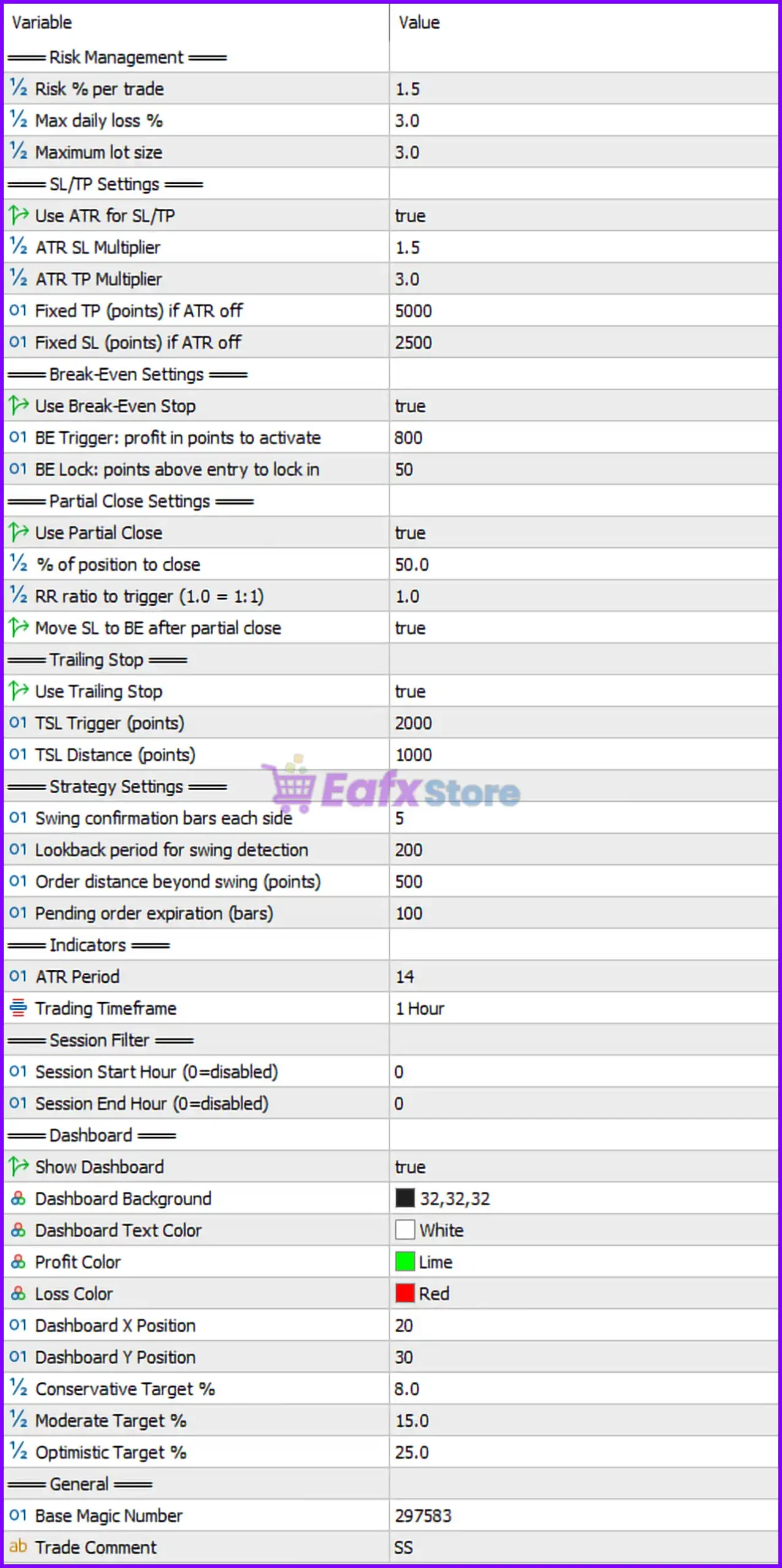
🔶 Risk Management Settings
🔹 Risk % per Trade: Set to 1.5%, defining the percentage of account equity risked on each trade.
🔹 Max Daily Loss %: Configured at 3.0%, limiting the maximum allowable daily account loss.
🔹 Maximum Lot Size: Set to 3.0 lots, defining the largest position size the EA can open.
🔶 SL/TP Settings
🔹 Use ATR for SL/TP: Set to true, enabling ATR-based Stop Loss and Take Profit calculations.
🔹 ATR SL Multiplier: Configured at 1.5, multiplying the ATR value to calculate Stop Loss distance.
🔹 ATR TP Multiplier: Set to 3.0, multiplying the ATR value to calculate Take Profit distance.
🔹 Fixed TP (points) if ATR off: Configured at 5000 points, used as the Take Profit distance when ATR-based TP is disabled.
🔹 Fixed SL (points) if ATR off: Set to 2500 points, used as the Stop Loss distance when ATR-based SL is disabled.
🔶 Break-Even Settings
🔹 Use Break-Even Stop: Set to true, enabling automatic break-even protection.
🔹 BE Trigger: Profit in Points to Activate: Configured at 800 points, activating break-even when the trade reaches 800 points of profit.
🔹 BE Lock: Points Above Entry to Lock In: Set to 50 points, moving Stop Loss 50 points beyond the entry price after break-even activation.
🔶 Partial Close Settings
🔹 Use Partial Close: Set to true, allowing the EA to partially close profitable positions.
🔹 % of Position to Close: Configured at 50.0%, closing half of the position when the partial close condition is met.
🔹 RR Ratio to Trigger (1.0 = 1:1): Set to 1.0, triggering the partial close when the trade reaches a 1:1 risk-to-reward ratio.
🔹 Move SL to BE After Partial Close: Set to true, automatically moving Stop Loss to break-even after the partial position is closed.
🔶 Trailing Stop Settings
🔹 Use Trailing Stop: Set to true, enabling dynamic trailing stop management.
🔹 TSL Trigger (Points): Configured at 2000 points, activating the trailing stop after reaching 2000 points of profit.
🔹 TSL Distance (Points): Set to 1000 points, maintaining a 1000-point distance between price and Stop Loss.
🔶 Strategy Settings
🔹 Swing Confirmation Bars Each Side: Configured at 5, requiring five candles on both sides to confirm a valid swing high or swing low.
🔹 Lookback Period for Swing Detection: Set to 200, defining the number of historical bars analyzed for swing identification.
🔹 Order Distance Beyond Swing (Points): Configured at 500 points, placing pending orders 500 points beyond the detected swing level.
🔹 Pending Order Expiration (Bars): Set to 100 bars, automatically removing pending orders after 100 bars if not triggered.
🔶 Indicator Settings
🔹 ATR Period: Configured at 14, defining the period used for Average True Range calculations.
🔹 Trading Timeframe: Set to 1 Hour, meaning the EA is optimized to operate on the H1 timeframe.
🔶 Session Filter Settings
🔹 Session Start Hour (0=disabled): Set to 0, meaning session filtering is disabled and no specific start time restriction is applied.
🔹 Session End Hour (0=disabled): Configured at 0, meaning session filtering is disabled and no specific end time restriction is applied.
🔶 Dashboard Settings
🔹 Show Dashboard: Set to true, enabling the on-chart dashboard display.
🔹 Dashboard Background: Configured as 32,32,32, providing a dark dashboard background color.
🔹 Dashboard Text Color: Set to White, displaying dashboard text in white.
🔹 Profit Color: Configured as Lime, displaying profit information in green.
🔹 Loss Color: Set to Red, displaying loss information in red.
🔹 Dashboard X Position: Configured at 20, defining the horizontal dashboard position on the chart.
🔹 Dashboard Y Position: Set to 30, defining the vertical dashboard position on the chart.
🔹 Conservative Target %: Configured at 8.0%, representing the conservative profit target level.
🔹 Moderate Target %: Set to 15.0%, representing the moderate profit target level.
🔹 Optimistic Target %: Configured at 25.0%, representing the aggressive profit target level.
🔶 General Settings
🔹 Base Magic Number: Set to 297583, serving as the unique identifier for all trades managed by the EA.
🔹 Trade Comment: Configured as SS, adding the comment "SS" to all orders opened by the Expert Advisor.
🔢 Conclusion
SwingSniper Multi Asset Swing Breakout EA MT5 is a comprehensive breakout trading system designed to capture market movements beyond significant swing levels.
With advanced features such as ATR-based SL/TP, Break-Even Protection, Partial Close Management, Trailing Stop Control, and Multi-Asset Compatibility, the EA provides traders with a robust framework for managing risk and maximizing opportunities.
Key settings such as Risk 1.5%, Max Daily Loss 3.0%, ATR TP Multiplier 3.0, and Lookback Period 200 allow users to tailor the system to their preferred trading style and risk tolerance.
🔢 FAQs
❓ What is SwingSniper Multi Asset Swing Breakout EA MT5?
SwingSniper Multi Asset Swing Breakout EA MT5 is an automated breakout trading robot that identifies swing highs and lows and places trades when price breaks those levels.
❓ What timeframe is recommended for SwingSniper Multi Asset Swing Breakout EA MT5?
The settings show a recommended Trading Timeframe of 1 Hour (H1).
❓ How does the ATR-based Stop Loss and Take Profit system work?
The EA uses ATR Period 14, ATR SL Multiplier 1.5, and ATR TP Multiplier 3.0 to dynamically calculate protective stop-loss and profit targets based on market volatility.
❓ What happens when the trade reaches the break-even trigger?
Once profit reaches 800 points, the EA moves the Stop Loss to secure 50 points above the entry price.
❓ Can SwingSniper Multi Asset Swing Breakout EA MT5 partially close trades?
Yes, the EA can automatically close 50.0% of a position when the trade reaches a 1:1 risk-to-reward ratio, while also moving the Stop Loss to break-even for additional protection.



