


Greezly Bot Pro MT5 – Complete Settings Guide and Parameter Explanation
Greezly Bot Pro MT5 is an automated MetaTrader 5 Expert Advisor designed to manage trades using flexible lot sizing, martingale progression, equity protection and order spacing strategies.
The EA provides traders with customizable risk management tools, trade multiplication settings, spread control, and account protection mechanisms, making it suitable for both conservative and aggressive trading approaches.

Installation Panel Parameters
Below are the details of the parameters in the advisor’s trading system settings table:
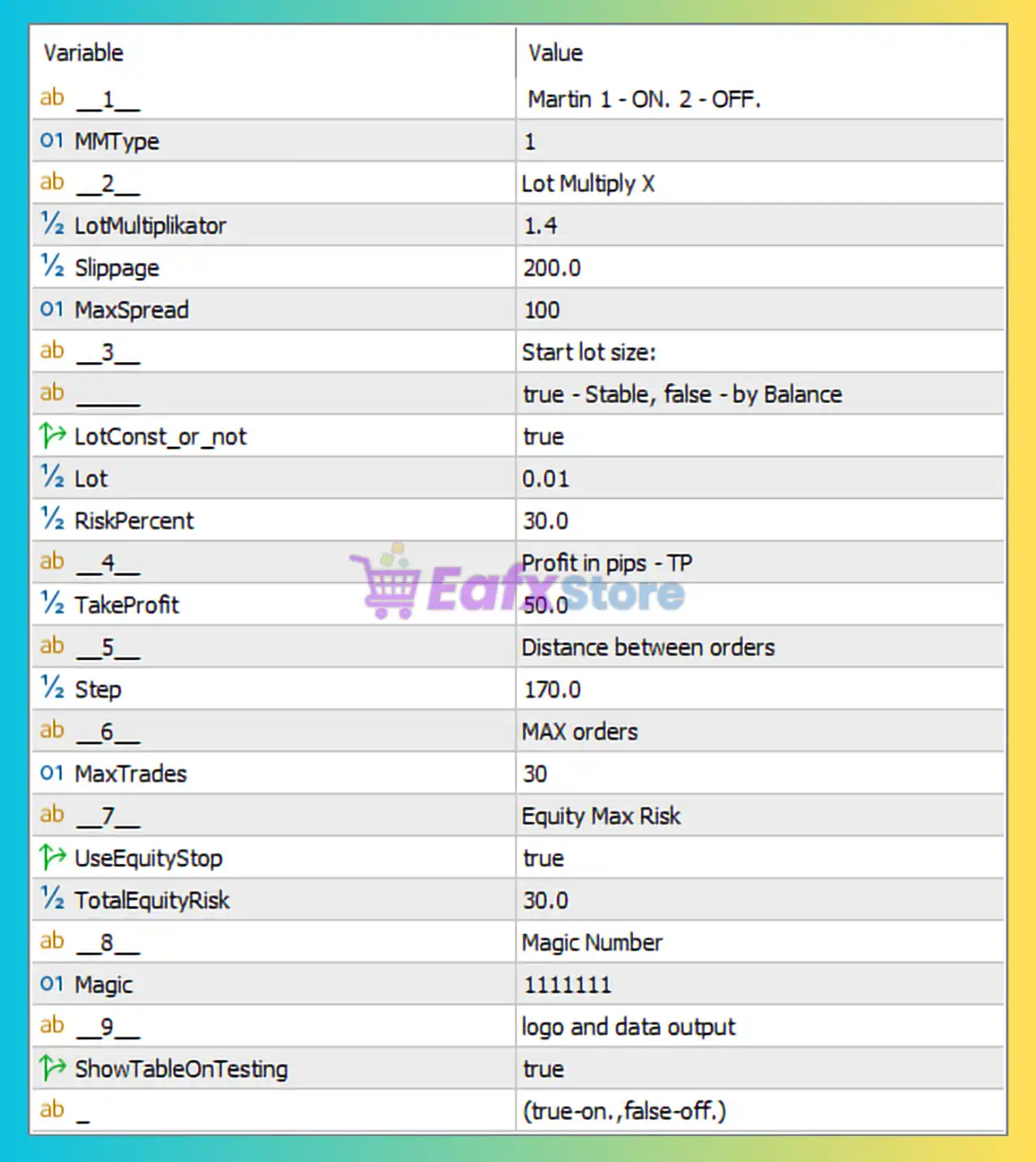
Martingale Settings
🔹 1: Section header indicating "Martin 1 - ON. 2 - OFF.", used to control the martingale trading mode.
🔹 MTType: Set to 1, meaning the Martingale system is enabled according to the EA configuration.
Lot Multiplier Settings
🔹 2: Section header labeled "Lot Multiply X", grouping lot multiplication parameters.
🔹 LotMultiplikator: Configured at 1.4, meaning each subsequent trade lot size is multiplied by 1.4.
🔹 Slippage: Set to 200.0, defining the maximum acceptable price slippage during order execution.
🔹 MaxSpread: Configured at 100, specifying the maximum spread allowed for opening new trades.
Position Size Settings
🔹 3: Section header labeled "Start lot size:".
🔹 LotConst_or_not: Set to true, meaning the EA uses a fixed lot size instead of balance-based lot calculations.
🔹 Lot: Configured at 0.01 lots, defining the initial trading volume for the first position.
🔹 RiskPercent: Set to 30.0%, specifying the percentage risk parameter used when dynamic lot sizing is enabled.
🔹 Description: The note "true - Stable, false - by Balance" indicates that true uses a fixed lot size while false calculates lot size based on account balance.
Take Profit Settings
🔹 4: Section header labeled "Profit in pips - TP".
🔹 TakeProfit: Configured at 50.0 pips, defining the target profit distance for each trade.
Grid Distance Settings
🔹 5: Section header labeled "Distance between orders".
🔹 Step: Set to 170.0 pips, defining the distance between consecutive orders in the trading sequence.
Maximum Orders Settings
🔹 6: Section header labeled "MAX orders".
🔹 MaxTrades: Configured at 30, allowing a maximum of 30 simultaneously managed positions.
Equity Protection Settings
🔹 7: Section header labeled "Equity Max Risk".
🔹 UseEquityStop: Set to true, enabling account equity protection.
🔹 TotalEquityRisk: Configured at 30.0%, defining the maximum equity drawdown threshold before protective actions are triggered.
Magic Number Settings
🔹 8: Section header labeled "MagicNumber".
🔹 Magic: Set to 1111111, serving as the unique identifier for all trades opened by Greezly Bot Pro MT5.
Logging and Data Output Settings
🔹 9: Section header labeled "logo and data output".
🔹 ShowTableOnTesting: Set to true, enabling the display of statistics, logs, and information tables during backtesting and testing sessions.
🔹 Description: The note "(true-on., false-off.)" indicates that enabling the parameter shows the information table while disabling it hides the output.
Conclusion
Greezly Bot Pro MT5 is a flexible automated trading system that combines martingale functionality, fixed or balance-based lot sizing, equity protection, and grid-style order management. With key parameters such as LotMultiplikator 1.4, TakeProfit 50.0, Step 170.0, MaxTrades 30, TotalEquityRisk 30.0%, and Magic Number 1111111, traders can customize the EA according to their risk tolerance and trading objectives. Proper optimization and risk management are essential when using martingale-based strategies to maintain long-term account stability.
FAQs
❓ What is Greezly Bot Pro MT5?
Greezly Bot Pro MT5 is an automated MetaTrader 5 Expert Advisor that uses lot multiplication, order spacing, and equity protection mechanisms to manage trades automatically.
❓ What does MTType = 1 mean?
The parameter MTType = 1 indicates that the Martingale trading mode is enabled according to the EA's configuration.
❓ How does the LotMultiplikator 1.4 work?
The LotMultiplikator = 1.4 increases the size of subsequent trades by a factor of 1.4, allowing the EA to recover previous losses more quickly.
❓ What is the purpose of TotalEquityRisk 30.0%?
The TotalEquityRisk = 30.0% setting limits the maximum allowable equity drawdown before the EA activates its protection mechanism.
❓ How many trades can Greezly Bot Pro MT5 open at the same time?
The MaxTrades = 30 parameter allows the EA to manage up to 30 active positions simultaneously.



