






Harmonizer EA MT5 + SetFiles (Latest version) - Unlimited

Subscriptions for Special Plan
- 30 EA package is more economical!
- Special package with 99%
- Download 1 EA/Day

Subscriptions for Premium Membership
- Download Unlimited in 1 Year
- Get 100% Discount
- Get free access to all

Subscriptions for Gold Membership
- 1 Year Membership
- Get 100% Discount
- Access EA+Indicator+Course
Frequently bought together 🎁
Add these products to enhance your purchase


What is Harmonizer EA MT5?
Harmonizer EA MT5 is an advanced grid-based Expert Advisor (EA) designed for automated trading across multiple symbols. Instead of relying on overfitted historical data, it adapts dynamically to real-time market volatility. With integrated risk management, news filtering, and smart distance logic, it aims to balance opportunity capture with structured drawdown control for stable performance.
 Vendor Wedsite: Click here
About the Author
This product is compiled by Amir Hossein Moharreri. This author has more than +4 years of experience working on MQL5 with many famous products such as Harmonizer EA MT5, Harmonizer EA MT4, Balancer EA MT4, Harmonizer Extreme EA MT5 and other advisors. Among them, Harmonizer EA MT5 is his best performing products.
Delivery time 24h-48h after payment.
Refund if not delivered.
You will receive the current version without any limitations (ID+Time).
Key Features of Harmonizer EA MT5
🔹 Volatility-Adaptive Grid Engine: Adjusts trade distance dynamically based on live market conditions.
🔹 Multi-Symbol One-Chart Setup: Trades multiple pairs efficiently from a single chart.
🔹 Integrated News Filter System: Avoids high-impact events during live trading and backtests.
🔹 Advanced Drawdown Protection: Global and daily limits safeguard account equity.
🔹 Flexible Money Management Modes: Supports fixed lots, deposit load and auto risk models.
What is the Harmonizer EA MT5 Trading Strategy?
🔹 Grid-Based Volatility Strategy: Opens structured trades after calculated price movements.
🔹 Smart Distance Algorithm: Expands spacing according to market volatility shifts.
🔹 Session-Level Profit Targeting: Closes trade sets once defined profit is reached.
🔹 Trailing Stop Activation Logic: Locks in gains when session profit exceeds trigger.
🔹 Adaptive Trade Frequency Control: Adjusts entry volume based on selected intensity.
Harmonizer EA MT5 Review
Harmonizer EA MT5 Live Signal Results
Harmonizer EA achieved impressive profit performance when trading with forex pairs. Trading results on real account for 29 consecutive weeks of trading:
✅ Initial Deposit: $700
✅ Total Profit: +82%
✅ Win Rate: 66.3%
✅ Maximum Drawdown: 26.4%
Harmonizer EA MT5 Live Trading
Harmonizer EA MT5 Backtests
🔶 Backtesting results with AUDCAD have been carried out over a 10-year period using the Every Tick model, ensuring the highest level of accuracy in execution. The results show extremely high profits but also significant risks.
✅ Initial Deposit: $2,000
✅ Total Net Profit: $72.75 million
✅ Win Rate: 69.74%
✅ Balance Drawdown Maximal: 6.37%
Harmonizer EA MT5 Backtest Results
🔶 Tested over a period of 6 years (15/01/2017 – 15/05/2023) using the Every Tick model, ensuring the highest level of execution accuracy. The test focused on the AUDCAD pair low-risk strategy, which was reflected in moderate drawdowns and stable profits. Performance parameters include:
✅ Initial Deposit: $5,000
✅ Total Net Profit: $19,600.91
✅ Win Rate: 64.82%
✅ Balance Drawdown Maximal: 5.90%
Harmonizer EA MT5 Backtests Results
Why Choose & Use Harmonizer EA MT5?
🔹 Not Overfitted to History: Built to adapt to changing live market volatility.
🔹 Structured Capital Protection Tools: Multiple drawdown and daily loss controls included.
🔹 Prop Firm Friendly Controls: Daily drawdown monitoring aligns with evaluation rules.
🔹 Marketplace-Ready Grid Solution: Balanced, configurable and risk-aware EA.
Is Harmonizer EA MT5 Safe?
Harmonizer EA MT5 demonstrates remarkable potential in delivering stable and reliable profits, making it a reliable tool in the forex market. Harmonizer EA is highly regarded by the MQL5 community in many aspects and has gained the trust of its users.
⭐⭐⭐⭐⭐ AFX (2023.09.18): “Author really does their best to help you out. Will update on profits. Highly recommend.”
⭐⭐⭐⭐⭐ Ziad Bassil (2024.01.03): “After a month of testing, I quickly moved to LIVE trading. It is ON now for the past 3 months and I can only say I am very very satisfied with the results. Great job and great support from the Author. You only know a good EA when you see the Author has so much passion for his work. 5 stars and well deserved.”
Trading Specifications
Recommended settings and parameters to pay attention to from developers and experts:
| Features | Type |
|---|---|
| Trading platform | MetaTrader 5 (MT5) |
| Time frames | M15 (15 minute chart) |
| Currency pairs | AUDCAD, NZDCAD, AUDNZD |
| Minimum / Recommended deposit | $500 |
| Minimum / Recommended leverage | 1:200 or higher |
| Additional services | Unlock and Decompile |
| Recommended brokers | Exness Broker, Icmarkets Broker |
| Recommended VPS | MyfxVPS.com (Blue VPS, Golden VPS). Lowest Latency, 2 week Free Trial, 100% Free for 12-18 Months. |
Product Download Package?
The download package of the product suite includes:
Experts
✅ Harmonizer EA MT5.ex5
SetFiles
✅ default.set
✅ Harmonizer341kDDt.set
✅ Harmonizer1Using_TSLv.set
✅ New_default_Harmonizer.set
➡️ Reviewed by David Easton
Conclusion
In short, Harmonizer EA MT5 is an advanced and highly efficient grid trading expert advisor designed to adapt dynamically to market volatility, ensuring precise trade entries and effective risk management. With its cutting-edge algorithm, multi-symbol support, and comprehensive risk control features, this EA provides traders with a powerful tool for automated trading on MetaTrader 5.
🔢 Harmonizer EA MT5 Settings & Configuration Guide
Harmonizer EA MT5 is an automated trading Expert Advisor designed to manage multi-symbol trading through configurable money management, strategy, grid, news-filter, time-filter, and trade-execution controls.
The displayed configuration uses a Low Risk (0.3 Load) lot calculation method, 0.01 fixed lots, a 250 Take Profit, and a maximum of 9 trades. It supports both Buy and Sell directions, smart trade-distance management, configurable trade multipliers, Friday trading, optional news protection, and symbol-level controls.
These settings allow traders to customize position sizing, drawdown protection, trade frequency, entry spacing, and execution behavior according to their trading requirements.
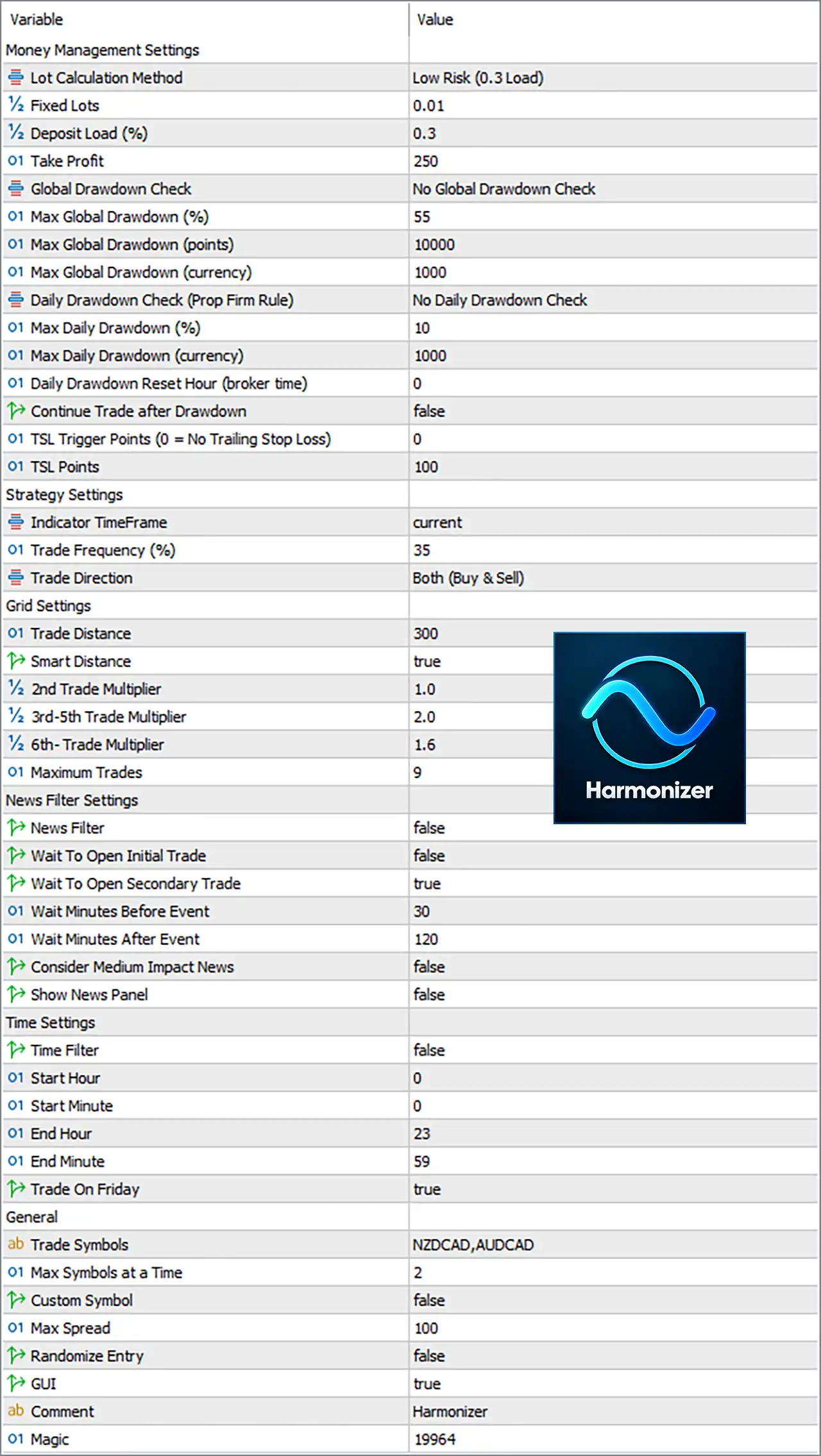
Harmonizer EA MT5 Settings Panel
⚙️ Money Management Settings
🔹 Lot Calculation Method = Low Risk (0.3 Load) — Selects the EA’s low-risk 0.3 Load position-sizing method for calculating trading volume.
🔹 Fixed Lots = 0.01 — Sets the fixed trading volume to 0.01 lots when fixed-lot sizing is used.
🔹 Deposit Load (%) = 0.3 — Sets the deposit-load parameter to 0.3, which is used by the selected lot calculation method to determine position sizing.
🔹 Take Profit = 250 — Sets the configured Take Profit distance to 250 according to the EA’s internal point/unit convention.
🔹 Global Drawdown Check = No Global Drawdown Check — Disables the global drawdown-check mechanism in the displayed configuration.
🔹 Max Global Drawdown (%) = 55 — Defines the maximum global drawdown threshold as 55% when percentage-based global drawdown protection is used.
🔹 Max Global Drawdown (points) = 10000 — Sets the maximum global drawdown threshold to 10000 points when point-based protection is used.
🔹 Max Global Drawdown (currency) = 1000 — Sets the maximum global drawdown threshold to 1000 in the account’s currency when currency-based protection is used.
🔹 Daily Drawdown Check (Prop Firm Rule) = No Daily Drawdown Check — Disables the daily drawdown-check mechanism intended for Prop Firm-style risk rules.
🔹 Max Daily Drawdown (%) = 10 — Defines the maximum daily drawdown threshold as 10% when daily percentage protection is enabled.
🔹 Max Daily Drawdown (currency) = 1000 — Sets the maximum daily drawdown threshold to 1000 in the account’s currency.
🔹 Daily Drawdown Reset Hour (broker time) = 0 — Sets the daily drawdown reset time to 0:00 broker time.
🔹 Continue Trade after Drawdown = false — Prevents the EA from continuing normal trading after the configured drawdown condition has been triggered.
🔹 TSL Trigger Points (0 = No Trailing Stop Loss) = 0 — Sets the trailing-stop trigger to 0, which means the Trailing Stop Loss function is disabled under this setting.
🔹 TSL Points = 100 — Sets the Trailing Stop Loss distance to 100 points if the TSL trigger is enabled.
⚙️ Strategy Settings
🔹 Indicator TimeFrame = current — Sets the indicator calculation timeframe to the current chart timeframe rather than a fixed timeframe.
🔹 Trade Frequency (%) = 35 — Sets the trade-frequency parameter to 35%, controlling the EA’s configured frequency/probability of trade opportunities according to its internal strategy logic.
🔹 Trade Direction = Both (Buy & Sell) — Allows the EA to open both Buy and Sell positions.
⚙️ Grid Settings
🔹 Trade Distance = 300 — Sets the distance between configured trade entries to 300 points according to the EA’s internal distance convention.
🔹 Smart Distance = true — Enables Smart Distance, allowing the EA to dynamically manage trade spacing rather than relying only on a fixed distance.
🔹 2nd Trade Multiplier = 1.0 — Sets the volume multiplier for the 2nd trade to 1.0.
🔹 3rd-5th Trade Multiplier = 2.0 — Sets the volume multiplier for the 3rd through 5th trades to 2.0.
🔹 6th- Trade Multiplier = 1.6 — Sets the volume multiplier for the 6th and subsequent trades to 1.6, according to the EA’s configured scaling logic.
🔹 Maximum Trades = 9 — Limits the EA to a maximum of 9 trades under the configured trade-management cycle.
⚙️ News Filter Settings
🔹 News Filter = false — Disables the main news-filter mechanism in the displayed configuration.
🔹 Wait To Open Initial Trade = false — Allows the EA to open its initial trade without waiting for the configured news-event waiting period.
🔹 Wait To Open Secondary Trade = true — Requires the EA to apply the configured waiting condition before opening secondary trades.
🔹 Wait Minutes Before Event = 30 — Sets the pre-news waiting period to 30 minutes when the applicable news-filter logic is active.
🔹 Wait Minutes After Event = 120 — Sets the post-news waiting period to 120 minutes when the applicable news-filter logic is active.
🔹 Consider Medium Impact News = false — Excludes medium-impact news events from consideration in the news-filter logic.
🔹 Show News Panel = false — Disables the on-chart news information panel.
⚙️ Time Settings
🔹 Time Filter = false — Disables the EA’s dedicated trading-time filter, so the Start and End Hour settings are not actively restricting trading while this option remains disabled.
🔹 Start Hour = 0 — Defines the trading start hour as 0:00 when the Time Filter is enabled.
🔹 Start Minute = 0 — Defines the trading start minute as 00 when the Time Filter is enabled.
🔹 End Hour = 23 — Defines the trading end hour as 23:00 when the Time Filter is enabled.
🔹 End Minute = 59 — Defines the trading end minute as 59, creating a configured trading window from 00:00 to 23:59 when the Time Filter is enabled.
🔹 Trade On Friday = true — Enables trading on Friday.
⚙️ General Settings
🔹 Trade Symbols = NZDCAD,AUDCAD — Defines NZDCAD and AUDCAD as the trading symbols used by the EA.
🔹 Max Symbols at a Time = 2 — Allows the EA to trade a maximum of 2 symbols simultaneously.
🔹 Custom Symbol = false — Disables custom-symbol functionality, so the EA uses the symbols defined through the standard Trade Symbols setting.
🔹 Max Spread = 100 — Sets the maximum permitted spread to 100 points for trade execution.
🔹 Randomize Entry = false — Disables randomized entry behavior, keeping entry decisions based on the EA’s standard strategy logic.
🔹 GUI = true — Enables the EA’s graphical user interface for displaying its controls or trading information on the chart.
🔹 Comment = Harmonizer — Sets Harmonizer as the trade/comment identifier associated with the EA’s orders.
🔹 Magic = 19964 — Uses 19964 as the EA’s Magic Number, allowing its trades to be identified and managed separately from other Expert Advisors or manual positions.
🔢 Conclusion
The displayed Harmonizer EA MT5 configuration combines automated money management with multi-symbol trading, smart trade-distance control, configurable trade multipliers, and a maximum of 9 trades. The current setup uses Low Risk (0.3 Load) with 0.01 Fixed Lots, a 250 Take Profit, 300 Trade Distance, and both Buy and Sell directions. Global and daily drawdown checks are currently disabled, while the trailing-stop trigger is set to 0, meaning trailing-stop functionality is inactive. The EA is configured for NZDCAD and AUDCAD, with up to 2 symbols simultaneously, Friday trading enabled, and a 100-point maximum spread.
For live trading, traders should verify how the EA internally interprets points, deposit load, trade multipliers, drawdown thresholds, and Smart Distance because these implementation details can vary between Expert Advisors.
User Reviews
Only logged in customers who have purchased this product may leave a review.
1. What is Harmonizer EA MT5?
Harmonizer EA MT5 is an advanced grid trading Expert Advisor (EA) for MetaTrader 5 that adapts dynamically to market volatility instead of relying solely on historical data. It optimizes trade entries while maintaining strong risk management.
2. How does the grid trading strategy in Harmonizer EA MT5 work?
The EA places multiple trades in a structured grid pattern, adjusting trade distances based on market volatility. It aims to capture profits from price fluctuations while minimizing risk through adaptive lot sizing and stop-loss mechanisms.
3. What currency pairs and timeframes does Harmonizer EA MT5 support?
It primarily trades AUDCAD and NZDCAD, with AUDNZD as an optional pair. The recommended timeframe is M15 (15-minute chart).
4. What is the minimum deposit and leverage required?
Minimum deposit: $500
Recommended leverage: 1:200 or higher for optimal trade execution.
5. How does Harmonizer EA MT5 manage risk?
The EA includes built-in risk management tools, such as:
✔ Global drawdown limits
✔ Daily drawdown protection
✔ Adjustable lot sizing
✔ Trailing Stop Loss (TSL)
✔ News filter to avoid high-risk events
6. Can I track the live trading performance of Harmonizer EA MT5?
Yes, a Live Signal is available, showing real-time trading results to verify performance before purchase.
7. What are the key results from backtesting?
A 10-year backtest (2014-2024) on AUDCAD showed:
✔ Initial Deposit: $2,000
✔ Total Net Profit: $72M
✔ Win Rate: 69.74%
✔ Maximum Drawdown: 6.37%
8. Is Harmonizer EA MT5 fully automated?
Yes, it is a 100% automated trading system, requiring no manual intervention. Once set up, it operates continuously based on its algorithm, making it a "fire and forget" solution for traders.
-
 Original price was: $500.00.$249.00Current price is: $249.00.
-
 Original price was: $888.00.$249.00Current price is: $249.00.
-
 Original price was: $439.00.$249.00Current price is: $249.00.
-
 Original price was: $9,999.00.$249.00Current price is: $249.00.
-
 0Original price was: $2,288.00.$249.00Current price is: $249.00.
-
 0Original price was: $290.00.$179.00Current price is: $179.00.
-
 1Original price was: $500.00.$249.00Current price is: $249.00.
-
 0Original price was: $199.00.$179.00Current price is: $179.00.
There are no reviews yet.