


🔢 Harmonizer EA MT5 Settings & Configuration Guide
Harmonizer EA MT5 is an automated trading Expert Advisor designed to manage multi-symbol trading through configurable money management, strategy, grid, news-filter, time-filter, and trade-execution controls.
The displayed configuration uses a Low Risk (0.3 Load) lot calculation method, 0.01 fixed lots, a 250 Take Profit, and a maximum of 9 trades. It supports both Buy and Sell directions, smart trade-distance management, configurable trade multipliers, Friday trading, optional news protection, and symbol-level controls.
These settings allow traders to customize position sizing, drawdown protection, trade frequency, entry spacing, and execution behavior according to their trading requirements.
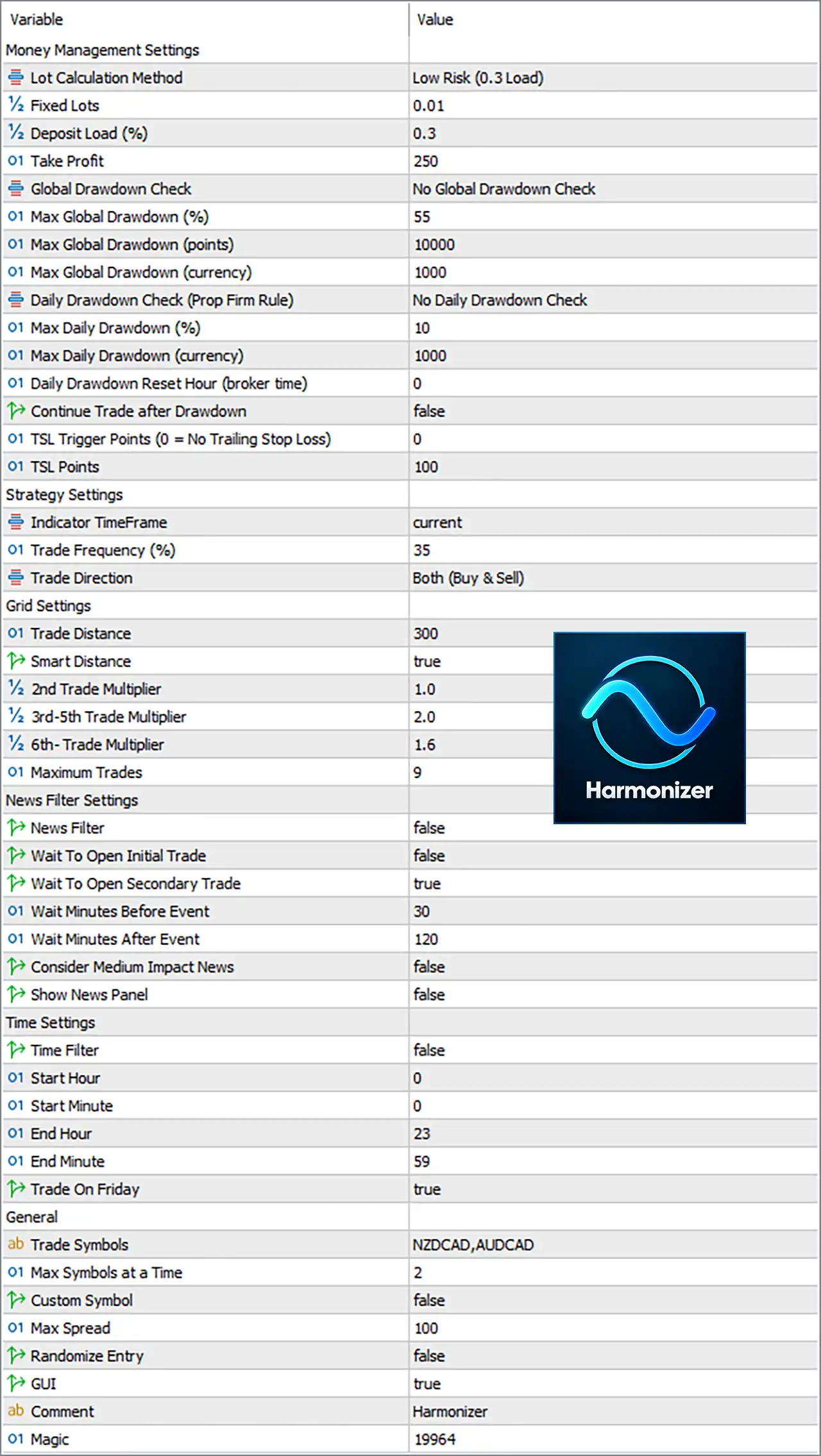
⚙️ Money Management Settings
🔹 Lot Calculation Method = Low Risk (0.3 Load) — Selects the EA's low-risk 0.3 Load position-sizing method for calculating trading volume.
🔹 Fixed Lots = 0.01 — Sets the fixed trading volume to 0.01 lots when fixed-lot sizing is used.
🔹 Deposit Load (%) = 0.3 — Sets the deposit-load parameter to 0.3, which is used by the selected lot calculation method to determine position sizing.
🔹 Take Profit = 250 — Sets the configured Take Profit distance to 250 according to the EA's internal point/unit convention.
🔹 Global Drawdown Check = No Global Drawdown Check — Disables the global drawdown-check mechanism in the displayed configuration.
🔹 Max Global Drawdown (%) = 55 — Defines the maximum global drawdown threshold as 55% when percentage-based global drawdown protection is used.
🔹 Max Global Drawdown (points) = 10000 — Sets the maximum global drawdown threshold to 10000 points when point-based protection is used.
🔹 Max Global Drawdown (currency) = 1000 — Sets the maximum global drawdown threshold to 1000 in the account's currency when currency-based protection is used.
🔹 Daily Drawdown Check (Prop Firm Rule) = No Daily Drawdown Check — Disables the daily drawdown-check mechanism intended for Prop Firm-style risk rules.
🔹 Max Daily Drawdown (%) = 10 — Defines the maximum daily drawdown threshold as 10% when daily percentage protection is enabled.
🔹 Max Daily Drawdown (currency) = 1000 — Sets the maximum daily drawdown threshold to 1000 in the account's currency.
🔹 Daily Drawdown Reset Hour (broker time) = 0 — Sets the daily drawdown reset time to 0:00 broker time.
🔹 Continue Trade after Drawdown = false — Prevents the EA from continuing normal trading after the configured drawdown condition has been triggered.
🔹 TSL Trigger Points (0 = No Trailing Stop Loss) = 0 — Sets the trailing-stop trigger to 0, which means the Trailing Stop Loss function is disabled under this setting.
🔹 TSL Points = 100 — Sets the Trailing Stop Loss distance to 100 points if the TSL trigger is enabled.
⚙️ Strategy Settings
🔹 Indicator TimeFrame = current — Sets the indicator calculation timeframe to the current chart timeframe rather than a fixed timeframe.
🔹 Trade Frequency (%) = 35 — Sets the trade-frequency parameter to 35%, controlling the EA's configured frequency/probability of trade opportunities according to its internal strategy logic.
🔹 Trade Direction = Both (Buy & Sell) — Allows the EA to open both Buy and Sell positions.
⚙️ Grid Settings
🔹 Trade Distance = 300 — Sets the distance between configured trade entries to 300 points according to the EA's internal distance convention.
🔹 Smart Distance = true — Enables Smart Distance, allowing the EA to dynamically manage trade spacing rather than relying only on a fixed distance.
🔹 2nd Trade Multiplier = 1.0 — Sets the volume multiplier for the 2nd trade to 1.0.
🔹 3rd-5th Trade Multiplier = 2.0 — Sets the volume multiplier for the 3rd through 5th trades to 2.0.
🔹 6th- Trade Multiplier = 1.6 — Sets the volume multiplier for the 6th and subsequent trades to 1.6, according to the EA's configured scaling logic.
🔹 Maximum Trades = 9 — Limits the EA to a maximum of 9 trades under the configured trade-management cycle.
⚙️ News Filter Settings
🔹 News Filter = false — Disables the main news-filter mechanism in the displayed configuration.
🔹 Wait To Open Initial Trade = false — Allows the EA to open its initial trade without waiting for the configured news-event waiting period.
🔹 Wait To Open Secondary Trade = true — Requires the EA to apply the configured waiting condition before opening secondary trades.
🔹 Wait Minutes Before Event = 30 — Sets the pre-news waiting period to 30 minutes when the applicable news-filter logic is active.
🔹 Wait Minutes After Event = 120 — Sets the post-news waiting period to 120 minutes when the applicable news-filter logic is active.
🔹 Consider Medium Impact News = false — Excludes medium-impact news events from consideration in the news-filter logic.
🔹 Show News Panel = false — Disables the on-chart news information panel.
⚙️ Time Settings
🔹 Time Filter = false — Disables the EA's dedicated trading-time filter, so the Start and End Hour settings are not actively restricting trading while this option remains disabled.
🔹 Start Hour = 0 — Defines the trading start hour as 0:00 when the Time Filter is enabled.
🔹 Start Minute = 0 — Defines the trading start minute as 00 when the Time Filter is enabled.
🔹 End Hour = 23 — Defines the trading end hour as 23:00 when the Time Filter is enabled.
🔹 End Minute = 59 — Defines the trading end minute as 59, creating a configured trading window from 00:00 to 23:59 when the Time Filter is enabled.
🔹 Trade On Friday = true — Enables trading on Friday.
⚙️ General Settings
🔹 Trade Symbols = NZDCAD,AUDCAD — Defines NZDCAD and AUDCAD as the trading symbols used by the EA.
🔹 Max Symbols at a Time = 2 — Allows the EA to trade a maximum of 2 symbols simultaneously.
🔹 Custom Symbol = false — Disables custom-symbol functionality, so the EA uses the symbols defined through the standard Trade Symbols setting.
🔹 Max Spread = 100 — Sets the maximum permitted spread to 100 points for trade execution.
🔹 Randomize Entry = false — Disables randomized entry behavior, keeping entry decisions based on the EA's standard strategy logic.
🔹 GUI = true — Enables the EA's graphical user interface for displaying its controls or trading information on the chart.
🔹 Comment = Harmonizer — Sets Harmonizer as the trade/comment identifier associated with the EA's orders.
🔹 Magic = 19964 — Uses 19964 as the EA's Magic Number, allowing its trades to be identified and managed separately from other Expert Advisors or manual positions.
🔢 Conclusion
The displayed Harmonizer EA MT5 configuration combines automated money management with multi-symbol trading, smart trade-distance control, configurable trade multipliers, and a maximum of 9 trades. The current setup uses Low Risk (0.3 Load) with 0.01 Fixed Lots, a 250 Take Profit, 300 Trade Distance, and both Buy and Sell directions. Global and daily drawdown checks are currently disabled, while the trailing-stop trigger is set to 0, meaning trailing-stop functionality is inactive. The EA is configured for NZDCAD and AUDCAD, with up to 2 symbols simultaneously, Friday trading enabled, and a 100-point maximum spread.
For live trading, traders should verify how the EA internally interprets points, deposit load, trade multipliers, drawdown thresholds, and Smart Distance because these implementation details can vary between Expert Advisors.




