



Score EA MT5 (Latest version) - Unlimited

Subscriptions for Special Plan
- 30 EA package is more economical!
- Special package with 99%
- Download 1 EA/Day

Subscriptions for Premium Membership
- Download Unlimited in 1 Year
- Get 100% Discount
- Get free access to all

Subscriptions for Gold Membership
- 1 Year Membership
- Get 100% Discount
- Access EA+Indicator+Course
Frequently bought together 🎁
Add these products to enhance your purchase

Score EA MT5 – Adaptive Multi-Symbol Trading Intelligence
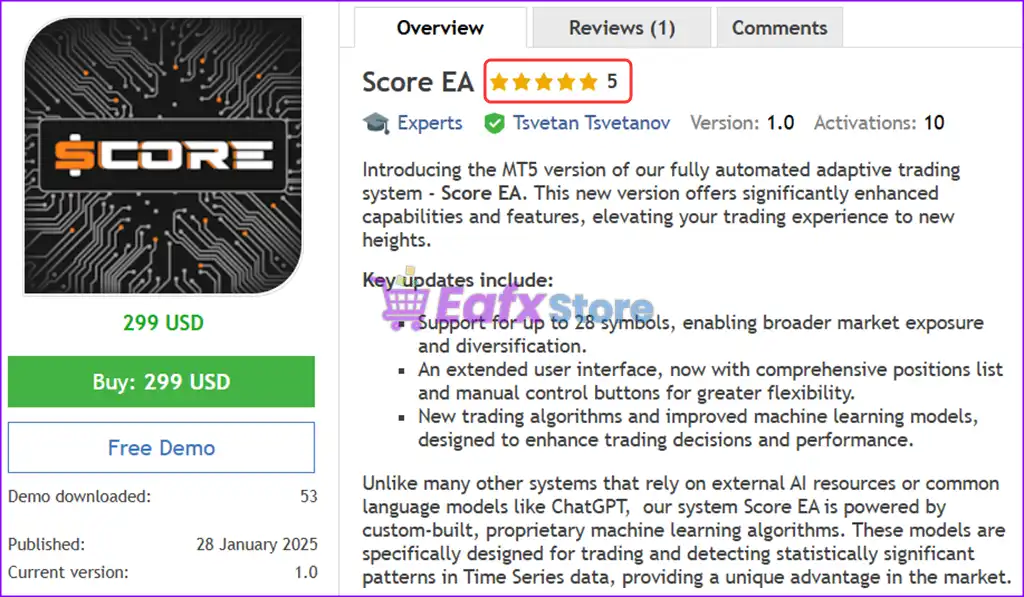
Score EA is a next-generation trading solution designed for precision, adaptability, and performance. Built on proprietary machine learning models specifically designed for the financial markets, Score EA is a powerful trading system designed to give users an edge in today’s dynamic market environment.
 Vendor Website: Click here
About the Author
This product is compiled by Tsvetan Tsvetanov. This Italy author has more than +10 years of experience working on MQL5 with many famous products such as Score EA, Custom Market Watch MT4, Score EA MT4 and others. Among them, Score EA MT5 is his best performing products.
Delivery time 24h-48h after payment.
Refund if not delivered.
You will receive the current version without any limitations (ID+Time).
Key Features of Score EA MT5
🔹 Fully Automated Trading System Powered by AI – Score EA automated trading is built with proprietary machine learning models specifically designed for financial time series data.
🔹 Multi-Investment Trading Capability (Up to 28 Pairs) – Trade up to 28 currency pairs simultaneously, increasing market exposure, diversifying risk and profit potential in a single interface.
🔹 Custom Machine Learning Algorithms – Unlike most systems that rely on ChatGPT or third-party models, Score EA leverages in-house AI and statistical algorithms, providing deep pattern recognition to generate accurate signals.
🔹 Advanced Trading Logic – Driven by a unique combination of machine learning, statistical analysis and adaptive logic, the EA intelligently reacts to changing market conditions.
Additional Features
🔹 Customizable Strategy Parameters – External settings provide complete control over trade frequency, risk limits, session filters, and more—perfect for personalizing strategies to match market behavior.
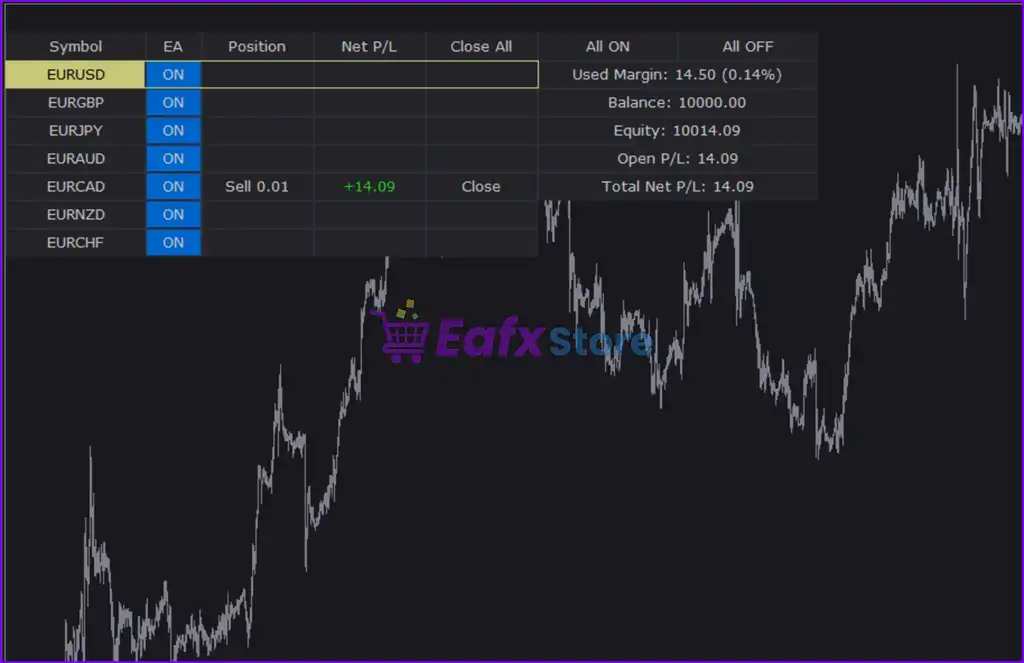
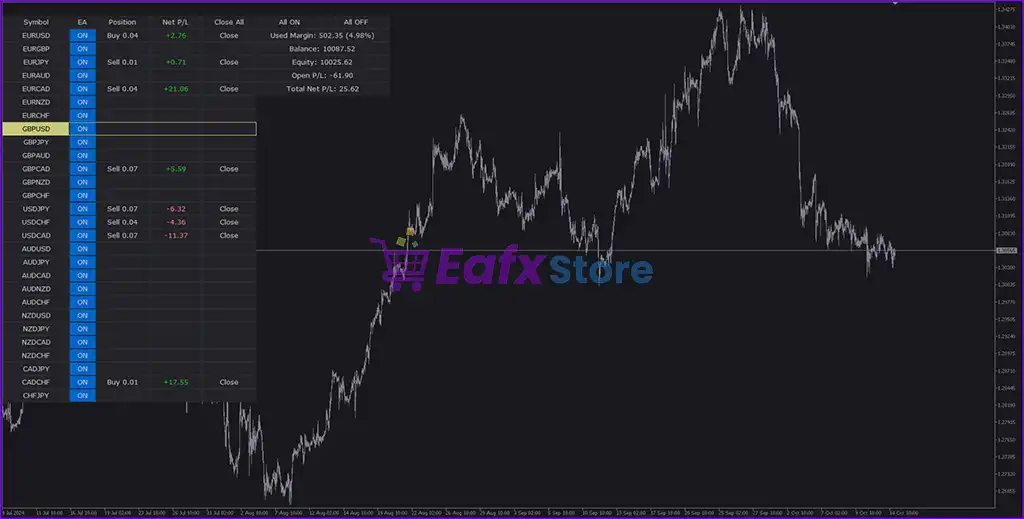
🔹 Built-in Manual Controls – The new, expanded UI allows you to monitor positions, adjust EA activity by symbol, and monitor P/L in real time, streamlining your trading process.
🔹 Dynamic Risk Manager – Built-in tools to configure lot size, drawdown control, risk limits, and risk limits for each currency pair, ensuring strong capital protection.
🔹 Flexible Compatibility – Designed for brokers that support hedging and non-FIFO trading rules, providing flexibility in execution strategies.
Score EA MT5 Review
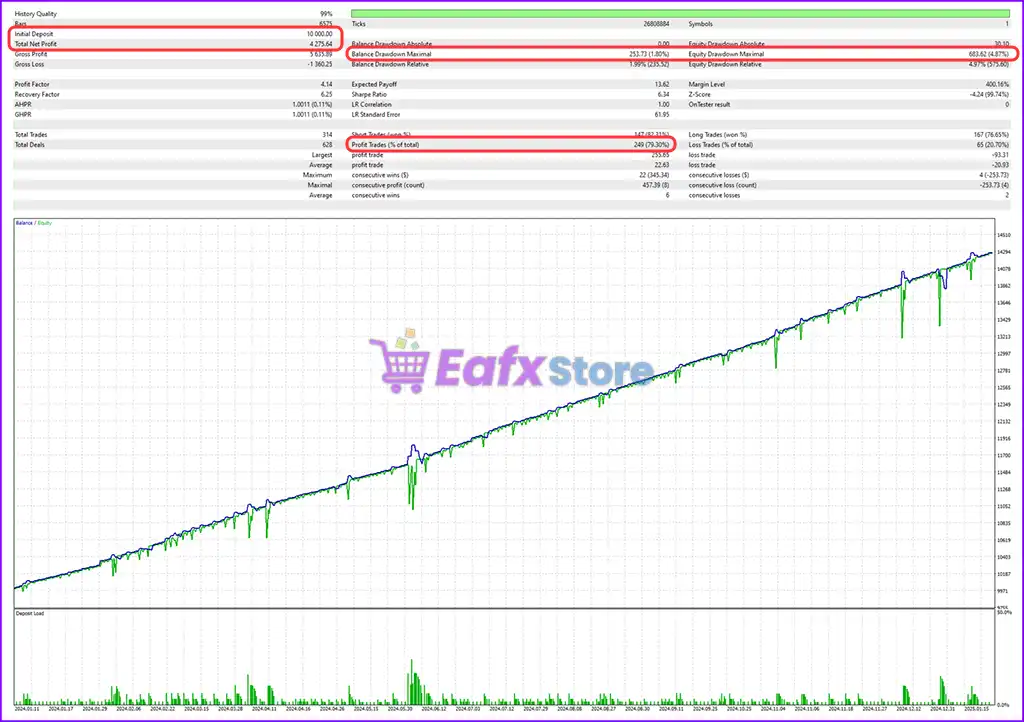
Score EA – designed for consistent profits with excellent risk control. Backtested with 99% model accuracy, this EA achieves an impressive profit factor of 4.14 and its maximum drawdown remains below 5%, making it a top candidate for proprietary challenges, capital preservation portfolios, and long-term automated trading.
✅ Initial deposit: $10,000
✅ Total net profit: $4,275.64
✅ Win rate: 79.30%
✅ Maximum balance drawdown: 1.80%
✅ Maximum equity drawdown: 4.87%
Score EA MT5 Backtest Results
Score EA MT5 Review
User Reviews and Feedback
Score EA delivers outstanding trading performance, particularly when optimized for the 28 currency pairs, showcasing its potential to generate consistent profits. Highly rated and trusted by the MQL5 community, this expert advisor combines advanced strategies with reliable results, making it a top choice for traders seeking efficiency and profitability in the forex market. Here are 5 star user reviews:
⭐⭐⭐⭐⭐ Mr. freedomq (2025.04.07): “This is a hidden gem. Follow the instructions I.e 1000 dollar per currency and do back testing with different parameters on all currencies and pick the ones that have good profit factor with low drawdown.”
Recommended settings
Recommended settings and parameters to pay attention to from developers and experts:
| Features | Type |
|---|---|
| Trading platform | MetaTrader 5 (MT5) |
| Time frames | Any |
| Currency pairs | 28 currency pairs |
| Minimum / Recommended deposit | $1,000 |
| Minimum / Recommended leverage | Any |
| Product type | Original version |
| Additional services | Unlock and Decompile |
| Recommended brokers | Exness Broker, Icmarkets Broker |
| Recommended VPS | MyfxVPS.com ( Blue VPS, Golden VPS). Lowest Latency, 2 week Free Trial, 100% Free for 12-18 Months. |
Why choose Score EA?
🔹 AI That’s Actually Built for Trading – Score EA uses bespoke AI models, engineered specifically for detecting statistically significant trading signals—not generalized language AI like ChatGPT.
🔹 Broad Market Coverage – With multi-symbol support, you can simultaneously trade majors, crosses, and carefully selected exotic pairs for diversified alpha generation.
🔹 User-Controlled Flexibility – Whether you prefer quick trades that last minutes or long-term swing positions that run for days or weeks, Score EA adapts to your strategy style.
🔹 Reduce Emotional Decision-Making – Fully automated logic ensures consistent execution, removing emotional bias, FOMO, and overtrading from your routine.
🔹 Beginner & Pro-Friendly – Whether you’re a newcomer exploring forex robots or an experienced trader managing large capital, Score EA provides the tools, control, and performance you need.
🔹 Real-Time Monitoring & Adjustments – Easily track open trades and manually toggle the EA’s status per symbol, allowing for on-the-fly management during volatile market conditions.
🔹 Scalable for Prop Firm Challenges – With proper risk settings and diversified pair selection, Score EA is suitable for prop firm evaluations and funded account growth.
Product Download Package?
The download package of the product suite includes:
✅ Experts: Score EA.ex5
Conclusion
In short, Score EA for MetaTrader 5 is an advanced, AI-powered trading solution built for traders who demand precision, scalability, and control. With its proprietary machine learning algorithms developed specifically for financial time series, Score EA stands out as a high-performance Expert Advisor (EA) capable of adapting to ever-changing market conditions. Whether you’re trading a single pair or managing a portfolio of up to 28 currency pairs, this EA provides the tools you need for smart diversification and consistent profit generation.
🔢 Score EA MT5 Settings Explained – Complete Parameter Guide
Score EA is a fully automated multi-currency Expert Advisor for MetaTrader 5 that supports up to 28 Forex pairs simultaneously. It offers flexible signal selection, progressive lot sizing, swap direction control, drawdown protection, profit management, and an intuitive interface, making it suitable for traders seeking diversified automated portfolio trading with customizable risk management.
Score EA MT5 Settings
🔢 Installation Panel Parameters
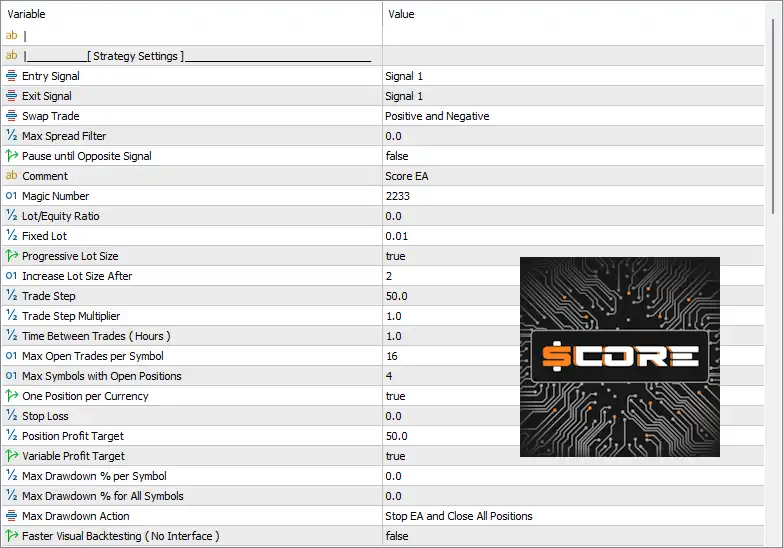
Below are the details of the parameters in the advisor’s trading system settings table:
Score EA MT5 Settings Panel
Score EA MT5 Setting Panel
🔶 Strategy Settings
🔹 Entry Signal = Signal 1 – Selects Signal 1 as the primary algorithm used to open new trading positions.
🔹 Exit Signal = Signal 1 – Uses Signal 1 as the condition for closing existing trades.
🔹 Swap Trade = Positive and Negative – Allows trading on both positive and negative swap currency pairs.
🔹 Max Spread Filter = 0.0 – Sets the maximum allowable spread to 0.0, effectively disabling the spread filter.
🔹 Pause until Opposite Signal = false – Keeps trading active without waiting for an opposite signal before opening new trades.
🔹 Comment = Score EA – Adds the trade comment “Score EA” to every order opened by the Expert Advisor.
🔹 MagicNumber = 2233 – Assigns the unique Magic Number 2233 to distinguish EA trades from manual positions or other EAs.
🔹 Lot/Equity Ratio = 0.0 – Sets the lot-to-equity ratio to 0.0, meaning this calculation is not used.
🔹 Fixed Lot = 0.01 – Uses a fixed trading volume of 0.01 lots.
🔹 Progressive Lot Size = true – Enables progressive lot sizing that increases position size automatically according to the EA’s internal rules.
🔹 Increase Lot Size After = 2 – Increases the lot size after every 2 qualifying trading events.
🔹 Trade Step = 50.0 – Sets the trading step distance to 50.0 units.
🔹 Trade Step Multiplier = 1.0 – Uses a multiplier of 1.0, keeping each trade step unchanged.
🔹 Time Between Trades (Hours) = 1.0 – Waits 1.0 hour before opening another trade.
🔹 Max Open Trades per Symbol = 16 – Allows a maximum of 16 simultaneous positions on each trading symbol.
🔹 Max Symbols with Open Positions = 4 – Limits trading to 4 symbols with active positions at the same time.
🔹 One Position per Currency = true – Prevents multiple positions involving the same currency simultaneously.
🔹 Stop Loss = 0.0 – Sets Stop Loss to 0.0, meaning no fixed Stop Loss is applied.
🔹 Position Profit Target = 50.0 – Closes positions after reaching a profit target of 50.0.
🔹 Variable Profit Target = true – Enables dynamic profit target adjustment based on market conditions.
🔹 Max Drawdown % per Symbol = 0.0 – Sets the per-symbol drawdown limit to 0.0, effectively disabling this restriction.
🔹 Max Drawdown % for All Symbols = 0.0 – Sets the total portfolio drawdown limit to 0.0, disabling overall drawdown control.
🔹 Max Drawdown Action = Stop EA and Close All Positions – Stops the EA and closes all open trades if the configured drawdown condition is triggered.
🔹 Faster Visual Backtesting (No Interface) = false – Keeps the graphical interface enabled during visual strategy testing.
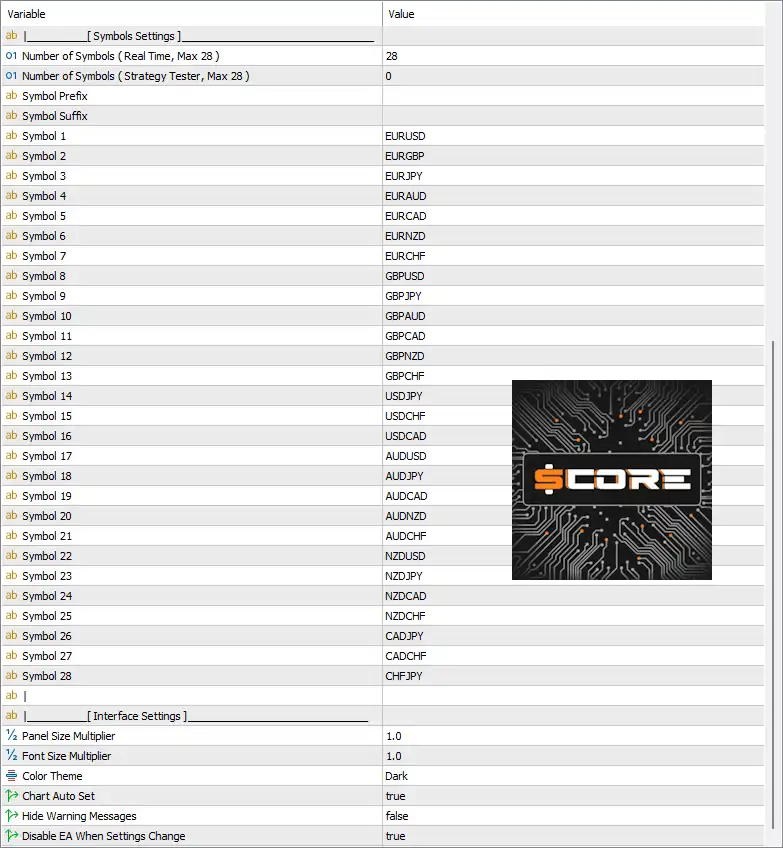
🔶 Symbols Settings
🔹 Number of Symbols (Real Time, Max 28) = 28 – Enables monitoring of up to 28 symbols during live trading.
🔹 Number of Symbols (Strategy Tester, Max 28) = 0 – Uses 0 symbols in the Strategy Tester unless configured manually.
🔹 Symbol Prefix = (blank) – No broker-specific symbol prefix is used.
🔹 Symbol Suffix = (blank) – No broker-specific symbol suffix is used.
🔹 Symbol 1 = EURUSD – Enables EURUSD.
🔹 Symbol 2 = EURGBP – Enables EURGBP.
🔹 Symbol 3 = EURJPY – Enables EURJPY.
🔹 Symbol 4 = EURAUD – Enables EURAUD.
🔹 Symbol 5 = EURCAD – Enables EURCAD.
🔹 Symbol 6 = EURNZD – Enables EURNZD.
🔹 Symbol 7 = EURCHF – Enables EURCHF.
🔹 Symbol 8 = GBPUSD – Enables GBPUSD.
🔹 Symbol 9 = GBPJPY – Enables GBPJPY.
🔹 Symbol 10 = GBPAUD – Enables GBPAUD.
🔹 Symbol 11 = GBPCAD – Enables GBPCAD.
🔹 Symbol 12 = GBPNZD – Enables GBPNZD.
🔹 Symbol 13 = GBPCHF – Enables GBPCHF.
🔹 Symbol 14 = USDJPY – Enables USDJPY.
🔹 Symbol 15 = USDCHF – Enables USDCHF.
🔹 Symbol 16 = USDCAD – Enables USDCAD.
🔹 Symbol 17 = AUDUSD – Enables AUDUSD.
🔹 Symbol 18 = AUDJPY – Enables AUDJPY.
🔹 Symbol 19 = AUDCAD – Enables AUDCAD.
🔹 Symbol 20 = AUDNZD – Enables AUDNZD.
🔹 Symbol 21 = AUDCHF – Enables AUDCHF.
🔹 Symbol 22 = NZDUSD – Enables NZDUSD.
🔹 Symbol 23 = NZDJPY – Enables NZDJPY.
🔹 Symbol 24 = NZDCAD – Enables NZDCAD.
🔹 Symbol 25 = NZDCHF – Enables NZDCHF.
🔹 Symbol 26 = CADJPY – Enables CADJPY.
🔹 Symbol 27 = CADCHF – Enables CADCHF.
🔹 Symbol 28 = CHFJPY – Enables CHFJPY.
🔶 Interface Settings
🔹 Panel Size Multiplier = 1.0 – Displays the control panel at 100% of its default size.
🔹 Font Size Multiplier = 1.0 – Uses the default interface font size.
🔹 Color Theme = Dark – Applies the Dark visual theme.
🔹 Chart Auto Set = true – Automatically configures chart settings for optimal EA operation.
🔹 Hide Warning Messages = false – Displays all warning messages on the chart.
🔹 Disable EA When Settings Change = true – Automatically disables the EA whenever input settings are modified, helping prevent accidental trading with incomplete configurations.
🔢 Conclusion
Score EA MT5 is a highly configurable multi-symbol trading system designed for diversified Forex portfolio management. With support for 28 currency pairs, progressive lot sizing, flexible entry and exit signals, variable profit targets, and comprehensive trade management controls, it provides traders with a scalable framework for automated MetaTrader 5 trading while maintaining configurable risk management and portfolio diversification.
🔢 FAQs
❓ What markets can Score EA MT5 trade?
Score EA MT5 supports up to 28 Forex currency pairs, allowing diversified multi-currency portfolio trading.
❓ Does Score EA MT5 use fixed or progressive lot sizing?
Both are supported. The default configuration uses a 0.01 fixed lot with Progressive Lot Size = true, allowing automatic lot increases after specified conditions.
❓ How many symbols can Score EA MT5 trade simultaneously?
The EA allows trading on up to 28 configured symbols, while limiting active positions to 4 symbols simultaneously by default.
❓ Can I customize the trading signals?
Yes. Entry and exit signals can be selected independently, with the default configuration using Signal 1 for both.
❓ Does Score EA MT5 include risk management features?
Yes. The EA includes position limits, progressive money management, drawdown actions, profit targets, spread filtering options, and automatic portfolio control for safer automated trading.
User Reviews
Only logged in customers who have purchased this product may leave a review.
1. What is Score EA and how is it different from other Expert Advisors?
Score EA is a next-generation, fully automated trading system powered by custom-built machine learning algorithms. Unlike most EAs, it doesn’t rely on pre-trained models like ChatGPT but instead uses AI specifically designed for financial markets, making it highly accurate and adaptive.
2. Which currency pairs does Score EA support?
Score EA can trade up to 28 currency pairs simultaneously, offering broad market coverage, risk diversification, and higher profit potential.
3. Is Score EA suitable for beginners or only for advanced traders?
Both. Score EA features an intuitive interface and customizable settings, making it beginner-friendly while still offering advanced configuration tools for professional and prop firm traders.
4. What is the minimum deposit required to use Score EA effectively?
The recommended minimum deposit is $1,000, ideally per currency pair traded, for optimal performance and risk management.
5. How does Score EA manage risk?
It includes a Dynamic Risk Manager that allows configuration of lot sizes, drawdown limits, and individual risk settings for each currency pair. This ensures capital protection and adapts to your risk appetite.
6. Is Score EA compatible with all brokers?
Score EA is designed for brokers that support hedging and do not enforce FIFO rules, such as Exness and HTFX.
7. Can I monitor and control Score EA during live trading?
Yes. Score EA includes manual control options that let you monitor performance in real time, manage trades by currency pair, and toggle the EA’s activity instantly.
8. What are the backtest results and performance metrics?
With 99% modeling accuracy:
Win rate: 79.30%
Profit Factor: 4.14
Max Drawdown: Under 5%
These results show high profitability with low risk, ideal for long-term automation and prop firm challenges.
-
 Original price was: $500.00.$249.00Current price is: $249.00.
 -
 Original price was: $888.00.$249.00Current price is: $249.00.
 -
 Original price was: $439.00.$249.00Current price is: $249.00.
 -
 Original price was: $9,999.00.$249.00Current price is: $249.00.
-
 1Original price was: $500.00.$249.00Current price is: $249.00.
 -
 0Original price was: $199.00.$179.00Current price is: $179.00.
 -
 1Original price was: $1,299.00.$249.00Current price is: $249.00.
 -
 27Original price was: $60,000.00.$239.00Current price is: $239.00.
There are no reviews yet.