





SwiftCap Trinity EA MT5 (Latest version) – GroupBuy
Select a variant to see availability.
Quick Verdict
SwiftCap Trinity EA MT5 is a multi-strategy Gold Expert Advisor (EA) designed to diversify trading logic across four independent systems. With flexible risk controls, separate system management, and account protection features, it offers a structured solution for traders seeking automated XAUUSD trading and prop-firm compatibility.
Best For
✅ Gold traders looking for a multi-strategy MT5 Expert Advisor.
✅ Prop firm traders seeking automated risk and account protection tools.
✅ Diversification-focused traders who prefer several independent trading systems.
✅ Traders wanting flexible risk control through percentage, USD or fixed-lot sizing.
✅ Users with compatible GMT+2/GMT+3 brokers and reliable VPS infrastructure.
Overall Rating
8.6/10 ⭐⭐⭐⭐⭐
| Category | Rating |
|---|---|
| Multi-Strategy Architecture | 8.8/10 |
| Risk Management | 8.2/10 |
| Historical Performance | 8.7/10 |
| Prop Firm Suitability | 8.5/10 |
What is SwiftCap Trinity EA MT5?
SwiftCap Trinity EA MT5 is a professional multi-strategy Expert Advisor built for automated Gold trading on MetaTrader 5. It combines four independent systems—Intra-Day Swing, Session Trading, Daily Range Capture and Price Action—within one structured framework.
Each system can be controlled separately with its own risk settings, magic number and trade comment. Trinity also includes account-level protection features designed to support disciplined trading and prop firm environments.
 Vendor Website: View here
This is GroupBuy ==> How to Join
About the Developer
SwiftCap Trinity EA MT5 is developed by Hassan Sarfraz, founder of SwiftCap EAs. The supplied developer profile shows three published MetaTrader 5 products:
⭐ SwiftCap Trinity EA MT5
The profile also shows a dedicated SwiftCap EAs website and an established seller presence on the platform.
How Does SwiftCap Trinity EA MT5 Work?
Four Independent Trading Systems
SwiftCap Trinity does not depend on a single entry model. Instead, it combines four independent approaches:
Intra-Day Swing Strategy
Identifies market structures early in the trading day and seeks to capture intraday momentum.
Simplified Session Trading
Uses session-based logic to identify suitable trading opportunities under changing market conditions.
Daily Range Capture
Uses the previous day’s highs and lows as important reference points and applies trailing-based exits.
Price Action Strategy
Focuses on market momentum and price behavior to provide another independent trading perspective.
All four systems can operate within the same EA while maintaining separate trade identification and risk settings.
Independent Risk Allocation
Each system can use:
🔹 Percentage of balance
🔹 Fixed lot size
🔹 Fixed USD amount
This allows traders to allocate different risk levels to individual strategies instead of treating the entire EA as a single trading engine.
Automated Account Protection
The EA also provides global account-level controls, including daily risk limits, equity targets and maximum lot restrictions.
These settings can be enabled according to the trader’s preferred risk framework.
Key Features of SwiftCap Trinity EA MT5
Four Independent Strategies
Combines swing, session, range, and price-action systems within one MT5 Expert Advisor.
Flexible Risk Management
Supports percentage-based risk, fixed USD amounts, and fixed-lot position sizing.
Individual System Control
Each strategy can be enabled or disabled independently for greater portfolio flexibility.
Separate Trade Identification
Dedicated magic numbers and trade comments make each system easier to track.
Prop Firm Ready
Includes daily risk and equity protection features designed for disciplined account management.
Gold-Focused Automation
Built specifically around XAUUSD trading with fully automated execution.
Plug-and-Play Setup
No set files are required, with core trading parameters already integrated into the EA.
Historical Trading Results Performance
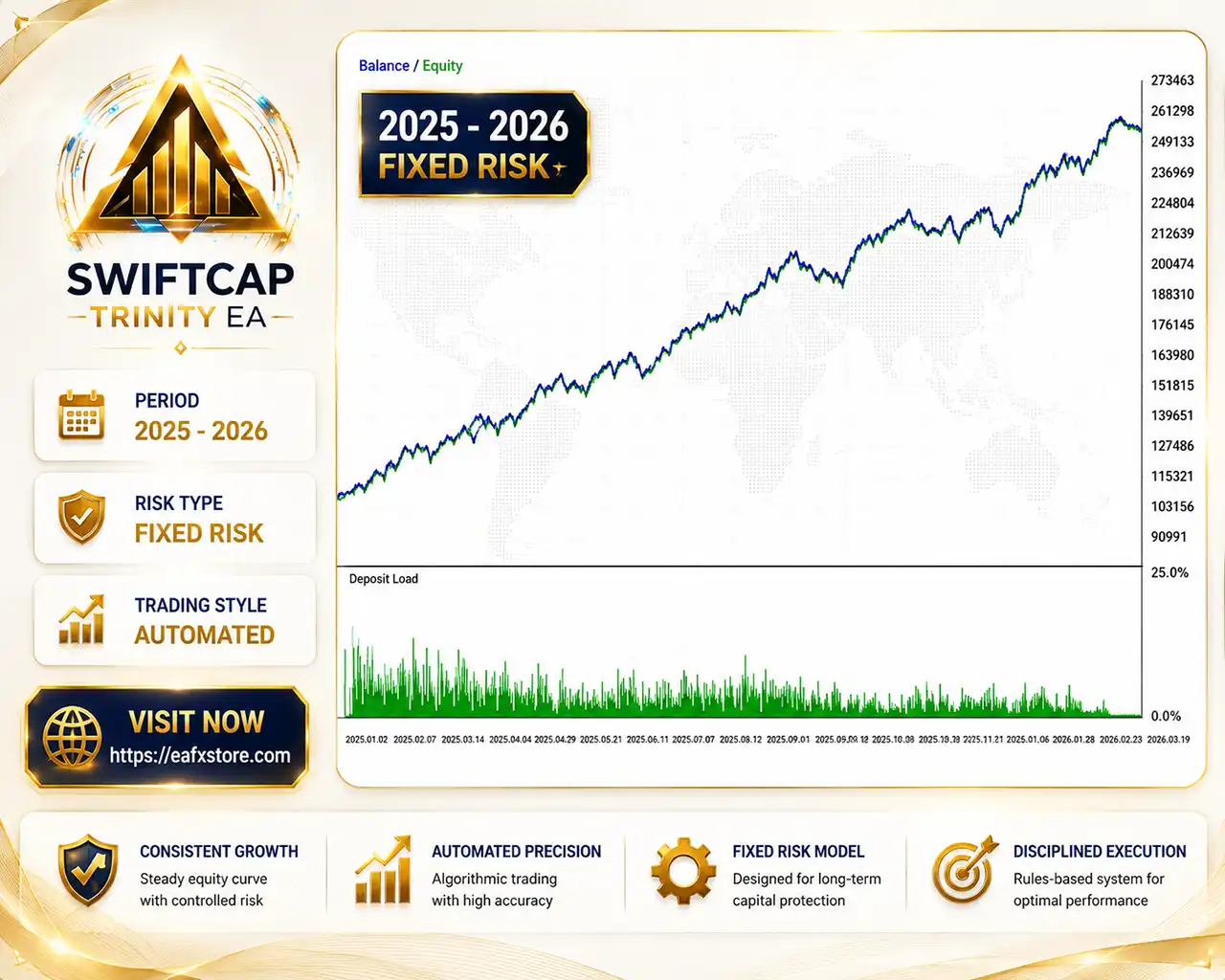
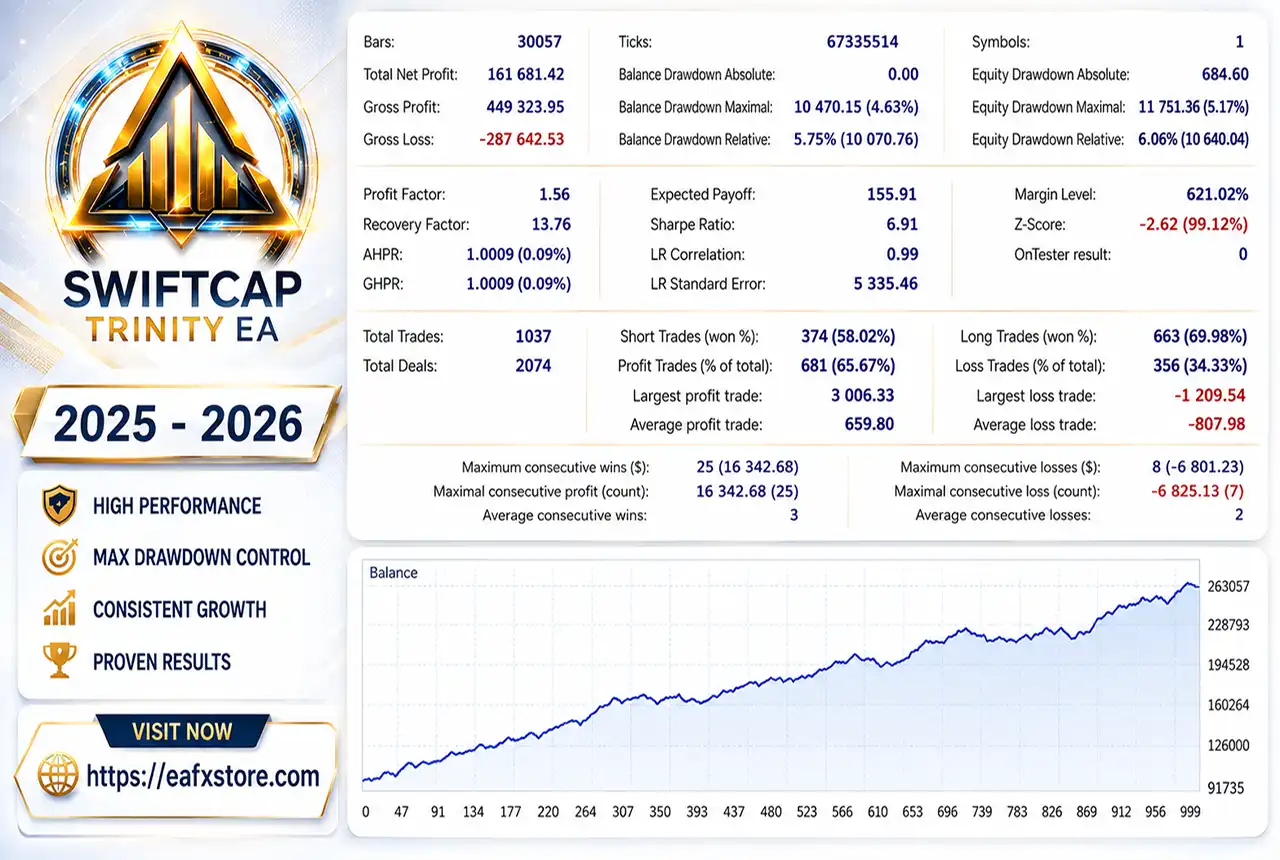
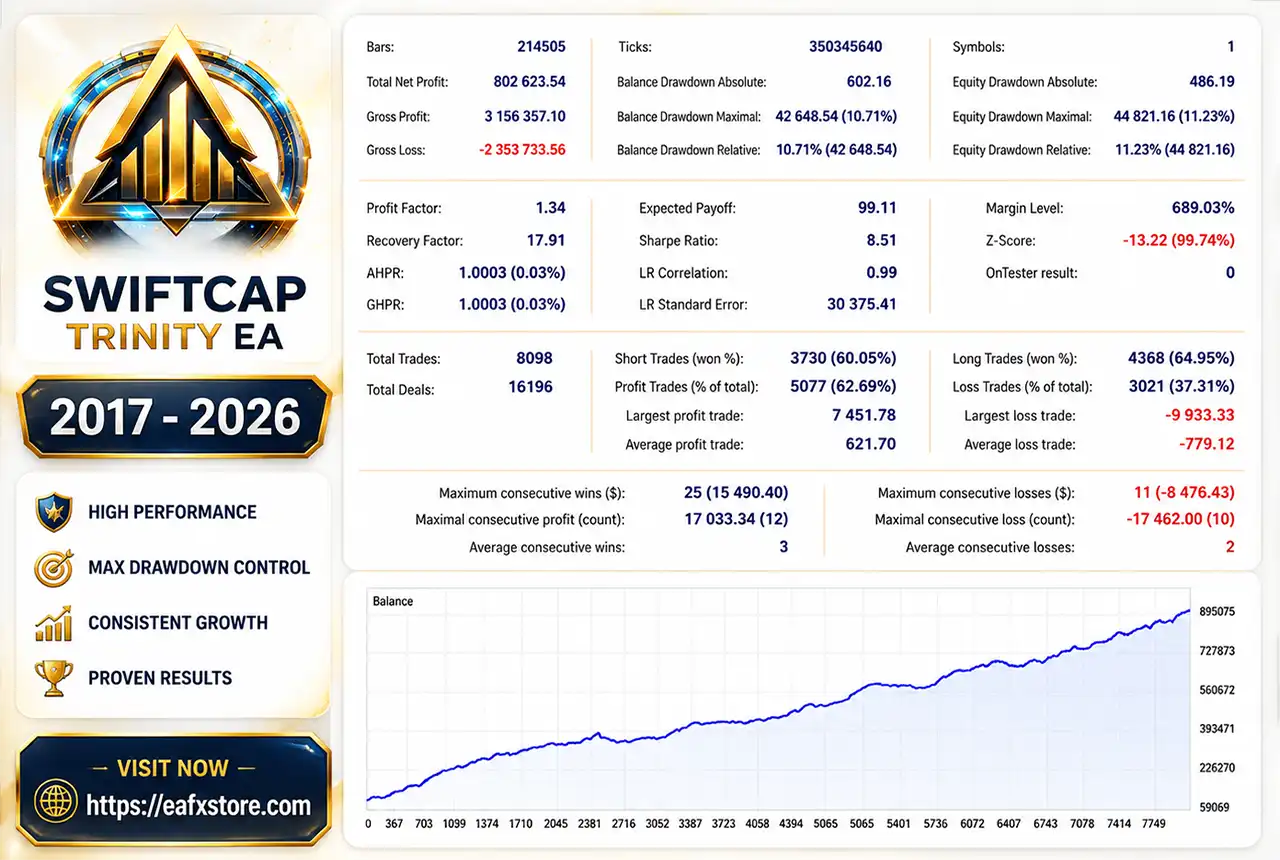
The supplied screenshots show two historical MT5 strategy-test results for SwiftCap Trinity EA. The figures below reproduce the key metrics visible in each test.
Historical Test 1 — 2017–2026
SwiftCap Trinity EA MT5 Backtest Results
| Metric | Result |
|---|---|
| Total Net Profit | 802,623.54 |
| Profit Factor | 1.34 |
| Recovery Factor | 17.91 |
| Total Trades | 8,098 |
| Profit Trades | 62.69% |
| Maximum Equity Drawdown | 11.23% |
| Sharpe Ratio | 8.51 |
| Largest Profit Trade | 7,451.78 |
| Largest Loss Trade | -9,933.33 |
| Average Profit Trade | 621.70 |
The first test covers a long historical period and shows a steadily rising balance curve.
The 1.34 Profit Factor indicates that gross profits exceeded gross losses, while the 11.23% maximum equity drawdown provides an important reference for evaluating the system’s risk profile.
Historical Test 2 — 2025–2026
SwiftCap Trinity EA MT5 Backtest
| Metric | Result |
|---|---|
| Total Net Profit | 161,681.42 |
| Profit Factor | 1.56 |
| Recovery Factor | 13.76 |
| Total Trades | 1,037 |
| Profit Trades | 65.67% |
| Maximum Equity Drawdown | 5.17% |
| Sharpe Ratio | 6.91 |
| Largest Profit Trade | 3,006.33 |
| Largest Loss Trade | -1,209.54 |
| Average Profit Trade | 659.80 |
The more recent test shows a higher Profit Factor of 1.56 and a lower 5.17% maximum equity drawdown.
The result also recorded a 65.67% winning-trade percentage, although historical testing should not be interpreted as a guarantee of future live performance.
Why SwiftCap Trinity EA MT5 Stands Out
Diversification Without Multiple EAs
One of Trinity’s main advantages is its internal diversification.
Rather than requiring separate Expert Advisors for different approaches, the system combines four trading methodologies inside one framework.
Individual Strategy Management
Each strategy has its own risk type, risk allocation, lot size, magic number and trade comment.
This makes it easier to identify which system generated a particular position and adjust exposure accordingly.
Designed for Structured Automation
Trinity is built around predefined trading logic rather than discretionary decision-making.
Once configured, the EA handles entries and management automatically, reducing the need for constant manual intervention.
Risk Management Features
SwiftCap Trinity EA MT5 provides several account and position-management options.
System-Level Risk
The supplied configuration sets all four systems to:
🔹 Risk Type: Percentage of balance
🔹 Risk Per Trade: 1.0%
🔹 Reference Risk Amount: 100.0 USD
🔹 Fixed Lot Reference: 0.01 lots
Because four systems are enabled simultaneously, traders should consider their combined exposure, rather than evaluating each 1% allocation in isolation.
Global Account Protection
The EA includes:
🔹 Maximum daily risk limit
🔹 Equity profit target
🔹 Maximum lot-per-trade control
🔹 Individual system risk allocation
🔹 Fixed-lot and fixed-USD alternatives
Importantly, the displayed configuration has the maximum daily risk limit disabled, the equity target disabled, and maximum lot per trade set to 0.0, meaning no additional lot cap is imposed by that setting. Traders should review these controls before live deployment.
Recommended Trading Conditions
For the configuration described by the developer, the following conditions are recommended:
Trading Environment
| Parameter | Recommendation |
|---|---|
| Platform | MetaTrader 5 |
| Instrument | XAUUSD (Gold) |
| Timeframe | Any |
| Account Type | Hedging |
| Broker Server Time | GMT+2 or GMT+3 |
| Minimum Deposit | $500+ |
| Recommended Leverage | 1:100+ |
| VPS | Strongly recommended |
Broker Compatibility
The product description lists IC Markets, FP Markets, Fusion Markets, FTMO, FundedNext, The 5%ers, and similar environments as compatible examples.
The GMT+2/GMT+3 requirement is particularly important because several strategy components rely on time-based trading logic.
Using a different server timezone may affect how those components operate.
Weaknesses and Risk Warnings
Broker Timezone Restriction
The EA is specifically designed for GMT+2/GMT+3 broker server time. Traders using other server configurations should carefully evaluate compatibility before going live.
Combined Strategy Exposure
Running all four systems simultaneously can increase overall account exposure. Individual risk settings should therefore be considered together rather than separately.
Protection Is Not Automatically Fully Active
The supplied settings show the global daily risk limit, equity target, and maximum lot restriction disabled.
Users should configure these features according to their account size and risk tolerance.
Gold Trading Risk
XAUUSD can experience rapid price movements, spread expansion, and slippage during volatile market conditions. Actual results may differ from historical tests.
VPS Requirement
A reliable VPS is strongly recommended for stable 24/5 operation, especially when automated execution is expected without interruption.
Who Should Use SwiftCap Trinity EA MT5?
SwiftCap Trinity EA MT5 may be suitable for:
🔹 Gold traders seeking a diversified automated trading solution.
🔹 Prop firm traders who need structured risk-management capabilities.
🔹 Experienced MT5 users who understand automated trading and account exposure.
🔹 Traders seeking multiple strategies without running several independent EAs.
🔹 Users who prefer customizable risk allocation for different trading systems.
🔹 Traders with suitable GMT+2/GMT+3 broker accounts and stable VPS infrastructure.
It may be less suitable for traders looking for a completely hands-off system without understanding or configuring account-level risk.
Final Verdict
SwiftCap Trinity EA MT5 offers a well-structured approach to automated Gold trading by combining four independent strategies with flexible position sizing and account protection tools. Its strongest advantage is internal diversification, while its main considerations are combined exposure, broker timezone requirements and the need for careful risk configuration.
For traders seeking a multi-strategy XAUUSD EA with prop-firm-oriented controls, SwiftCap Trinity presents a compelling automated trading framework.
🔢 SwiftCap Trinity EA MT5 Settings Guide
SwiftCap Trinity EA MT5 is a multi-system automated trading Expert Advisor designed to combine four independent trading systems under one framework. Its configuration focuses on flexible risk allocation, separate system identification, fixed-lot controls and global account protection.
The settings shown below provide detailed control over each system while also allowing traders to define account-level daily risk, equity targets, and maximum trade exposure.
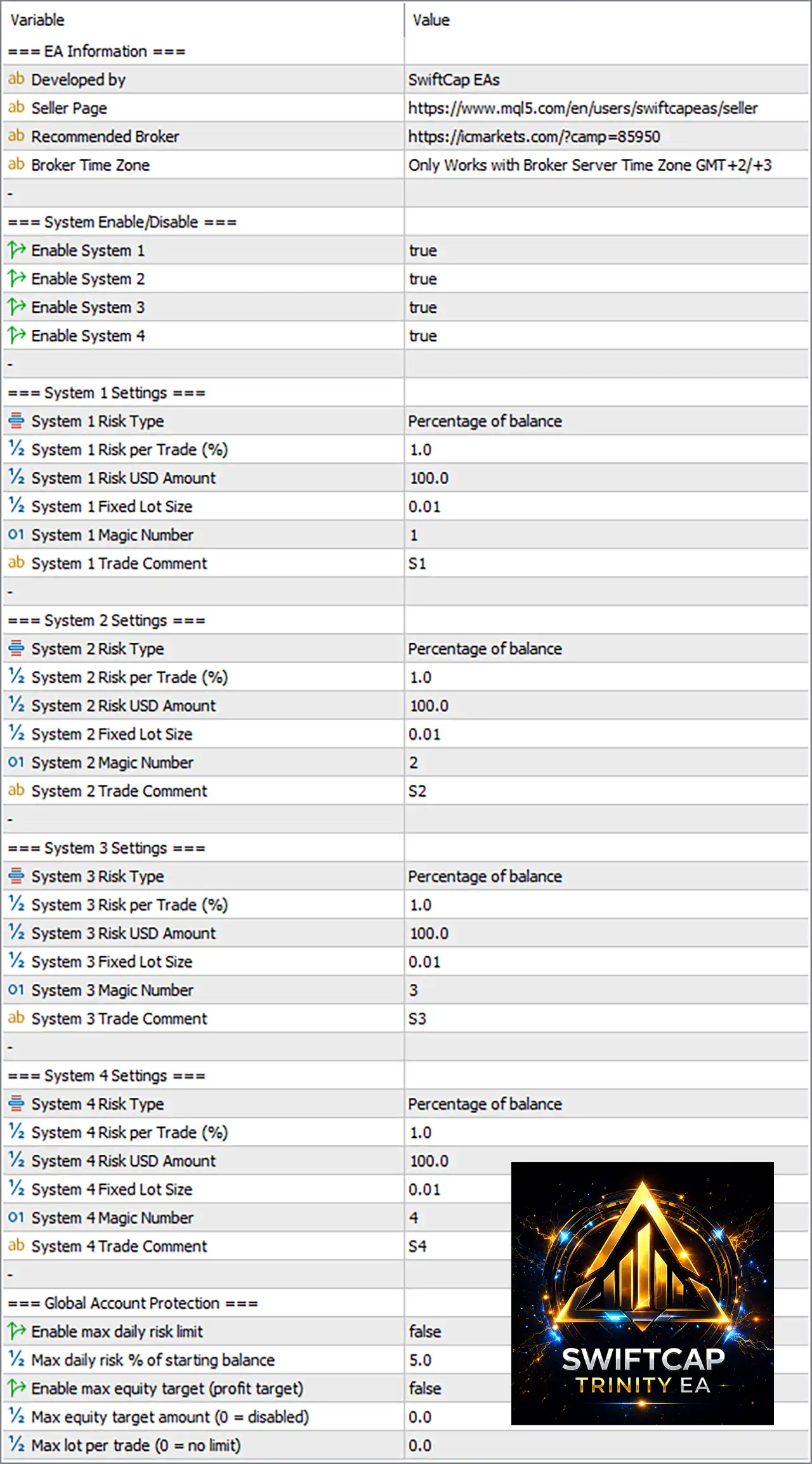
SwiftCap Trinity EA MT5 Settings Panel
🔶 System Enable/Disable
🔹 Enable System 1 = true – Enables System 1 for automated trading.
🔹 Enable System 2 = true – Enables System 2 for automated trading.
🔹 Enable System 3 = true – Enables System 3 for automated trading.
🔹 Enable System 4 = true – Enables System 4 for automated trading.
🔶 System 1 Settings
🔹 System 1 Risk Type = Percentage of balance – Calculates System 1 risk according to a percentage of the account balance.
🔹 System 1 Risk per Trade (%) = 1.0 – Sets the System 1 risk allocation to 1.0% per trade when percentage-based risk is used.
🔹 System 1 Risk USD Amount = 100.0 – Sets the reference monetary risk amount at 100.0 USD.
🔹 System 1 Fixed Lot Size = 0.01 – Defines a fixed trading volume of 0.01 lots when fixed-lot sizing is applicable.
🔹 System 1 Magic Number = 1 – Uses 1 as the unique identifier for System 1 trades.
🔹 System 1 Trade Comment = S1 – Adds S1 as the trade comment for System 1 positions.
🔶 System 2 Settings
🔹 System 2 Risk Type = Percentage of balance – Calculates System 2 risk according to a percentage of the account balance.
🔹 System 2 Risk per Trade (%) = 1.0 – Sets the System 2 risk allocation to 1.0% per trade.
🔹 System 2 Risk USD Amount = 100.0 – Sets the reference monetary risk amount at 100.0 USD.
🔹 System 2 Fixed Lot Size = 0.01 – Defines a fixed trading volume of 0.01 lots when fixed-lot sizing is used.
🔹 System 2 Magic Number = 2 – Uses 2 as the unique identifier for System 2 trades.
🔹 System 2 Trade Comment = S2 – Adds S2 as the trade comment for System 2 positions.
🔶 System 3 Settings
🔹 System 3 Risk Type = Percentage of balance – Calculates System 3 risk according to a percentage of the account balance.
🔹 System 3 Risk per Trade (%) = 1.0 – Sets the System 3 risk allocation to 1.0% per trade.
🔹 System 3 Risk USD Amount = 100.0 – Sets the reference monetary risk amount at 100.0 USD.
🔹 System 3 Fixed Lot Size = 0.01 – Defines a fixed trading volume of 0.01 lots when fixed-lot sizing is selected.
🔹 System 3 Magic Number = 3 – Uses 3 as the unique identifier for System 3 trades.
🔹 System 3 Trade Comment = S3 – Adds S3 as the trade comment for System 3 positions.
🔶 System 4 Settings
🔹 System 4 Risk Type = Percentage of balance – Calculates System 4 risk according to a percentage of the account balance.
🔹 System 4 Risk per Trade (%) = 1.0 – Sets the System 4 risk allocation to 1.0% per trade.
🔹 System 4 Risk USD Amount = 100.0 – Sets the reference monetary risk amount at 100.0 USD.
🔹 System 4 Fixed Lot Size = 0.01 – Defines a fixed trading volume of 0.01 lots when fixed-lot sizing is applicable.
🔹 System 4 Magic Number = 4 – Uses 4 as the unique identifier for System 4 trades.
🔹 System 4 Trade Comment = S4 – Adds S4 as the trade comment for System 4 positions.
🔢 Global Account Protection
🔹 Enable max daily risk limit = false – Disables the maximum daily risk protection in the displayed configuration.
🔹 Max daily risk % of starting balance = 5.0 – Defines a maximum daily risk threshold of 5.0% of the starting balance when the daily risk limit is enabled.
🔹 Enable max equity target (profit target) = false – Disables the maximum equity/profit target feature.
🔹 Max equity target amount (0 = disabled) = 0.0 – Sets the maximum equity target to 0.0, which also represents a disabled monetary target.
🔹 Max lot per trade (0 = no limit) = 0.0 – Sets the maximum lot-per-trade restriction to 0.0, meaning there is no lot-size limit imposed by this parameter.
🔢 SwiftCap Trinity EA MT5 Risk Management Overview
The displayed configuration enables all four trading systems simultaneously, with each system using Percentage of balance as its risk type and a 1.0% risk per trade setting.
Each system also has its own independent identification:
🔹 System 1: Magic Number 1, Comment S1
🔹 System 2: Magic Number 2, Comment S2
🔹 System 3: Magic Number 3, Comment S3
🔹 System 4: Magic Number 4, Comment S4
This structure makes it easier to distinguish trades generated by each individual system when reviewing positions, orders, or account history.
The displayed 100.0 USD Risk Amount and 0.01 Fixed Lot Size values provide alternative sizing references, while the active risk type remains Percentage of balance.
🔢 Key Settings Summary
🔹 Trading Systems: 4 systems enabled
🔹 Risk Type: Percentage of balance
🔹 Risk Per Trade: 1.0% for Systems 1–4
🔹 Reference Risk Amount: 100.0 USD for Systems 1–4
🔹 Fixed Lot Size: 0.01 for Systems 1–4
🔹 Magic Numbers: 1, 2, 3, 4
🔹 Trade Comments: S1, S2, S3, S4
🔹 Maximum Daily Risk Protection: Disabled
🔹 Maximum Daily Risk Setting: 5.0%
🔹 Maximum Equity Target: Disabled
🔹 Maximum Equity Target Amount: 0.0
🔹 Maximum Lot Per Trade: 0.0 — no limit
🔹 Required Broker Server Time Zone: GMT+2/+3
🔢 Conclusion
SwiftCap Trinity EA MT5 is configured as a four-system automated trading framework with all Systems 1–4 enabled. Each system uses 1.0% percentage-based risk per trade, a 0.01 fixed-lot reference, and separate Magic Numbers from 1 to 4, providing clear trade identification.
The global protection layer is currently relatively permissive because the maximum daily risk limit and maximum equity target are disabled, while Max Lot per Trade = 0.0 means no additional lot cap is imposed by that setting. Traders should therefore carefully evaluate their broker conditions, account balance, and combined exposure across all four systems before using these settings on a live account.
🔢 FAQs
❓ How many trading systems are available in SwiftCap Trinity EA MT5?
The displayed settings contain 4 independent systems, and all four are currently enabled.
❓ What is the risk per trade for each system?
Systems 1, 2, 3, and 4 are each configured with 1.0% risk per trade under the Percentage of balance risk type.
❓ What are the Magic Numbers for the four systems?
System 1 uses 1, System 2 uses 2, System 3 uses 3, and System 4 uses 4.
❓ Is the maximum daily risk protection enabled?
No. Enable max daily risk limit = false. However, the configured threshold is 5.0% of starting balance if the feature is activated.
❓ What does Max lot per trade = 0.0 mean?
The setting explicitly defines 0.0 as no limit, so the EA does not impose a maximum lot restriction through this parameter.
User Reviews
Only logged in customers who have purchased this product may leave a review.
❓ What is SwiftCap Trinity EA MT5?
SwiftCap Trinity EA MT5 is a multi-strategy Expert Advisor for XAUUSD that combines four independent trading systems within one unified automated framework.
❓ Which market does SwiftCap Trinity EA MT5 trade?
SwiftCap Trinity EA MT5 is designed specifically for Gold (XAUUSD). It can operate on any timeframe while managing its four internal strategies automatically.
❓ What strategies are included in SwiftCap Trinity EA MT5?
SwiftCap Trinity EA MT5 includes Intra-Day Swing, Simplified Session Trading, Daily Range Capture, and Price Action strategies for diversified market analysis.
❓ Can I enable or disable individual strategies?
Yes. SwiftCap Trinity EA MT5 lets you enable or disable each of its four systems individually and configure separate risk settings for greater control.
❓ Is SwiftCap Trinity EA MT5 suitable for Prop Firm trading?
Yes. SwiftCap Trinity EA MT5 includes daily risk limits, equity target protection, and maximum lot controls designed to support common prop firm risk requirements.
❓ What account type does SwiftCap Trinity EA MT5 require?
SwiftCap Trinity EA MT5 requires a hedging account. A minimum deposit of $500 and leverage of 1:100 or higher are recommended for smaller accounts.
❓ Which broker server time is required?
SwiftCap Trinity EA MT5 is specifically designed for brokers using GMT+2 or GMT+3 server time because some strategy components depend on time-based calculations.
❓ How should SwiftCap Trinity EA MT5 be installed?
Attach SwiftCap Trinity EA MT5 to one XAUUSD chart, select the desired systems, configure risk and protection settings, then enable AutoTrading in MT5.
❓ Can SwiftCap Trinity EA MT5 be attached to multiple charts?
No. SwiftCap Trinity EA MT5 should use a single chart instance because one EA manages all four trading systems and their positions from that instance.
-
 Original price was: $30,000.00.$249.00Current price is: $249.00.
 -
 Price range: $89.00 through $599.00
 -
 Price range: $80.00 through $599.00
 -
 Price range: $89.00 through $599.00
-
 3Price range: $89.00 through $599.00
 -
 1Price range: $89.00 through $599.00
 -
 1
1 -
 0Price range: $89.00 through $1,200.00
There are no reviews yet.