
🔢 SwiftCap Master EA MT5 Settings Guide
SwiftCap Master EA MT5 is a professional intraday Expert Advisor designed for MetaTrader 5, focusing on disciplined risk management, percentage-based trading, intelligent trailing stop execution and trend-filtered entries.
With configurable trading sessions, flexible money management modes, moving average directional filtering, and built-in account protection tools, the EA helps traders optimize automated trading performance while maintaining strict capital preservation.
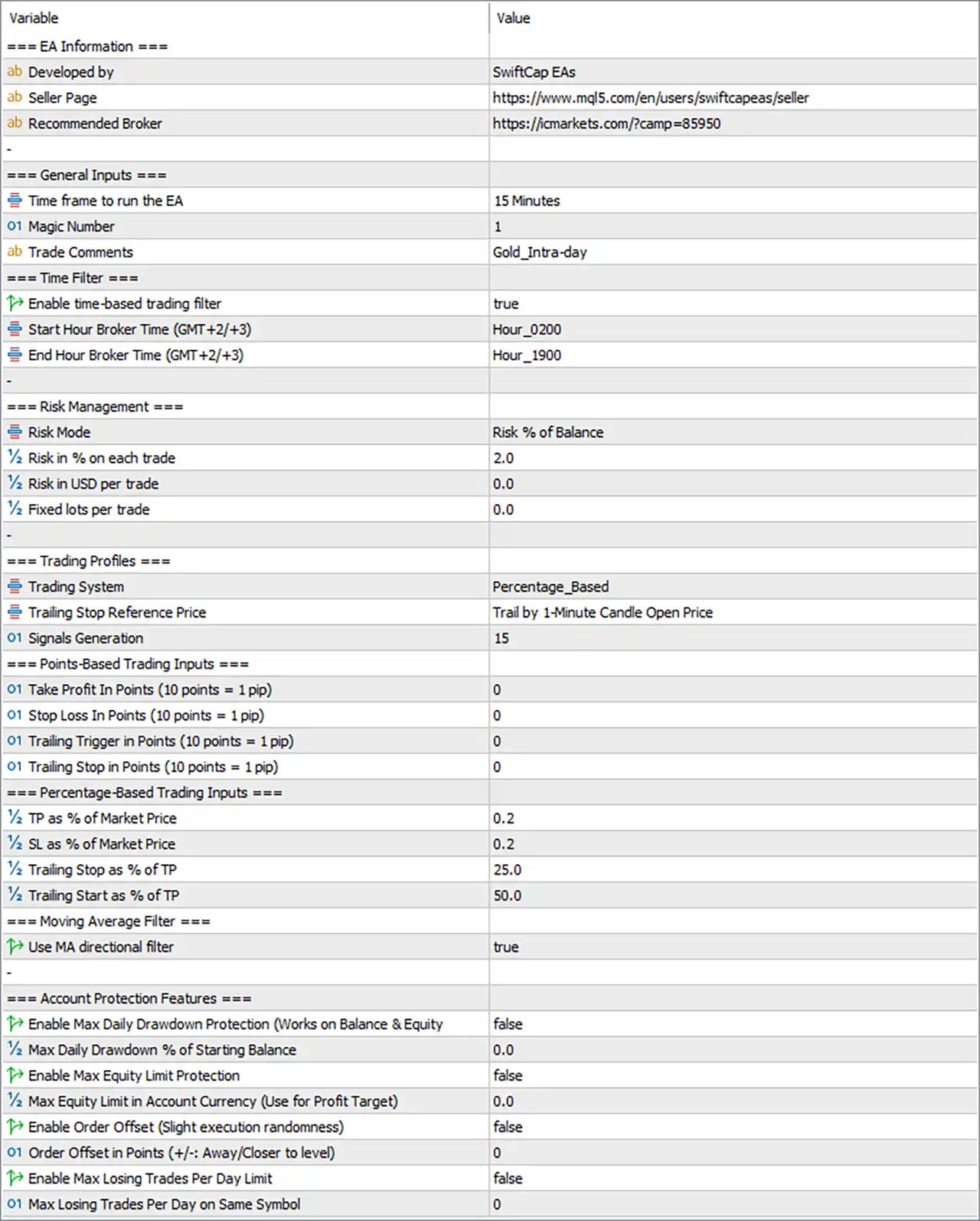
🔢 SwiftCap Master EA MT5 Settings Explained
🔄 General Inputs
🔹 Time frame to run the EA = 15 Minutes – The EA is optimized to operate on the M15 timeframe.
🔹 Magic Number = 1 – Unique identifier used to distinguish this EA's trades from other EAs or manual positions.
🔹 Trade Comments = Gold_Intra-day – Custom trade comment attached to every position opened by the EA.
🔄 Time Filter
🔹 Enable time-based trading filter = true – Activates trading only during the specified trading session.
🔹 Start Hour Broker Time (GMT+2/+3) = Hour_0200 – Trading begins at 02:00 broker server time.
🔹 End Hour Broker Time (GMT+2/+3) = Hour_1900 – Trading stops at 19:00 broker server time.
🔄 Risk Management
🔹 Risk Mode = Risk % of Balance – Position sizing is calculated as a percentage of the account balance.
🔹 Risk in % on each trade = 2.0 – Risks 2.0% of the account balance on every trade.
🔹 Risk in USD per trade = 0.0 – Fixed USD risk is disabled because percentage risk management is used.
🔹 Fixed lots per trade = 0.0 – Fixed lot sizing is disabled while percentage-based risk management is active.
🔄 Trading Profiles
🔹 Trading System = Percentage_Based – Uses a percentage-based trading methodology instead of fixed pip targets.
🔹 Trailing Stop Reference Price = Trail by 1-Minute Candle Open Price – Trailing Stop follows the opening price of the M1 candle.
🔹 Signals Generation = 15 – Signal generation sensitivity is configured with a value of 15.
🔄 Points-Based Trading Inputs
🔹 Take Profit In Points (10 points = 1 pip) = 0 – Fixed Take Profit in points is disabled.
🔹 Stop Loss In Points (10 points = 1 pip) = 0 – Fixed Stop Loss in points is disabled.
🔹 Trailing Trigger In Points (10 points = 1 pip) = 0 – Point-based trailing trigger is disabled.
🔹 Trailing Stop In Points (10 points = 1 pip) = 0 – Point-based trailing stop distance is disabled.
🔄 Percentage-Based Trading Inputs
🔹 TP as % of Market Price = 0.2 – Take Profit is calculated as 0.2% of the current market price.
🔹 SL as % of Market Price = 0.2 – Stop Loss is calculated as 0.2% of the current market price.
🔹 Trailing Stop as % of TP = 25.0 – Trailing Stop distance equals 25.0% of the Take Profit target.
🔹 Trailing Start as % of TP = 50.0 – Trailing begins after reaching 50.0% of the Take Profit objective.
🔄 Moving Average Filter
🔹 Use MA directional filter = true – Enables the Moving Average directional filter to trade only in the prevailing trend direction.
🔄 Account Protection Features
🔹 Enable Max Daily Drawdown Protection (Works on Balance & Equity) = false – Daily drawdown protection is disabled.
🔹 Max Daily Drawdown % of Starting Balance = 0.0 – No maximum daily drawdown percentage is enforced.
🔹 Enable Max Equity Limit Protection = false – Maximum equity protection is disabled.
🔹 Max Equity Limit in Account Currency (Use for Profit Target) = 0.0 – No equity-based profit target is configured.
🔹 Enable Order Offset (Slight execution randomness) = false – Randomized order placement is disabled.
🔹 Order Offset in Points (+/- Away/Closer to level) = 0 – No price offset is applied during order execution.
🔹 Enable Max Losing Trades Per Day Limit = false – Daily losing trade limitation is disabled.
🔹 Max Losing Trades Per Day on Same Symbol = 0 – Unlimited losing trades per day are allowed because the protection is disabled.
🔢 Conclusion
SwiftCap Master EA MT5 is a well-balanced intraday Expert Advisor that emphasizes percentage-based money management, controlled trading sessions, intelligent trailing stop logic, and trend confirmation through a Moving Average filter. Its flexible configuration allows traders to optimize risk exposure while maintaining consistent execution. Whether trading proprietary firm accounts or personal portfolios, SwiftCap Master EA MT5 offers a structured framework for disciplined automated trading.
🔢 FAQs
❓ What timeframe is recommended for SwiftCap Master EA MT5?
The EA is specifically optimized for the 15-Minute (M15) timeframe.
❓ Does SwiftCap Master EA MT5 use percentage-based risk management?
Yes. The default configuration risks 2.0% of the account balance per trade.
❓ Can I trade only during specific market hours?
Yes. The built-in time filter allows trading between 02:00 and 19:00 broker time (GMT+2/+3).
❓ Does the EA support intelligent trailing stops?
Yes. The EA uses a percentage-based trailing system that begins after 50% of the Take Profit target has been reached and trails at 25% of the TP distance.
❓ Does SwiftCap Master EA MT5 include account protection features?
Yes. It includes optional protections such as maximum daily drawdown control, equity protection, order offset management, and daily losing trade limits, which can be enabled when needed.