

Introduction to AI Gold Darwin MT5
AI Gold Darwin MT5 is an automated Gold trading Expert Advisor (EA) designed for MetaTrader 5, specifically configured for the XAUUSD (Gold) trading market. It operates using the H1 timeframe and provides configurable lot sizing, risk percentage management, trade identification, and chart information display.
AI Gold Darwin MT5 also includes dedicated support resources, AI-related services, economic calendar access, and broker connection links. Its configuration allows traders to set their preferred trading volume, risk parameters, and account identification details.
With a recommended minimum deposit of $500 per 0.01 lot, AI Gold Darwin MT5 provides a structured configuration for traders interested in automated Gold trading.
General Information Settings
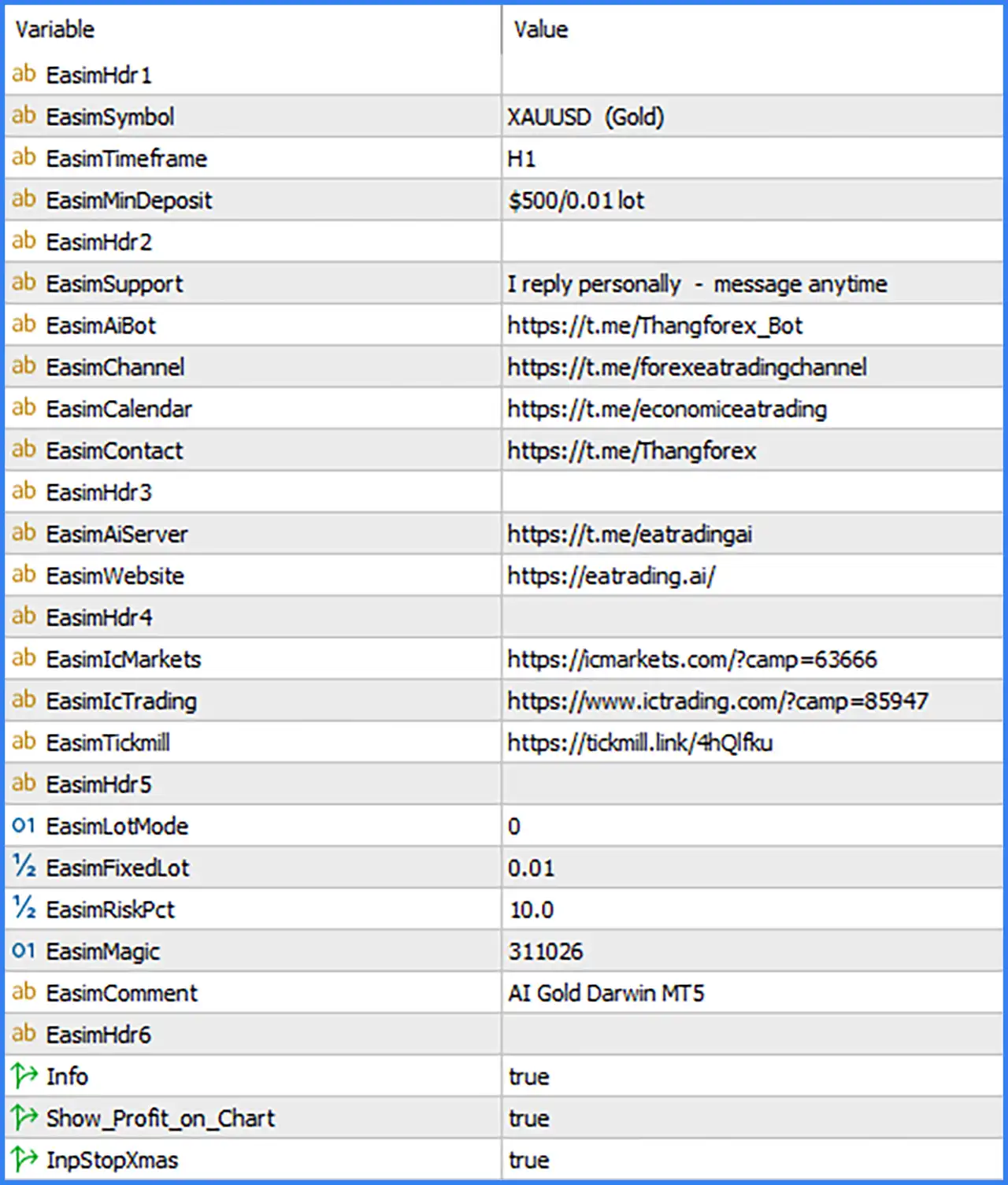
🔹 EasimHdr1 = Empty – A section heading used to organize the EA's general information settings; it does not contain a configurable trading value.
🔹 EasimSymbol = XAUUSD (Gold) – Specifies XAUUSD (Gold) as the designated trading instrument for AI Gold Darwin MT5.
🔹 EasimTimeframe = H1 – Sets the recommended trading timeframe to H1 (1 Hour), allowing the EA to operate using hourly market data.
🔹 EasimMinDeposit = $500/0.01 lot – Indicates a recommended minimum account deposit of $500 for every 0.01 lot of trading volume, providing a reference for account funding and position sizing.
Lot Size and Risk Management Settings
🔹 EasimHdr5 = Empty – A section heading separating broker information from the EA's trading volume and risk management configuration.
🔹 EasimLotMode = 0 – Defines the lot sizing mode selection for the EA; the default value is 0, although the screenshot does not specify which exact lot calculation method this numerical mode represents.
🔹 EasimFixedLot = 0.01 – Sets the configured fixed trading volume to 0.01 lots when the corresponding lot sizing mode uses fixed lot trading.
🔹 EasimRiskPct = 10.0 – Sets the risk percentage parameter to 10.0, representing the configured risk allocation value used by the EA's risk management system.
🔹 EasimMagic = 311026 – Assigns the Magic Number 311026 to identify trades opened by AI Gold Darwin MT5, helping distinguish its positions from manual trades and other Expert Advisors.
🔹 EasimComment = AI Gold Darwin MT5 – Sets the trading order comment to AI Gold Darwin MT5, making it easier to recognize the EA's orders in the MetaTrader 5 terminal.
Display and Additional Settings
🔹 EasimHdr6 = Empty – A section heading separating the trading configuration from additional information display and operational controls.
🔹 Info = true – Enables the EA's information display feature, allowing relevant EA information to be shown on the trading chart.
🔹 Show_Profit_on_Chart = true – Enables profit display on the chart, allowing traders to monitor trading performance directly within the MetaTrader 5 interface.
🔹 InpStopXmas = true – Enables the parameter identified as the Christmas stop setting; its exact operational behavior and activation schedule are not specified in the supplied screenshot.
Conclusion
AI Gold Darwin MT5 provides a dedicated automated trading configuration for XAUUSD (Gold) using the H1 timeframe. Its Inputs include trading volume selection, risk percentage configuration, trade identification, chart information display, and additional operational controls.
The default settings specify EasimLotMode = 0, EasimFixedLot = 0.01, and EasimRiskPct = 10.0, together with Magic Number 311026. The recommended minimum deposit is $500 per 0.01 lot.
Additionally, the EA provides access to developer support, Telegram resources, an economic calendar, AI services, and recommended broker registration links.
Overall, AI Gold Darwin MT5 offers a combination of automated Gold trading configuration and supporting resources. Traders should verify the lot sizing mode, actual risk calculation, and Christmas stop functionality with the developer before using the EA on a live account.