

This guide walks through the inputs of AI Nodiurnal EA MT5 with the values recommended for live trading. The set files that come with the EA already contain these settings, so you can load them in one click and adjust only what your broker or account needs.
🔢 AI Nodiurnal EA MT5 – Complete Settings & Parameters Guide
AI Nodiurnal EA MT5 is an automated MetaTrader 5 Expert Advisor (EA) designed to trade with intelligent trend filtering, dynamic position management and integrated economic news protection.
The EA combines multi-timeframe analysis, automated lot sizing, profit management tools, and advanced news filters to help traders maintain consistency while controlling risk across multiple market conditions.
🔢 AI Nodiurnal EA MT5 Settings Explained
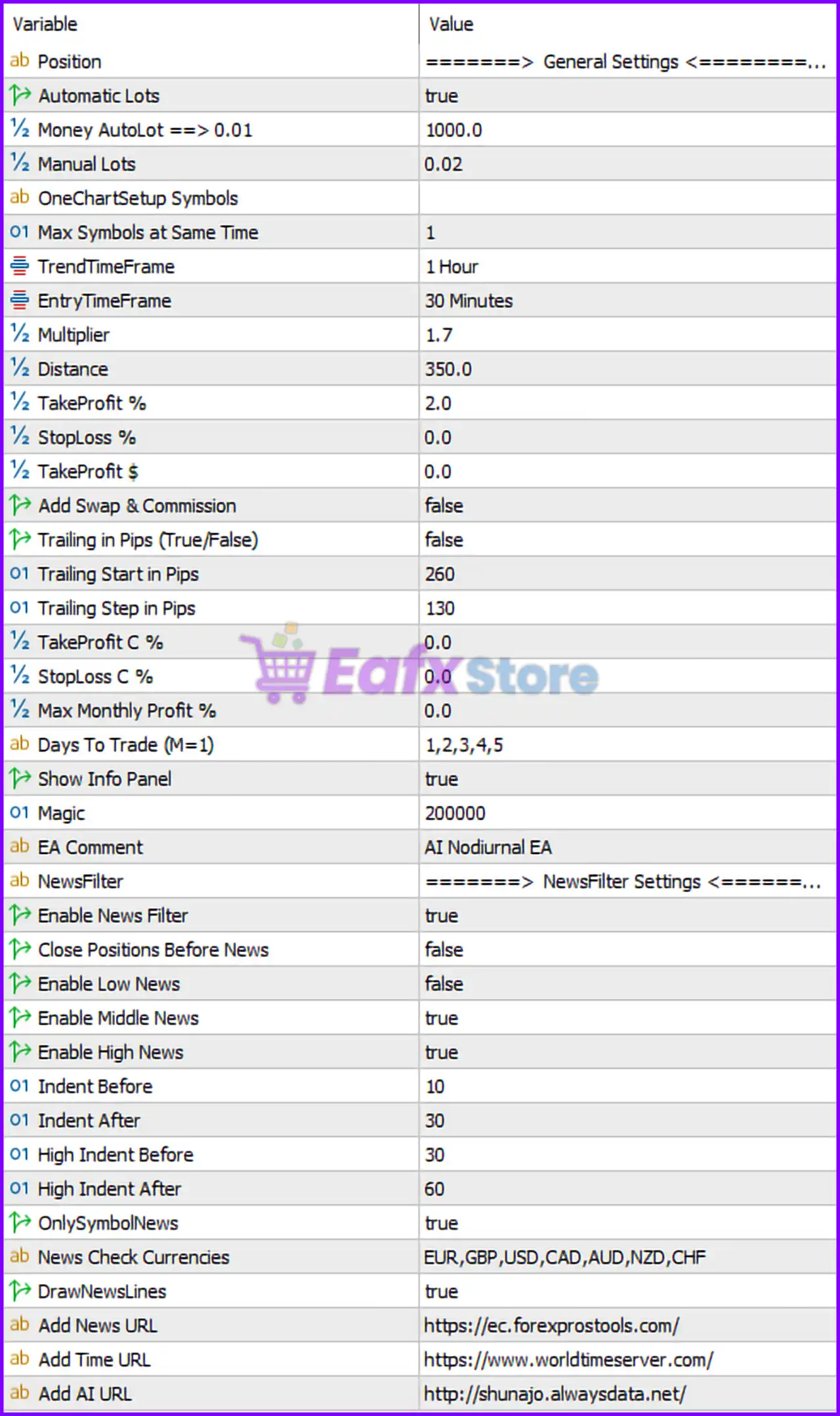
Below are the details of the parameters in the advisor’s trading system settings table:
🔶 General Settings
🔹 Position = General Settings — Main configuration section containing the EA’s core operational parameters.
🔹 Automatic Lots = true — Enables automatic lot size calculation based on account balance.
🔹 Money AutoLot => 0.01 = 1000.0 — The EA opens 0.01 lots for every 1000.0 units of account balance when AutoLot is enabled.
🔹 Manual Lots = 0.02 — Fixed lot size used when Automatic Lots is disabled.
🔶 OneChart Setup Symbols
🔹 Max Symbols at Same Time = 1 — Limits the EA to trading only 1 symbol simultaneously.
🔹 TrendTimeFrame = 1 Hour — Uses the H1 timeframe to determine the primary market trend.
🔹 EntryTimeFrame = 30 Minutes — Uses the M30 timeframe for trade entries and execution signals.
🔶 Trade Management Settings
🔹 Multiplier = 1.7 — Lot multiplier applied to subsequent positions when position scaling is used.
🔹 Distance = 350.0 — Minimum distance between positions is 350.0 points.
🔹 TakeProfit % = 2.0 — Closes trades when a profit target of 2.0% is reached.
🔹 StopLoss % = 0.0 — Percentage-based stop loss is disabled.
🔹 TakeProfit $ = 0.0 — Dollar-based take profit target is disabled.
🔹 Add Swap & Commission = false — Trading costs such as swap and commission are excluded from profit calculations.
🔶 Trailing Stop Settings
🔹 Trailing in Pips (True/False) = false — Pip-based trailing stop is currently disabled.
🔹 Trailing Start in Pips = 260 — If trailing is enabled, it starts after 260 pips of profit.
🔹 Trailing Step in Pips = 130 — The stop loss advances every 130 pips of additional profit.
🔶 Basket & Profit Controls
🔹 TakeProfit C % = 0.0 — Combined basket take-profit percentage is disabled.
🔹 StopLoss C % = 0.0 — Combined basket stop-loss percentage is disabled.
🔹 Max Monthly Profit % = 0.0 — Monthly profit cap is disabled.
🔶 Trading Schedule
🔹 Days To Trade (M=1) = 1,2,3,4,5 — Trading is allowed from Monday through Friday.
🔶 Interface & Identification
🔹 Show Info Panel = true — Displays the EA information panel directly on the chart.
🔹 Magic = 200000 — Unique identifier used to manage and track AI Nodiurnal EA trades.
🔹 EA Comment = AI Nodiurnal EA — Custom comment attached to all orders opened by the EA.
🔢 News Filter Settings
🔶 News Filter Controls
🔹 Enable News Filter = true — Activates the built-in economic news protection system.
🔹 Close Positions Before News = false — Existing positions remain open before major news releases.
🔹 Enable Low News = false — Low-impact news events are ignored.
🔹 Enable Middle News = true — Medium-impact economic events are filtered.
🔹 Enable High News = true — High-impact economic events are filtered.
🔶 Medium Impact News Settings
🔹 Indent Before = 10 — Trading pauses 10 minutes before medium-impact news.
🔹 Indent After = 30 — Trading resumes 30 minutes after medium-impact news.
🔶 High Impact News Settings
🔹 High Indent Before = 30 — Trading pauses 30 minutes before high-impact news.
🔹 High Indent After = 60 — Trading resumes 60 minutes after high-impact news.
🔶 News Monitoring Options
🔹 OnlySymbolNews = true — Filters and displays only news events relevant to the traded symbol.
🔹 News Check Currencies = EUR,GBP,USD,CAD,AUD,NZD,CHF — Economic events from these currencies are monitored.
🔹 DrawNewsLines = true — Displays upcoming news event markers directly on the chart.
🔶 External Data Sources
🔹 Add News URL = https://ec.forexprostools.com/ — Source used for economic calendar news data.
🔹 Add Time URL = https://www.worldtimeserver.com/ — Source used for time synchronization.
🔹 Add AI URL = http://shunao.alwaysdata.net/ — External AI-related service endpoint used by the EA.
🔢 Conclusion
AI Nodiurnal EA MT5 is a sophisticated automated trading system that combines H1 trend analysis, M30 entry precision, automatic lot sizing, and advanced economic news filtering. With support for dynamic trade scaling through a 1.7 multiplier, configurable profit targets, and comprehensive protection against medium- and high-impact news events, the EA provides traders with a balanced framework for automated market participation while maintaining risk control.
🔢 FAQs
❓ What timeframe does AI Nodiurnal EA MT5 use for trend analysis?
The EA uses the 1 Hour (H1) timeframe to identify and follow the primary market trend.
❓ Which timeframe is used for trade entries?
Trade execution signals are generated using the 30 Minutes (M30) timeframe.
❓ How does the AutoLot feature work?
When enabled, the EA opens 0.01 lots for every 1000.0 units of account balance.
❓ Does AI Nodiurnal EA MT5 include a news filter?
Yes, it includes an advanced economic news filter that monitors EUR, GBP, USD, CAD, AUD, NZD, and CHF events.
❓ What is the purpose of the 1.7 Multiplier setting?
The Multiplier = 1.7 increases the size of subsequent positions when the EA uses position-scaling or recovery logic.
Get AI Nodiurnal EA MT5
Download AI Nodiurnal EA MT5 with its set files, read the full product details and requirements here: AI Nodiurnal EA MT5 →