

This guide walks through the inputs of AT Ai Bot MT5 with the values recommended for live trading. The set files that come with the EA already contain these settings, so you can load them in one click and adjust only what your broker or account needs.
🔢 AT Ai Bot MT5 Settings Guide
AT Ai Bot MT5 is an automated trading Expert Advisor designed around AI-assisted market analysis, configurable risk management, fixed or risk-based position sizing, ATR-based trailing-stop functionality, trading-hour controls and economic-news filtering.
The configuration shown provides detailed controls for trade volume, risk exposure, trading sessions, high-impact news protection, chart information, API connectivity, and AI model selection.
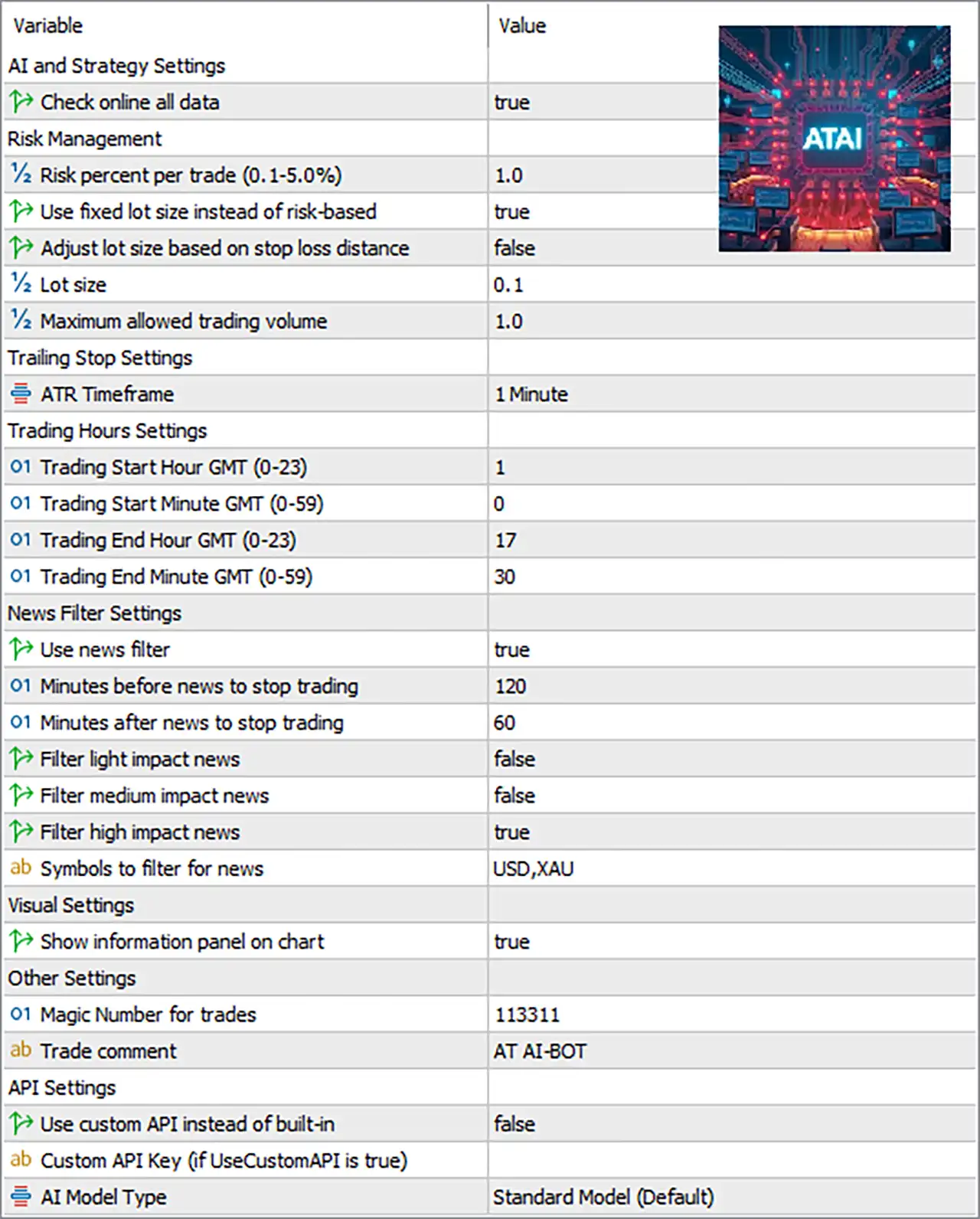
🔶 AI and Strategy Settings
🔹 Check online all data: true — Enables the EA to check online data as part of its AI and strategy analysis process.
🔶 Risk Management
🔹 Risk percent per trade (0.1-5.0%): 1.0 — Sets the configured risk level to 1.0% per trade when risk-based position sizing is used.
🔹 Use fixed lot size instead of risk-based: true — Enables fixed-lot trading instead of calculating position size from the risk percentage.
🔹 Adjust lot size based on stop loss distance: false — Disables automatic lot adjustment according to the Stop Loss distance.
🔹 Lot size: 0.1 — Sets the fixed trading volume to 0.1 lots.
🔹 Maximum allowed trading volume: 1.0 — Limits the maximum permitted trading volume to 1.0 lot.
🔶 Trailing Stop Settings
🔹 ATR Timeframe: 1 Minute — Sets the ATR calculation timeframe to 1 Minute, which is used for ATR-related trailing-stop calculations.
🔶 Trading Hours Settings
🔹 Trading Start Hour GMT (0-23): 1 — Sets the trading start hour to 01:00 GMT.
🔹 Trading Start Minute GMT (0-59): 0 — Sets the trading start minute to 00, making the configured start time 01:00 GMT.
🔹 Trading End Hour GMT (0-23): 17 — Sets the trading end hour to 17:00 GMT.
🔹 Trading End Minute GMT (0-59): 30 — Sets the trading end minute to 30, making the configured end time 17:30 GMT.
🔹 Trading Window: 01:00-17:30 GMT — Based on the four time parameters, the configured trading session runs from 01:00 to 17:30 GMT.
🔶 News Filter Settings
🔹 Use news filter: true — Enables the economic-news protection system.
🔹 Minutes before news to stop trading: 120 — Stops new trading 120 minutes before a qualifying news event.
🔹 Minutes after news to stop trading: 60 — Keeps the trading pause active for 60 minutes after a qualifying news event.
🔹 Filter light impact news: false — Disables filtering of low/light-impact economic events.
🔹 Filter medium impact news: false — Disables filtering of medium-impact economic events.
🔹 Filter high impact news: true — Enables protection against high-impact economic news events.
🔹 Symbols to filter for news: USD,XAU — Applies the news filter to events associated with USD and XAU.
🔶 Visual Settings
🔹 Show information panel on chart: true — Displays the EA's information panel directly on the trading chart.
🔶 Other Settings
🔹 Magic Number for trades: 113311 — Uses 113311 as the unique identifier for trades opened and managed by the EA.
🔹 Trade comment: AT AI-BOT — Adds AT AI-BOT as the comment associated with EA-generated trades.
🔶 API Settings
🔹 Use custom API instead of built-in: false — Keeps the custom API disabled and therefore uses the EA's built-in API configuration.
🔹 Custom API Key (if UseCustomAPI is true): Not provided — No API key is visible in the supplied configuration; this field becomes relevant when Use custom API instead of built-in is set to true.
🔹 AI Model Type: Standard Model (Default) — Selects the Standard Model (Default) as the AI model configuration.
🔢 Key Settings Summary
🔹 Online Data: true — Online data checking is enabled.
🔹 Risk Percentage: 1.0% — The configured risk percentage is 1.0% per trade, although fixed-lot mode currently takes priority.
🔹 Fixed Lot Mode: true — The EA is configured to use a fixed lot size rather than risk-based sizing.
🔹 Lot Size: 0.1 — The configured fixed volume is 0.1 lots.
🔹 Maximum Trading Volume: 1.0 — The maximum allowed volume is 1.0 lot.
🔹 Stop-Loss-Based Lot Adjustment: false — Lot size is not automatically adjusted according to Stop Loss distance.
🔹 ATR Timeframe: 1 Minute — ATR calculations use the 1 Minute timeframe.
🔹 Trading Start: 01:00 GMT — The EA begins its configured trading window at 01:00 GMT.
🔹 Trading End: 17:30 GMT — The EA ends its configured trading window at 17:30 GMT.
🔹 News Filter: true — Economic-news protection is enabled.
🔹 High-Impact News Filter: true — High-impact events are filtered.
🔹 Medium-Impact News Filter: false — Medium-impact events are not filtered.
🔹 Light-Impact News Filter: false — Light-impact events are not filtered.
🔹 News Symbols: USD,XAU — News filtering focuses on USD and XAU.
🔹 Pre-News Protection: 120 minutes — Trading is stopped up to 120 minutes before qualifying news.
🔹 Post-News Protection: 60 minutes — Trading remains paused for 60 minutes after qualifying news.
🔹 Chart Information Panel: true — The EA's information panel is displayed.
🔹 Magic Number: 113311 — EA trades are identified using Magic Number 113311.
🔹 Trade Comment: AT AI-BOT — EA orders use the comment AT AI-BOT.
🔹 Custom API: false — The custom API option is disabled.
🔹 AI Model: Standard Model (Default) — The Standard Model is selected.
🔢 Practical Configuration Notes
🔹 Fixed-lot priority: Because Use fixed lot size instead of risk-based = true, the 0.1 fixed lot setting is the primary position-sizing configuration rather than the 1.0% risk setting.
🔹 Maximum volume protection: The Maximum allowed trading volume = 1.0 provides an upper limit for the configured trading volume.
🔹 News protection: With the news filter enabled and high-impact filtering active, the EA is configured to avoid qualifying USD/XAU high-impact events from 120 minutes before until 60 minutes after the event.
🔹 Trading schedule: The configured trading window is 01:00-17:30 GMT, which should be checked against the broker's server time and the intended market session.
🔹 AI connectivity: Check online all data = true while Use custom API instead of built-in = false, indicating that the configuration is intended to use online data through the EA's built-in API setup rather than a user-supplied custom API.
🔢 Conclusion
AT Ai Bot MT5 offers a relatively straightforward but flexible configuration structure. The supplied setup combines online data analysis, fixed-lot execution, ATR-based calculations, scheduled trading, high-impact news protection, and a default AI model.
The current configuration uses 0.1 fixed lots, with a maximum allowed volume of 1.0, trades between 01:00 and 17:30 GMT, and applies a 120-minute pre-news / 60-minute post-news protection window for USD and XAU high-impact events.
For traders evaluating this configuration, particular attention should be given to the 0.1 fixed lot size, because fixed-lot mode is enabled even though the risk percentage is set to 1.0%. Position sizing should therefore be evaluated against the account balance, symbol contract specifications, and expected Stop Loss exposure before live deployment.
🔢 FAQs
❓ What lot size is AT Ai Bot MT5 currently configured to use?
The EA is configured for fixed-lot trading with a lot size of 0.1, while the maximum allowed trading volume is 1.0 lot.
❓ Does AT Ai Bot MT5 use risk-based position sizing?
The configuration contains a 1.0% risk-per-trade setting, but Use fixed lot size instead of risk-based = true, so the fixed 0.1-lot setting is currently the active sizing method.
❓ What are the AT Ai Bot MT5 trading hours?
The configured trading period is 01:00 to 17:30 GMT.
❓ Does the EA avoid high-impact news?
Yes. Use news filter = true and Filter high impact news = true. The configured protection is 120 minutes before and 60 minutes after qualifying news.
❓ Which AI model is selected in AT Ai Bot MT5?
The configuration uses Standard Model (Default), while the custom API option is disabled with Use custom API instead of built-in = false.
Get AT Ai Bot MT5
Download AT Ai Bot MT5 with its set files, read the full product details and requirements here: AT Ai Bot MT5 →